Skip to content
  • Categories
  • Recent
  • Tags
  • Popular
Skins
  • Light
  • Brite
  • Cerulean
  • Cosmo
  • Flatly
  • Journal
  • Litera
  • Lumen
  • Lux
  • Materia
  • Minty
  • Morph
  • Pulse
  • Sandstone
  • Simplex
  • Sketchy
  • Spacelab
  • United
  • Yeti
  • Zephyr
  • Dark
  • Cyborg
  • Darkly
  • Quartz
  • Slate
  • Solar
  • Superhero
  • Vapor

  • Default (Zephyr)
  • No Skin
Collapse
RipperStore Logo
  1. Home
  2. Assets
  3. Gifts / Downloads
  4. VRCW Recovery Tool. Get Fully Working Unity Projects Out of VRCW Files

VRCW Recovery Tool. Get Fully Working Unity Projects Out of VRCW Files

Scheduled Pinned Locked Moved Gifts / Downloads
toolworldextractvrcwvrcw to unityworld ripping
22 Posts 8 Posters 1.5k Views 38 Watching
  • Oldest to Newest
  • Newest to Oldest
  • Most Votes
Reply
  • Reply as topic
Log in to reply
This topic has been deleted. Only users with topic management privileges can see it.
  • D DreamDeku

    @kirin35 1.3 was a big improvement i am now a member paying for your coffee lol one thing i am noticing with some shaders is in vr the left eye looks great but the right eye has some shaders follow your line of sight and stretch and stuff

    oxygynO
    oxygynO
    oxygyn
    wrote last edited by
    #9

    @DreamDeku ii can help with this sir/ma'am. that problem is most likely a broken video screen shader. (proTV, Vidzi, etc) the way to fix this is to delete the video screen shader and apply the real one.

    friendly, helpful, asset hoarder. no gatekeeping no trading. β™₯

    K 1 Reply Last reply
    0
    • D
      D
      DreamDeku
      wrote last edited by
      #10

      like for instance one was a lava lamp shader, i had to find the real one buy it and replace the shader then it worked, but it was so close to working with this tool it was just the left eye that was wonky

      oxygynO 1 Reply Last reply
      0
      • D DreamDeku

        like for instance one was a lava lamp shader, i had to find the real one buy it and replace the shader then it worked, but it was so close to working with this tool it was just the left eye that was wonky

        oxygynO
        oxygynO
        oxygyn
        wrote last edited by oxygyn
        #11

        @DreamDeku a lava lamp shader? interesting. from my experience it was 99% always the TV shader (i've been manually repairing worlds way before this program). interesting, thanks for letting us know!

        friendly, helpful, asset hoarder. no gatekeeping no trading. β™₯

        1 Reply Last reply
        0
        • D DreamDeku

          @kirin35 1.3 was a big improvement i am now a member paying for your coffee lol one thing i am noticing with some shaders is in vr the left eye looks great but the right eye has some shaders follow your line of sight and stretch and stuff

          K
          K
          kirin35
          wrote last edited by
          #12

          @DreamDeku said:

          @kirin35 1.3 was a big improvement i am now a member paying for your coffee lol one thing i am noticing with some shaders is in vr the left eye looks great but the right eye has some shaders follow your line of sight and stretch and stuff

          This was an issue with how the shader decompiler handled the matrix arrays. I have now written my own shader decompiler for this program, and this issue is fixed on it. So the next version (1.4) should fix the issue you are describing.

          1 Reply Last reply
          πŸ™‚
          0
          • oxygynO oxygyn

            @DreamDeku ii can help with this sir/ma'am. that problem is most likely a broken video screen shader. (proTV, Vidzi, etc) the way to fix this is to delete the video screen shader and apply the real one.

            K
            K
            kirin35
            wrote last edited by
            #13

            @oxygyn said:

            @DreamDeku ii can help with this sir/ma'am. that problem is most likely a broken video screen shader. (proTV, Vidzi, etc) the way to fix this is to delete the video screen shader and apply the real one.

            The program actually auto applies the real shaders, if it has access to the real shader package. So ProTV almost always look right.

            oxygynO 1 Reply Last reply
            0
            • NEET113N
              NEET113N
              NEET113
              wrote last edited by NEET113
              #14

              Thank you so much for this amazing tool!

              I'm running into an issue during the consolidation process. After 1800 seconds (30 minutes), it fails with the following error:

              consolidation: failed consolidate timed out after 1800s

              Is the 1800-second timeout an intentional limit, or does this indicate that something is going wrong? If this isn't expected behavior, is there anything I can do to fix it?😭😭😭

              K 1 Reply Last reply
              0
              • K kirin35

                @oxygyn said:

                @DreamDeku ii can help with this sir/ma'am. that problem is most likely a broken video screen shader. (proTV, Vidzi, etc) the way to fix this is to delete the video screen shader and apply the real one.

                The program actually auto applies the real shaders, if it has access to the real shader package. So ProTV almost always look right.

                oxygynO
                oxygynO
                oxygyn
                wrote last edited by
                #15

                @kirin35 that is amazing ! ur program is the ONLY thing i have ever paid for when it comes to unity/vrchat . thanks for this incredible tool

                friendly, helpful, asset hoarder. no gatekeeping no trading. β™₯

                1 Reply Last reply
                β™₯
                1
                • NEET113N NEET113

                  Thank you so much for this amazing tool!

                  I'm running into an issue during the consolidation process. After 1800 seconds (30 minutes), it fails with the following error:

                  consolidation: failed consolidate timed out after 1800s

                  Is the 1800-second timeout an intentional limit, or does this indicate that something is going wrong? If this isn't expected behavior, is there anything I can do to fix it?😭😭😭

                  K
                  K
                  kirin35
                  wrote last edited by kirin35
                  #16

                  @NEET113 said:

                  Thank you so much for this amazing tool!

                  I'm running into an issue during the consolidation process. After 1800 seconds (30 minutes), it fails with the following error:

                  consolidation: failed consolidate timed out after 1800s

                  Is the 1800-second timeout an intentional limit, or does this indicate that something is going wrong? If this isn't expected behavior, is there anything I can do to fix it?😭😭😭

                  On the recovery page, if you click on Advanced there is an option to specify the Unity time out limit, try putting a large number there(it is in minutes do like 120, that should be fine.). On big worlds; basically anything above 1GB .vrcw file, it is the expected behaviour.

                  1 Reply Last reply
                  β™₯
                  0
                  • NEET113N
                    NEET113N
                    NEET113
                    wrote last edited by
                    #17

                    Thank you so much! I'll give it a try. 😊😊😊

                    1 Reply Last reply
                    0
                    • NEET113N
                      NEET113N
                      NEET113
                      wrote last edited by
                      #18

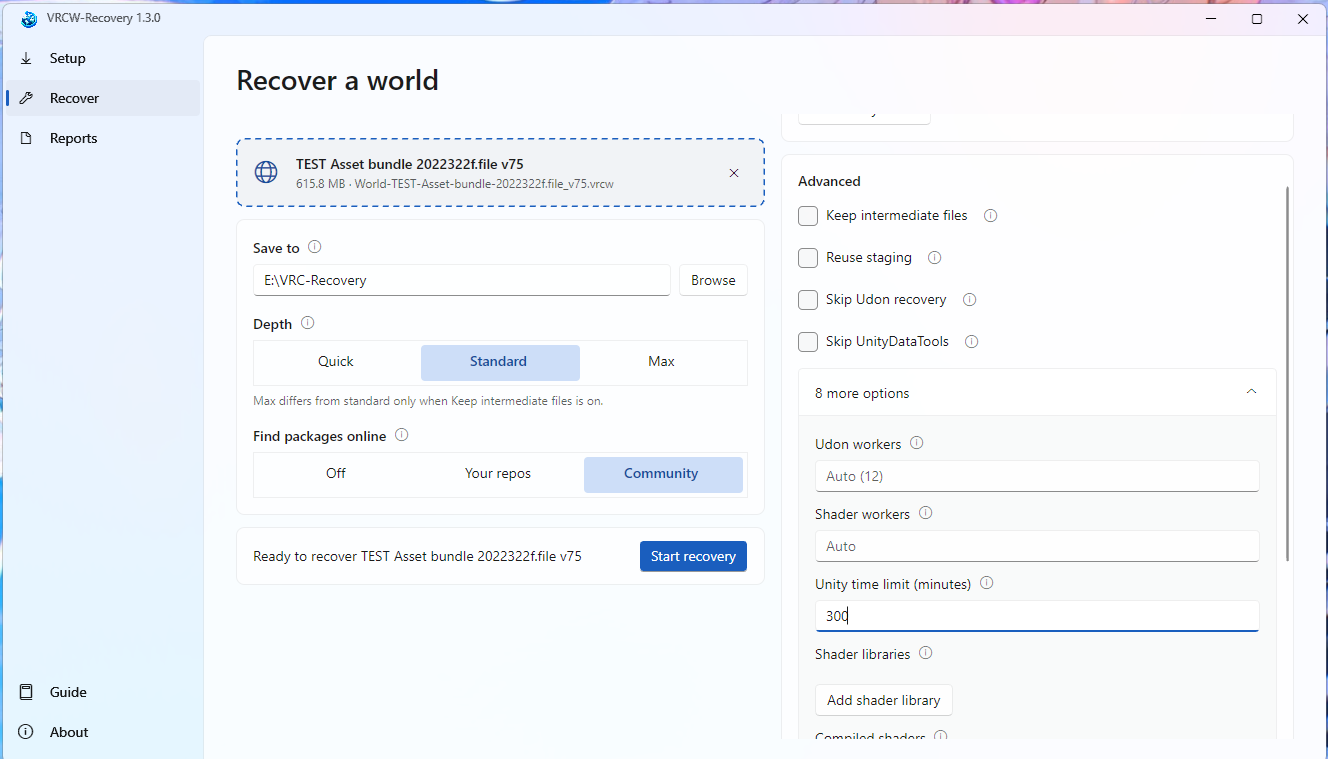
                      γ‚Ήγ‚―γƒͺγƒΌγƒ³γ‚·γƒ§γƒƒγƒˆ 2026-10-19 105732.png
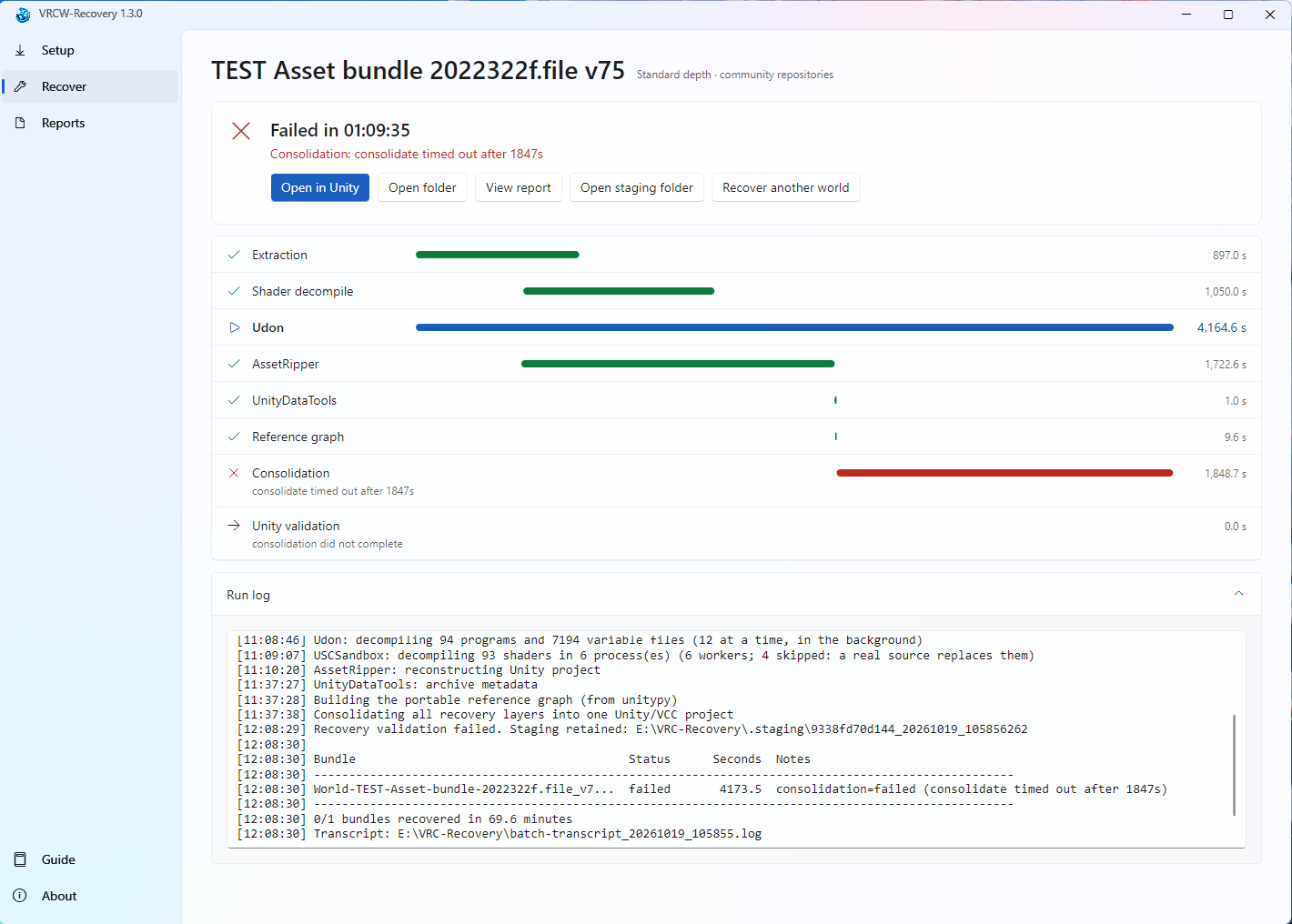
                      γ‚Ήγ‚―γƒͺγƒΌγƒ³γ‚·γƒ§γƒƒγƒˆ 2026-10-19 140212.png

                      Is this what you meant...? 😭 I tried setting the time limit to 300 minutes, but unfortunately, it still didn't work. Could you please help me out once again?πŸ₯Ή

                      K 1 Reply Last reply
                      0
                      • NEET113N NEET113

                        γ‚Ήγ‚―γƒͺγƒΌγƒ³γ‚·γƒ§γƒƒγƒˆ 2026-10-19 105732.png
                        γ‚Ήγ‚―γƒͺγƒΌγƒ³γ‚·γƒ§γƒƒγƒˆ 2026-10-19 140212.png

                        Is this what you meant...? 😭 I tried setting the time limit to 300 minutes, but unfortunately, it still didn't work. Could you please help me out once again?πŸ₯Ή

                        K
                        K
                        kirin35
                        wrote last edited by
                        #19

                        @NEET113 said:

                        γ‚Ήγ‚―γƒͺγƒΌγƒ³γ‚·γƒ§γƒƒγƒˆ 2026-10-19 105732.png
                        γ‚Ήγ‚―γƒͺγƒΌγƒ³γ‚·γƒ§γƒƒγƒˆ 2026-10-19 140212.png

                        Is this what you meant...? 😭 I tried setting the time limit to 300 minutes, but unfortunately, it still didn't work. Could you please help me out once again?πŸ₯Ή

                        Open a terminal where you have the .exe;
                        Type this command:

                        Start-Process .\VRCW-Recovery-1.3.0.exe -ArgumentList 'recover','"C:\path\to\World-TEST-Asset-bundle-2022322f.file_v75.vrcw"','--output-root','"E:\VRC-Recovery"','--depth','standard','--reuse-staging','--tool-timeout-seconds','0','--unity-timeout-seconds','18000' -Wait -NoNewWindow
                        

                        Change "C:\path\to\World-TEST-Asset-bundle-2022322f.file_v75.vrcw" with your actual path to .vrcw, if u deleted the .staging folder remove --reuse-staging flag.

                        1 Reply Last reply
                        0
                        • DAMIANARO ITAD
                          DAMIANARO ITAD
                          DAMIANARO ITA
                          wrote last edited by
                          #20

                          @kirin35 Do you have the version for VRCA?

                          K 1 Reply Last reply
                          0
                          • DAMIANARO ITAD DAMIANARO ITA

                            @kirin35 Do you have the version for VRCA?

                            K
                            K
                            kirin35
                            wrote last edited by
                            #21

                            @DAMIANARO-ITA said:

                            @kirin35 Do you have the version for VRCA?

                            I don't but I might make one in the future.

                            1 Reply Last reply
                            0
                            • T
                              T
                              trashpanda
                              wrote last edited by
                              #22

                              Will the 1.3 or 1.4 be released with a free equivalent version as well?
                              Sadly i can't buy anything from Coffee as my card is rejected. If you sell it on Gumroad i'll definetly buy it.

                              I made a tool to export Unity scenes to Blender in a proper way, since doing renders is my main focus. The extractor also rebuilds the scene in a way that is very awkward to export, so the standard Unity FBX exporter will not work properly. Some VRChat worlds in Blender look incredible, i feel there's so much lost potential there, now this extraction tool finally helps with getting the best out of the assets.

                              1 Reply Last reply
                              0

                              Hello! It looks like you're interested in this conversation, but you don't have an account yet.

                              Getting fed up of having to scroll through the same posts each visit? When you register for an account, you'll always come back to exactly where you were before, and choose to be notified of new replies (either via email, or push notification). You'll also be able to save bookmarks and upvote posts to show your appreciation to other community members.

                              With your input, this post could be even better πŸ’—

                              Register Login
                              Reply
                              • Reply as topic
                              Log in to reply
                              • Oldest to Newest
                              • Newest to Oldest
                              • Most Votes


                              • Login

                              • Login or register to search.
                              • First post
                                Last post
                              0
                              • Categories
                              • Recent
                              • Tags
                              • Popular