
LF: Rip + unitypackage of this FUNHOUSE Splits Avatar
-
@Fredthepotato17 Totes. I keep it on but it doesn't matter a lot.
@bigbangattack Here ya go, hope it works well for ya
-
@bigbangattack Here ya go, hope it works well for ya
@Fredthepotato17 So there are a lot of missing components (scripts) all around the model, namely on the parts including physbones. I assume these were old physbones scripts or something that were replaced? (there's a lot more down this list)
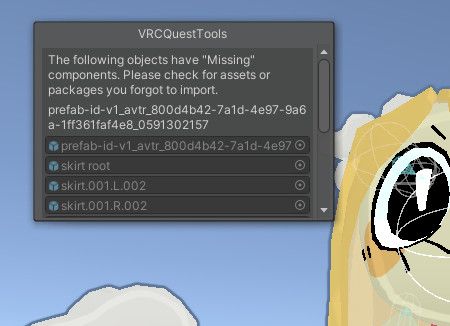
Regardless, it works fine and uploads fine. Thanks so much!
-
B bigbangattack has marked this topic as solved
-
@bigbangattack Here ya go, hope it works well for ya
@Fredthepotato17 Agh, just one more issue.
Some visemes are missing/invisible. Her lighting is also a little off but that's whatever.
Could you fix the former?
-
Well last I checked the visemes were kinda broken on the normal model too. You could try tweaking with the settings on the avatar descriptor
-
Well last I checked the visemes were kinda broken on the normal model too. You could try tweaking with the settings on the avatar descriptor
@Fredthepotato17 They worked perfectly fine on the avatar i linked, but i'll try that.
-
Well last I checked the visemes were kinda broken on the normal model too. You could try tweaking with the settings on the avatar descriptor
@Fredthepotato17 Went and fiddled around. A lot of japanese words I can't read. I went through them all, and a handful are in fact mouth shapes. But only a couple are practical for visemes.

But beyond that, there aren't enough unique mouth blendshapes to fill out all of the visemes. I'd imagine you have to go into blender to add new ones (or duplicate existing ones under appropriate names), but I'm too lazy to do that.
Could you take another look at it? Sorry to have you coming back to this so many times.
-
Ah, well you see the ones labeled "A, E, I, O, U"? Those seem to be the primary visemes, i've seen a few avatars have them like that. Currently I do not know how to fully use those myself, but you might be able to either set them in multiple of the visemes slots, or use vrcfury's custom visemes toggles to have a workaround.
-
Ah, well you see the ones labeled "A, E, I, O, U"? Those seem to be the primary visemes, i've seen a few avatars have them like that. Currently I do not know how to fully use those myself, but you might be able to either set them in multiple of the visemes slots, or use vrcfury's custom visemes toggles to have a workaround.
@Fredthepotato17 Note that I said unique mouth blendshapes. They must be uniquely named; you can't set multiple visemes to the same named blendshape. It just won't show up. I've tried.
You can get around this by duplicating a blendshape and just giving it a different name, then using that instead.
And yeah, you can sometimes get by with just those primary visemes, but the problem is that this is a 2D mouth. The mouth shape can't exactly blend together for all the niche visemes.
So...yeah. Oh well. Gonna be waiting on a fix.
-
bump
-
bump

Hello! It looks like you're interested in this conversation, but you don't have an account yet.
Getting fed up of having to scroll through the same posts each visit? When you register for an account, you'll always come back to exactly where you were before, and choose to be notified of new replies (either via email, or push notification). You'll also be able to save bookmarks and upvote posts to show your appreciation to other community members.
With your input, this post could be even better 💗
Register Login