
Gogoloco not working on avi
-
So basically there’s been people in my threads and myself have been experiencing avatars that have been fixed bc they were like previously VRCA’s and the loco not working. For me, I open gesture manager and it doesn’t work, cool I delete the beyond prefab and the gogoloco that comes with the avatar. It now has TWO gogoloco menus, there’s a next page and it still doesnt work. The only solution I had was deleting the SDK that came with the avatar but then the toggles don’t work and so I’m a bit stuck. Any help is appreciated.
-
So basically there’s been people in my threads and myself have been experiencing avatars that have been fixed bc they were like previously VRCA’s and the loco not working. For me, I open gesture manager and it doesn’t work, cool I delete the beyond prefab and the gogoloco that comes with the avatar. It now has TWO gogoloco menus, there’s a next page and it still doesnt work. The only solution I had was deleting the SDK that came with the avatar but then the toggles don’t work and so I’m a bit stuck. Any help is appreciated.
@M1zuki Delete the GoGoLoco from the VRC Expressions Menu and I'll recommend you delete every Animator on the Avatar Descriptor except Gesture and FX, that's more than likely gonna fix everything.
-
So basically there’s been people in my threads and myself have been experiencing avatars that have been fixed bc they were like previously VRCA’s and the loco not working. For me, I open gesture manager and it doesn’t work, cool I delete the beyond prefab and the gogoloco that comes with the avatar. It now has TWO gogoloco menus, there’s a next page and it still doesnt work. The only solution I had was deleting the SDK that came with the avatar but then the toggles don’t work and so I’m a bit stuck. Any help is appreciated.
@M1zuki Simply remove Gogoloco from the avatar hierarchy and delete it from the expressions section as well. Grab a new Gogoloco prefab, place it in the project, and—in the Layers section on the right—select the Gogoloco instance you intend to use for the actions.
-
So basically there’s been people in my threads and myself have been experiencing avatars that have been fixed bc they were like previously VRCA’s and the loco not working. For me, I open gesture manager and it doesn’t work, cool I delete the beyond prefab and the gogoloco that comes with the avatar. It now has TWO gogoloco menus, there’s a next page and it still doesnt work. The only solution I had was deleting the SDK that came with the avatar but then the toggles don’t work and so I’m a bit stuck. Any help is appreciated.
@M1zuki the only thing i could think is that mybe this is a new way to keep ppl from ripping who knows
-
@M1zuki Simply remove Gogoloco from the avatar hierarchy and delete it from the expressions section as well. Grab a new Gogoloco prefab, place it in the project, and—in the Layers section on the right—select the Gogoloco instance you intend to use for the actions.
@Lotus-Okami the expression menu is VRCFURY not Gogoloco, what do I do instead
-
@M1zuki Delete the GoGoLoco from the VRC Expressions Menu and I'll recommend you delete every Animator on the Avatar Descriptor except Gesture and FX, that's more than likely gonna fix everything.
@VRCAmazing It’s VRCfury for the expression menu, you two basically said the same thing
 so I’m replying to you as well
 -
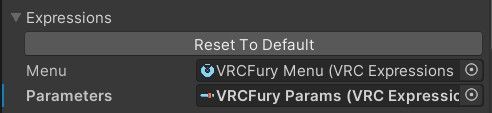
@M1zuki For the "Expressions" section (under Parameters), remove the GoGoLoco entry; in the "Hierarchy" section, delete the existing object and add the new prefab; and in the "Layers" section, change the "Action" layer to "GoGoLoco Action."
-
@M1zuki For the "Expressions" section (under Parameters), remove the GoGoLoco entry; in the "Hierarchy" section, delete the existing object and add the new prefab; and in the "Layers" section, change the "Action" layer to "GoGoLoco Action."
@Lotus-Okami wdym under parameters, this is what I see
-
@M1zuki For the "Expressions" section (under Parameters), remove the GoGoLoco entry; in the "Hierarchy" section, delete the existing object and add the new prefab; and in the "Layers" section, change the "Action" layer to "GoGoLoco Action."
@Lotus-Okami oh wait you're talking about in the animator
-
 M M1zuki referenced this topic on




Hello! It looks like you're interested in this conversation, but you don't have an account yet.
Getting fed up of having to scroll through the same posts each visit? When you register for an account, you'll always come back to exactly where you were before, and choose to be notified of new replies (either via email, or push notification). You'll also be able to save bookmarks and upvote posts to show your appreciation to other community members.
With your input, this post could be even better 💗
Register Login