
Breast Physics Plus -Latest ver-
-
@Norakami
" i see you use my stuff i pay for got other stuff and trade is my first and last gift i advise all here !"
who was that directed too?
-
-
@Norakami OK because i was like, what did i doooooooooooooo!?
-
-
-
upgrades
-
System moved this topic from Looking for... on
-
-
-
-
Does anyone have a tutorial of how to add this to a model? I want to put this on one of my avatars ~ Thank you!

@boofbug use bar menu called
- "nHaruka" → 2. "Breast Physics Plus" → 3. drag & drop the root bone of the chest in the "Left Breast(root), Right Breast(root)" field of the displayed pop-up window (What you need to drag & drop is your Avatar - armature - Hips - Spine - Chest - Boob(or something)_L/R) → Click setup button → Then you can see L_Bust0 / R_Bust0 → Done but if you want customize, you can adjust L/R_Bust0's Physbone's parameters(However, it works good enough just by setup)
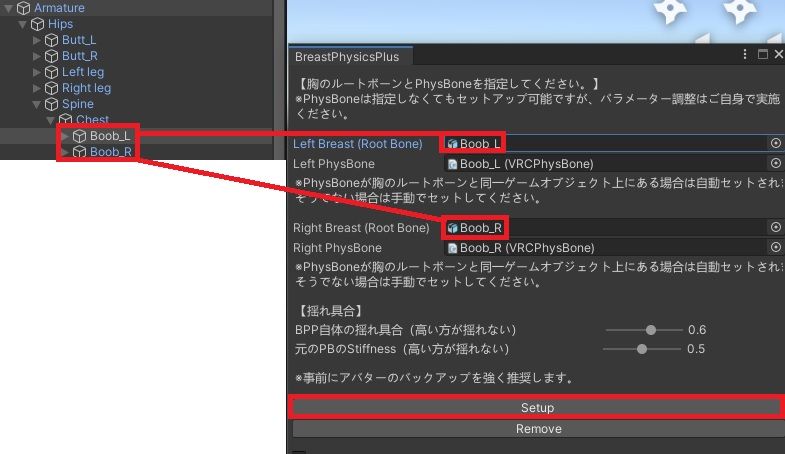
- "nHaruka" → 2. "Breast Physics Plus" → 3. drag & drop the root bone of the chest in the "Left Breast(root), Right Breast(root)" field of the displayed pop-up window (What you need to drag & drop is your Avatar - armature - Hips - Spine - Chest - Boob(or something)_L/R) → Click setup button → Then you can see L_Bust0 / R_Bust0 → Done but if you want customize, you can adjust L/R_Bust0's Physbone's parameters(However, it works good enough just by setup)
-
-
@boofbug use bar menu called
- "nHaruka" → 2. "Breast Physics Plus" → 3. drag & drop the root bone of the chest in the "Left Breast(root), Right Breast(root)" field of the displayed pop-up window (What you need to drag & drop is your Avatar - armature - Hips - Spine - Chest - Boob(or something)_L/R) → Click setup button → Then you can see L_Bust0 / R_Bust0 → Done but if you want customize, you can adjust L/R_Bust0's Physbone's parameters(However, it works good enough just by setup)
Thank you so much I'll give this a try ~
- "nHaruka" → 2. "Breast Physics Plus" → 3. drag & drop the root bone of the chest in the "Left Breast(root), Right Breast(root)" field of the displayed pop-up window (What you need to drag & drop is your Avatar - armature - Hips - Spine - Chest - Boob(or something)_L/R) → Click setup button → Then you can see L_Bust0 / R_Bust0 → Done but if you want customize, you can adjust L/R_Bust0's Physbone's parameters(However, it works good enough just by setup)
-
-
-
-
-
-
v2.7.3
-
-
Bump for latest!






Hello! It looks like you're interested in this conversation, but you don't have an account yet.
Getting fed up of having to scroll through the same posts each visit? When you register for an account, you'll always come back to exactly where you were before, and choose to be notified of new replies (either via email, or push notification). You'll also be able to save bookmarks and upvote posts to show your appreciation to other community members.
With your input, this post could be even better 💗
Register Login