
Help with avatar preview in VRC
-
Hi, I am having an issue with my avatar's preview in VRC, and I can't seem to figure it out.
I want it to not have the tail, and only the bottom ears on its preview in VRC. I have the assets disabled in Unity, however that does not help. I have also noticed when I disable GestureManager after using play mode in Unity, it loads my avatar the same way as it does in the VRC preview, having both the ears and tail, and I cant figure out a way to change it. Any advice would be appreciated
The first pic is what it looks like on the VRC preview and after i turn off gesture manager, and the second one is what it looks like with unity with everything properly enabled and disabled.

-
A toggle and/or an animation is automatically turning it on when your avatar first loads. The avatar preview shows your avatar fully compiled with no toggles active, so you probably have a reversed toggle that's turning the animation on while the toggle appears off. Alternatively, the animation might be playing from somewhere else. You'll need to check which animations are affecting that GameObject.
-
@Thisistest2 tysm for your reply, i dug around a bit in unity and this is the animation for the ears, the avatar has all three ear states on one animation it seems, where do i go from there?
the animation that makes the upper ears appear seems to be "earslower 1"
and for the tail, the animation that makes it appear is "Tail"
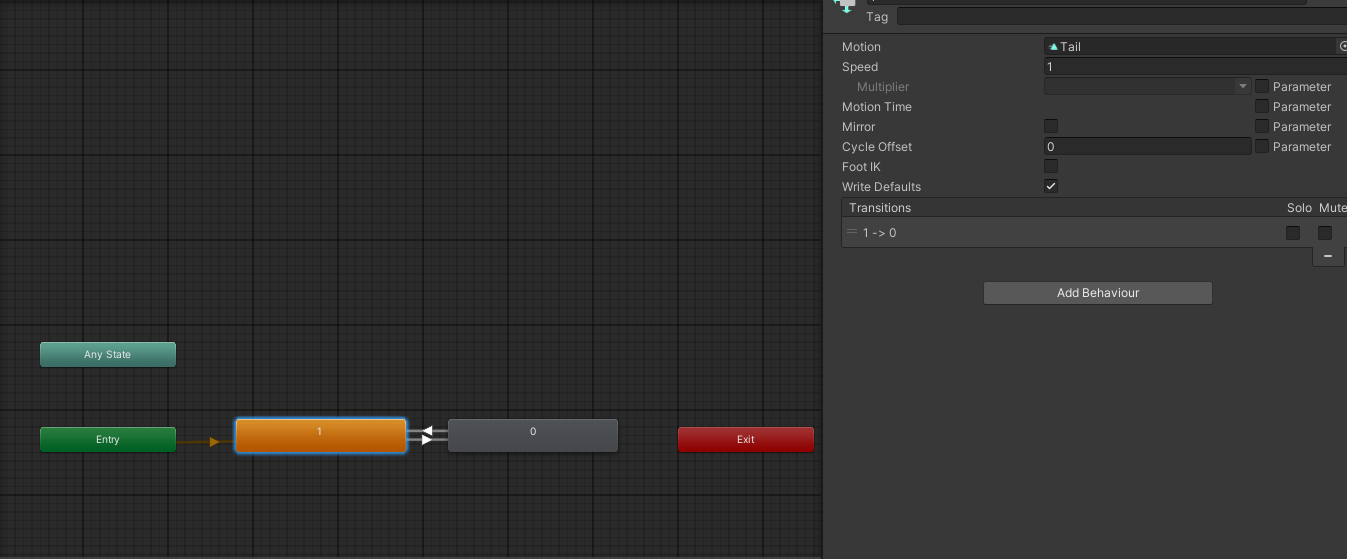
im still a noob in unity so this might be an easy fix, i am just kinda lost still when it comes to animations

-
@Thisistest2 tysm for your reply, i dug around a bit in unity and this is the animation for the ears, the avatar has all three ear states on one animation it seems, where do i go from there?
the animation that makes the upper ears appear seems to be "earslower 1"and for the tail, the animation that makes it appear is "Tail"
im still a noob in unity so this might be an easy fix, i am just kinda lost still when it comes to animations
@skyward So those white arrows show the flow of how an animation moves between states. If the ‘0’ block is playing the earslower1 animation and that’s what’s activating the ears, then the flow might be getting stuck there—either because there’s no arrow pointing back to an off state, or because the parameter that turns it on is staying set to toggle on when you don’t want it to be.
Parameters are how the Animator decides which path to follow when there are multiple arrows leading out of a single block. It’s like a true/false value, a number, or other logic that determines the animation flow based on what’s toggled or set—like radial menus and such. To see what a parameter does, click on one of the white arrows and check the box on the right side of the screen.
If you want to simplify things, you can use the Toggle Assistant tool, which you can download for free from Gumroad:
https://shatteredfur.gumroad.com/l/vrctoggle
Use the toggle remover to remove the ear and tail toggles, then add them back using this tool. It’s pretty straightforward but I'll understand if you get stuck, if you need a more detailed walkthrough, just say the word. If you do use this and figure it our yourself make sure to set it to off by default but to save the sate.
-
@Thisistest2 tysm for the tip. i was a bit afraid to touch the ears bc it includes three states (upper ears and lower ears which are both objects, and elf ears which seem to be a blendshape on the body of the model?), so I went to try it with the tail
i deleted the existing toggle, and created a new one, but in the editor mode in the Gesture Manager it still shows the tail, even though i have it set to off by default and bound to a new toggle and everything
not sure if i missed anything, heres the new animations the Toggle Assistant created, and how it looks in editor mode which still has the tail for some reason, is it bc the toggle was created wrong?

-
@skyward Are you sure you were in play mode when you took that most recent picture of the avi? It shouldn't be in that pose when you hit play and then navigate to the Gesture Manager GameObject. It should be standing straight up, like it would in desktop mode in vrchat. That pose makes it look like you're either in the middle of editing an animation or just finished doing so.
Other than that, if it's still not working, try deleting the tail toggle and don’t add it back. Then enter play mode and check if it shows "off" when you open Gesture Manager. Let me know what happens. Also, make sure the GameObject is off before you press play—this way, you’ll know if something else is turning it on.
Sorry if I’m being redundant—I can’t see what you’re doing or know the full context.
-
The deleting the tail toggle suggestion is just to make sure that its not something else like a toggle that is like 'furry mode" which turns on both ears and tail or something which may override the animation telling it to not be on
-
@Thisistest2 No youre all good! Tysm for trying to troubleshoot, ill add some more context, hopefully this will make it a bit more understandable:
So in this image is what the model looks like after i turn off Gesture Manager (not fully out of play mode yet) or go into "edit mode" inside GM which was that picture I shared before in which the avatar was floating, which coincides with how my avatar looks in the VRC preview in-game


Then this is what my settings are like when im fully out of Play Mode - I have the assets for the ears and the tail disabled, I only have the lower ears enabled
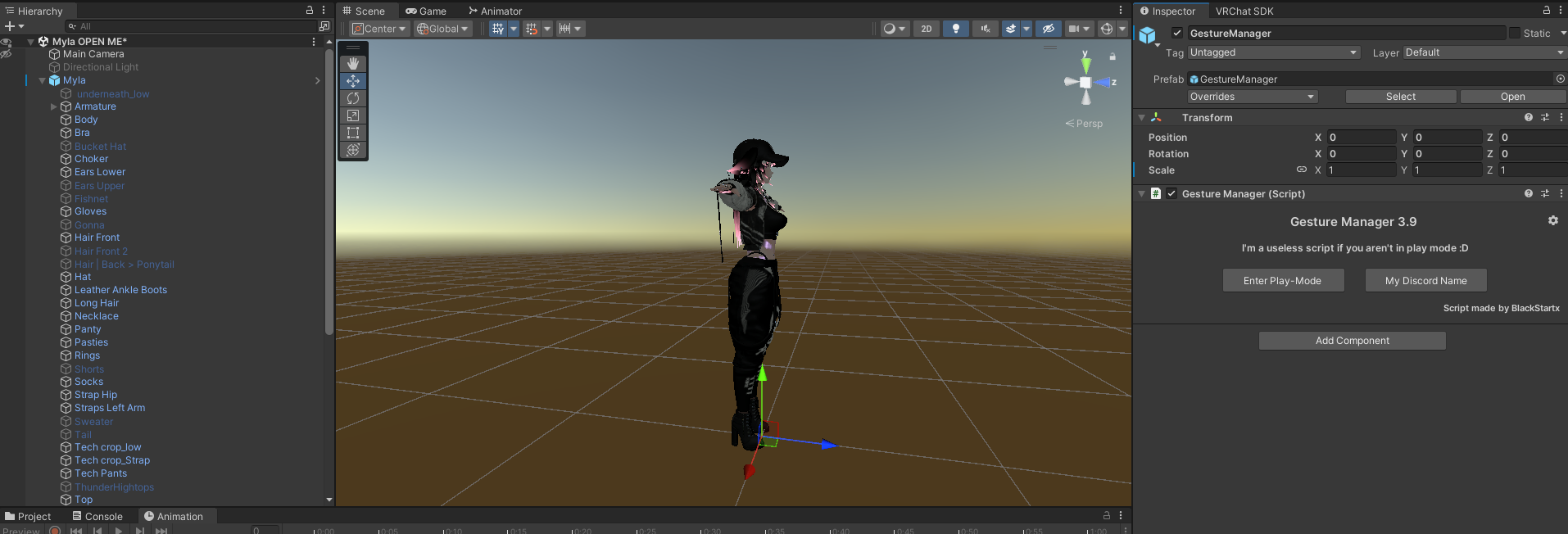
When I enter actual Game Mode, everything loads proper how I want it (when I have a toggle for the tail existing)

The avatar itself does not have a "furry mode", it has separate toggles for each type of ears, and then two more toggles for bunny ears&tail (these were not base avatar, I've added them myself so they're not tied to the tail or other ears)
So now I've tried removing the toggle you suggested altogether, and even though I have the asset off out of playmode, the tail still somehow shows up! I'm super confused now:D

-
@Thisistest2 No youre all good! Tysm for trying to troubleshoot, ill add some more context, hopefully this will make it a bit more understandable:
So in this image is what the model looks like after i turn off Gesture Manager (not fully out of play mode yet) or go into "edit mode" inside GM which was that picture I shared before in which the avatar was floating, which coincides with how my avatar looks in the VRC preview in-game
Then this is what my settings are like when im fully out of Play Mode - I have the assets for the ears and the tail disabled, I only have the lower ears enabled
When I enter actual Game Mode, everything loads proper how I want it (when I have a toggle for the tail existing)
The avatar itself does not have a "furry mode", it has separate toggles for each type of ears, and then two more toggles for bunny ears&tail (these were not base avatar, I've added them myself so they're not tied to the tail or other ears)
So now I've tried removing the toggle you suggested altogether, and even though I have the asset off out of playmode, the tail still somehow shows up! I'm super confused now:D
@skyward To be honest, I would just backtrack and re-add that tail toggle if it looks exactly how you want it and it works. However, it’s definitely confusing how it turns back on after being removed. It makes me think there might be another animation affecting the tail, and the toggle-assisted animations you created were just overwriting it. If you just want to move on, I doubt this glitch will cause issues with your avatar in the future. But if you’d prefer to figure it out, then by all means, go ahead and hunt it down.
-
@Thisistest2 yeah, definitely very strange. it all works, just the avatar preview has been irking me, if anything i'll just remove the tail completely if i dont end up using it much.
ty for your time! have a a great rest of your week

Hello! It looks like you're interested in this conversation, but you don't have an account yet.
Getting fed up of having to scroll through the same posts each visit? When you register for an account, you'll always come back to exactly where you were before, and choose to be notified of new replies (either via email, or push notification). You'll also be able to save bookmarks and upvote posts to show your appreciation to other community members.
With your input, this post could be even better 💗
Register Login