
Skip to content
  • Categories
  • Recent
  • Tags
  • Popular
Skins
  • Light
  • Brite
  • Cerulean
  • Cosmo
  • Flatly
  • Journal
  • Litera
  • Lumen
  • Lux
  • Materia
  • Minty
  • Morph
  • Pulse
  • Sandstone
  • Simplex
  • Sketchy
  • Spacelab
  • United
  • Yeti
  • Zephyr
  • Dark
  • Cyborg
  • Darkly
  • Quartz
  • Slate
  • Solar
  • Superhero
  • Vapor

  • Default (Zephyr)
  • No Skin
Collapse
RipperStore Logo
  1. Home
  2. Assets
  3. General Assets
  4. LF: Help seperating assets from Clove by Bratbun

LF: Help seperating assets from Clove by Bratbun

Scheduled Pinned Locked Moved General Assets
bratbunchibifurry
6 Posts 2 Posters 570 Views 1 Watching
  • Oldest to Newest
  • Newest to Oldest
  • Most Votes
Reply
  • Reply as topic
Log in to reply
This topic has been deleted. Only users with topic management privileges can see it.
  • cookiemonster655C
    cookiemonster655C
    cookiemonster655
    wrote on last edited by
    #1

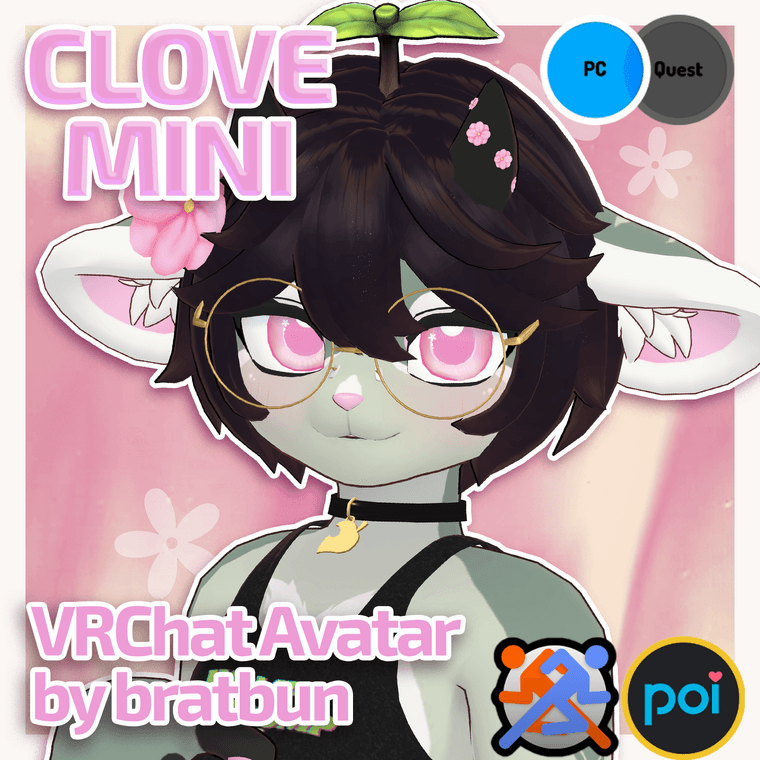
    I want the hair, glasses and oversized hoodie from this model but I cant figure out how to seperate em in blender. if anyone can help pls do!
    https://bratbun.gumroad.com/l/CloveMini?layout=profile&recommended_by=search
    2ce8456a-d40f-4c8a-8595-e9f8d075e46c-image.png

    1 Reply Last reply
    0
    • cookiemonster655C
      cookiemonster655C
      cookiemonster655
      wrote on last edited by
      #2

      btw if you need the fbx: https://forum.ripper.store/topic/48161/lf-clove-mini/13

      1 Reply Last reply
      0
      • cookiemonster655C
        cookiemonster655C
        cookiemonster655
        wrote on last edited by
        #3

        bump[

        1 Reply Last reply
        0
        • D
          D
          DeepDishBussy
          wrote on last edited by
          #4

          hi, you can use CATS blender plugin and separate by material. That should work for SOME meshes that are combined. If that doesn't work, go into edit mode by pressing tab, select a vertice/face from the part you want and press control and L to select the vertex group. Once you've got all the meshes, clean up the armature by deleting bones you don't need

          DM me if any of my links go down or if a file is outdated

          cookiemonster655C 2 Replies Last reply
          1
          • D DeepDishBussy

            hi, you can use CATS blender plugin and separate by material. That should work for SOME meshes that are combined. If that doesn't work, go into edit mode by pressing tab, select a vertice/face from the part you want and press control and L to select the vertex group. Once you've got all the meshes, clean up the armature by deleting bones you don't need

            cookiemonster655C
            cookiemonster655C
            cookiemonster655
            wrote on last edited by
            #5

            @LeonKennedy eek thank you!

            1 Reply Last reply
            0
            • D DeepDishBussy

              hi, you can use CATS blender plugin and separate by material. That should work for SOME meshes that are combined. If that doesn't work, go into edit mode by pressing tab, select a vertice/face from the part you want and press control and L to select the vertex group. Once you've got all the meshes, clean up the armature by deleting bones you don't need

              cookiemonster655C
              cookiemonster655C
              cookiemonster655
              wrote on last edited by
              #6

              @LeonKennedy I also tried doing this by just removing the ears n tail (cause thats all i really needed to do anyway -w-, i was gonna replace them)
              I did the CATS method, when i brought it back to unity after removing the ears n tail the gestures arent working and the blendshape for the socks arent working
              they are toggled on in the photo: 72ec8386-10c2-40a5-b285-bf4477b0a9b8-image.png
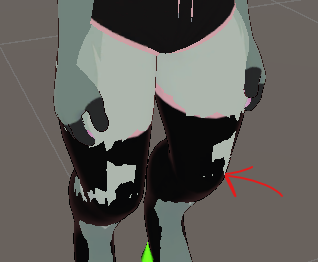
              Only the sprout is moving when i do any of the expressions
              c164ca5b-f4d3-4bd9-9f30-29c226d2f2db-image.png

              1 Reply Last reply
              0

              Hello! It looks like you're interested in this conversation, but you don't have an account yet.

              Getting fed up of having to scroll through the same posts each visit? When you register for an account, you'll always come back to exactly where you were before, and choose to be notified of new replies (either via email, or push notification). You'll also be able to save bookmarks and upvote posts to show your appreciation to other community members.

              With your input, this post could be even better 💗

              Register Login
              Reply
              • Reply as topic
              Log in to reply
              • Oldest to Newest
              • Newest to Oldest
              • Most Votes


              • Login

              • Login or register to search.
              • First post
                Last post
              0
              • Categories
              • Recent
              • Tags
              • Popular