Skip to content
  • Categories
  • Recent
  • Tags
  • Popular
Skins
  • Light
  • Brite
  • Cerulean
  • Cosmo
  • Flatly
  • Journal
  • Litera
  • Lumen
  • Lux
  • Materia
  • Minty
  • Morph
  • Pulse
  • Sandstone
  • Simplex
  • Sketchy
  • Spacelab
  • United
  • Yeti
  • Zephyr
  • Dark
  • Cyborg
  • Darkly
  • Quartz
  • Slate
  • Solar
  • Superhero
  • Vapor

  • Default (Zephyr)
  • No Skin
Collapse
RipperStore Logo
  1. Home
  2. Guides
  3. Tutorials
  4. How to get high quality textures?

How to get high quality textures?

Scheduled Pinned Locked Moved Tutorials
textureboothnew user help
4 Posts 2 Posters 694 Views 3 Watching
  • Oldest to Newest
  • Newest to Oldest
  • Most Votes
Reply
  • Reply as topic
Log in to reply
This topic has been deleted. Only users with topic management privileges can see it.
  • sleepyNdumbS
    sleepyNdumbS
    sleepyNdumb
    wrote on last edited by
    #1

    This may be a silly question but I see these really pretty booth models people have made and the quality is insane! I have experience putting together booth models, but I haven't figured out how some people get their textures to look so nice. Does anyone know how they do it?
    Here are some pictures so you can see,
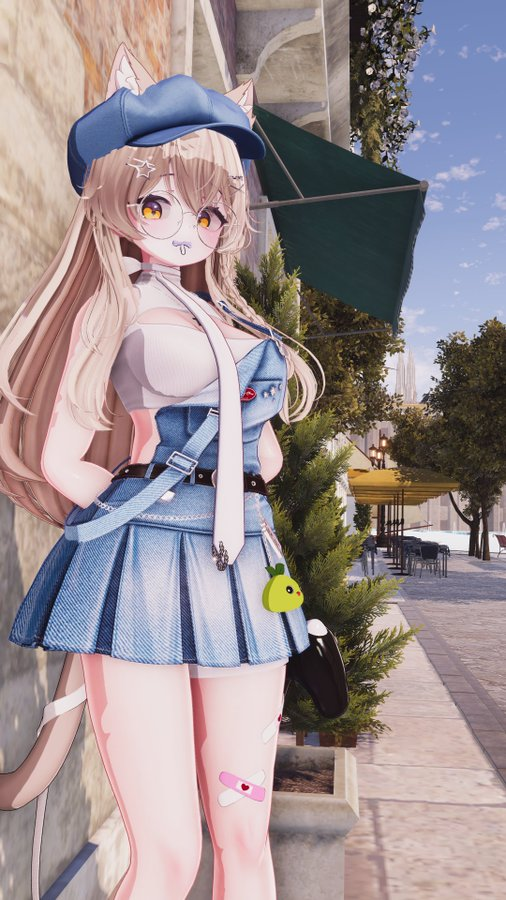
    4d9224c6-4930-4840-8399-aa25661c596d-image.png
    f3692743-7693-4829-badd-6b9deb3df2ad-image.png
    Any help is much appreciated and thanks for taking the time to help out!

    1 Reply Last reply
    0
    • ?
      ?
      A Former User
      wrote on last edited by [[global:former-user]]
      #2

      i think it could be making the textures higher or using a lighting system? it could also be the world lighting too maybe? when i take pics w mine i use a lighting system called PCSS and it def brings stuff out more

      sleepyNdumbS 1 Reply Last reply
      0
      • ? A Former User

        i think it could be making the textures higher or using a lighting system? it could also be the world lighting too maybe? when i take pics w mine i use a lighting system called PCSS and it def brings stuff out more

        sleepyNdumbS
        sleepyNdumbS
        sleepyNdumb
        wrote on last edited by
        #3

        @WolfyPawz__ I was wondering if it might be PCSS but wasn't sure, thank you sm! Also, do you know how exactly to make the textures higher?

        ? 1 Reply Last reply
        0
        • sleepyNdumbS sleepyNdumb

          @WolfyPawz__ I was wondering if it might be PCSS but wasn't sure, thank you sm! Also, do you know how exactly to make the textures higher?

          ?
          ?
          A Former User
          wrote on last edited by [[global:former-user]]
          #4

          @sleepyNdumb i can try and explain!!

          so when ur in unity and you hit the texture,, if u scroll down on the right side of ur screen,, youll see max size n stuff,, you can make it higher that way and set the compression to high

          1 Reply Last reply
          0

          Hello! It looks like you're interested in this conversation, but you don't have an account yet.

          Getting fed up of having to scroll through the same posts each visit? When you register for an account, you'll always come back to exactly where you were before, and choose to be notified of new replies (either via email, or push notification). You'll also be able to save bookmarks and upvote posts to show your appreciation to other community members.

          With your input, this post could be even better 💗

          Register Login
          Reply
          • Reply as topic
          Log in to reply
          • Oldest to Newest
          • Newest to Oldest
          • Most Votes


          • Login

          • Login or register to search.
          • First post
            Last post
          0
          • Categories
          • Recent
          • Tags
          • Popular