Skip to content
  • Categories
  • Recent
  • Tags
  • Popular
Skins
  • Light
  • Brite
  • Cerulean
  • Cosmo
  • Flatly
  • Journal
  • Litera
  • Lumen
  • Lux
  • Materia
  • Minty
  • Morph
  • Pulse
  • Sandstone
  • Simplex
  • Sketchy
  • Spacelab
  • United
  • Yeti
  • Zephyr
  • Dark
  • Cyborg
  • Darkly
  • Quartz
  • Slate
  • Solar
  • Superhero
  • Vapor

  • Default (Zephyr)
  • No Skin
Collapse
RipperStore Logo
  1. Home
  2. Assets
  3. Looking for...
  4. Worlds
  5. iY MMD World Going Offline

iY MMD World Going Offline

Scheduled Pinned Locked Moved Worlds
worldmmdtaken downdelete
65 Posts 23 Posters 19.3k Views 20 Watching
  • Oldest to Newest
  • Newest to Oldest
  • Most Votes
Reply
  • Reply as topic
Log in to reply
This topic has been deleted. Only users with topic management privileges can see it.
  • EricZhouE
    EricZhouE
    EricZhou
    wrote on last edited by EricZhou
    #16

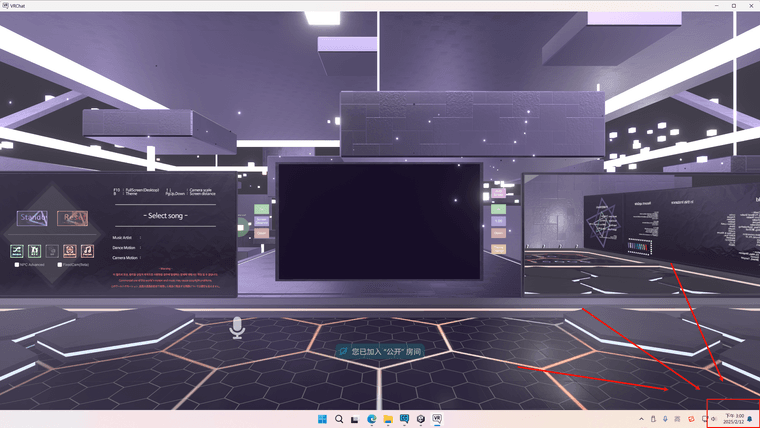
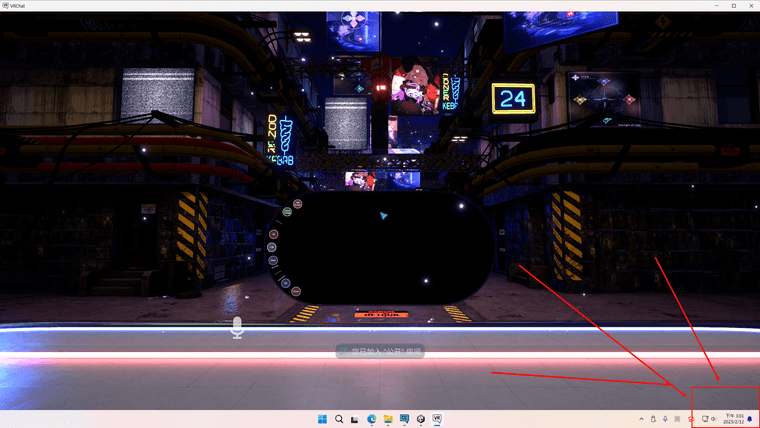
    I did it!

    PixPin_2025-02-12_15-00-27.png PixPin_2025-02-12_15-01-47.png

    J 1 Reply Last reply
    0
    • princelykittenP
      princelykittenP
      princelykitten
      wrote on last edited by
      #17

      this is how I find out it's gone... I hope it gets reuploaded soon ;w;

      uwu

      M 1 Reply Last reply
      0
      • princelykittenP princelykitten

        this is how I find out it's gone... I hope it gets reuploaded soon ;w;

        M
        M
        Metasect
        wrote on last edited by Metasect
        #18

        @princelykitten

        I doubt it, the Japanese community kind of went Karen on Iris Alias, the author of the world about all the copyright bs and complained like they were the victims (typical). Iris Alias took down the world themselves following that.

        I have no faith iY MMD World will be uploaded back.

        1 Reply Last reply
        1
        • EricZhouE EricZhou

          @Metasect
          I have the same cache file in

          C:\Users\****\AppData\LocalLow\VRChat\VRChat\Cache-WindowsPlayer\05FFBBE1048199A4\000000000000000000000000ba000000\__data
          

          Are you extracting it from this folder as well?

          M
          M
          Metasect
          wrote on last edited by
          #19
          This post is deleted!
          1 Reply Last reply
          0
          • M Metasect

            Sure am glad I had a cached copy of that world. I figured "__data" and ".vrcw" files are exactly the same content. From there, all I did was rename that cache file to something akin to my other locally built worlds (e.g. "scene-StandaloneWindows64-something.vrcw", where "something" is whatever name will appear in VRChat Quick Launcher's local world files).

            After doing this, and placing said file alongside my other locally built worlds located at "LocalLow\VRChat\VRChat\Worlds", the world loaded just fine.
            Of course being a locally loaded world means it's neither on VRC servers, nor can people join you. But you yourself still gets to enjoy it.

            With that nifty little trick in mind, enjoy loading any cached worlds you may have.

            White CosmosW
            White CosmosW
            White Cosmos
            wrote on last edited by
            #20

            @Metasect said in iY MMD World Going Offline:

            in VRChat Quick Launcher's local world files).

            Mind sharing how to? I might try to upload it.

            As a farewell to organizing and hosting files, I hope you all buy things you really like and use often. I try to buy anything and everything I can, with hardly any income at all.

            If a file is down, reply and ping BLACK0NYX as well. I'm adding him to my threads as an editor overtime. Eventually he may make his own and direct to them. We'll see.

            M 1 Reply Last reply
            0
            • White CosmosW White Cosmos

              @Metasect said in iY MMD World Going Offline:

              in VRChat Quick Launcher's local world files).

              Mind sharing how to? I might try to upload it.

              M
              M
              Metasect
              wrote on last edited by Metasect
              #21

              @CharmingMaiden

              How to what ? Access the VRChat Quick Launcher ? It's in Tools inside the Creator Companion.

              As for upload, I would advise against it. If the creator find that world back up, they'll get it taken down (and you risk a ban too). Plus, you can only upload a world which you have the project of. This one is not a project, it's a bundled world file.

              White CosmosW 1 Reply Last reply
              0
              • M Metasect

                Sure am glad I had a cached copy of that world. I figured "__data" and ".vrcw" files are exactly the same content. From there, all I did was rename that cache file to something akin to my other locally built worlds (e.g. "scene-StandaloneWindows64-something.vrcw", where "something" is whatever name will appear in VRChat Quick Launcher's local world files).

                After doing this, and placing said file alongside my other locally built worlds located at "LocalLow\VRChat\VRChat\Worlds", the world loaded just fine.
                Of course being a locally loaded world means it's neither on VRC servers, nor can people join you. But you yourself still gets to enjoy it.

                With that nifty little trick in mind, enjoy loading any cached worlds you may have.

                T
                T
                Terabyte-1
                wrote on last edited by
                #22

                @Metasect Would appreciate it if you could upload a youtube video to explain how to do that 😄 I'm so dumb at these things😭

                M 1 Reply Last reply
                0
                • M Metasect

                  @CharmingMaiden

                  How to what ? Access the VRChat Quick Launcher ? It's in Tools inside the Creator Companion.

                  As for upload, I would advise against it. If the creator find that world back up, they'll get it taken down (and you risk a ban too). Plus, you can only upload a world which you have the project of. This one is not a project, it's a bundled world file.

                  White CosmosW
                  White CosmosW
                  White Cosmos
                  wrote on last edited by
                  #23

                  @Metasect dunno how to upload. do tell. dm.

                  As a farewell to organizing and hosting files, I hope you all buy things you really like and use often. I try to buy anything and everything I can, with hardly any income at all.

                  If a file is down, reply and ping BLACK0NYX as well. I'm adding him to my threads as an editor overtime. Eventually he may make his own and direct to them. We'll see.

                  M 1 Reply Last reply
                  0
                  • K
                    K
                    Kawaiicute
                    wrote on last edited by
                    #24

                    i dont know how to use VRChat Quick Launcher to open the world help Dx

                    M 1 Reply Last reply
                    0
                    • LiteralL
                      LiteralL
                      Literal
                      wrote on last edited by
                      #25

                      Just to give a note, You cannot rip this world it will only shoot errors inside your console!
                      The world has been taken down

                      Retired Leaker and Ripper!

                      1 Reply Last reply
                      0
                      • White CosmosW White Cosmos

                        @Metasect dunno how to upload. do tell. dm.

                        M
                        M
                        Metasect
                        wrote on last edited by
                        #26

                        @CharmingMaiden

                        You cannot upload this world.
                        I do not know how, and even if i did, I would not say, because it would get you banned.

                        All I did here, was load the world file locally, in Offline Testing mode.

                        1 Reply Last reply
                        0
                        • K Kawaiicute

                          i dont know how to use VRChat Quick Launcher to open the world help Dx

                          M
                          M
                          Metasect
                          wrote on last edited by Metasect
                          #27

                          @Kawaiicute

                          Open Creator Companion app, then to go Tools tab, and launch the Quick Launcher in there.

                          For the file, just obtain it (check my Proton link above), and rename it to "scene-StandaloneWindows64-mmdWorld.vrcw" (Make sure you can see file extensions in File Explorer)

                          Place that renamed file in "AppData\LocalLow\VRChat\VRChat\Worlds"

                          In the Quick Launcher, look down at the Instance info section, click on "Local", and select the world file you just added.

                          In Profiles section, click "Add Profile", this will be Profile 0, which should be what you normally use to login to VRChat (Steam, VRChat account, etc). You can check if you want to launch that Profile in Desktop or VR with the checkbox on the right. make sure the checkbox on the left is checked to be active.

                          Press "Launch all selected", and there you go.

                          HirokuuH 1 Reply Last reply
                          0
                          • T Terabyte-1

                            @Metasect Would appreciate it if you could upload a youtube video to explain how to do that 😄 I'm so dumb at these things😭

                            M
                            M
                            Metasect
                            wrote on last edited by
                            #28

                            @Terabyte-1

                            I will not upload anything to youtube anymore with a ten foot pole, sorry.
                            Read my message above.

                            1 Reply Last reply
                            0
                            • M Metasect

                              @Kawaiicute

                              Open Creator Companion app, then to go Tools tab, and launch the Quick Launcher in there.

                              For the file, just obtain it (check my Proton link above), and rename it to "scene-StandaloneWindows64-mmdWorld.vrcw" (Make sure you can see file extensions in File Explorer)

                              Place that renamed file in "AppData\LocalLow\VRChat\VRChat\Worlds"

                              In the Quick Launcher, look down at the Instance info section, click on "Local", and select the world file you just added.

                              In Profiles section, click "Add Profile", this will be Profile 0, which should be what you normally use to login to VRChat (Steam, VRChat account, etc). You can check if you want to launch that Profile in Desktop or VR with the checkbox on the right. make sure the checkbox on the left is checked to be active.

                              Press "Launch all selected", and there you go.

                              HirokuuH
                              HirokuuH
                              Hirokuu
                              wrote on last edited by
                              #29

                              @Metasect When naming it it's still a text file so the quick launcher won't recognize it as a world. What should I do?

                              Just sharing what I can.
                              If you can give me Tolass/Kuuta/Mamehinata assets that would make me very happy!
                              Gift Repository/wishlist Things I've shared + things I'm looking for. If you can help I would greatly appreciate it.

                              For trade requests please contact/request me through DM as I do not use Discord. Thank you. Feel free to ask me if I have a certain asset there is many I haven't listed yet.
                              Hirokuu's Trading List

                              M 1 Reply Last reply
                              0
                              • HirokuuH Hirokuu

                                @Metasect When naming it it's still a text file so the quick launcher won't recognize it as a world. What should I do?

                                M
                                M
                                Metasect
                                wrote on last edited by
                                #30

                                @Hirokuu

                                Make sure when you rename the file that you can see hidden file extensions in File Explorer.

                                1. Open File Explorer (open any folder).
                                2. Click the View tab.
                                3. Select "File name extension"
                                4. Optionally, you can enable Hidden items.
                                  Filename extensions will now be visible.
                                HirokuuH 1 Reply Last reply
                                0
                                • M Metasect

                                  @Hirokuu

                                  Make sure when you rename the file that you can see hidden file extensions in File Explorer.

                                  1. Open File Explorer (open any folder).
                                  2. Click the View tab.
                                  3. Select "File name extension"
                                  4. Optionally, you can enable Hidden items.
                                    Filename extensions will now be visible.
                                  HirokuuH
                                  HirokuuH
                                  Hirokuu
                                  wrote on last edited by
                                  #31

                                  @Metasect I had those settings already it might be a different issue?

                                  Just sharing what I can.
                                  If you can give me Tolass/Kuuta/Mamehinata assets that would make me very happy!
                                  Gift Repository/wishlist Things I've shared + things I'm looking for. If you can help I would greatly appreciate it.

                                  For trade requests please contact/request me through DM as I do not use Discord. Thank you. Feel free to ask me if I have a certain asset there is many I haven't listed yet.
                                  Hirokuu's Trading List

                                  M 1 Reply Last reply
                                  0
                                  • HirokuuH Hirokuu

                                    @Metasect I had those settings already it might be a different issue?

                                    M
                                    M
                                    Metasect
                                    wrote on last edited by
                                    #32

                                    @Hirokuu

                                    I am not sure. This is not normal Windows behavior.

                                    HirokuuH 1 Reply Last reply
                                    0
                                    • M Metasect

                                      @Hirokuu

                                      I am not sure. This is not normal Windows behavior.

                                      HirokuuH
                                      HirokuuH
                                      Hirokuu
                                      wrote on last edited by
                                      #33

                                      @Metasect I fixed it! The file kept adding the .txt at end as default all I had to do was delete it

                                      Just sharing what I can.
                                      If you can give me Tolass/Kuuta/Mamehinata assets that would make me very happy!
                                      Gift Repository/wishlist Things I've shared + things I'm looking for. If you can help I would greatly appreciate it.

                                      For trade requests please contact/request me through DM as I do not use Discord. Thank you. Feel free to ask me if I have a certain asset there is many I haven't listed yet.
                                      Hirokuu's Trading List

                                      M 1 Reply Last reply
                                      👍
                                      0
                                      • HirokuuH Hirokuu

                                        @Metasect I fixed it! The file kept adding the .txt at end as default all I had to do was delete it

                                        M
                                        M
                                        Metasect
                                        wrote on last edited by
                                        #34

                                        @Hirokuu

                                        Glad you got it sorted out.

                                        HirokuuH 1 Reply Last reply
                                        0
                                        • M Metasect

                                          @Hirokuu

                                          Glad you got it sorted out.

                                          HirokuuH
                                          HirokuuH
                                          Hirokuu
                                          wrote on last edited by
                                          #35

                                          @Metasect Thank you for the help I appreciate it loosing this world was really sad but I'm glad there was a way to keep using it.

                                          Just sharing what I can.
                                          If you can give me Tolass/Kuuta/Mamehinata assets that would make me very happy!
                                          Gift Repository/wishlist Things I've shared + things I'm looking for. If you can help I would greatly appreciate it.

                                          For trade requests please contact/request me through DM as I do not use Discord. Thank you. Feel free to ask me if I have a certain asset there is many I haven't listed yet.
                                          Hirokuu's Trading List

                                          M 1 Reply Last reply
                                          0

                                          Hello! It looks like you're interested in this conversation, but you don't have an account yet.

                                          Getting fed up of having to scroll through the same posts each visit? When you register for an account, you'll always come back to exactly where you were before, and choose to be notified of new replies (either via email, or push notification). You'll also be able to save bookmarks and upvote posts to show your appreciation to other community members.

                                          With your input, this post could be even better 💗

                                          Register Login
                                          Reply
                                          • Reply as topic
                                          Log in to reply
                                          • Oldest to Newest
                                          • Newest to Oldest
                                          • Most Votes


                                          • Login

                                          • Login or register to search.
                                          • First post
                                            Last post
                                          0
                                          • Categories
                                          • Recent
                                          • Tags
                                          • Popular