
How to merge these models, Manuka
-
@picturesque how do i use it as my base and how do i transfer the apron and the other clotes?
@hbanana727
To use it as your base:- in the R18 parts folder,
- select a scene within it the unity logo
- Double-click it and the base will be preassembled
For apron and other clothing:
- Unhide them on the avatar so there's no transfer required.
For the additional clothing:
- Set up each outfit with modular
- Use vixen to set up the Toggles
- Make a vixen folder and call it closet or clothing
- Set up Ejects to make it so you can swap between clothing
which you can read up how to use ejects here
hopefully this helps you out
Happy hunting
-
@hbanana727
To use it as your base:- in the R18 parts folder,
- select a scene within it the unity logo
- Double-click it and the base will be preassembled
For apron and other clothing:
- Unhide them on the avatar so there's no transfer required.
For the additional clothing:
- Set up each outfit with modular
- Use vixen to set up the Toggles
- Make a vixen folder and call it closet or clothing
- Set up Ejects to make it so you can swap between clothing
which you can read up how to use ejects here
hopefully this helps you out
@picturesque the text is grayed out and it doesent seem to be hidden tough?
or is there a second way to hide or unhide something im not aware of? -
i found out how to enable these things now. now imma try to fix the nipples
-
@hbanana727
To use it as your base:- in the R18 parts folder,
- select a scene within it the unity logo
- Double-click it and the base will be preassembled
For apron and other clothing:
- Unhide them on the avatar so there's no transfer required.
For the additional clothing:
- Set up each outfit with modular
- Use vixen to set up the Toggles
- Make a vixen folder and call it closet or clothing
- Set up Ejects to make it so you can swap between clothing
which you can read up how to use ejects here
hopefully this helps you out
@picturesque so far this has been going grate, thanks a lot for all the help untill now.
my problem now:- the bra stays clipping no matter what i do to the slider.
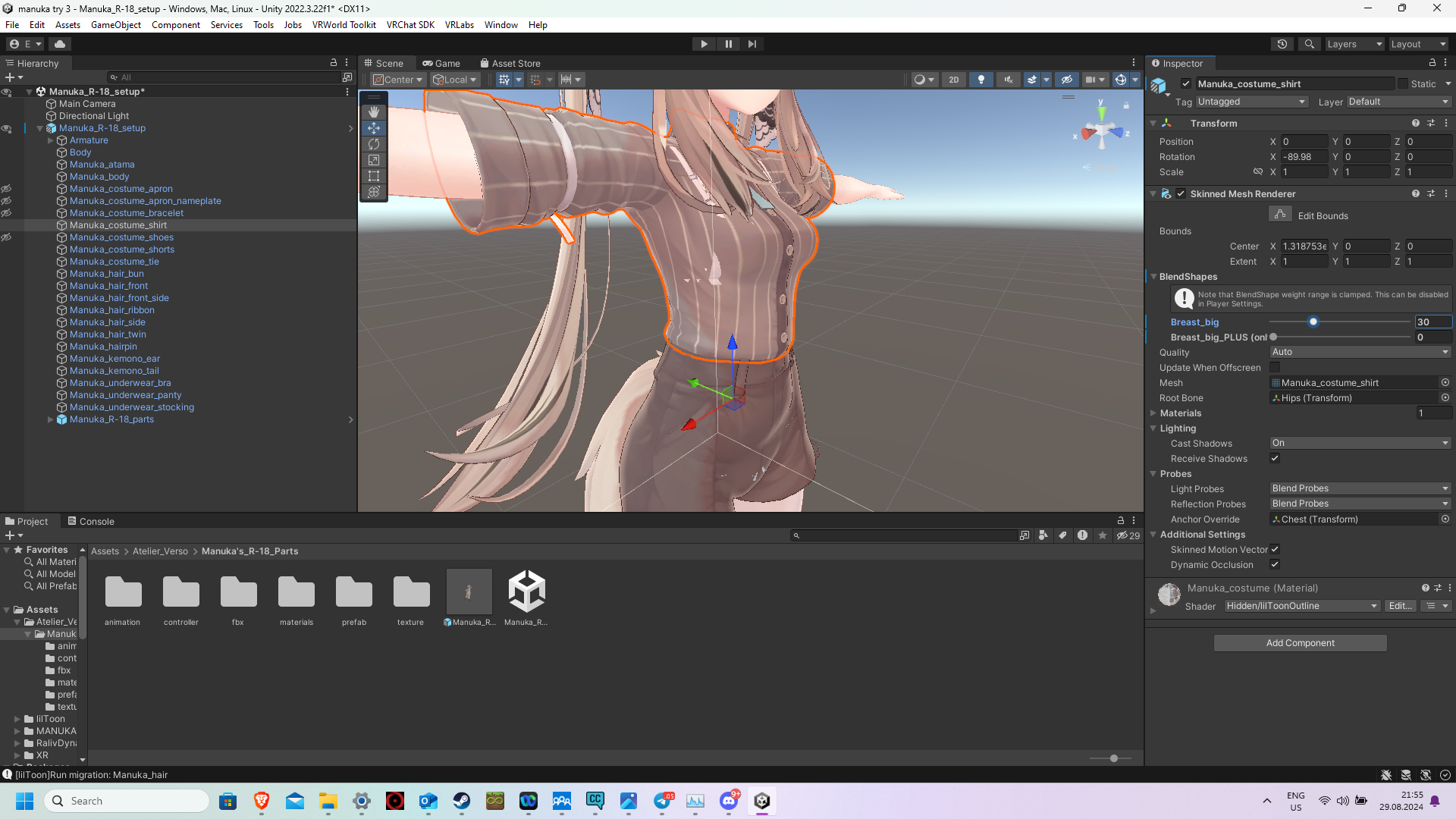
- when i need to fix the shirt (without the bra) i need to make them really big (like 21 or something) and the apron at 19) so if i compare the before and after it looks like a lot of air.
is there any way i could fix that (at least the underwear)
-
@picturesque so far this has been going grate, thanks a lot for all the help untill now.
my problem now:- the bra stays clipping no matter what i do to the slider.
- when i need to fix the shirt (without the bra) i need to make them really big (like 21 or something) and the apron at 19) so if i compare the before and after it looks like a lot of air.
is there any way i could fix that (at least the underwear)
@hbanana727
for the first problemIf you're using Vixen:
- make a toggle for the clothes
- set the bra and panty to disable when enabled
by doing so, I'll hide them while the clothing is on.
as for the second problem
when using Vixen:
i'll quote myself from yesterday
If you want it listed instead, here is the comment I got it from@picturesque said in How to merge these models, Manuka:
after going under base settings, select toggle objects, and drag all the clothing into the top section one by one
Last but not least, select change properties, hit the + and drag the Manuka_body from the hierarchy into the box that appears and select Blendshapes
Finally, go to the chikubi blendshape in the list and hit add, and when set to "when active," set it from 100 to 0
ta-da, your done making a toggle and rinse and repeat for the bikini if the nipples are clipping through it as wellBy doing this, you won't need to adjust the clothing to fit the nipples.
If anything is still being shown:
clothing (bra,panty,etc)
- hide on the hierarchy
Nipples
- In blendshapes, shrink on the manuka_body "chikubi" to 0
hopefully you find this helpful
Happy hunting
- the bra stays clipping no matter what i do to the slider.
-
@hbanana727
for the first problemIf you're using Vixen:
- make a toggle for the clothes
- set the bra and panty to disable when enabled
by doing so, I'll hide them while the clothing is on.
as for the second problem
when using Vixen:
i'll quote myself from yesterday
If you want it listed instead, here is the comment I got it from@picturesque said in How to merge these models, Manuka:
after going under base settings, select toggle objects, and drag all the clothing into the top section one by one
Last but not least, select change properties, hit the + and drag the Manuka_body from the hierarchy into the box that appears and select Blendshapes
Finally, go to the chikubi blendshape in the list and hit add, and when set to "when active," set it from 100 to 0
ta-da, your done making a toggle and rinse and repeat for the bikini if the nipples are clipping through it as wellBy doing this, you won't need to adjust the clothing to fit the nipples.
If anything is still being shown:
clothing (bra,panty,etc)
- hide on the hierarchy
Nipples
- In blendshapes, shrink on the manuka_body "chikubi" to 0
hopefully you find this helpful
@picturesque everything worked now! (i will just live with the slightly bigger breasts witch is only in the original outfit a problem.)
does vixen also have the ability to swap materials? i looked for it on the tools guide/website but they had no good awnsers.
i would like to toggle between 4 different skin textures. -
@picturesque everything worked now! (i will just live with the slightly bigger breasts witch is only in the original outfit a problem.)
does vixen also have the ability to swap materials? i looked for it on the tools guide/website but they had no good awnsers.
i would like to toggle between 4 different skin textures.@hbanana727 Sadly, no. For now at least you would have to make an animation for it and make a radial puppet toggle to house that animation. It'd be kind of confusing/difficult to explain in text, so here is a tutorial on how to do it. hope this helps
Happy hunting
-
so far this has been going grate, thanks a lot for all the help untill now.
thanks, it kinda worked. altough it broke to much other stuff so i can not use it.
thank you for all your help. im done with the character now.
now im off to find a script that allows me to upload bigger files than 500mb -
@picturesque nvm, when i put the pikubi to 0 nothing changes
-
like in the toggles
-
so far this has been going grate, thanks a lot for all the help untill now.
thanks, it kinda worked. altough it broke to much other stuff so i can not use it.
thank you for all your help. im done with the character now.
now im off to find a script that allows me to upload bigger files than 500mb -
@hbanana727 No problem, glad to help

@picturesque the pikubi in the toggle doesent work... and once again i will be on my search for a solution...
-
-
For some reason when I put the model in unity everything is pink and shader is on error what do i do?
@AnaFrawla Download and import the shaders your model uses, most booth ones use liltoon
-
For some reason when I put the model in unity everything is pink and shader is on error what do i do?
@AnaFrawla are you uesing the things i used in this one?


Hello! It looks like you're interested in this conversation, but you don't have an account yet.
Getting fed up of having to scroll through the same posts each visit? When you register for an account, you'll always come back to exactly where you were before, and choose to be notified of new replies (either via email, or push notification). You'll also be able to save bookmarks and upvote posts to show your appreciation to other community members.
With your input, this post could be even better 💗
Register Login