
Mochi by Strawbunny [Decrypted]
-
@SeraphicRoses confirmed there are a few missing meshes within the avatar; that's on me.
you can fix this by:
-
find the mesh that's missing in the Hierarchy

-
in the
Inspector, under theSkinnedMeshRenderer, where there is aMissing (Mesh), open the selector and search for the proper Mesh, select it
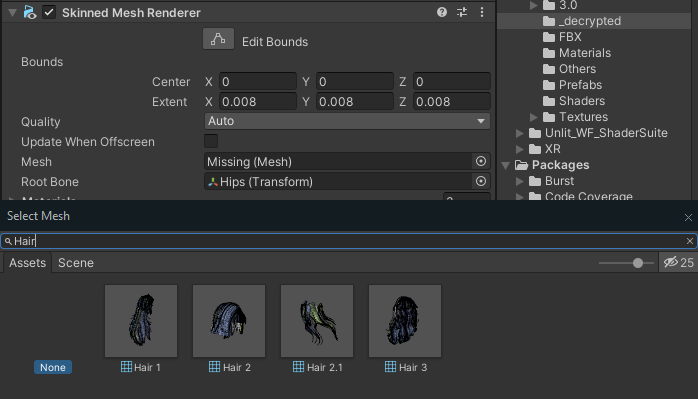
again, apologies for the issue; I had not tested this properly before uploading and I assure you this won't be an issue with future uploads

@taikeru you're fine thank you so so much!! <33
-
-
@PurpleElysia not at the moment sorry, will get back around to the quest versions within time
@taikeru okay no problem!
-
decompiled the GonsoLicense and decrypted all avatar files; this one includes the base FBX~
all necessary addons (excluding poiyomi) are included within the file.
original store link:
https://strawbunny.gumroad.com/l/mochivr
download link (workupload):
-
-
if anyone wants the files pm me or the op ^^
If any of my download links don't work PM me with the forum link! ❤︎₊ ⊹
Rizz'm with the Tism -
Don't mind me, I'll just bump this thread, so people can find it.

Planned obsolescence in technology and appliances, of 1–5 years, is a redundant strategy. We should only need to replace something when such a big improvement is genuinely useful and keeps us safe. Not everyone can afford to replace something.
If you want something to be treasured and remembered years later. Create it in a way that stands the test of time. Not riddled with something that makes it more fragile and broken.
Media & digital preservation is the thread that helps people in the future understand the past, where it can be appreciated as much as we did.
-
This post is deleted!
-
does anyone have issues with toggles and the animation on game
-
does anyone have issues with toggles and the animation on game
@6angelica6 read above, those might be the issues you're having;
if not, feel free to tag me with whatever issues you're facing and i'll try my best to help solve them~
-
-
@taikeru i got the toggles to work but i cant move. the avi cant move the head or body and go go loco dosent work
-
-
-
-
-
-
Omg thank you so much
-
Anyone have quest decrypted files or knows a good video for converting her
@6angelica6 did you fix the movement issue? if so, how did you? i bypassed another avatar that had gonso (not mochi) but when i move the character she's not only stuck in t pose, but also moves straight into the ground?
sadly i cant select the fbx and fix it that way because when i imported all the files the meshes just appeared as "OGMeshes"
also wondering if @taikeru can give some insight on how to fix this bc i have no clue...
-
-
@6angelica6 did you fix the movement issue? if so, how did you? i bypassed another avatar that had gonso (not mochi) but when i move the character she's not only stuck in t pose, but also moves straight into the ground?
sadly i cant select the fbx and fix it that way because when i imported all the files the meshes just appeared as "OGMeshes"
also wondering if @taikeru can give some insight on how to fix this bc i have no clue...
@blayzah post #16 - import GoGo from VCC and use that; this is likely the issue for most decrypted avatars as the GoGo included from the base package is also modified by the Licenser
this is stated in my guide as well, if you followed that
to my knowledge, hal's download (the latest backups provided) also have this issue fixed (if you're looking to download this model specifically)
as for the
OGMeshessituation, i'm not really aware of what to do about that as i'm assuming you're working with a newer released model (and the licenser has a new update nearly every time, annoyingly) - in that case if you'd like to you can pm me and i'll try to give as much insight as i can


 Download Link (workupload.com)










Hello! It looks like you're interested in this conversation, but you don't have an account yet.
Getting fed up of having to scroll through the same posts each visit? When you register for an account, you'll always come back to exactly where you were before, and choose to be notified of new replies (either via email, or push notification). You'll also be able to save bookmarks and upvote posts to show your appreciation to other community members.
With your input, this post could be even better 💗
Register Login