
Textures not applying to avatar upload
-
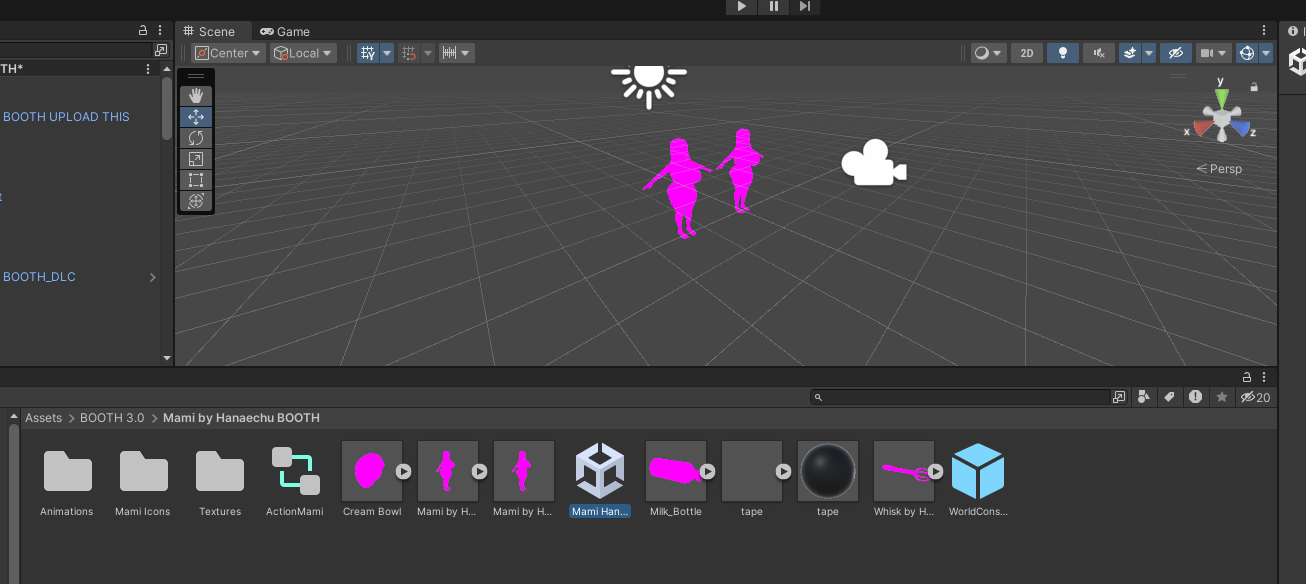
I'm trying to upload the file for Mami found in This Thread And after loading in the model scene, it doesn't seem to apply any of the textures but models all the clothes and proportions. I'm new to uploading so probably a basic skill issue but can this be fixed?
-
seems like is not a texture problem . but shaders. chek the materials click them and select the correct shader like Lil toons, Poiyomi, Mochies etc
-
seems like is not a texture problem . but shaders. chek the materials click them and select the correct shader like Lil toons, Poiyomi, Mochies etc
@Potato2022 Thanks I managed to fix it by applying standard shading to all materials. in the unity there's a poiyomi file that came with the model, is that separate from some sort of poiyomi shader I need to install or is there a way to make unity recognize it?
-
theres poiyomi toon thats free. or you can serch up for poiyomi pro here aswell. and use that alot of booth model also use Lil toon shader
-
System moved this topic from Looking for... on
Hello! It looks like you're interested in this conversation, but you don't have an account yet.
Getting fed up of having to scroll through the same posts each visit? When you register for an account, you'll always come back to exactly where you were before, and choose to be notified of new replies (either via email, or push notification). You'll also be able to save bookmarks and upvote posts to show your appreciation to other community members.
With your input, this post could be even better 💗
Register Login