
cvELD_ShellFit1.3.4「2本セットセール」
-
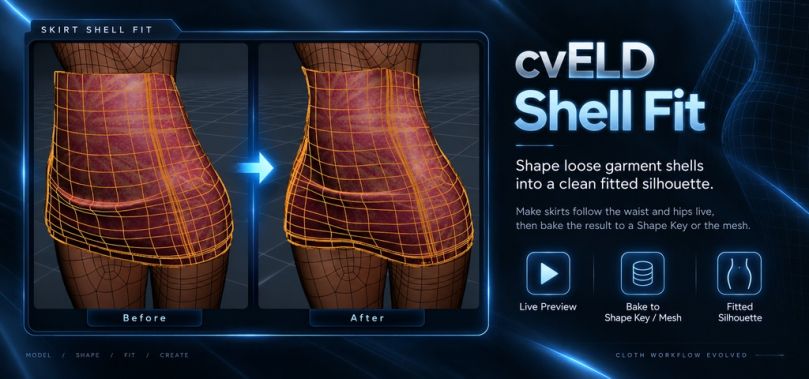
BL | <-- 1.3.4 ver
System Requirements
Blender 4.5.0–5.3.0 (5.2.1 recommended) Usage & Documentation
Please visit the link below for details on how to use each feature and for advanced settings.
https://cveld.net/tools/ShellFit/DOCUMENTATION.html Adjust clipping between the base body and clothing while viewing the results
cvELD Shell Fit is a Blender add-on designed to fix clipping issues between a base body and clothing.
It supports two workflows: tucking the body inside the clothing or conforming the clothing to the body's surface. You can make adjustments while viewing the results in real-time and bake the final shape into a shape key or mesh.
It streamlines the repetitive, tedious tasks involved in creating clothing for VRChat or fitting outfits.
 Two fitting methods to choose from
・Body Moves: Moves the body to tuck it inside the clothing.
・Cloth Moves: Moves the clothing to conform to the body's surface.
You can switch between these methods depending on whether you want to preserve the clothing's original shape or have it hug the body closely.
🧵 From thin fabric to thick parts
Three modes are available to suit different shapes:
・Shell: For thin fabrics.
・Solid: For thick shapes like rings or belts.
・Auto: Automatically selects the mode based on the shape.
The Solid mode includes options like "Rigid First" (prioritizing shape retention) and "Squeeze Bulge" (optimized for rings).
 ️ Adjust specific areas while viewing the results
You can tweak parameters while checking the live preview.
It supports partial fitting by allowing you to define the area of effect using vertex groups or weight painting.
It works with posed models and meshes using the Solidify modifier, and allows for further refinement using "Refine" or "Cover" passes.
 Save results as shape keys or meshes
You can bake the final shape to suit your specific needs.・Bake to Shape Key: Use this when you want to toggle between the original and adjusted shapes.
・Bake Directly to Mesh: Use this when you want to apply the adjusted shape directly to the mesh. Accelerated certain calculations
We replaced some Python-based processes with C code to improve speed, achieving performance gains of 8x to 150x in the affected operations.
*Results vary depending on the specific operation and conditions; this does not mean the entire add-on or every operation runs 8–150 times faster.
 v1.3.4: Improved bulge generation methods and automatic settings
In addition to the existing "based on contact area" method, we added "indenting by bringing an object close" as a standalone generation method.
・Improved automatic generation and setup of guides
・Improved deformation smoothness and stability when releasing guides
・Reduced unnecessary recalculations during idle states
・Data is now preserved, allowing a new preview to start even if "bulge attributes" remain without an active modifier
・Removed the "additional reference object" option; functionality is now consolidated into the standard reference field ️ Toggle visibility in the right-click menu
You can toggle QuickShellFit's visibility via Preferences > General > "Show in right-click menu."
Disabling this removes it from the right-click menu in Mesh/Curve Edit Mode. It is enabled by default; changes take effect the next time the menu is opened.
To retain this setting for future sessions, please execute "Save Preferences."

Hello! It looks like you're interested in this conversation, but you don't have an account yet.
Getting fed up of having to scroll through the same posts each visit? When you register for an account, you'll always come back to exactly where you were before, and choose to be notified of new replies (either via email, or push notification). You'll also be able to save bookmarks and upvote posts to show your appreciation to other community members.
With your input, this post could be even better 💗
Register Login