Skip to content
  • Categories
  • Recent
  • Tags
  • Popular
Skins
  • Light
  • Brite
  • Cerulean
  • Cosmo
  • Flatly
  • Journal
  • Litera
  • Lumen
  • Lux
  • Materia
  • Minty
  • Morph
  • Pulse
  • Sandstone
  • Simplex
  • Sketchy
  • Spacelab
  • United
  • Yeti
  • Zephyr
  • Dark
  • Cyborg
  • Darkly
  • Quartz
  • Slate
  • Solar
  • Superhero
  • Vapor

  • Default (Zephyr)
  • No Skin
Collapse
RipperStore Logo
  1. Home
  2. Assets
  3. Gifts / Downloads
  4. BONFIE EDIT (RELEASED!)

BONFIE EDIT (RELEASED!)

Scheduled Pinned Locked Moved Gifts / Downloads
fniabonfieeditcryptiacurvesfncfazclaires
233 Posts 85 Posters 14.3k Views 179 Watching
  • Oldest to Newest
  • Newest to Oldest
  • Most Votes
Reply
  • Reply as topic
Log in to reply
This topic has been deleted. Only users with topic management privileges can see it.
  • nihil.rarN nihil.rar

    @vMxSv do you need it uploaded fully or do you just need help? what are you having problems with

    vMxSvV
    vMxSvV
    vMxSv
    wrote last edited by vMxSv
    #214

    @nihil.rar yeah i cant upload the pc version idk only ur quest version works
    (the scen on the pc avi is broken)

    nihil.rarN 1 Reply Last reply
    0
    • vMxSvV vMxSv

      @nihil.rar yeah i cant upload the pc version idk only ur quest version works
      (the scen on the pc avi is broken)

      nihil.rarN
      nihil.rarN
      nihil.rar
      wrote last edited by
      #215

      @vMxSv that probably means you're missing the sps vcc package

      1 Reply Last reply
      0
      • nihil.rarN nihil.rar

        @angel27253 first issue is you're trying to open the blend file which won't work
        something in the fx controller is broken for you
        The scene is broken for you/you're opening the wrong scene
        you don't have gesture manager installed
        it's still saying you're missing vcc packages

        angel27253A
        angel27253A
        angel27253
        wrote last edited by
        #216

        @nihil.rar alright ill look into it thank you

        1 Reply Last reply
        😺
        1
        • nihil.rarN nihil.rar

          @angel27253 first issue is you're trying to open the blend file which won't work
          something in the fx controller is broken for you
          The scene is broken for you/you're opening the wrong scene
          you don't have gesture manager installed
          it's still saying you're missing vcc packages

          angel27253A
          angel27253A
          angel27253
          wrote last edited by
          #217

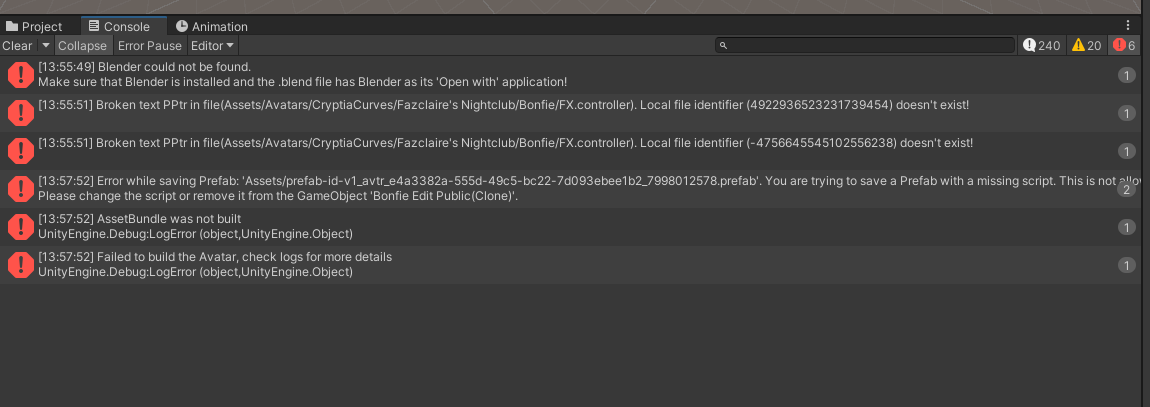
          @nihil.rar Im so sorry to be a bother, i remade the scene i redownloaded the file, and imported what u told me to and now it shows up with this Screenshot 2026-10-08 140332.png
          nihil.rarN 1 Reply Last reply
          1
          • vMxSvV
            vMxSvV
            vMxSv
            wrote last edited by
            #218

            thx guys

            1 Reply Last reply
            0
            • angel27253A angel27253

              @nihil.rar Im so sorry to be a bother, i remade the scene i redownloaded the file, and imported what u told me to and now it shows up with this Screenshot 2026-10-08 140332.png

              nihil.rarN
              nihil.rarN
              nihil.rar
              wrote last edited by nihil.rar
              #219

              @angel27253 still you're missing some kind of required package or asset which is causing those scripts to break or they are breaking some other way somehow (less likely), Unity should NOT be trying to open a .blend, I don't have blender installed and I worked with this avatar just fine, I would guess you're opening an incorrect scene (there are at least 2) which is trying to reference the blend file, which is not what you need, but those seem to be the only issues now

              nihil.rarN angel27253A 3 Replies Last reply
              0
              • nihil.rarN nihil.rar

                @angel27253 still you're missing some kind of required package or asset which is causing those scripts to break or they are breaking some other way somehow (less likely), Unity should NOT be trying to open a .blend, I don't have blender installed and I worked with this avatar just fine, I would guess you're opening an incorrect scene (there are at least 2) which is trying to reference the blend file, which is not what you need, but those seem to be the only issues now

                nihil.rarN
                nihil.rarN
                nihil.rar
                wrote last edited by
                #220

                and don't worry about being a bother. I posted that file here, i'm responsible for helping people with it

                1 Reply Last reply
                0
                • nihil.rarN nihil.rar

                  @angel27253 still you're missing some kind of required package or asset which is causing those scripts to break or they are breaking some other way somehow (less likely), Unity should NOT be trying to open a .blend, I don't have blender installed and I worked with this avatar just fine, I would guess you're opening an incorrect scene (there are at least 2) which is trying to reference the blend file, which is not what you need, but those seem to be the only issues now

                  nihil.rarN
                  nihil.rarN
                  nihil.rar
                  wrote last edited by
                  #221

                  actually I think i know the issue! I completely forgot to mention this in the original post
                  you NEED a package called d4rk's optimiser for the quest version. I'm so sorry for not mentioning this sooner

                  1 Reply Last reply
                  0
                  • nihil.rarN
                    nihil.rarN
                    nihil.rar
                    wrote last edited by
                    #222

                    at least i think you do. I think i remember using that

                    1 Reply Last reply
                    0
                    • nihil.rarN nihil.rar

                      @angel27253 still you're missing some kind of required package or asset which is causing those scripts to break or they are breaking some other way somehow (less likely), Unity should NOT be trying to open a .blend, I don't have blender installed and I worked with this avatar just fine, I would guess you're opening an incorrect scene (there are at least 2) which is trying to reference the blend file, which is not what you need, but those seem to be the only issues now

                      angel27253A
                      angel27253A
                      angel27253
                      wrote last edited by
                      #223

                      nihil.rar i did some messing around and it seems to have worked well enough, Thanks for the help though❤

                      nihil.rarN 1 Reply Last reply
                      1
                      • angel27253A angel27253

                        nihil.rar i did some messing around and it seems to have worked well enough, Thanks for the help though❤

                        nihil.rarN
                        nihil.rarN
                        nihil.rar
                        wrote last edited by
                        #224

                        @angel27253 of course! sorry for the inconvenience

                        1 Reply Last reply
                        0
                        • nihil.rarN
                          nihil.rarN
                          nihil.rar
                          wrote last edited by
                          #225

                          Everyone want an updated version w/ the pp? i can texture it properly too

                          Helixshade2H D 2 Replies Last reply
                          2
                          • nihil.rarN nihil.rar

                            Everyone want an updated version w/ the pp? i can texture it properly too

                            Helixshade2H
                            Helixshade2H
                            Helixshade2
                            wrote last edited by
                            #226

                            @nihil.rar that would be nice

                            1 Reply Last reply
                            0
                            • nihil.rarN nihil.rar

                              Everyone want an updated version w/ the pp? i can texture it properly too

                              D
                              D
                              DAEDRICswat
                              wrote last edited by
                              #227

                              @nihil.rar would love!

                              1 Reply Last reply
                              0
                              • nihil.rarN
                                nihil.rarN
                                nihil.rar
                                wrote last edited by
                                #228

                                I'll try and get it out today then! once I start it shouldn't take too long to finish. either way please be patient

                                1 Reply Last reply
                                0
                                • nihil.rarN
                                  nihil.rarN
                                  nihil.rar
                                  wrote last edited by
                                  #229

                                  should be out in the next 30 minutes. also fixed an issue with the materials on the pc version (sorry everyone) but the new version will very likely require a single extra step when uploading for quest

                                  1 Reply Last reply
                                  0
                                  • nihil.rarN
                                    nihil.rarN
                                    nihil.rar
                                    wrote last edited by
                                    #230

                                    [register or login to view this hidden content]
                                    Here it is! Same deal as before, horns aren't on quest, but ONE difference
                                    Upload the pc version as you normally would; don't worry about anything
                                    BUT, when you switch to QUEST, go to "All Models" near the top left of your bottom window (I use the default layout for unity), click on it, find the bonfie EDIT (not the normal bonfie) and the "cocks" model. select both at once (ctrl + click) or do them individually, scroll down until you find "normals". set it to "None" or if you want to add some cool material effects feel free to set it to "Calculate" (just shrinks the size of the avatar a small amount compared to "Import" but still allows for specular and rim lighting and such things), and THEN upload the quest version. This just gets rid of the normals for the models which shrinks the avatar's size drastically without changing much visually. if it really gets on your nerves, feel free to try and optimise it another way, you can always set the normals back to "Import" whenever you like

                                    nihil.rarN 1 Reply Last reply
                                    5
                                    • nihil.rarN nihil.rar

                                      [register or login to view this hidden content]
                                      Here it is! Same deal as before, horns aren't on quest, but ONE difference
                                      Upload the pc version as you normally would; don't worry about anything
                                      BUT, when you switch to QUEST, go to "All Models" near the top left of your bottom window (I use the default layout for unity), click on it, find the bonfie EDIT (not the normal bonfie) and the "cocks" model. select both at once (ctrl + click) or do them individually, scroll down until you find "normals". set it to "None" or if you want to add some cool material effects feel free to set it to "Calculate" (just shrinks the size of the avatar a small amount compared to "Import" but still allows for specular and rim lighting and such things), and THEN upload the quest version. This just gets rid of the normals for the models which shrinks the avatar's size drastically without changing much visually. if it really gets on your nerves, feel free to try and optimise it another way, you can always set the normals back to "Import" whenever you like

                                      nihil.rarN
                                      nihil.rarN
                                      nihil.rar
                                      wrote last edited by
                                      #231

                                      and if you're going to download this consider upvoting my posts. I saw about 40 people download my first file and i got a single upvote on that post. jesus guys 😭

                                      D 1 Reply Last reply
                                      0
                                      • nihil.rarN nihil.rar

                                        and if you're going to download this consider upvoting my posts. I saw about 40 people download my first file and i got a single upvote on that post. jesus guys 😭

                                        D
                                        D
                                        DAEDRICswat
                                        wrote last edited by
                                        #232

                                        @nihil.rar I have upvotted friend. I think it is important that we do to establish trust. Sorry for the others who did not.

                                        nihil.rarN 1 Reply Last reply
                                        1
                                        • D DAEDRICswat

                                          @nihil.rar I have upvotted friend. I think it is important that we do to establish trust. Sorry for the others who did not.

                                          nihil.rarN
                                          nihil.rarN
                                          nihil.rar
                                          wrote last edited by
                                          #233

                                          @DAEDRICswat it's okay!

                                          1 Reply Last reply
                                          1

                                          Hello! It looks like you're interested in this conversation, but you don't have an account yet.

                                          Getting fed up of having to scroll through the same posts each visit? When you register for an account, you'll always come back to exactly where you were before, and choose to be notified of new replies (either via email, or push notification). You'll also be able to save bookmarks and upvote posts to show your appreciation to other community members.

                                          With your input, this post could be even better 💗

                                          Register Login
                                          Reply
                                          • Reply as topic
                                          Log in to reply
                                          • Oldest to Newest
                                          • Newest to Oldest
                                          • Most Votes


                                          • Login

                                          • Login or register to search.
                                          • First post
                                            Last post
                                          0
                                          • Categories
                                          • Recent
                                          • Tags
                                          • Popular