Skip to content
  • Categories
  • Recent
  • Tags
  • Popular
Skins
  • Light
  • Brite
  • Cerulean
  • Cosmo
  • Flatly
  • Journal
  • Litera
  • Lumen
  • Lux
  • Materia
  • Minty
  • Morph
  • Pulse
  • Sandstone
  • Simplex
  • Sketchy
  • Spacelab
  • United
  • Yeti
  • Zephyr
  • Dark
  • Cyborg
  • Darkly
  • Quartz
  • Slate
  • Solar
  • Superhero
  • Vapor

  • Default (Zephyr)
  • No Skin
Collapse
RipperStore Logo
  1. Home
  2. Assets
  3. Looking for...
  4. Scripts & Tools
  5. アバターレンダーキュー確認道具-衣装無視眼鏡-

アバターレンダーキュー確認道具-衣装無視眼鏡-

Scheduled Pinned Locked Moved Unsolved Scripts & Tools
vrchatnsfw
8 Posts 6 Posters 304 Views 9 Watching
  • Oldest to Newest
  • Newest to Oldest
  • Most Votes
Reply
  • Reply as topic
Log in to reply
This topic has been deleted. Only users with topic management privileges can see it.
  • M
    M
    milkmiko
    wrote last edited by
    #1

    アバターレンダーキュー確認道具-衣装無視眼鏡-
    Please, I need it.
    link text
    https://booth.pm/en/items/8785019
    ภาพ_2026-09-20_190526629.png

    1 Reply Last reply
    1
    • K
      K
      KrillLaKrill
      wrote last edited by
      #2

      bump

      1 Reply Last reply
      0
      • ShelisS
        ShelisS
        Shelis
        wrote last edited by
        #3

        bump

        1 Reply Last reply
        0
        • ShelisS
          ShelisS
          Shelis
          wrote last edited by
          #4

          bump

          1 Reply Last reply
          0
          • S
            S
            sora1468
            wrote last edited by
            #5

            bump

            1 Reply Last reply
            0
            • DAMIANARO ITAD
              DAMIANARO ITAD
              DAMIANARO ITA
              wrote last edited by
              #6

              [register or login to view this hidden content]
              Guys, I don't remember where I got it, and I really don't think this is the exact one, but what it does is very similar. It doesn't work on everything—only on specific shaders; I don't know which ones, but it works a lot of the time.

              cepxakC ShelisS 2 Replies Last reply
              2
              • DAMIANARO ITAD DAMIANARO ITA

                [register or login to view this hidden content]
                Guys, I don't remember where I got it, and I really don't think this is the exact one, but what it does is very similar. It doesn't work on everything—only on specific shaders; I don't know which ones, but it works a lot of the time.

                cepxakC
                cepxakC
                cepxak
                wrote last edited by
                #7

                @DAMIANARO-ITA https://booth.pm/en/items/6338215

                1 Reply Last reply
                0
                • DAMIANARO ITAD DAMIANARO ITA

                  [register or login to view this hidden content]
                  Guys, I don't remember where I got it, and I really don't think this is the exact one, but what it does is very similar. It doesn't work on everything—only on specific shaders; I don't know which ones, but it works a lot of the time.

                  ShelisS
                  ShelisS
                  Shelis
                  wrote last edited by Shelis
                  #8

                  @DAMIANARO-ITA Thank for sharing >^.^<

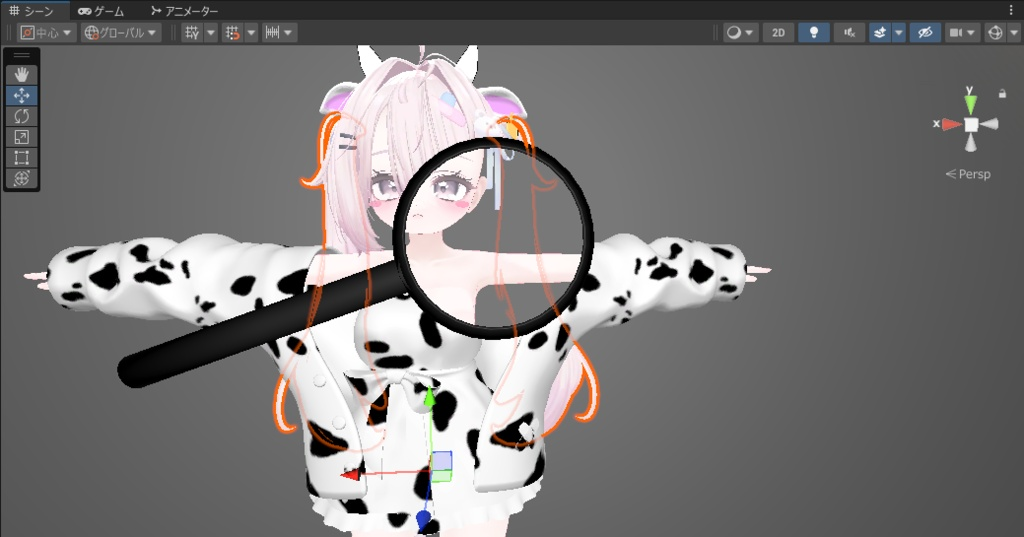
                  about this asset
                  You can easily improve this asset yourself by making it the same as the one shown on the booth page.
                  The whole point here is the x‑ray shader.

                  Here’s a short guide on how to do it.

                  In your project, find the x-ray material and make several copies.
                  alt text

                  After that, for each copy of the x-ray material, you need to set the Render Queue value.

                  • default 2460
                  • recommend add 2450,2001 and 2000
                    alt text

                  After you do this, you need to create new toggle for changing the material via VRCFuty;
                  looks something like this.
                  alt text

                  • After such improvements, x-ray will scan almost everything see‑through.

                  Exception: clothing where render queue is 2000
                  usually this value is also set on body textures, so the entire avatar will be transparent.
                  1 Reply Last reply
                  1

                  Hello! It looks like you're interested in this conversation, but you don't have an account yet.

                  Getting fed up of having to scroll through the same posts each visit? When you register for an account, you'll always come back to exactly where you were before, and choose to be notified of new replies (either via email, or push notification). You'll also be able to save bookmarks and upvote posts to show your appreciation to other community members.

                  With your input, this post could be even better 💗

                  Register Login
                  Reply
                  • Reply as topic
                  Log in to reply
                  • Oldest to Newest
                  • Newest to Oldest
                  • Most Votes


                  • Login

                  • Login or register to search.
                  • First post
                    Last post
                  0
                  • Categories
                  • Recent
                  • Tags
                  • Popular