
Naiko by NetPet
-
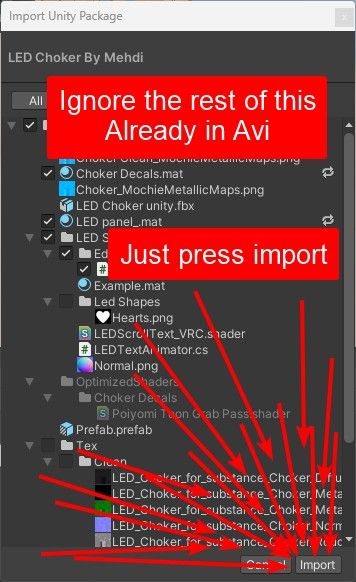
To change choker text please upload the unitypackage in this zip. Then follow the tutorial video included. Don't worry about replacing/removing anything there's just a couple missing scripts that add the editor.
You need to move Assets>LED Choker>LED Shader>LEDTextAnimator.cs into the "Editor" folder. The folder should be in the LED Shader folder legit just drag it in, it's not meant to ship with the "finished" avi so it bugs out if it's not in the Editor folder.
Just incase my instructions above weren't super clear to others:
@NotQrof sorry to bother do you know why the text seems to have no color? everytime i try messing around with it from the default the colors just poof..?
-
To change choker text please upload the unitypackage in this zip. Then follow the tutorial video included. Don't worry about replacing/removing anything there's just a couple missing scripts that add the editor.
You need to move Assets>LED Choker>LED Shader>LEDTextAnimator.cs into the "Editor" folder. The folder should be in the LED Shader folder legit just drag it in, it's not meant to ship with the "finished" avi so it bugs out if it's not in the Editor folder.
Just incase my instructions above weren't super clear to others:
-
@SteelDuck It's a baked shader, unsure rn unless you clone the choker/text display & have a toggle for them with different text on each.
-
-
-
@gebnbinah Last update was 5/31/2026 for the avi
-
Naiko looks great and I really want to use her but for some reason I can see what I believe to be the back of her neck while in Full Body, it's the most visible while in lock hip but it's still slightly visible in lock head, I pushed the viewpoint a bit more forward hoping that might help but to no avail
 also when I put my hand through the back of my head (NOT in front of my viewpoint) I can see my fingers poking through, but as I bring my hand closer in front of my view point my hand disappears about mid way through my head then when it's in font of my head I can see it again like normal. the problem doesn't happen with other people's avi's or world objects. I've had full body for years and never had this problem before, if anybody has an idea I'd love some help if possible!
-
Naiko looks great and I really want to use her but for some reason I can see what I believe to be the back of her neck while in Full Body, it's the most visible while in lock hip but it's still slightly visible in lock head, I pushed the viewpoint a bit more forward hoping that might help but to no avail
also when I put my hand through the back of my head (NOT in front of my viewpoint) I can see my fingers poking through, but as I bring my hand closer in front of my view point my hand disappears about mid way through my head then when it's in font of my head I can see it again like normal. the problem doesn't happen with other people's avi's or world objects. I've had full body for years and never had this problem before, if anybody has an idea I'd love some help if possible! Check bone mapping in Unity. Check out Naiko in Tpose and just compare skeleton to mesh. It's prob head/neck rig or weighting issue. If it's not that it my next thing to look at would probably be head chop.
I'd just sus out the neck->head transition then head chop before I mess with viewpoints. I hate blender so I'm never going to touch the weighting but you could idk.
-
Naiko looks great and I really want to use her but for some reason I can see what I believe to be the back of her neck while in Full Body, it's the most visible while in lock hip but it's still slightly visible in lock head, I pushed the viewpoint a bit more forward hoping that might help but to no avail
also when I put my hand through the back of my head (NOT in front of my viewpoint) I can see my fingers poking through, but as I bring my hand closer in front of my view point my hand disappears about mid way through my head then when it's in font of my head I can see it again like normal. the problem doesn't happen with other people's avi's or world objects. I've had full body for years and never had this problem before, if anybody has an idea I'd love some help if possible! -
-
I don't have fbt but after checking I think it's mainly head chop. If you just add a head chop component and add the neck you should be fine. If that doesn't fix it then goodluck because idk what else it would be.
-
@NotQrof it's working!!! thank you! I can actually use her in vr
 my hands are still sometimes visible but that's just slightly odd compared to hurting my eyes constantly
 Could very well be armature or IK config.
While wearing Naiko put your hands behind your head and look straight forward. Swap to another avatar without moving your hands as much as possible. See if it shows on other avis with the same pose.If it's truly only on Naiko I'd assume the armature or IK config but that would also depend on how many trackers you got.
-
-
@NotQrof without even hopping in vr I can guarantee to you that that'll happen, I've only got 3, a hip and 2 feet
I guess the next question would be what headset?
If it's a headset with inside out tracking (e.g Quest) then the problem is most likely a non-avatar problem. Most likely just the prediction/guessing of the headset when it's unable to track.
If you have a headset that uses lighthouses/base stations (e.g Index) then idk.
-
I guess the next question would be what headset?
If it's a headset with inside out tracking (e.g Quest) then the problem is most likely a non-avatar problem. Most likely just the prediction/guessing of the headset when it's unable to track.
If you have a headset that uses lighthouses/base stations (e.g Index) then idk.



Hello! It looks like you're interested in this conversation, but you don't have an account yet.
Getting fed up of having to scroll through the same posts each visit? When you register for an account, you'll always come back to exactly where you were before, and choose to be notified of new replies (either via email, or push notification). You'll also be able to save bookmarks and upvote posts to show your appreciation to other community members.
With your input, this post could be even better 💗
Register Login