Skip to content
  • Categories
  • Recent
  • Tags
  • Popular
Skins
  • Light
  • Brite
  • Cerulean
  • Cosmo
  • Flatly
  • Journal
  • Litera
  • Lumen
  • Lux
  • Materia
  • Minty
  • Morph
  • Pulse
  • Sandstone
  • Simplex
  • Sketchy
  • Spacelab
  • United
  • Yeti
  • Zephyr
  • Dark
  • Cyborg
  • Darkly
  • Quartz
  • Slate
  • Solar
  • Superhero
  • Vapor

  • Default (Zephyr)
  • No Skin
Collapse
RipperStore Logo
  1. Home
  2. Assets
  3. Looking for...
  4. Gumroad/Payhip Avatars
  5. [FOUND] TexGon3D Pomni model!!!!

[FOUND] TexGon3D Pomni model!!!!

Scheduled Pinned Locked Moved Unsolved Gumroad/Payhip Avatars
tadcdigitalcircustexgon3dpomniblender3dmodelrig
36 Posts 7 Posters 1.3k Views 4 Watching
  • Oldest to Newest
  • Newest to Oldest
  • Most Votes
Reply
  • Reply as topic
Log in to reply
This topic has been deleted. Only users with topic management privileges can see it.
  • MajjorNinja26M MajjorNinja26

    alt text

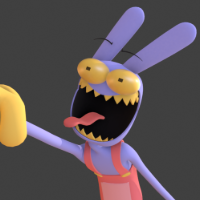
    I've already fixed several bugs in the rig regarding armature; everything is corrected just like in the video. I'm fixing the textures now; I just need to figure out a way to add some drivers.

    C
    C
    cynxedoes3d
    wrote on last edited by
    #24

    @MajjorNinja26 lowk still want the og though 😭

    1 Reply Last reply
    0
    • 3273982139g9e1g3
      3273982139g9e1g3
      3273982139g9e1g
      wrote on last edited by
      #25

      Anything?

      1 Reply Last reply
      0
      • C
        C
        cynxedoes3d
        wrote on last edited by
        #26

        yeah, anything.?

        1 Reply Last reply
        0
        • MajjorNinja26M
          MajjorNinja26M
          MajjorNinja26
          wrote on last edited by
          #27

          DONE!!! It worked! I can finally say the model is finished.

          • I made several corrections to the character's armature, regarding the rig, armature of the teeth, mouth, and eyes.

          • Corrected the eye textures.

          (I tried to keep it as close to the original as possible, I hope it turned out well.)

          • Corrected the model's mesh; now it's smoother with subdivision.

          • Recreated the drivers. I redid the texture drivers for the eyes and other parts. I hope it turned out well because (IT WAS FUKING OF WORK TO DO THIS! ;(

          Notes: Please update me when using the model if it's working correctly.

          If the model is heavy, activate Simplify to 0 or 1; this happens because the mesh is subdivided.

          Any questions or errors, comment below 🙂

          DL: [register or login to view this hidden content]

          C ImaKunI cainegoonerC 3 Replies Last reply
          1
          • MajjorNinja26M MajjorNinja26

            DONE!!! It worked! I can finally say the model is finished.

            • I made several corrections to the character's armature, regarding the rig, armature of the teeth, mouth, and eyes.

            • Corrected the eye textures.

            (I tried to keep it as close to the original as possible, I hope it turned out well.)

            • Corrected the model's mesh; now it's smoother with subdivision.

            • Recreated the drivers. I redid the texture drivers for the eyes and other parts. I hope it turned out well because (IT WAS FUKING OF WORK TO DO THIS! ;(

            Notes: Please update me when using the model if it's working correctly.

            If the model is heavy, activate Simplify to 0 or 1; this happens because the mesh is subdivided.

            Any questions or errors, comment below 🙂

            DL: [register or login to view this hidden content]

            C
            C
            cynxedoes3d
            wrote on last edited by
            #28

            @MajjorNinja26 nice! off topic, I'm not good at lighting. Do you know how I could make it more show accurate?

            1 Reply Last reply
            0
            • MajjorNinja26M MajjorNinja26

              DONE!!! It worked! I can finally say the model is finished.

              • I made several corrections to the character's armature, regarding the rig, armature of the teeth, mouth, and eyes.

              • Corrected the eye textures.

              (I tried to keep it as close to the original as possible, I hope it turned out well.)

              • Corrected the model's mesh; now it's smoother with subdivision.

              • Recreated the drivers. I redid the texture drivers for the eyes and other parts. I hope it turned out well because (IT WAS FUKING OF WORK TO DO THIS! ;(

              Notes: Please update me when using the model if it's working correctly.

              If the model is heavy, activate Simplify to 0 or 1; this happens because the mesh is subdivided.

              Any questions or errors, comment below 🙂

              DL: [register or login to view this hidden content]

              ImaKunI
              ImaKunI
              ImaKun
              wrote on last edited by
              #29

              @MajjorNinja26 The model looks awesome with all these corrections!!!

              1 Reply Last reply
              0
              • ImaKunI
                ImaKunI
                ImaKun
                wrote on last edited by ImaKun
                #30

                4d1a279a-f809-45d8-954d-1570fee64718-image.jpeg
                Found a small bug when changing the size of the left compulsive pupil.

                d4027285-ee06-49f3-a81f-d16c4bd1d980-image.jpeg
                If you encounter the same bug, go to left eye material settings and set "pomni eye animation" to "Extend" instead of "Repeat", just as it did on right eye.

                UPD: I also noticed that instead of "Closest" in this node is indicated as "Linear". I don’t know if this is a mistake or if it’s needed for animation.

                MajjorNinja26M 1 Reply Last reply
                0
                • ImaKunI ImaKun

                  4d1a279a-f809-45d8-954d-1570fee64718-image.jpeg
                  Found a small bug when changing the size of the left compulsive pupil.

                  d4027285-ee06-49f3-a81f-d16c4bd1d980-image.jpeg
                  If you encounter the same bug, go to left eye material settings and set "pomni eye animation" to "Extend" instead of "Repeat", just as it did on right eye.

                  UPD: I also noticed that instead of "Closest" in this node is indicated as "Linear". I don’t know if this is a mistake or if it’s needed for animation.

                  MajjorNinja26M
                  MajjorNinja26M
                  MajjorNinja26
                  wrote on last edited by
                  #31

                  @ImaKun Oh danm, I can't believe I missed that one, lol. This happens because the texture is in "Repeat" mode, where when you shrink the texture it repeats its center. To fix it, go to Image Texture and change "Repeat" to "Extend".

                  Regarding the format, I set it to "Linear" because when you enlarge and shrink the texture, it kind of smooths it out and "hides" the pixels that are too noticeable. And yes, I only did this with this specific texture because of the animation. But if you want to change it for all textures, feel free.

                  1 Reply Last reply
                  1
                  • MajjorNinja26M MajjorNinja26

                    DONE!!! It worked! I can finally say the model is finished.

                    • I made several corrections to the character's armature, regarding the rig, armature of the teeth, mouth, and eyes.

                    • Corrected the eye textures.

                    (I tried to keep it as close to the original as possible, I hope it turned out well.)

                    • Corrected the model's mesh; now it's smoother with subdivision.

                    • Recreated the drivers. I redid the texture drivers for the eyes and other parts. I hope it turned out well because (IT WAS FUKING OF WORK TO DO THIS! ;(

                    Notes: Please update me when using the model if it's working correctly.

                    If the model is heavy, activate Simplify to 0 or 1; this happens because the mesh is subdivided.

                    Any questions or errors, comment below 🙂

                    DL: [register or login to view this hidden content]

                    cainegoonerC
                    cainegoonerC
                    cainegooner
                    wrote on last edited by
                    #32

                    @MajjorNinja26 OH MY GOD!!!!! BRO THE PERSON I ASKED TO FIX IT BLOCKED ME SO I JUST PRAYED THAT SOMEBODY HERE COULD DO IT CUZ IM ASS AT STUFF LIKE THAT XD

                    you´re goated nontheless twin

                    1 Reply Last reply
                    0
                    • 3273982139g9e1g3
                      3273982139g9e1g3
                      3273982139g9e1g
                      wrote on last edited by
                      #33

                      Is the spiral eyes supposed to clip into the white eye when moving the eye controls

                      1 Reply Last reply
                      0
                      • luteL
                        luteL
                        lute
                        wrote on last edited by
                        #34

                        was it ever converted to vrc?

                        1 Reply Last reply
                        0
                        • luteL
                          luteL
                          lute
                          wrote on last edited by
                          #35

                          or unity for that matter

                          1 Reply Last reply
                          0
                          • ImaKunI
                            ImaKunI
                            ImaKun
                            wrote on last edited by
                            #36

                            Why was the post deleted?

                            1 Reply Last reply
                            0

                            Hello! It looks like you're interested in this conversation, but you don't have an account yet.

                            Getting fed up of having to scroll through the same posts each visit? When you register for an account, you'll always come back to exactly where you were before, and choose to be notified of new replies (either via email, or push notification). You'll also be able to save bookmarks and upvote posts to show your appreciation to other community members.

                            With your input, this post could be even better 💗

                            Register Login
                            Reply
                            • Reply as topic
                            Log in to reply
                            • Oldest to Newest
                            • Newest to Oldest
                            • Most Votes


                            • Login

                            • Login or register to search.
                            • First post
                              Last post
                            0
                            • Categories
                            • Recent
                            • Tags
                            • Popular