Skip to content
  • Categories
  • Recent
  • Tags
  • Popular
Skins
  • Light
  • Brite
  • Cerulean
  • Cosmo
  • Flatly
  • Journal
  • Litera
  • Lumen
  • Lux
  • Materia
  • Minty
  • Morph
  • Pulse
  • Sandstone
  • Simplex
  • Sketchy
  • Spacelab
  • United
  • Yeti
  • Zephyr
  • Dark
  • Cyborg
  • Darkly
  • Quartz
  • Slate
  • Solar
  • Superhero
  • Vapor

  • Default (Zephyr)
  • No Skin
Collapse
RipperStore Logo
  1. Home
  2. Assets
  3. Gifts / Downloads
  4. GIFT:【愛莉 - AIRI】 ドリーミー・おまんこ / Dreamy Omanko 【R18】

GIFT:【愛莉 - AIRI】 ドリーミー・おまんこ / Dreamy Omanko 【R18】

Scheduled Pinned Locked Moved Gifts / Downloads
giftpussyairinsfwerp
50 Posts 27 Posters 6.8k Views 17 Watching
  • Oldest to Newest
  • Newest to Oldest
  • Most Votes
Reply
  • Reply as topic
Log in to reply
This topic has been deleted. Only users with topic management privileges can see it.
  • C chokobunny

    good to know. it still wont work for me. I usually struggle with annonfiles a lot.

    ReaZeroR
    ReaZeroR
    ReaZero
    wrote on last edited by
    #23

    @chokobunny what browser are you using? cus when i lick it it i get a ''This site can’t provide a secure connection''

    1 Reply Last reply
    0
    • ReaZeroR
      ReaZeroR
      ReaZero
      wrote on last edited by
      #24

      here a better and working link
      [register or login to view this hidden content]

      MisellM 1 Reply Last reply
      1
      • I
        I
        IanMoone
        wrote on last edited by
        #25

        Bump for Lumina version. Please

        1 Reply Last reply
        0
        • ReaZeroR ReaZero

          here a better and working link
          [register or login to view this hidden content]

          MisellM
          MisellM
          Misell
          wrote on last edited by
          #26

          @ReaZero the reason i was using anonfile to avoid dmca, this assets creator quite active doing dmca n bumping for assets. I didn't choose anonfile bcoz it was good file host, but bcoz it's ignore dmca request.

          nya~

          1 Reply Last reply
          1
          • K
            K
            Koruja
            wrote on last edited by Koruja
            #27

            thx for updating link, anonfile worked just fine

            MisellM 1 Reply Last reply
            0
            • K Koruja

              thx for updating link, anonfile worked just fine

              MisellM
              MisellM
              Misell
              wrote on last edited by
              #28

              @Koruja i didn't even updating it again since 18 days ago, since it always been work fine, it just need extra step for some browser since well, anti-dmca file host is pretty suspicious ❤

              nya~

              ReaZeroR 1 Reply Last reply
              0
              • MisellM Misell

                @Koruja i didn't even updating it again since 18 days ago, since it always been work fine, it just need extra step for some browser since well, anti-dmca file host is pretty suspicious ❤

                ReaZeroR
                ReaZeroR
                ReaZero
                wrote on last edited by
                #29

                @Misell oh im sorry

                MisellM 1 Reply Last reply
                0
                • ReaZeroR ReaZero

                  @Misell oh im sorry

                  MisellM
                  MisellM
                  Misell
                  wrote on last edited by
                  #30

                  @ReaZero it's fine, if u want to keep updating the link u can do it x.x
                  i'm pretty lazy~

                  nya~

                  1 Reply Last reply
                  0
                  • thatcatoverthereT
                    thatcatoverthereT
                    thatcatoverthere
                    wrote on last edited by
                    #31

                    links down

                    MisellM 1 Reply Last reply
                    0
                    • thatcatoverthereT thatcatoverthere

                      links down

                      MisellM
                      MisellM
                      Misell
                      wrote on last edited by
                      #32

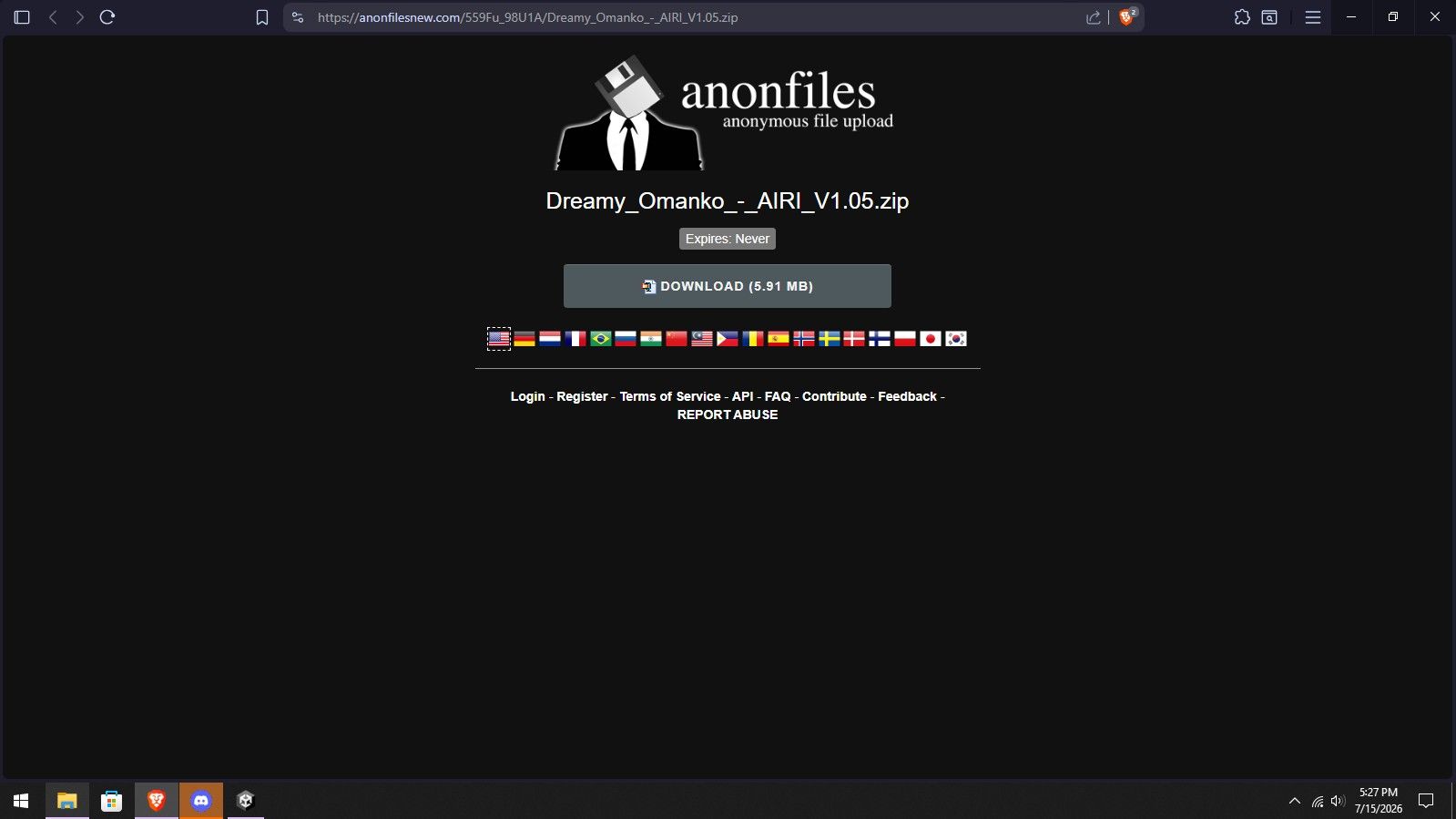
                      @thatcatoverthere as per 7/15/2026, it's still there
                      5160fc46-bbce-485d-8019-f723c1ae1c32-image.jpeg

                      nya~

                      Samus301S 2 Replies Last reply
                      0
                      • RoxasLoverR
                        RoxasLoverR
                        RoxasLover
                        wrote on last edited by
                        #33
                        This post is deleted!
                        1 Reply Last reply
                        0
                        • MisellM Misell

                          @thatcatoverthere as per 7/15/2026, it's still there
                          5160fc46-bbce-485d-8019-f723c1ae1c32-image.jpeg

                          Samus301S
                          Samus301S
                          Samus301
                          wrote on last edited by
                          #34
                          This post is deleted!
                          1 Reply Last reply
                          0
                          • MisellM Misell

                            @thatcatoverthere as per 7/15/2026, it's still there
                            5160fc46-bbce-485d-8019-f723c1ae1c32-image.jpeg

                            Samus301S
                            Samus301S
                            Samus301
                            wrote on last edited by
                            #35

                            @Misell Any chance you could upload/update the file, the tutorial link was updated a week ago so you cant access them anymore

                            1 Reply Last reply
                            0
                            • MisellM
                              MisellM
                              Misell
                              wrote on last edited by
                              #36

                              How to install for LilToon:

                              Video [do_for_milltina_v1.02_how_to_install_v1_1440p.mp4]

                              How to install for Poiyomi:

                              ⚠️KUMALY / AIRI have Poiyomi variant, you can skip step with translation materials to Poiyomi!⚠️ (I don't have the update for Kumaly tho..)
                              anonfiles.com (Airi)

                              Video [do_for_milltina_v1.02_how_to_install_poiyomi_version_v1 1440p.mp4]

                              How to use extra PhysBones disabler for VRCFury/Modular Avatar/Manual:

                              If you want to disable PhysBones in outfits, simply set the parameter “DreamyOmanko_PB_OFF” to "1", or add the “Toggle me ON to disable Omanko PB” GameObject to your outfit and use it as a GameObject toggle set to ON.
                              When this object is enabled, it will automatically disable the PhysBones.

                              UV diagram for custom content creators:

                              UV0 - Tangent space/Normal map - Reserved only for seamless skin facture, normal map tangent calculations.
                              UV1 - Main texture - Use it for your custom textures, made to be 100% accurate with original textures.
                              UV2 - Tiling/Discard - Hide part of mesh vertexes (Fully usable for Poiyomi skin blending).
                              UV3 - Blending - Reserved for Poiyomi to skip part of hand painting for custom textures (combined to work together with UV1, UV2).

                              ⚠️ONLY FOR VERSION 1.04 OR ABOVE ⚠️

                              FOR CUSTOM TEXTURES, YOU CAN REPLACE ZOOMED OMANKO BODY TEXTURE WITH YOUR OWN, REMEMBER TO SET TILING FROM 10x10 (ONLY VERSION 1.04) TO 1x1 AND FOR OFFSET NUMBERS (DEPENDING ON AVATAR) TO 0x0!!!!!! AND ALYWAYS USE UV1 (FOR LILTOON SLOT "MAIN TEXTURE" IS ALWAYS UV0, INSTEAD OF IT USE MAIN TEXTURE ND 1 OR MAIN TEXTURE ND2 AND SET IT TO UV1!!!).

                              Troubleshooting

                              • I don’t have the SPS option in the radial menu. (v1.00 - 1.05)

                              Check if the DreamyOmanko_SPS gameobject or DreamyOmanko_SPS_Big (older versions) has a Missing Script component on it.

                              You most likely updated VRCFury through VRChat Creator Companion (VCC) while the Unity project was still open then clicked on the Unity window during the import process which caused library cache data corruption.

                              • How to fix it:
                              1. Close the project and don’t panic, everything will be fine!
                              2. Open your project folder in File Explorer. You should see folders such as Assets, Packages, Logs, Library.
                              3. Delete the entire Library folder (it may be quite large).=
                              4. Launch your project again in Unity and wait for it to rebuild the Library (this may take a while depending on how many things you had in the project).
                              5. You should see an empty scene in Unity. Just click on your scene file with your avatar in the Unity Explorer/Project window.
                              6. After that, everything should be okay again, and the missing script should disappear and be replaced with SPS Socket (VRCFury) plus you just gained a few GB of free space 😉
                              • Inside of Omanko its not visible/empty/transparent in editor mode (v1.00 - 1.04)

                              That’s because my asset is built using hidden mesh sections to prevent visibility for other players when it’s turned off.

                              • How to make it visible in the editor:
                              1. Click on DreamyOmanko in the hierarchy.
                              2. In the Inspector window, find the internal material (DreamyOmanko (INSIDE) or just DreamyOmanko).
                              3. Expand the UV Tile Discard section in Liltoon material. You should see the 0x1 tile selected on a 4x4 grid, uncheck that tile.
                              4. The inside should now become visible in Edit Mode. (Remember to enable it again before uploading.)

                              @Samus301

                              nya~

                              Samus301S 1 Reply Last reply
                              5
                              • Thisfufu69T
                                Thisfufu69T
                                Thisfufu69
                                wrote on last edited by
                                #37

                                Only for Airi?

                                MisellM 1 Reply Last reply
                                0
                                • MisellM Misell

                                  How to install for LilToon:

                                  Video [do_for_milltina_v1.02_how_to_install_v1_1440p.mp4]

                                  How to install for Poiyomi:

                                  ⚠️KUMALY / AIRI have Poiyomi variant, you can skip step with translation materials to Poiyomi!⚠️ (I don't have the update for Kumaly tho..)
                                  anonfiles.com (Airi)

                                  Video [do_for_milltina_v1.02_how_to_install_poiyomi_version_v1 1440p.mp4]

                                  How to use extra PhysBones disabler for VRCFury/Modular Avatar/Manual:

                                  If you want to disable PhysBones in outfits, simply set the parameter “DreamyOmanko_PB_OFF” to "1", or add the “Toggle me ON to disable Omanko PB” GameObject to your outfit and use it as a GameObject toggle set to ON.
                                  When this object is enabled, it will automatically disable the PhysBones.

                                  UV diagram for custom content creators:

                                  UV0 - Tangent space/Normal map - Reserved only for seamless skin facture, normal map tangent calculations.
                                  UV1 - Main texture - Use it for your custom textures, made to be 100% accurate with original textures.
                                  UV2 - Tiling/Discard - Hide part of mesh vertexes (Fully usable for Poiyomi skin blending).
                                  UV3 - Blending - Reserved for Poiyomi to skip part of hand painting for custom textures (combined to work together with UV1, UV2).

                                  ⚠️ONLY FOR VERSION 1.04 OR ABOVE ⚠️

                                  FOR CUSTOM TEXTURES, YOU CAN REPLACE ZOOMED OMANKO BODY TEXTURE WITH YOUR OWN, REMEMBER TO SET TILING FROM 10x10 (ONLY VERSION 1.04) TO 1x1 AND FOR OFFSET NUMBERS (DEPENDING ON AVATAR) TO 0x0!!!!!! AND ALYWAYS USE UV1 (FOR LILTOON SLOT "MAIN TEXTURE" IS ALWAYS UV0, INSTEAD OF IT USE MAIN TEXTURE ND 1 OR MAIN TEXTURE ND2 AND SET IT TO UV1!!!).

                                  Troubleshooting

                                  • I don’t have the SPS option in the radial menu. (v1.00 - 1.05)

                                  Check if the DreamyOmanko_SPS gameobject or DreamyOmanko_SPS_Big (older versions) has a Missing Script component on it.

                                  You most likely updated VRCFury through VRChat Creator Companion (VCC) while the Unity project was still open then clicked on the Unity window during the import process which caused library cache data corruption.

                                  • How to fix it:
                                  1. Close the project and don’t panic, everything will be fine!
                                  2. Open your project folder in File Explorer. You should see folders such as Assets, Packages, Logs, Library.
                                  3. Delete the entire Library folder (it may be quite large).=
                                  4. Launch your project again in Unity and wait for it to rebuild the Library (this may take a while depending on how many things you had in the project).
                                  5. You should see an empty scene in Unity. Just click on your scene file with your avatar in the Unity Explorer/Project window.
                                  6. After that, everything should be okay again, and the missing script should disappear and be replaced with SPS Socket (VRCFury) plus you just gained a few GB of free space 😉
                                  • Inside of Omanko its not visible/empty/transparent in editor mode (v1.00 - 1.04)

                                  That’s because my asset is built using hidden mesh sections to prevent visibility for other players when it’s turned off.

                                  • How to make it visible in the editor:
                                  1. Click on DreamyOmanko in the hierarchy.
                                  2. In the Inspector window, find the internal material (DreamyOmanko (INSIDE) or just DreamyOmanko).
                                  3. Expand the UV Tile Discard section in Liltoon material. You should see the 0x1 tile selected on a 4x4 grid, uncheck that tile.
                                  4. The inside should now become visible in Edit Mode. (Remember to enable it again before uploading.)

                                  @Samus301

                                  Samus301S
                                  Samus301S
                                  Samus301
                                  wrote on last edited by
                                  #38

                                  @Misell Appreciate it

                                  1 Reply Last reply
                                  💝
                                  0
                                  • Thisfufu69T Thisfufu69

                                    Only for Airi?

                                    MisellM
                                    MisellM
                                    Misell
                                    wrote on last edited by
                                    #39

                                    @Thisfufu69 the tutorial ? it work for anyone, altho i can't updating Kumaly :<

                                    nya~

                                    1 Reply Last reply
                                    0
                                    • space_uwuS
                                      space_uwuS
                                      space_uwu
                                      wrote on last edited by
                                      #40

                                      reupload Kumaly??

                                      MisellM 1 Reply Last reply
                                      0
                                      • nanochiiN
                                        nanochiiN
                                        nanochii
                                        wrote on last edited by
                                        #41

                                        is there a tutorial on how to connect it the existing SPS system

                                        MisellM 1 Reply Last reply
                                        0
                                        • Casper_TheAlienC
                                          Casper_TheAlienC
                                          Casper_TheAlien
                                          wrote last edited by
                                          #42

                                          can i get a working link pls?

                                          MisellM 1 Reply Last reply
                                          0

                                          Hello! It looks like you're interested in this conversation, but you don't have an account yet.

                                          Getting fed up of having to scroll through the same posts each visit? When you register for an account, you'll always come back to exactly where you were before, and choose to be notified of new replies (either via email, or push notification). You'll also be able to save bookmarks and upvote posts to show your appreciation to other community members.

                                          With your input, this post could be even better 💗

                                          Register Login
                                          Reply
                                          • Reply as topic
                                          Log in to reply
                                          • Oldest to Newest
                                          • Newest to Oldest
                                          • Most Votes


                                          • Login

                                          • Login or register to search.
                                          • First post
                                            Last post
                                          0
                                          • Categories
                                          • Recent
                                          • Tags
                                          • Popular