Skip to content
  • Categories
  • Recent
  • Tags
  • Popular
Skins
  • Light
  • Brite
  • Cerulean
  • Cosmo
  • Flatly
  • Journal
  • Litera
  • Lumen
  • Lux
  • Materia
  • Minty
  • Morph
  • Pulse
  • Sandstone
  • Simplex
  • Sketchy
  • Spacelab
  • United
  • Yeti
  • Zephyr
  • Dark
  • Cyborg
  • Darkly
  • Quartz
  • Slate
  • Solar
  • Superhero
  • Vapor

  • Default (Zephyr)
  • No Skin
Collapse
RipperStore Logo
  1. Home
  2. Assets
  3. Looking for...
  4. Furry Avatars
  5. Looking for Yukizard model (Evov1/Valorlynz) !!!

Looking for Yukizard model (Evov1/Valorlynz) !!!

Scheduled Pinned Locked Moved Unsolved Furry Avatars
yukiblendfurrynsfmpokemon
76 Posts 28 Posters 6.5k Views 85 Watching
  • Oldest to Newest
  • Newest to Oldest
  • Most Votes
Reply
  • Reply as topic
Log in to reply
This topic has been deleted. Only users with topic management privileges can see it.
  • M
    M
    MIKEUNIX94
    wrote on last edited by
    #35

    Bump

    1 Reply Last reply
    0
    • Hoxton21H
      Hoxton21H
      Hoxton21
      wrote on last edited by
      #36

      bump

      Hellhound, Master of bumping threads

      Don't mind me, just here to bump :3

      1 Reply Last reply
      0
      • H
        H
        Hffgfdd
        wrote on last edited by
        #37

        Who's the author of this post: https://forum.ripper.store/topic/44942/yukizard-evov1-valorlynz ? I think it's logical to ask him about the model.

        LunaFloraL 1 Reply Last reply
        0
        • H Hffgfdd

          Who's the author of this post: https://forum.ripper.store/topic/44942/yukizard-evov1-valorlynz ? I think it's logical to ask him about the model.

          LunaFloraL
          LunaFloraL
          LunaFlora
          wrote on last edited by
          #38

          @Hffgfdd It says access denied, so idk

          1 Reply Last reply
          0
          • F FreedomFighter

            Без имени-3.png

            Sorry guys my post have fallen because of this guy(

            H
            H
            Hffgfdd
            wrote on last edited by
            #39

            @FreedomFighter is this your post: https://forum.ripper.store/topic/44942/yukizard-evov1-valorlynz ?

            1 Reply Last reply
            0
            • H Hffgfdd

              so here it is: https://www.patreon.com/EchobunnyMV/posts/yukizard-hmv-127327194.
              or is the link not working and this is not it?

              RIGI1R
              RIGI1R
              RIGI1
              wrote on last edited by
              #40

              @Hffgfdd guys I check it this is not model is a video this is link: https://pawchive.pw/patreon/user/142227625/post/118280112

              1 Reply Last reply
              0
              • D
                D
                DarkHorse95
                wrote on last edited by
                #41

                Render Compile 1.png

                [register or login to view this hidden content]

                After many hours of work, I finally present to you my Zard edit. Sorry that it took so long.
                Keep in mind that this model is still Blender only. 4.5.5 LTS is recommend.
                It is also recommended to open the file instead of appending it in.
                Textures are packaged within the file, but I can upload them separately if needed.

                If you have any questions regarding the model, I will try my best to answer them.
                A backup file is also available, so please DM me if there is any trouble with this link.

                M S Z D 4 Replies Last reply
                👑
                6
                • Toy chicaT
                  Toy chicaT
                  Toy chica
                  wrote on last edited by
                  #42

                  Your fine

                  Looking for a person that knows rigging blender to unity only dont want vrca or ripped models i dont care for ripped avatars because im not a ripper

                  1 Reply Last reply
                  1
                  • Toy chicaT
                    Toy chicaT
                    Toy chica
                    wrote on last edited by
                    #43

                    Bump for unity package

                    Looking for a person that knows rigging blender to unity only dont want vrca or ripped models i dont care for ripped avatars because im not a ripper

                    1 Reply Last reply
                    1
                    • D DarkHorse95

                      Render Compile 1.png

                      [register or login to view this hidden content]

                      After many hours of work, I finally present to you my Zard edit. Sorry that it took so long.
                      Keep in mind that this model is still Blender only. 4.5.5 LTS is recommend.
                      It is also recommended to open the file instead of appending it in.
                      Textures are packaged within the file, but I can upload them separately if needed.

                      If you have any questions regarding the model, I will try my best to answer them.
                      A backup file is also available, so please DM me if there is any trouble with this link.

                      M
                      M
                      MIKEUNIX94
                      wrote on last edited by
                      #44

                      @DarkHorse95 does she have the t-pose in the blender file.

                      D 1 Reply Last reply
                      0
                      • M MIKEUNIX94

                        @DarkHorse95 does she have the t-pose in the blender file.

                        D
                        D
                        DarkHorse95
                        wrote on last edited by DarkHorse95
                        #45

                        @MIKEUNIX94
                        She does, yes. All you have to do is reset/clear all bone Location & Rotation.

                        S 1 Reply Last reply
                        3
                        • M
                          M
                          MIKEUNIX94
                          wrote on last edited by
                          #46

                          Okay thanks 😉👌

                          1 Reply Last reply
                          0
                          • D DarkHorse95

                            @MIKEUNIX94
                            She does, yes. All you have to do is reset/clear all bone Location & Rotation.

                            S
                            S
                            snow500
                            wrote on last edited by
                            #47
                            This post is deleted!
                            1 Reply Last reply
                            0
                            • Jaio_9871J
                              Jaio_9871J
                              Jaio_9871
                              wrote on last edited by
                              #48

                              bump

                              1 Reply Last reply
                              0
                              • D DarkHorse95

                                Render Compile 1.png

                                [register or login to view this hidden content]

                                After many hours of work, I finally present to you my Zard edit. Sorry that it took so long.
                                Keep in mind that this model is still Blender only. 4.5.5 LTS is recommend.
                                It is also recommended to open the file instead of appending it in.
                                Textures are packaged within the file, but I can upload them separately if needed.

                                If you have any questions regarding the model, I will try my best to answer them.
                                A backup file is also available, so please DM me if there is any trouble with this link.

                                S
                                S
                                snow500
                                wrote on last edited by
                                #49

                                @DarkHorse95 Have a question, how can I change the clothes? I'm selecting each bone to see a parameter that I could change for another clothing and even tried hiding and unhide the clothe I wanted and doesn't work
                                D 1 Reply Last reply
                                2
                                • S snow500

                                  @DarkHorse95 Have a question, how can I change the clothes? I'm selecting each bone to see a parameter that I could change for another clothing and even tried hiding and unhide the clothe I wanted and doesn't work

                                  D
                                  D
                                  DarkHorse95
                                  wrote on last edited by DarkHorse95
                                  #50

                                  @snow500

                                  Untitled 2.png

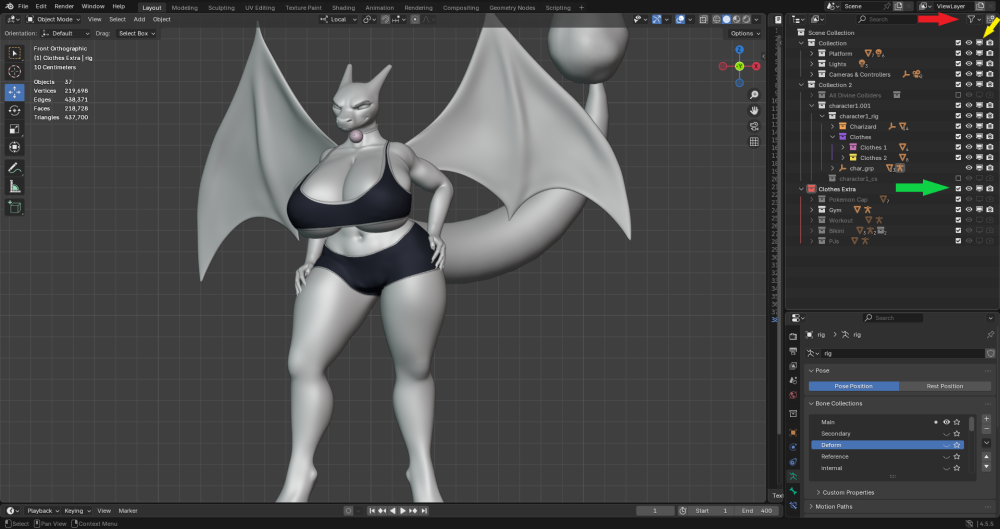
                                  For changing or hiding the clothes, be sure that either Disable In Viewport (yellow) and/or Exclude From View Layer (green) are checked in the Toggle Restrictions drop down filter (red).

                                  To hide the clothes, ensure that either icon is turned off/greyed out.
                                  Or select the desired clothing item & hit H. (Eye Icon)
                                  Important Note: This will not disable the auto activated Body Shapekeys for said clothing. Use Disable In Viewport.

                                  Some items may require using Shift + Click on Hide In Viewport/Disable In Viewport.

                                  W 1 Reply Last reply
                                  6
                                  • D DarkHorse95

                                    @snow500

                                    Untitled 2.png

                                    For changing or hiding the clothes, be sure that either Disable In Viewport (yellow) and/or Exclude From View Layer (green) are checked in the Toggle Restrictions drop down filter (red).

                                    To hide the clothes, ensure that either icon is turned off/greyed out.
                                    Or select the desired clothing item & hit H. (Eye Icon)
                                    Important Note: This will not disable the auto activated Body Shapekeys for said clothing. Use Disable In Viewport.

                                    Some items may require using Shift + Click on Hide In Viewport/Disable In Viewport.

                                    W
                                    W
                                    Winds2907
                                    wrote on last edited by
                                    #51

                                    @DarkHorse95 hey is it ok if I can make a edit that just includes shiny textures and post it here?

                                    1 Reply Last reply
                                    0
                                    • LunaFloraL
                                      LunaFloraL
                                      LunaFlora
                                      wrote on last edited by
                                      #52

                                      dont see why not, as long as u credit them

                                      1 Reply Last reply
                                      0
                                      • Toy chicaT
                                        Toy chicaT
                                        Toy chica
                                        wrote on last edited by
                                        #53

                                        Now we whait for the unity port

                                        Looking for a person that knows rigging blender to unity only dont want vrca or ripped models i dont care for ripped avatars because im not a ripper

                                        1 Reply Last reply
                                        0
                                        • D DarkHorse95

                                          Render Compile 1.png

                                          [register or login to view this hidden content]

                                          After many hours of work, I finally present to you my Zard edit. Sorry that it took so long.
                                          Keep in mind that this model is still Blender only. 4.5.5 LTS is recommend.
                                          It is also recommended to open the file instead of appending it in.
                                          Textures are packaged within the file, but I can upload them separately if needed.

                                          If you have any questions regarding the model, I will try my best to answer them.
                                          A backup file is also available, so please DM me if there is any trouble with this link.

                                          Z
                                          Z
                                          Zackary42
                                          wrote on last edited by
                                          #54
                                          This post is deleted!
                                          1 Reply Last reply
                                          0

                                          Hello! It looks like you're interested in this conversation, but you don't have an account yet.

                                          Getting fed up of having to scroll through the same posts each visit? When you register for an account, you'll always come back to exactly where you were before, and choose to be notified of new replies (either via email, or push notification). You'll also be able to save bookmarks and upvote posts to show your appreciation to other community members.

                                          With your input, this post could be even better 💗

                                          Register Login
                                          Reply
                                          • Reply as topic
                                          Log in to reply
                                          • Oldest to Newest
                                          • Newest to Oldest
                                          • Most Votes


                                          • Login

                                          • Login or register to search.
                                          • First post
                                            Last post
                                          0
                                          • Categories
                                          • Recent
                                          • Tags
                                          • Popular