Skip to content
  • Categories
  • Recent
  • Tags
  • Popular
Skins
  • Light
  • Brite
  • Cerulean
  • Cosmo
  • Flatly
  • Journal
  • Litera
  • Lumen
  • Lux
  • Materia
  • Minty
  • Morph
  • Pulse
  • Sandstone
  • Simplex
  • Sketchy
  • Spacelab
  • United
  • Yeti
  • Zephyr
  • Dark
  • Cyborg
  • Darkly
  • Quartz
  • Slate
  • Solar
  • Superhero
  • Vapor

  • Default (Zephyr)
  • No Skin
Collapse
RipperStore Logo
  1. Home
  2. Assets
  3. Looking for...
  4. NSFW
  5. Kris Dreemur by Nuke84

Kris Dreemur by Nuke84

Scheduled Pinned Locked Moved Unsolved NSFW
deltarunekrisundertale
171 Posts 33 Posters 5.8k Views 37 Watching
  • Oldest to Newest
  • Newest to Oldest
  • Most Votes
Reply
  • Reply as topic
Log in to reply
This topic has been deleted. Only users with topic management privileges can see it.
  • S Sebastian

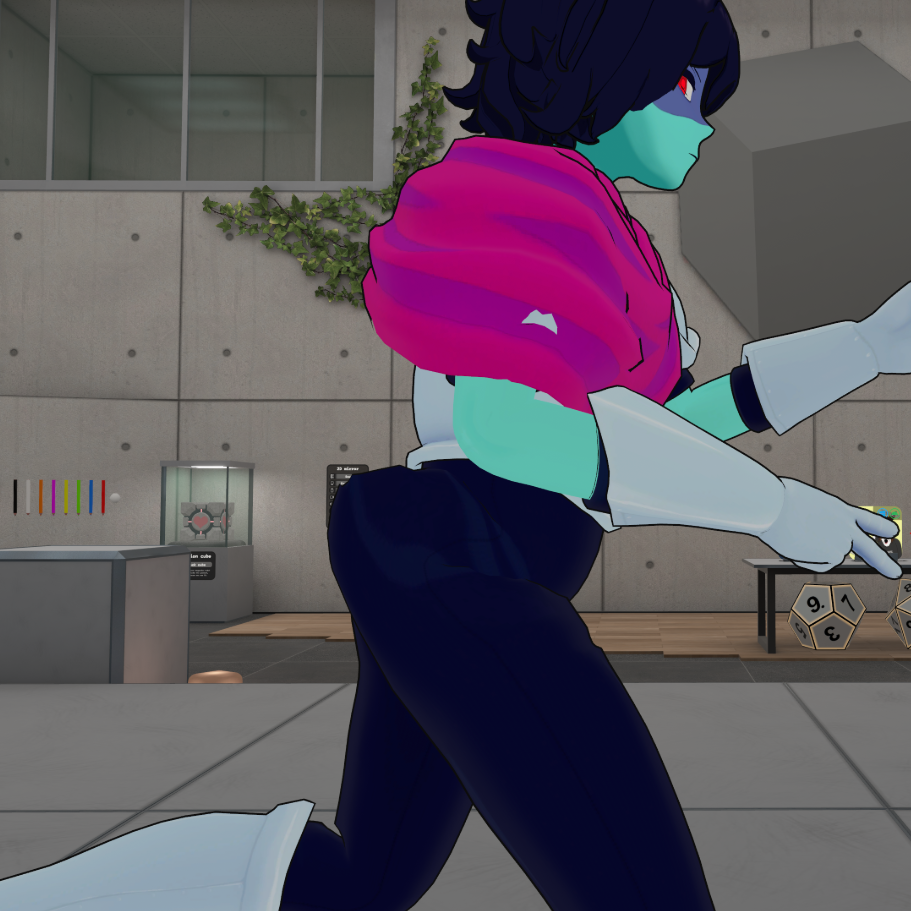
    It's finally here!!!

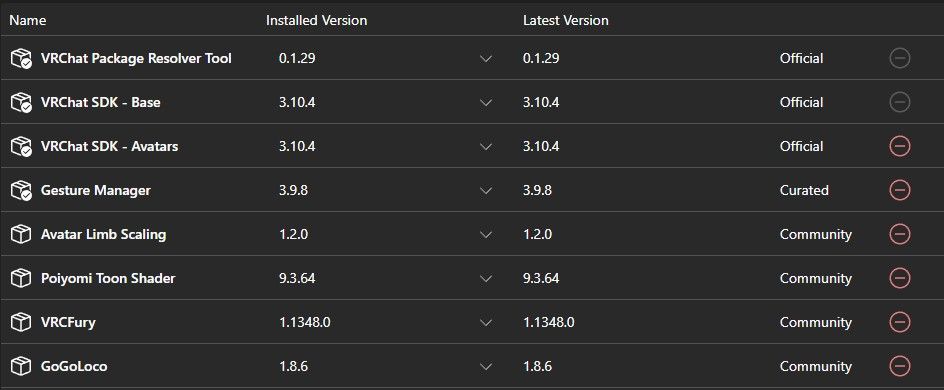
    44a11af7-04e7-4add-9f93-1e271fe3ebf6-image.jpeg
    (Everything that is needed for the avatar)

    And, here's the unitypackage!
    🔗 Download Link (workupload.com)
    There's a dark fountain asset in the package too, but I made two versions of the avatar with and without the fountain to choose from.

    NSFW, and SFW packages are there, you'll have to add your own SPS to the avatar...
    And both dark world, and light world are separate avatars, for optimization purposes, they got a lot vertices.

    Anyway, hope ya'll have fun with it! Tell me if there's anything else you'd like me to add and I'll try!

    LostGirl1225L
    LostGirl1225L
    LostGirl1225
    wrote on last edited by
    #69

    @Sebastian THANKS !!!

    1 Reply Last reply
    0
    • LostGirl1225L
      LostGirl1225L
      LostGirl1225
      wrote on last edited by
      #70

      @sebastian uhhh. how do i "merge" the quest and pc avi together so they make one?

      S 1 Reply Last reply
      0
      • LostGirl1225L LostGirl1225

        @sebastian uhhh. how do i "merge" the quest and pc avi together so they make one?

        S
        S
        Sebastian
        wrote on last edited by
        #71

        @LostGirl1225 Uhh, you're supposed to upload the quest and pc versions separately so the avatar can be seen between their prospective platforms?

        LostGirl1225L 2 Replies Last reply
        0
        • S Sebastian

          @LostGirl1225 Uhh, you're supposed to upload the quest and pc versions separately so the avatar can be seen between their prospective platforms?

          LostGirl1225L
          LostGirl1225L
          LostGirl1225
          wrote on last edited by
          #72
          This post is deleted!
          1 Reply Last reply
          0
          • S Sebastian

            @LostGirl1225 Uhh, you're supposed to upload the quest and pc versions separately so the avatar can be seen between their prospective platforms?

            LostGirl1225L
            LostGirl1225L
            LostGirl1225
            wrote on last edited by
            #73

            @Sebastian no like i mean, when i want to upload the quest vertion it just makes a whole new avatar

            TheDirtyDozenT 1 Reply Last reply
            0
            • LostGirl1225L LostGirl1225

              @Sebastian no like i mean, when i want to upload the quest vertion it just makes a whole new avatar

              TheDirtyDozenT
              TheDirtyDozenT
              TheDirtyDozen
              wrote on last edited by TheDirtyDozen
              #74

              @LostGirl1225 So to put both avatars together, you'll need to create a new project for the quest version in Unity, sign into the VRC SDK, change the build target in the SDK from Windows to Android. Then after that, select which avatar you plan to upload for your quest build, go to your inspector and scroll down to the pipeline manager. Go back to your PC build and repeat this step, and then copy the blueprint ID. Go back to your quest build and then paste the blueprint ID into the pipeline manager. All of your info from the PC build will be synced up to the quest build the next time you go to the SDK to fill anything in. MAKE SURE YOUR PC BUILD HAS BEEN UPLOADED FIRST BEFORE DOING ANY OF THIS!

              LostGirl1225L 1 Reply Last reply
              0
              • TheDirtyDozenT TheDirtyDozen

                @LostGirl1225 So to put both avatars together, you'll need to create a new project for the quest version in Unity, sign into the VRC SDK, change the build target in the SDK from Windows to Android. Then after that, select which avatar you plan to upload for your quest build, go to your inspector and scroll down to the pipeline manager. Go back to your PC build and repeat this step, and then copy the blueprint ID. Go back to your quest build and then paste the blueprint ID into the pipeline manager. All of your info from the PC build will be synced up to the quest build the next time you go to the SDK to fill anything in. MAKE SURE YOUR PC BUILD HAS BEEN UPLOADED FIRST BEFORE DOING ANY OF THIS!

                LostGirl1225L
                LostGirl1225L
                LostGirl1225
                wrote on last edited by
                #75

                @TheDirtyDozen kk thx !!!!

                1 Reply Last reply
                0
                • Meowskulls67M Meowskulls67

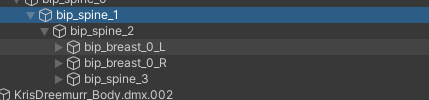
                  @Sebastian minor issue with the rigging2026_07_03_08i_Kleki.png

                  happens with light world version too, Swaping the spine out for the second spine bone fixes this if anyone else has this issue

                  LostGirl1225L
                  LostGirl1225L
                  LostGirl1225
                  wrote on last edited by
                  #76

                  @Meowskulls67 wich bone do we swap? i didnt understood ;_;

                  Meowskulls67M 1 Reply Last reply
                  0
                  • LostGirl1225L LostGirl1225

                    @Meowskulls67 wich bone do we swap? i didnt understood ;_;

                    Meowskulls67M
                    Meowskulls67M
                    Meowskulls67
                    wrote on last edited by
                    #77

                    @LostGirl1225 Click the one i circled, itll highlight up on the left, youll want to select the one right after it (idk if its spine 1 but if it is youll want to swap it to spine 2)

                    LostGirl1225L 2 Replies Last reply
                    0
                    • Meowskulls67M Meowskulls67

                      @LostGirl1225 Click the one i circled, itll highlight up on the left, youll want to select the one right after it (idk if its spine 1 but if it is youll want to swap it to spine 2)

                      LostGirl1225L
                      LostGirl1225L
                      LostGirl1225
                      wrote on last edited by
                      #78

                      @Meowskulls67 thx !

                      1 Reply Last reply
                      0
                      • Meowskulls67M Meowskulls67

                        @LostGirl1225 Click the one i circled, itll highlight up on the left, youll want to select the one right after it (idk if its spine 1 but if it is youll want to swap it to spine 2)

                        LostGirl1225L
                        LostGirl1225L
                        LostGirl1225
                        wrote on last edited by
                        #79

                        @Meowskulls67 wich one is circeled ;-; im not a unity pro ;-;Capture d'écran 2026-07-06 094908.png

                        Meowskulls67M 1 Reply Last reply
                        0
                        • LostGirl1225L LostGirl1225

                          @Meowskulls67 wich one is circeled ;-; im not a unity pro ;-;Capture d'écran 2026-07-06 094908.png

                          Meowskulls67M
                          Meowskulls67M
                          Meowskulls67
                          wrote on last edited by
                          #80

                          @LostGirl1225 So when you click the bone i circled it should highlight there

                          1 Reply Last reply
                          0
                          • LostGirl1225L
                            LostGirl1225L
                            LostGirl1225
                            wrote on last edited by
                            #81

                            @meowskulls67 ohh kk

                            1 Reply Last reply
                            0
                            • LostGirl1225L
                              LostGirl1225L
                              LostGirl1225
                              wrote on last edited by
                              #82

                              @meowskulls67 wait how do i see the bones? (sorry if im bothering 😭 )

                              1 Reply Last reply
                              0
                              • Meowskulls67M
                                Meowskulls67M
                                Meowskulls67
                                wrote on last edited by
                                #83

                                The bones are the triangles in the avatar, the one circled in the image click it

                                LostGirl1225L 1 Reply Last reply
                                0
                                • Meowskulls67M Meowskulls67

                                  The bones are the triangles in the avatar, the one circled in the image click it

                                  LostGirl1225L
                                  LostGirl1225L
                                  LostGirl1225
                                  wrote on last edited by
                                  #84

                                  @Meowskulls67 i know, but i dont see them, how do i see them in unity?

                                  S 1 Reply Last reply
                                  0
                                  • LostGirl1225L LostGirl1225

                                    @Meowskulls67 i know, but i dont see them, how do i see them in unity?

                                    S
                                    S
                                    Sebastian
                                    wrote on last edited by
                                    #85

                                    @LostGirl1225 Just a little bit of patience and I’ll release a new version with all the fixes

                                    LostGirl1225L 1 Reply Last reply
                                    1
                                    • S Sebastian

                                      @LostGirl1225 Just a little bit of patience and I’ll release a new version with all the fixes

                                      LostGirl1225L
                                      LostGirl1225L
                                      LostGirl1225
                                      wrote on last edited by
                                      #86

                                      @Sebastian kk

                                      1 Reply Last reply
                                      1
                                      • LostGirl1225L LostGirl1225 referenced this topic on
                                      • demongod4001D
                                        demongod4001D
                                        demongod4001
                                        wrote on last edited by
                                        #87

                                        w bro

                                        1 Reply Last reply
                                        0
                                        • S
                                          S
                                          Sebastian
                                          wrote on last edited by
                                          #88

                                          It's here again! All the bugs have been fixed along with forced expressions and combined scene so one avatar has both light world and dark world outfits. I recommend clearing out your previous file for this new one.

                                          [register or login to view this hidden content]

                                          @ me if you want anything else fixed/added!!!
                                          LostGirl1225L SpotgusS 2 Replies Last reply
                                          👑
                                          6

                                          Hello! It looks like you're interested in this conversation, but you don't have an account yet.

                                          Getting fed up of having to scroll through the same posts each visit? When you register for an account, you'll always come back to exactly where you were before, and choose to be notified of new replies (either via email, or push notification). You'll also be able to save bookmarks and upvote posts to show your appreciation to other community members.

                                          With your input, this post could be even better 💗

                                          Register Login
                                          Reply
                                          • Reply as topic
                                          Log in to reply
                                          • Oldest to Newest
                                          • Newest to Oldest
                                          • Most Votes


                                          • Login

                                          • Login or register to search.
                                          • First post
                                            Last post
                                          0
                                          • Categories
                                          • Recent
                                          • Tags
                                          • Popular