
[PC ONLY] ♥CHARMED ROBYN♥
-
@Lunella_gremlin Its a project folder. Not a unity package. Everything is inside. You have to import the entire project.
Also, since SPS2.0 beta is out, I may include and alternative SPS set next time. Unsure.
@White-Cosmos oh really?? thank you so much

will try test it as best as can
-
@Lunella_gremlin Its a project folder. Not a unity package. Everything is inside. You have to import the entire project.
Also, since SPS2.0 beta is out, I may include and alternative SPS set next time. Unsure.
@White-Cosmos when extracting the zip then you get an unspecified error on the DOTween.dll.mdb.meta file and a few other .meta files
-
ah you need to use the 7-zip to extract oopsy
-
Charmed Robyn, v1.01.
- Bird still does wierd things I don't think its setup to recognize the DLC. Idk.
If anything is pbroken, take a short video and give and explanation with screenshots of menu items too.
i currenty have these 2 errors in my logs
any ideas what they could be??
ive double clicked them to get to the source but nothing
lunella_gremlin is my discord you might have more luck contacting me there for further discussions : )
-
i have fixed it i had to attach it to a different already uploaded avatar
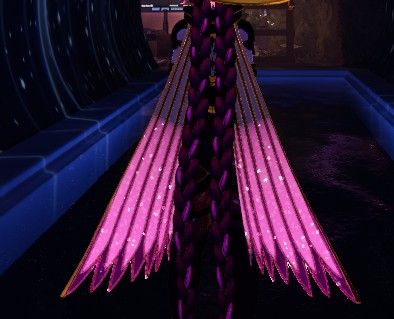
also for some reason then the scarf tails do not appear to be working
also the HUMI-D*** the one without the different language writing cannot be opened for some reason when im on PC
have not tested on PCVR yet
-
i have fixed it i had to attach it to a different already uploaded avatar
also for some reason then the scarf tails do not appear to be working
also the HUMI-D*** the one without the different language writing cannot be opened for some reason when im on PC
have not tested on PCVR yet
@Lunella_gremlin I'll look into. Please detail any fixes you do.
The scarf is difficult. It will show for others, but previously it wa sin your face in pcvr.
-
@Lunella_gremlin I'll look into. Please detail any fixes you do.
The scarf is difficult. It will show for others, but previously it wa sin your face in pcvr.
@White-Cosmos i know the bit was in the face i can still see that but the colorful bits that follow behind dont show up
i can get a screen shot in a bit
-
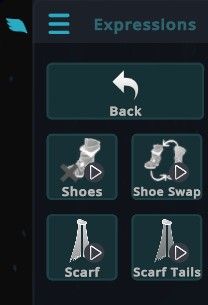
this is the basic PC one
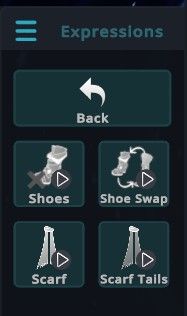

this is the new uploaded one
-
huh. ill look at it.
-
huh. ill look at it.
@White-Cosmos I am unable to test the nsfw features yet
I will test them when I can but I will only be able to test them with the stuff that comes with thr avatar until I find someone to test the rest of the stuff with
E.g. I can test the female ports but not the male : (
The slime toggles and everything seem to work but I only gave them like a 5 minute test
-
Other then that 10/10 you did an absolutey amazing job thank you do much

-
huh. ill look at it.
@White-Cosmos there were 2 errors in the logs when I was uploading
One was super vague and it was something to do.with S
Will get the exact error in a min
And a other one was just a boat load of words that didn't make any sense to me
Will paste the full ones in a bit was just wondering if you had them as well
-
i dont knbow how to read unity errors. cant help.
-
i dont knbow how to read unity errors. cant help.
@White-Cosmos understandable i dont think anyone in existence can
-
i dont knbow how to read unity errors. cant help.
@White-Cosmos all female ports for the slime and main both work with PCS when using the toy
cannot test the male ports as i am by my self and not on VR so i think it is just the one thing that cant be selected that i mentioned and the scarf as the only issues i have found : )
will obvioulsy test it more while playing at some point but super amazing job you did so well : D
Thank you so so much again
-
huh. ill look at it.
@White-Cosmos After doing some debugging i think i may have found a/the issue with the scarfs?
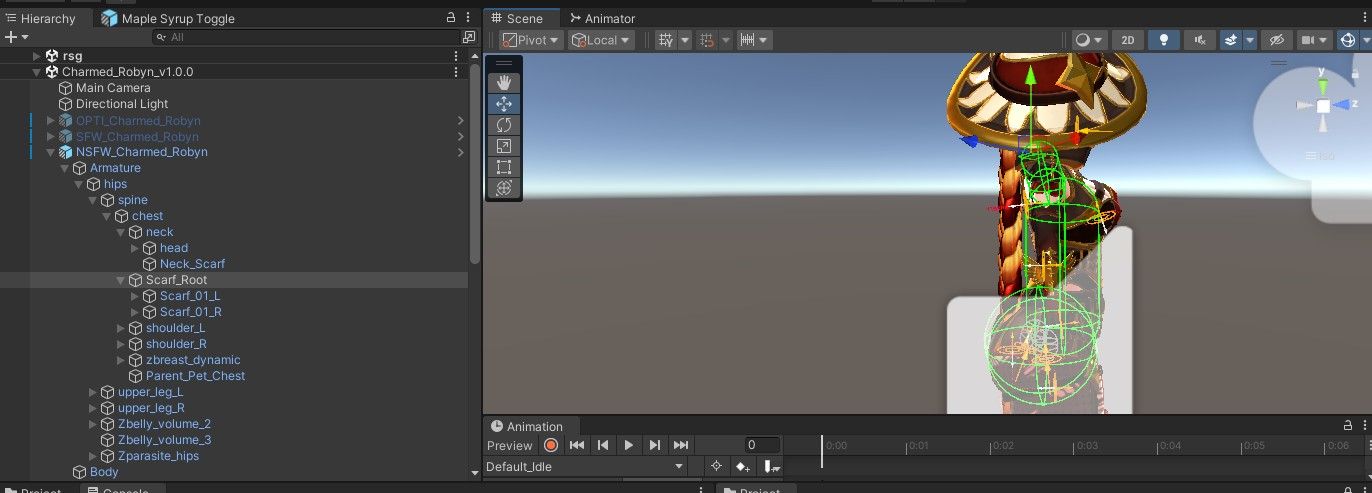
this is charmed robyn

this is normal robyn
the normal one appears to have its phybones but the other dosnt i think for some reason
-
@White-Cosmos After doing some debugging i think i may have found a/the issue with the scarfs?
this is charmed robyn
this is normal robyn
the normal one appears to have its phybones but the other dosnt i think for some reason
the scale on it was set to 0 so it was working but it was just too small to see : (
fixed now tho
i set the scale to 1 for everything
Uploaded to vrchat and it is functionallll
Still no clue about the not working D*** toggle like it dosnt even open which is what I find most confusing
-
Ah... lets see.. there's a componant on the scarf to hide it from first person view. It was not hidden ebfore and obstructed vision. Probably was a side effect of fixing that.
The other girls will not be recieiving this treatment. Orphea's size is too big and there's no way around it even with 512 size textures all around.
I don't really know what I'll do next. Robyn's panties still don't dissolve the same way as all the other dissolves so. Its a progress thing.
Bunnysuits on other girls don't match the alter colours. I don't have a psd for those.
Uh scarf.. send me... idk., a DM with photos on how to replicate. Make sure scarf is not visible in third person while in PCVR first, though.
-
Ah... lets see.. there's a componant on the scarf to hide it from first person view. It was not hidden ebfore and obstructed vision. Probably was a side effect of fixing that.
The other girls will not be recieiving this treatment. Orphea's size is too big and there's no way around it even with 512 size textures all around.
I don't really know what I'll do next. Robyn's panties still don't dissolve the same way as all the other dissolves so. Its a progress thing.
Bunnysuits on other girls don't match the alter colours. I don't have a psd for those.
Uh scarf.. send me... idk., a DM with photos on how to replicate. Make sure scarf is not visible in third person while in PCVR first, though.
@White-Cosmos how do i DM?
If you want for the scarf I can explain the steps
And it is still visible in third person and thr bit round your neck is invisible in first person
You need to click on the version go to amatures I
Go find spine
Go find neck
Then I think it's root_scarf
It should have inside it something_R_1 and something_L_1
If you click root_scarf then it should have thr phsybones then the scale at the top just needs to be set as 1. For all 3 columns
It may not be as easy at step1, step 2, step 3 as I can't remember if there is stuff between it in gaps or anything or precise names. When I get back onto it I will give a more specific guide and screen shots of it functional : )I will continue to look into Robyn because I love her so much
I will tag that blackonyx person if I find fixes to stuff : ) I'm guessing the issues might be pretty similar if the other avis have them and I am going to test how the quest verson cooperates with this one by
- Going stand alone and customising it
- Asking my frend to tell me what changes when I use a toggle in PC mode and they look at in quest mode
- Get them to use toggles in quest mode and I see what they do in PC mode
I will have a look into questifing it fully/mostly at some point slowly but thank you so so much for the work you've been doing
So so Sorry for the sloppy explanation I'm half asleep
I will continue to post any progress I make here like bug fixes any stuff I've added and what not
-
@White-Cosmos how do i DM?
If you want for the scarf I can explain the steps
And it is still visible in third person and thr bit round your neck is invisible in first person
You need to click on the version go to amatures I
Go find spine
Go find neck
Then I think it's root_scarf
It should have inside it something_R_1 and something_L_1
If you click root_scarf then it should have thr phsybones then the scale at the top just needs to be set as 1. For all 3 columns
It may not be as easy at step1, step 2, step 3 as I can't remember if there is stuff between it in gaps or anything or precise names. When I get back onto it I will give a more specific guide and screen shots of it functional : )I will continue to look into Robyn because I love her so much
I will tag that blackonyx person if I find fixes to stuff : ) I'm guessing the issues might be pretty similar if the other avis have them and I am going to test how the quest verson cooperates with this one by
- Going stand alone and customising it
- Asking my frend to tell me what changes when I use a toggle in PC mode and they look at in quest mode
- Get them to use toggles in quest mode and I see what they do in PC mode
I will have a look into questifing it fully/mostly at some point slowly but thank you so so much for the work you've been doing
So so Sorry for the sloppy explanation I'm half asleep
I will continue to post any progress I make here like bug fixes any stuff I've added and what not
Black0nyx is just managing thread urls and nothing else. Don't ping them for this.
Quest is not completely the same, but I was told already that the Quest version works under the Charmed variant still. I'm not changing menu locations or anything.
Regardless, I will never deal with Quest avatars. I don't understand how they work, and I play in PCVR.
I'll check Robyn very quickly then sleep.
It seems I did indeed change the scarf's scale to zero somehow. Odd. Its fixed now.


Hello! It looks like you're interested in this conversation, but you don't have an account yet.
Getting fed up of having to scroll through the same posts each visit? When you register for an account, you'll always come back to exactly where you were before, and choose to be notified of new replies (either via email, or push notification). You'll also be able to save bookmarks and upvote posts to show your appreciation to other community members.
With your input, this post could be even better 💗
Register Login