Skip to content
  • Categories
  • Recent
  • Tags
  • Popular
Skins
  • Light
  • Brite
  • Cerulean
  • Cosmo
  • Flatly
  • Journal
  • Litera
  • Lumen
  • Lux
  • Materia
  • Minty
  • Morph
  • Pulse
  • Sandstone
  • Simplex
  • Sketchy
  • Spacelab
  • United
  • Yeti
  • Zephyr
  • Dark
  • Cyborg
  • Darkly
  • Quartz
  • Slate
  • Solar
  • Superhero
  • Vapor

  • Default (Zephyr)
  • No Skin
Collapse
RipperStore Logo
  1. Home
  2. Guides
  3. New User Help
  4. How to make PC avatar compatible with quest?

How to make PC avatar compatible with quest?

Scheduled Pinned Locked Moved New User Help
help unityquest and pcnewbie
11 Posts 2 Posters 328 Views
  • Oldest to Newest
  • Newest to Oldest
  • Most Votes
Reply
  • Reply as topic
Log in to reply
This topic has been deleted. Only users with topic management privileges can see it.
  • Akame199A
    Akame199A
    Akame199
    wrote on last edited by
    #1

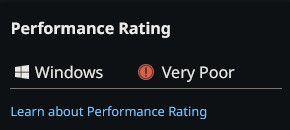
    Sooo I have an avatar that I really like and I want it to be able to be seen by quest players at the same time but I want to keep it looking the same for PC players? feda5e3e-9376-4371-92bb-7f662479f169-image.jpeg Im actually just guessing here but I think if performance rating only shows 'Windows' then quest people cant even see it?
    1 Reply Last reply
    0
    • KumanoTMK
      KumanoTMK
      KumanoTM
      wrote on last edited by KumanoTM
      #2

      when uploading to quest, you need to change the build target in unity to android. all textures need to be quest compatible which as of now is still just VRCToon. the total memory allowed is 10MB so youll need to use something like https://github.com/d4rkc0d3r/d4rkAvatarOptimizer to compress it enough to be able to do it. you can only have a max of 8 physbones, and a few other things that the builder will tell you to fix.

      make sure the pipeline manager build ID is the same between the quest and pc version of your avatar, it i s best to do these in seperate projects or to duplicate your materials so you don't need to swap them back and forth when editing each respective avatar.

      Akame199A 3 Replies Last reply
      0
      • KumanoTMK KumanoTM

        when uploading to quest, you need to change the build target in unity to android. all textures need to be quest compatible which as of now is still just VRCToon. the total memory allowed is 10MB so youll need to use something like https://github.com/d4rkc0d3r/d4rkAvatarOptimizer to compress it enough to be able to do it. you can only have a max of 8 physbones, and a few other things that the builder will tell you to fix.

        make sure the pipeline manager build ID is the same between the quest and pc version of your avatar, it i s best to do these in seperate projects or to duplicate your materials so you don't need to swap them back and forth when editing each respective avatar.

        Akame199A
        Akame199A
        Akame199
        wrote on last edited by
        #3

        @KumanoTM any chance u have visual examples? im kinda dumb when it comes to text based explanations lol

        KumanoTMK 1 Reply Last reply
        0
        • KumanoTMK KumanoTM

          when uploading to quest, you need to change the build target in unity to android. all textures need to be quest compatible which as of now is still just VRCToon. the total memory allowed is 10MB so youll need to use something like https://github.com/d4rkc0d3r/d4rkAvatarOptimizer to compress it enough to be able to do it. you can only have a max of 8 physbones, and a few other things that the builder will tell you to fix.

          make sure the pipeline manager build ID is the same between the quest and pc version of your avatar, it i s best to do these in seperate projects or to duplicate your materials so you don't need to swap them back and forth when editing each respective avatar.

          Akame199A
          Akame199A
          Akame199
          wrote on last edited by
          #4

          @KumanoTM 4a8d653c-aa15-40c8-a930-a83afd2320bd-image.jpeg upload where exactly?

          1 Reply Last reply
          0
          • KumanoTMK KumanoTM

            when uploading to quest, you need to change the build target in unity to android. all textures need to be quest compatible which as of now is still just VRCToon. the total memory allowed is 10MB so youll need to use something like https://github.com/d4rkc0d3r/d4rkAvatarOptimizer to compress it enough to be able to do it. you can only have a max of 8 physbones, and a few other things that the builder will tell you to fix.

            make sure the pipeline manager build ID is the same between the quest and pc version of your avatar, it i s best to do these in seperate projects or to duplicate your materials so you don't need to swap them back and forth when editing each respective avatar.

            Akame199A
            Akame199A
            Akame199
            wrote on last edited by
            #5

            @KumanoTM im looking at d4rks optimizer and it looks pretty straight forward its just im not sure about the pipeline stuff? like if i make 2 different projects how do i get them to be in one when i upload

            KumanoTMK 1 Reply Last reply
            0
            • Akame199A Akame199

              @KumanoTM any chance u have visual examples? im kinda dumb when it comes to text based explanations lol

              KumanoTMK
              KumanoTMK
              KumanoTM
              wrote on last edited by
              #6

              @Akame199 i can stream it on discord for you tomorrow if that helps?

              Akame199A 2 Replies Last reply
              0
              • Akame199A Akame199

                @KumanoTM im looking at d4rks optimizer and it looks pretty straight forward its just im not sure about the pipeline stuff? like if i make 2 different projects how do i get them to be in one when i upload

                KumanoTMK
                KumanoTMK
                KumanoTM
                wrote on last edited by
                #7

                @Akame199 8559209e-16e5-46f8-b863-44ee6477267d-image.jpeg detatch and copy that. it is 2/3 the way down on your inspector when you click on your avi in the higherarchy.

                Akame199A 1 Reply Last reply
                0
                • KumanoTMK KumanoTM

                  @Akame199 i can stream it on discord for you tomorrow if that helps?

                  Akame199A
                  Akame199A
                  Akame199
                  wrote on last edited by
                  #8

                  @KumanoTM sure that works

                  1 Reply Last reply
                  0
                  • KumanoTMK KumanoTM

                    @Akame199 i can stream it on discord for you tomorrow if that helps?

                    Akame199A
                    Akame199A
                    Akame199
                    wrote on last edited by
                    #9

                    @KumanoTM it doesnt let me send a dm, whats ur discord?

                    KumanoTMK 1 Reply Last reply
                    0
                    • KumanoTMK KumanoTM

                      @Akame199 8559209e-16e5-46f8-b863-44ee6477267d-image.jpeg detatch and copy that. it is 2/3 the way down on your inspector when you click on your avi in the higherarchy.

                      Akame199A
                      Akame199A
                      Akame199
                      wrote on last edited by
                      #10

                      @KumanoTM I found the blueprint ID and changed it as well, but when I try to upload it with the d4rks optimizer it just stays on 'Building Avatar'. I left it on for at least 20-30 mins and nothing happened.

                      1 Reply Last reply
                      0
                      • Akame199A Akame199

                        @KumanoTM it doesnt let me send a dm, whats ur discord?

                        KumanoTMK
                        KumanoTMK
                        KumanoTM
                        wrote on last edited by
                        #11

                        @Akame199 anunhappyteddie

                        1 Reply Last reply
                        0

                        Hello! It looks like you're interested in this conversation, but you don't have an account yet.

                        Getting fed up of having to scroll through the same posts each visit? When you register for an account, you'll always come back to exactly where you were before, and choose to be notified of new replies (either via email, or push notification). You'll also be able to save bookmarks and upvote posts to show your appreciation to other community members.

                        With your input, this post could be even better 💗

                        Register Login
                        Reply
                        • Reply as topic
                        Log in to reply
                        • Oldest to Newest
                        • Newest to Oldest
                        • Most Votes


                        • Login

                        • Login or register to search.
                        • First post
                          Last post
                        0
                        • Categories
                        • Recent
                        • Tags
                        • Popular