Skip to content
  • Categories
  • Recent
  • Tags
  • Popular
Skins
  • Light
  • Brite
  • Cerulean
  • Cosmo
  • Flatly
  • Journal
  • Litera
  • Lumen
  • Lux
  • Materia
  • Minty
  • Morph
  • Pulse
  • Sandstone
  • Simplex
  • Sketchy
  • Spacelab
  • United
  • Yeti
  • Zephyr
  • Dark
  • Cyborg
  • Darkly
  • Quartz
  • Slate
  • Solar
  • Superhero
  • Vapor

  • Default (Zephyr)
  • No Skin
Collapse
RipperStore Logo
  1. Home
  2. Assets
  3. Gifts / Downloads
  4. BunBnnuy's Library Manager

BunBnnuy's Library Manager

Scheduled Pinned Locked Moved Gifts / Downloads
toolslibrarymanagerdownloads
24 Posts 10 Posters 2.7k Views 20 Watching
  • Oldest to Newest
  • Newest to Oldest
  • Most Votes
Reply
  • Reply as topic
Log in to reply
This topic has been deleted. Only users with topic management privileges can see it.
  • TokeiNekoT
    TokeiNekoT
    TokeiNeko
    wrote on last edited by
    #3

    do you really have the robocat? looking for that cutie

    1 Reply Last reply
    0
    • BunBnnuyB
      BunBnnuyB
      BunBnnuy
      wrote on last edited by
      #4

      Bumpies for 1.0.0 release ๐Ÿ˜„
      Lots of UX improvements
      Fully integrated with Booth Library Manager
      Check it out at https://github.com/BunBnnuy/BBLM/releases/tag/1.0.0

      I like cute things
      Remember to upvote! Community is formed by sharing and gratitude :)
      Check out my Downloads Manager Tool
      BBLibrary Manager -> https://forum.ripper.store/topic/113453/bunbnnuy-s-library-manager
      BB Ripper.Store Searcher -> https://forum.ripper.store/topic/131318/bunbnnuy-s-riper.store-searcher/
      My Assets Library -> https://bunbnnuy.top/
      See something you want that i have? DM me and i will upload it

      1 Reply Last reply
      0
      • HeartStarH
        HeartStarH
        HeartStar
        wrote on last edited by
        #5

        Sooner or later I need to reset my PC and this will be very useful for then. I have like several hundred gigs of unsorted weirdly named assets that I'm thinking I may just clear everything and start from scratch. This tool will be a great asset to have from the beginning

        BunBnnuyB 1 Reply Last reply
        0
        • BunBnnuyB
          BunBnnuyB
          BunBnnuy
          wrote on last edited by BunBnnuy
          #6

          v1.0.1 release

          Tag System

          • Assets now support multiple tags
          • Booth items get tags auto-populated from the BLM database and Booth JSON API
          • Searchable multi-select tag filter panel with AND logic
          • Tag editor with autocomplete in the import/edit dialog

          Smarter Drag & Drop

          • Two drop zones: Add New Asset (left) opens the import dialog, Add to Existing Asset (right) lets you hover 500ms then drop a file directly onto any card โ€” no dialog
          • Download Queue
          • URL scheme downloads queue serially, one at a time
          • Footer shows active progress + pending count badge, with cancel support

          Two-Phase Booth Import

          • Asset card appears immediately with thumbnail; file downloads in the background with a per-card progress bar

          Card Glow

          • Cards briefly glow when modified (imported, edited, downloaded, file added)

          Pagination

          • Configurable page size: 10, 30, or 50 items per page

          Fixes

          • Fixed double-decode bug corrupting AWS pre-signed download URLs
          • Content-Type validation to reject HTML error pages saved as ZIP
          • Single click โ†’ Edit modal; double click โ†’ open folder (250ms debounce)
          • Progress bars moved to footer; no duplicate bars

          I'll edit the post with a video of the app working

          I like cute things
          Remember to upvote! Community is formed by sharing and gratitude :)
          Check out my Downloads Manager Tool
          BBLibrary Manager -> https://forum.ripper.store/topic/113453/bunbnnuy-s-library-manager
          BB Ripper.Store Searcher -> https://forum.ripper.store/topic/131318/bunbnnuy-s-riper.store-searcher/
          My Assets Library -> https://bunbnnuy.top/
          See something you want that i have? DM me and i will upload it

          BunBnnuyB 1 Reply Last reply
          0
          • BunBnnuyB BunBnnuy

            v1.0.1 release

            Tag System

            • Assets now support multiple tags
            • Booth items get tags auto-populated from the BLM database and Booth JSON API
            • Searchable multi-select tag filter panel with AND logic
            • Tag editor with autocomplete in the import/edit dialog

            Smarter Drag & Drop

            • Two drop zones: Add New Asset (left) opens the import dialog, Add to Existing Asset (right) lets you hover 500ms then drop a file directly onto any card โ€” no dialog
            • Download Queue
            • URL scheme downloads queue serially, one at a time
            • Footer shows active progress + pending count badge, with cancel support

            Two-Phase Booth Import

            • Asset card appears immediately with thumbnail; file downloads in the background with a per-card progress bar

            Card Glow

            • Cards briefly glow when modified (imported, edited, downloaded, file added)

            Pagination

            • Configurable page size: 10, 30, or 50 items per page

            Fixes

            • Fixed double-decode bug corrupting AWS pre-signed download URLs
            • Content-Type validation to reject HTML error pages saved as ZIP
            • Single click โ†’ Edit modal; double click โ†’ open folder (250ms debounce)
            • Progress bars moved to footer; no duplicate bars

            I'll edit the post with a video of the app working

            BunBnnuyB
            BunBnnuyB
            BunBnnuy
            wrote on last edited by
            #7

            Bumpies!!

            Release v1.1.0

            https://github.com/BunBnnuy/BBLM/releases/tag/v1.1.0

            What's new

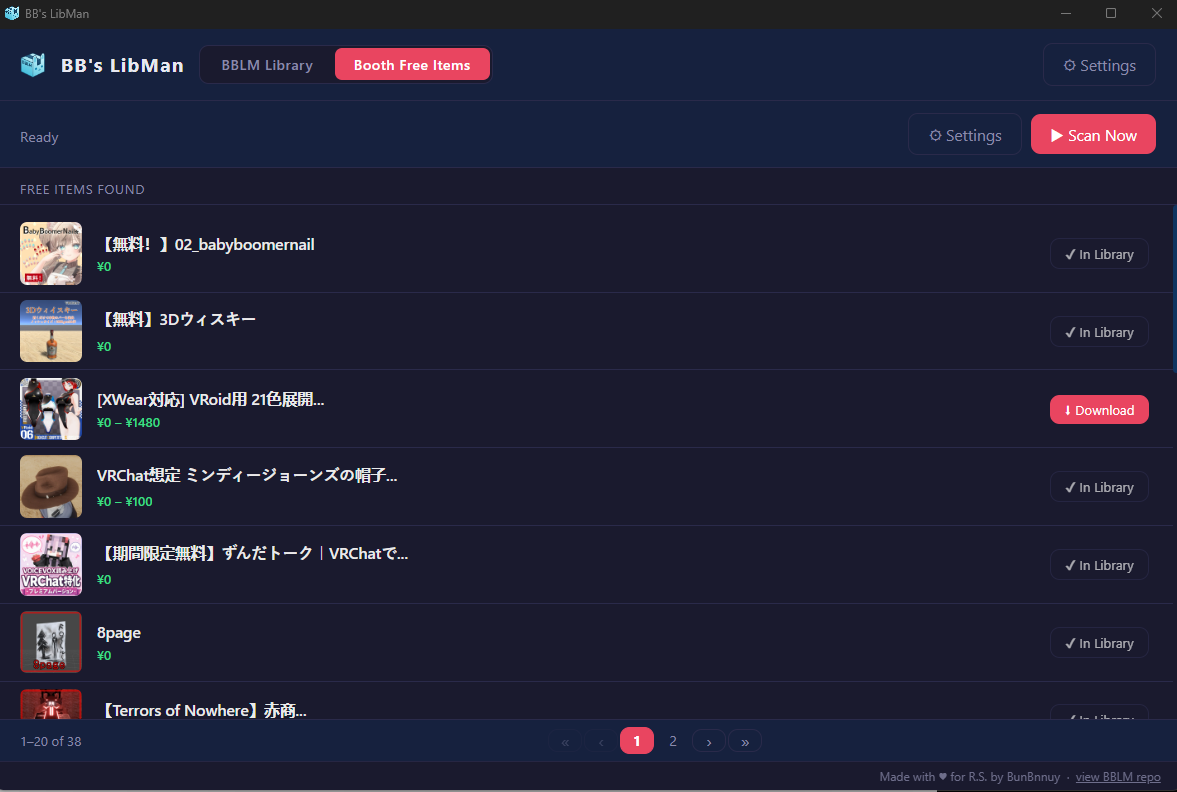
            ๐Ÿ†“ Booth Free Items tab

            A new tab that automatically scans Booth.pm for ยฅ0 VRChat items.

            • Smart detection โ€” visits each item page to check all variation prices, catching partially-free items (e.g. ยฅ0 โ€“ ยฅ300) that appear paid on the listing page
            • Price range display โ€” shows the full range when an item has both free and paid tiers
            • Internal download โ€” clicking Download handles the full flow inside the app; a Booth login window appears automatically when unauthenticated, and the session is remembered
            • "In Library" detection โ€” Download button is grayed out with โœ” In Library for items you already own, updating live as downloads complete
            • Paginated list โ€” thumbnail, name, and price in a clean 20-item paginated list; click any row to open the item on Booth
            • Auto-scan โ€” configurable interval (1โ€“24 hours) or manual trigger
            • Configurable depth โ€” set how many listing pages to scan (default 5, max 20)
            Screenshot_16.png

            ๐Ÿ› Bug fixes

            • Fixed thousand-separator parsing: items priced "1,000 JPY" were incorrectly detected as ยฅ0 free items
            • Library list now refreshes automatically when a download completes (no page change needed)

            I like cute things
            Remember to upvote! Community is formed by sharing and gratitude :)
            Check out my Downloads Manager Tool
            BBLibrary Manager -> https://forum.ripper.store/topic/113453/bunbnnuy-s-library-manager
            BB Ripper.Store Searcher -> https://forum.ripper.store/topic/131318/bunbnnuy-s-riper.store-searcher/
            My Assets Library -> https://bunbnnuy.top/
            See something you want that i have? DM me and i will upload it

            1 Reply Last reply
            0
            • HeartStarH HeartStar

              Sooner or later I need to reset my PC and this will be very useful for then. I have like several hundred gigs of unsorted weirdly named assets that I'm thinking I may just clear everything and start from scratch. This tool will be a great asset to have from the beginning

              BunBnnuyB
              BunBnnuyB
              BunBnnuy
              wrote on last edited by BunBnnuy
              #8

              @HeartStar I'm planing a feature that might help with that but it will take some time to develop.
              Look, .unitypackages are just fancy .tar.gz files so in theory i can take a folder and inspect compressed files looking for pathname files so that way I can extract the package name to give some idea what "materials.zip" really is. Like for example if i find Assets/PANDASTIC/BossMafia/prefab/lasyusha/7.prefab in the pathname file i can have an idea where to look for the origin. I can see it being VERY VERY VERY cpu intensive and time consuming since the origin must be search manually tho.
              But yeah that's probably my next major feature

              I like cute things
              Remember to upvote! Community is formed by sharing and gratitude :)
              Check out my Downloads Manager Tool
              BBLibrary Manager -> https://forum.ripper.store/topic/113453/bunbnnuy-s-library-manager
              BB Ripper.Store Searcher -> https://forum.ripper.store/topic/131318/bunbnnuy-s-riper.store-searcher/
              My Assets Library -> https://bunbnnuy.top/
              See something you want that i have? DM me and i will upload it

              1 Reply Last reply
              0
              • EllieE
                EllieE
                Ellie
                wrote on last edited by Ellie
                #9

                This program works well UNTIL you download multiple things at once. then it doesnt give multiple prompts for importing and just many notifications.

                It would also be nice if maybe when importing you can choose to "add to existing collection" so i.e:

                I download a fullset that is in multiple zips for each avatar and the materials, when it detects the download there should be a button of "add multiple to existing collection" and let me choose in explorer which ones and then in the program to where. :3

                ...or maybe a smart feature IF the file name of the zip has the same name as one that's already added it can be added automatically ๐Ÿ˜ฎ

                โ€‹ยท ยท โ”€โ”€โ”€โ”€โ”€โ”€ ๊’ฐเฆŒยทโœฆยทเป’๊’ฑ โ”€โ”€โ”€โ”€โ”€โ”€ ยท ยท
                ๐Ÿ‡ธโ€‹โ€‹๐Ÿ‡ญโ€‹โ€‹๐Ÿ‡ฆโ€‹โ€‹๐Ÿ‡ทโ€‹โ€‹๐Ÿ‡ฎโ€‹โ€‹๐Ÿ‡ณโ€‹โ€‹๐Ÿ‡ฌโ€‹ โ€‹๐Ÿ‡ผโ€‹โ€‹๐Ÿ‡ญโ€‹โ€‹๐Ÿ‡ฆโ€‹โ€‹๐Ÿ‡นโ€‹ โ€‹๐Ÿ‡ฎโ€‹ โ€‹๐Ÿ‡จโ€‹โ€‹๐Ÿ‡ฆโ€‹โ€‹๐Ÿ‡ณ โ€‹โœฆ ๐Ÿ‡นโ€‹โ€‹๐Ÿ‡ดโ€‹ โ€‹๐Ÿ‡ฒโ€‹โ€‹๐Ÿ‡ฆโ€‹โ€‹๐Ÿ‡ฐโ€‹โ€‹๐Ÿ‡ชโ€‹ โ€‹๐Ÿ‡พโ€‹โ€‹๐Ÿ‡ดโ€‹โ€‹๐Ÿ‡บโ€‹ โ€‹๐Ÿ‡ธโ€‹โ€‹๐Ÿ‡ฒโ€‹โ€‹๐Ÿ‡ฎโ€‹โ€‹๐Ÿ‡ฑโ€‹โ€‹๐Ÿ‡ชโ€‹
                ยท ยท โ”€โ”€โ”€โ”€โ”€โ”€โ”€โ”€โ”€โ”€โ”€โ”€โ”€โ”€โ”€โ”€โ”€โ”€ ยท ยท
                Wishie-List:
                ๐Ÿ‡จโ€‹โ€‹๐Ÿ‡ฑโ€‹โ€‹๐Ÿ‡ฎโ€‹โ€‹๐Ÿ‡จโ€‹โ€‹๐Ÿ‡ฐโ€‹ โ€‹๐Ÿ‡ญโ€‹โ€‹๐Ÿ‡ชโ€‹โ€‹๐Ÿ‡ทโ€‹โ€‹๐Ÿ‡ช >>GM Flowtoys>Shooting Star Flow/Springjoint<< ๐Ÿ‡จโ€‹โ€‹๐Ÿ‡ฑโ€‹โ€‹๐Ÿ‡ฎโ€‹โ€‹๐Ÿ‡จโ€‹โ€‹๐Ÿ‡ฐโ€‹ โ€‹๐Ÿ‡ญโ€‹โ€‹๐Ÿ‡ชโ€‹โ€‹๐Ÿ‡ทโ€‹โ€‹๐Ÿ‡ชโ€‹
                ยท ยท โ”€โ”€โ”€โ”€โ”€โ”€ ๊’ฐเฆŒยทโœฆยทเป’๊’ฑ โ”€โ”€โ”€โ”€โ”€โ”€ ยท ยท

                BunBnnuyB 2 Replies Last reply
                0
                • EllieE Ellie

                  This program works well UNTIL you download multiple things at once. then it doesnt give multiple prompts for importing and just many notifications.

                  It would also be nice if maybe when importing you can choose to "add to existing collection" so i.e:

                  I download a fullset that is in multiple zips for each avatar and the materials, when it detects the download there should be a button of "add multiple to existing collection" and let me choose in explorer which ones and then in the program to where. :3

                  ...or maybe a smart feature IF the file name of the zip has the same name as one that's already added it can be added automatically ๐Ÿ˜ฎ

                  BunBnnuyB
                  BunBnnuyB
                  BunBnnuy
                  wrote on last edited by
                  #10

                  @Ellie thank you very much for you input
                  Will definetly look into that!
                  For now what you can do is disable the downloads monitor and use the drag and drop features to create the collection first with the first file, and then the other files can be drag and dropped individually to the collection. It already works when downloading files from booth so it shouldn't be too hard for external downloads.
                  Wil also take a look to look for files with similar names and chose to add them as a collection

                  I like cute things
                  Remember to upvote! Community is formed by sharing and gratitude :)
                  Check out my Downloads Manager Tool
                  BBLibrary Manager -> https://forum.ripper.store/topic/113453/bunbnnuy-s-library-manager
                  BB Ripper.Store Searcher -> https://forum.ripper.store/topic/131318/bunbnnuy-s-riper.store-searcher/
                  My Assets Library -> https://bunbnnuy.top/
                  See something you want that i have? DM me and i will upload it

                  1 Reply Last reply
                  0
                  • bassboostedbitB
                    bassboostedbitB
                    bassboostedbit
                    wrote on last edited by
                    #11

                    So can i add any file? like from my flashdrive?

                    This gooner wants unity files so she can add them to vrc.
                    Please be patient, this person is a fucking idiot

                    Also, I can give PC avatars Quest compatibility. Just ask nicely

                    BunBnnuyB 1 Reply Last reply
                    0
                    • bassboostedbitB bassboostedbit

                      So can i add any file? like from my flashdrive?

                      BunBnnuyB
                      BunBnnuyB
                      BunBnnuy
                      wrote on last edited by
                      #12

                      @bassboostedbit yup, keep in mind once you add it to the library it will be moved from your flashdrive to your selected bblm directory, a source url is also required

                      I like cute things
                      Remember to upvote! Community is formed by sharing and gratitude :)
                      Check out my Downloads Manager Tool
                      BBLibrary Manager -> https://forum.ripper.store/topic/113453/bunbnnuy-s-library-manager
                      BB Ripper.Store Searcher -> https://forum.ripper.store/topic/131318/bunbnnuy-s-riper.store-searcher/
                      My Assets Library -> https://bunbnnuy.top/
                      See something you want that i have? DM me and i will upload it

                      1 Reply Last reply
                      0
                      • BunBnnuyB
                        BunBnnuyB
                        BunBnnuy
                        wrote on last edited by
                        #13

                        Release 1.2.0

                        Download Here:

                        https://github.com/BunBnnuy/BBLM/releases/tag/v1.2.0

                        What's New in v1.2.0

                        ๐Ÿ” Library Scanner
                        A new tab for finding assets already on your disk that haven't been imported yet. Pick any folder, scan it recursively for archives and Unity packages, then import anything you find directly from the results list โ€” no drag-drop needed.

                        ๐Ÿ†“ Booth Free Items: Enable / Disable Toggle
                        The Booth Free Items tab now has a master on/off switch so you can disable scanning without losing your settings.

                        ๐Ÿ”” Desktop Notifications Toggle
                        A new toggle in Settings lets you turn download completion / failure notifications on or off.

                        โž• Add Asset Button
                        A quick "+ Add Asset" button in the library toolbar opens the import dialog without needing to drag a file.

                        I like cute things
                        Remember to upvote! Community is formed by sharing and gratitude :)
                        Check out my Downloads Manager Tool
                        BBLibrary Manager -> https://forum.ripper.store/topic/113453/bunbnnuy-s-library-manager
                        BB Ripper.Store Searcher -> https://forum.ripper.store/topic/131318/bunbnnuy-s-riper.store-searcher/
                        My Assets Library -> https://bunbnnuy.top/
                        See something you want that i have? DM me and i will upload it

                        1 Reply Last reply
                        2
                        • EllieE Ellie

                          This program works well UNTIL you download multiple things at once. then it doesnt give multiple prompts for importing and just many notifications.

                          It would also be nice if maybe when importing you can choose to "add to existing collection" so i.e:

                          I download a fullset that is in multiple zips for each avatar and the materials, when it detects the download there should be a button of "add multiple to existing collection" and let me choose in explorer which ones and then in the program to where. :3

                          ...or maybe a smart feature IF the file name of the zip has the same name as one that's already added it can be added automatically ๐Ÿ˜ฎ

                          BunBnnuyB
                          BunBnnuyB
                          BunBnnuy
                          wrote on last edited by
                          #14

                          @Ellie Oops Claude didn't include the changes related to the new import file worflow but I added a few features like drag and dropping multiple files, now when the import window is open and it detects new files they are added automatically to the download seleccion and a header that let's you quick select a recent asset and add all the selected files to the collection.
                          For now it takes all the detected files (it also let's you unselect files just in case), the "smart" selection is still in the works

                          I like cute things
                          Remember to upvote! Community is formed by sharing and gratitude :)
                          Check out my Downloads Manager Tool
                          BBLibrary Manager -> https://forum.ripper.store/topic/113453/bunbnnuy-s-library-manager
                          BB Ripper.Store Searcher -> https://forum.ripper.store/topic/131318/bunbnnuy-s-riper.store-searcher/
                          My Assets Library -> https://bunbnnuy.top/
                          See something you want that i have? DM me and i will upload it

                          1 Reply Last reply
                          2
                          • B
                            B
                            BebeBlossom
                            wrote on last edited by
                            #15

                            Thank youu! This is amazing. Why isn't this more popular?

                            1 Reply Last reply
                            0
                            • BunBnnuyB
                              BunBnnuyB
                              BunBnnuy
                              wrote on last edited by
                              #16

                              New Patch update!!

                              What's New in v1.2.1

                              ๐Ÿ› Booth Card Polish
                              Moved the Booth source badge from the bottom-right to the bottom-left of the card thumbnail
                              Added a hover-only โ†— open origin link button in the bottom-right corner โ€” click it to open the item's original listing in your browser without leaving the app

                              Check it out at this git release:
                              https://github.com/BunBnnuy/BBLM/releases/tag/v1.2.1

                              Todo: Make an auto updater

                              I like cute things
                              Remember to upvote! Community is formed by sharing and gratitude :)
                              Check out my Downloads Manager Tool
                              BBLibrary Manager -> https://forum.ripper.store/topic/113453/bunbnnuy-s-library-manager
                              BB Ripper.Store Searcher -> https://forum.ripper.store/topic/131318/bunbnnuy-s-riper.store-searcher/
                              My Assets Library -> https://bunbnnuy.top/
                              See something you want that i have? DM me and i will upload it

                              1 Reply Last reply
                              1
                              • vrc_repoV
                                vrc_repoV
                                vrc_repo
                                wrote on last edited by vrc_repo
                                #17
                                1. What rules or methods are used for asset scanning?
                                  Are there cases where assets are never detected?

                                2.There are too many assets found after scanning to add them all at once.

                                4445e457-f218-442f-8fb9-5076e1cc878e-image.jpeg

                                BunBnnuyB 1 Reply Last reply
                                0
                                • vrc_repoV vrc_repo
                                  1. What rules or methods are used for asset scanning?
                                    Are there cases where assets are never detected?

                                  2.There are too many assets found after scanning to add them all at once.

                                  4445e457-f218-442f-8fb9-5076e1cc878e-image.jpeg

                                  BunBnnuyB
                                  BunBnnuyB
                                  BunBnnuy
                                  wrote on last edited by BunBnnuy
                                  #18

                                  @8inxIV yeah it is very possible
                                  The algo needs a lot of work, at this point It works by looking into common types of compressed files and .unitypackage files first
                                  then it unzips the files progressively until a pathname file is found then it adds the item to the list
                                  Compressed files without a pathname file such as textures only or .asset compressed files are not likely to be listed

                                  As for too many assets yeah BUT you don't need to rescan every time you want to work on moving your assets, the list is saved if you want to tackle it by small chunks

                                  I was planning on making it smart by looking at the pathname package name and try to look for it in common sites like payhip/jinxxi/booth But realized it was a really bad idea when i was temporally banned from booth for API abuse lol

                                  I like cute things
                                  Remember to upvote! Community is formed by sharing and gratitude :)
                                  Check out my Downloads Manager Tool
                                  BBLibrary Manager -> https://forum.ripper.store/topic/113453/bunbnnuy-s-library-manager
                                  BB Ripper.Store Searcher -> https://forum.ripper.store/topic/131318/bunbnnuy-s-riper.store-searcher/
                                  My Assets Library -> https://bunbnnuy.top/
                                  See something you want that i have? DM me and i will upload it

                                  1 Reply Last reply
                                  2
                                  • BunBnnuyB
                                    BunBnnuyB
                                    BunBnnuy
                                    wrote on last edited by BunBnnuy
                                    #19

                                    New Patch update!

                                    1.2.2 Fixing bugs

                                    A bug-fix release that repairs the import pipeline โ€” most importantly, multi-file imports no longer lose their fetched title and thumbnail.

                                    ๐Ÿ› Import Fixes

                                    • Fetched metadata is saved on multi-file imports. Importing several files at once discarded the title and thumbnail retrieved by Fetch data โ€” cards ended up named after the raw .zip file with no thumbnail. Tags saved correctly, which made the failure look partial and inconsistent.
                                    • Files sharing an origin no longer overwrite each other. Because files with the same origin URL land in the same asset folder, each one re-ran the full import and rewrote meta.json, wiping the previous file's metadata and file list. They are now appended to a single asset.
                                    • The import dialog always opens. A closed or crashed dialog could leave a stale window reference behind, after which every attempt to open it silently did nothing until the app was restarted.
                                    • The drop overlay no longer gets stuck. Dragging a file in, hovering Add to Existing long enough to arm it, then dragging back out left the overlay on screen indefinitely. It now clears when the drag ends, with a 10-second failsafe.

                                    โœจ Improvements

                                    • Auto-fetch now runs for multi-file imports that arrive with a known origin URL, not just single files.
                                    • The asset name field is visible for multi-file imports โ€” it used to be hidden, so a fetched name could be neither seen nor corrected.

                                    โš ๏ธ Behaviour Change

                                    Multi-file imports with an origin URL now create one asset containing all the files, rather than one asset per file โ€” the right shape for an avatar plus its texture packs. Files imported without an origin URL are still saved as separate assets, named after their filenames, exactly as before.

                                    Download here:

                                    https://github.com/BunBnnuy/BBLM/releases/tag/v1.2.2

                                    I like cute things
                                    Remember to upvote! Community is formed by sharing and gratitude :)
                                    Check out my Downloads Manager Tool
                                    BBLibrary Manager -> https://forum.ripper.store/topic/113453/bunbnnuy-s-library-manager
                                    BB Ripper.Store Searcher -> https://forum.ripper.store/topic/131318/bunbnnuy-s-riper.store-searcher/
                                    My Assets Library -> https://bunbnnuy.top/
                                    See something you want that i have? DM me and i will upload it

                                    1 Reply Last reply
                                    2
                                    • BunBnnuyB
                                      BunBnnuyB
                                      BunBnnuy
                                      wrote last edited by BunBnnuy
                                      #20

                                      BIG UPDATE (Against my will)

                                      1.3.0

                                      I was working on some minor stuff when i noticed Booth direct downloads were not working
                                      Booth.pm hardened the download method to now require some parameters that were previously optional. Had to release this version to fix it

                                      Also starting from this version, the app now auto updates so no more manually coming back here ^^

                                      The rest of the version notes:

                                      Highlights

                                      • Automatic updates โ€” the app now checks GitHub Releases on launch, downloads updates silently in the background, and installs them on the next quit.
                                      • Grid / List view toggle for the Booth Free Items tab.
                                      • Security hardening across filesystem, network, protocol-parsing, and Electron/IPC boundaries; asset writes are now transactional with rollback on failure.

                                      Fixed

                                      • Booth Free Items scanning failing with Invalid IP address: undefined.
                                      • Free item downloads being silently rejected due to unrecognized Booth deeplink query params (order_id, variation_id, client).
                                      • Free item downloads hanging for 60s and timing out when Booth navigated to the download scheme via same-page JS instead of an HTTP redirect.

                                      Download here:

                                      https://github.com/BunBnnuy/BBLM/releases/tag/v1.3.0

                                      I like cute things
                                      Remember to upvote! Community is formed by sharing and gratitude :)
                                      Check out my Downloads Manager Tool
                                      BBLibrary Manager -> https://forum.ripper.store/topic/113453/bunbnnuy-s-library-manager
                                      BB Ripper.Store Searcher -> https://forum.ripper.store/topic/131318/bunbnnuy-s-riper.store-searcher/
                                      My Assets Library -> https://bunbnnuy.top/
                                      See something you want that i have? DM me and i will upload it

                                      1 Reply Last reply
                                      2
                                      • BunBnnuyB
                                        BunBnnuyB
                                        BunBnnuy
                                        wrote last edited by BunBnnuy
                                        #21

                                        NOW IT'S TIME FOR THE REAL BIG UPDATE

                                        I'm glad to announce BBLM is a lot more useful now

                                        Version 1.4.0 now includes:

                                        • Optional Malware check ( Thanks to @summertyt for allowing me to include vrchat-scanner in BBLM)
                                        • Import Assets directly into unity (requires importing the companion .unitypackage to your project first)
                                        • Easier Autoupdates to BBLM
                                        • A NSFW Assets filter

                                        v1.4.0 update notes:

                                        Added

                                        • Malware scanning โ€” imported .unitypackage, .zip, .rar, and .7z files are scanned in the background with the vrchat-scanner CLI, which is downloaded and kept up to date automatically. Flagged assets show a warning modal with the scan output, and can be marked safe or unsafe. A โš  Threat filter lets you browse the library by scan result. Assets already in your library are swept one at a time whenever the computer has been idle for a few minutes, and a Scan All Assets Now button in Settings runs the whole library on demand. Scanning (and the idle backlog sweep) can each be turned off in Settings.
                                        • Unity project import โ€” right-click any asset with an archive or .unitypackage file and choose Add to project to copy selected files straight into an open Unity project, including files nested inside archives. A companion Editor script (installed once per project via Settings โ†’ Unity Import) lets BB's LibMan detect which Unity projects are currently open and drop packages in for Unity to import automatically.
                                        • Release notes popup โ€” shows a summary of what changed after an auto-update, pulled straight from the changelog. Revisit it anytime from Settings โ†’ About โ†’ Show Release Notes.
                                        • Adult content flag and filter โ€” items marked adult by the Booth API are tagged as such; a ๐Ÿ”ž Show All toggle in the library header hides or reveals them.

                                        Changed

                                        • The Library, Booth Free Items, and Library Scanner tabs now share one header bar, with search and tag/threat filters grouped together above the asset grid.

                                        Download here if you don't already have v1.3.0

                                        https://github.com/BunBnnuy/BBLM/releases/tag/v1.4.0

                                        If you already had v1.3.0 It should auto update โค

                                        I like cute things
                                        Remember to upvote! Community is formed by sharing and gratitude :)
                                        Check out my Downloads Manager Tool
                                        BBLibrary Manager -> https://forum.ripper.store/topic/113453/bunbnnuy-s-library-manager
                                        BB Ripper.Store Searcher -> https://forum.ripper.store/topic/131318/bunbnnuy-s-riper.store-searcher/
                                        My Assets Library -> https://bunbnnuy.top/
                                        See something you want that i have? DM me and i will upload it

                                        1 Reply Last reply
                                        2
                                        • R
                                          R
                                          Razz
                                          wrote last edited by
                                          #22

                                          bump

                                          1 Reply Last reply
                                          0

                                          Hello! It looks like you're interested in this conversation, but you don't have an account yet.

                                          Getting fed up of having to scroll through the same posts each visit? When you register for an account, you'll always come back to exactly where you were before, and choose to be notified of new replies (either via email, or push notification). You'll also be able to save bookmarks and upvote posts to show your appreciation to other community members.

                                          With your input, this post could be even better ๐Ÿ’—

                                          Register Login
                                          Reply
                                          • Reply as topic
                                          Log in to reply
                                          • Oldest to Newest
                                          • Newest to Oldest
                                          • Most Votes


                                          • Login

                                          • Login or register to search.
                                          • First post
                                            Last post
                                          0
                                          • Categories
                                          • Recent
                                          • Tags
                                          • Popular