Skip to content
  • Categories
  • Recent
  • Tags
  • Popular
Skins
  • Light
  • Brite
  • Cerulean
  • Cosmo
  • Flatly
  • Journal
  • Litera
  • Lumen
  • Lux
  • Materia
  • Minty
  • Morph
  • Pulse
  • Sandstone
  • Simplex
  • Sketchy
  • Spacelab
  • United
  • Yeti
  • Zephyr
  • Dark
  • Cyborg
  • Darkly
  • Quartz
  • Slate
  • Solar
  • Superhero
  • Vapor

  • Default (Zephyr)
  • No Skin
Collapse
RipperStore Logo
  1. Home
  2. Assets
  3. Looking for...
  4. NSFW
  5. Ben10 (upgrade Alien)

Ben10 (upgrade Alien)

Scheduled Pinned Locked Moved Unsolved NSFW
vrc avatarblender filesnsfwnsfw avatarfeamlehelpvrcconvertvrchat
33 Posts 9 Posters 2.0k Views 27 Watching
  • Oldest to Newest
  • Newest to Oldest
  • Most Votes
Reply
  • Reply as topic
Log in to reply
This topic has been deleted. Only users with topic management privileges can see it.
  • BerryBushB
    BerryBushB
    BerryBush
    wrote on last edited by BerryBush
    #7

    If not, then I can try my best to add some to it in unity, and also I can help with adding more physbones if you'd like!
    I have a tool that lets me merge physbones on an avatar(as long as the physbones being merged have the exact same settings and are set to "Ignore") so you can add more physbones and I'll merge the for you! (The only problem other than the setting requirements is that it adds another transform count for every merge bone made)

    I want to help you somehow as a thank you for working to convert this model to unity. So if I can help in any way let me know and I'll do my best. (Keep in mind that I don't have much unity knowledge, but I am learning more stuff every day)

    If i bump your post even though its already been solved or found, it's so I can come back to it later on my pc

    1 Reply Last reply
    0
    • Fredthepotato17F
      Fredthepotato17F
      Fredthepotato17
      wrote on last edited by
      #8

      It is fully quest compatible, and I know how to add more physbones, I just dont think it needs any more. And in terms of clothes it will likely be difficult to work with. I've had experiences with models like this before (namely tar) but it might not be impossible. Besides attaching them is easy with modular avatar. In any way you shouldn't have to repay me for this. I do avatar work for fun so just being able to help out someone is a good enough joy for me ^w^

      Poiyomi is for the weak, use toon standard instead

      BerryBushB 1 Reply Last reply
      2
      • Fredthepotato17F
        Fredthepotato17F
        Fredthepotato17
        wrote on last edited by
        #9

        Maybe a sfw edit could be made if we dont want to be lewd all the time

        Poiyomi is for the weak, use toon standard instead

        BerryBushB 1 Reply Last reply
        2
        • R
          R
          Razz
          wrote on last edited by
          #10

          bump

          1 Reply Last reply
          0
          • R
            R
            Razz
            wrote on last edited by
            #11

            can you maybe upload it to something like google drive or workupload?
            Mega doesnt want to work for me for some reason

            Fredthepotato17F 1 Reply Last reply
            0
            • Fredthepotato17F Fredthepotato17

              It is fully quest compatible, and I know how to add more physbones, I just dont think it needs any more. And in terms of clothes it will likely be difficult to work with. I've had experiences with models like this before (namely tar) but it might not be impossible. Besides attaching them is easy with modular avatar. In any way you shouldn't have to repay me for this. I do avatar work for fun so just being able to help out someone is a good enough joy for me ^w^

              BerryBushB
              BerryBushB
              BerryBush
              wrote on last edited by
              #12

              @Fredthepotato17
              Ok well I'm thankful for your work on converting it and am excited to mess around with it later!

              If i bump your post even though its already been solved or found, it's so I can come back to it later on my pc

              1 Reply Last reply
              0
              • Fredthepotato17F Fredthepotato17

                Maybe a sfw edit could be made if we dont want to be lewd all the time

                BerryBushB
                BerryBushB
                BerryBush
                wrote on last edited by
                #13

                @Fredthepotato17
                How about a blendshape or something so the nsfw parts are easily toggleable
                It'd be cool if you made it so that it had an omnitrix symbol somewhere that you can press or turn to toggle the nsfw bits on and off. Maybe have the symbol change to the Chaquetrix version when the nsfw bits are showing. Idk thought thatd be a cool suggestion

                If i bump your post even though its already been solved or found, it's so I can come back to it later on my pc

                1 Reply Last reply
                0
                • BerryBushB BerryBush referenced this topic on
                • R Razz

                  can you maybe upload it to something like google drive or workupload?
                  Mega doesnt want to work for me for some reason

                  Fredthepotato17F
                  Fredthepotato17F
                  Fredthepotato17
                  wrote on last edited by
                  #14

                  @Razz [register or login to view this hidden content]
                  Here ya go

                  Poiyomi is for the weak, use toon standard instead

                  1 Reply Last reply
                  1
                  • R
                    R
                    Razz
                    wrote on last edited by
                    #15

                    Thanks!
                    hey btw, could you maybe convert this model to a unitypackage file for vrchat avatar making?
                    https://smutba.se/project/18d3756f-cba6-42bc-a113-77964b0affc3/

                    1 Reply Last reply
                    -1
                    • M
                      M
                      Motte_Lapka
                      Banned
                      wrote on last edited by
                      #16

                      Cool, thanks to you guys.

                      1 Reply Last reply
                      0
                      • NymphoN
                        NymphoN
                        Nympho
                        wrote on last edited by
                        #17

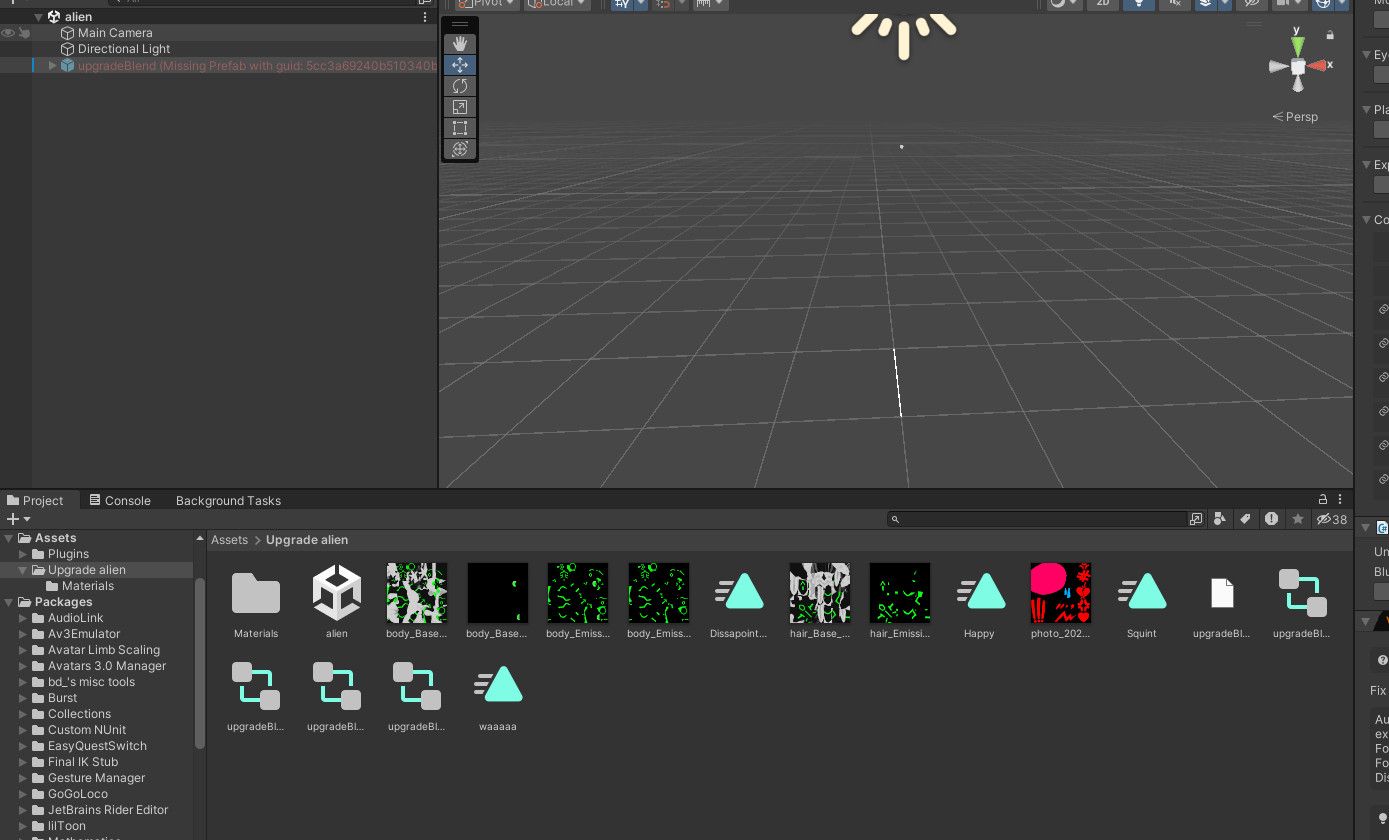
                        8b4f288d-cbb6-46f5-b011-f4e44425d534-image.jpeg

                        unsure what going on but the model does not show up

                        1 Reply Last reply
                        0
                        • Fredthepotato17F
                          Fredthepotato17F
                          Fredthepotato17
                          wrote on last edited by
                          #18

                          Do you have blender installed on your pc?

                          Poiyomi is for the weak, use toon standard instead

                          NymphoN 1 Reply Last reply
                          0
                          • NymphoN
                            NymphoN
                            Nympho
                            wrote on last edited by
                            #19

                            nope

                            1 Reply Last reply
                            0
                            • Fredthepotato17F Fredthepotato17

                              Do you have blender installed on your pc?

                              NymphoN
                              NymphoN
                              Nympho
                              wrote on last edited by Nympho
                              #20

                              @Fredthepotato17 Why do I need Blender when I specifically ask for Unity files? I barely even know Unity as it is.

                              1 Reply Last reply
                              0
                              • Fredthepotato17F
                                Fredthepotato17F
                                Fredthepotato17
                                wrote on last edited by
                                #21

                                It's a .blend file. Your pc needs to have blender installed to even know the file exists, sorry about that. You dont need to open blender at all at least, just have it installed

                                Poiyomi is for the weak, use toon standard instead

                                NymphoN 2 Replies Last reply
                                0
                                • Fredthepotato17F Fredthepotato17

                                  It's a .blend file. Your pc needs to have blender installed to even know the file exists, sorry about that. You dont need to open blender at all at least, just have it installed

                                  NymphoN
                                  NymphoN
                                  Nympho
                                  wrote on last edited by
                                  #22

                                  @Fredthepotato17 I set it up, but nothing is happening. same error

                                  1 Reply Last reply
                                  0
                                  • Fredthepotato17F Fredthepotato17

                                    It's a .blend file. Your pc needs to have blender installed to even know the file exists, sorry about that. You dont need to open blender at all at least, just have it installed

                                    NymphoN
                                    NymphoN
                                    Nympho
                                    wrote on last edited by
                                    #23

                                    @Fredthepotato17 I'm not trying to make things difficult for anyone I just want to explain that I'm still getting the hang of this and tend to learn slowly when it comes to these tasks. I installed Blender on Steam and reopened Unity, but I'm still facing the same issue. To be honest, I'm even more confused now. I apologize if my previous message sounded unclear; I'm truly lost and struggling to make sense of everything. I wish I were joking, but just last week, I finally figured out how to retexture a model. The most I've been able to do so far is install a shader and upload a model.

                                    BerryBushB 1 Reply Last reply
                                    0
                                    • NymphoN Nympho

                                      @Fredthepotato17 I'm not trying to make things difficult for anyone I just want to explain that I'm still getting the hang of this and tend to learn slowly when it comes to these tasks. I installed Blender on Steam and reopened Unity, but I'm still facing the same issue. To be honest, I'm even more confused now. I apologize if my previous message sounded unclear; I'm truly lost and struggling to make sense of everything. I wish I were joking, but just last week, I finally figured out how to retexture a model. The most I've been able to do so far is install a shader and upload a model.

                                      BerryBushB
                                      BerryBushB
                                      BerryBush
                                      wrote on last edited by
                                      #24

                                      @Nympho
                                      This might help you out: https://www.youtube.com/watch?v=IhMmYbrBmhk
                                      Good luck soldier!

                                      If i bump your post even though its already been solved or found, it's so I can come back to it later on my pc

                                      1 Reply Last reply
                                      0
                                      • Fredthepotato17F
                                        Fredthepotato17F
                                        Fredthepotato17
                                        wrote on last edited by
                                        #25

                                        Well yes, and im about as confused as you here. From the photo im seeing it seems the model itself is not registering as a proper file (the blank white one) and usually that is fixed by getting blender. My only other theory is maybe install the unitypackage again

                                        Poiyomi is for the weak, use toon standard instead

                                        1 Reply Last reply
                                        0
                                        • BerryBushB
                                          BerryBushB
                                          BerryBush
                                          wrote on last edited by
                                          #26

                                          I downloaded the blend file and put it into a file converter to make it an FBX so I could try my hand at doing something with it, and the model was all jumbled up and deformed.

                                          If i bump your post even though its already been solved or found, it's so I can come back to it later on my pc

                                          1 Reply Last reply
                                          0

                                          Hello! It looks like you're interested in this conversation, but you don't have an account yet.

                                          Getting fed up of having to scroll through the same posts each visit? When you register for an account, you'll always come back to exactly where you were before, and choose to be notified of new replies (either via email, or push notification). You'll also be able to save bookmarks and upvote posts to show your appreciation to other community members.

                                          With your input, this post could be even better 💗

                                          Register Login
                                          Reply
                                          • Reply as topic
                                          Log in to reply
                                          • Oldest to Newest
                                          • Newest to Oldest
                                          • Most Votes


                                          • Login

                                          • Login or register to search.
                                          • First post
                                            Last post
                                          0
                                          • Categories
                                          • Recent
                                          • Tags
                                          • Popular