
Pupstar Toggle Fixing HELP
-
I am using an avatar called pupstar by Jule3D, Anytime I change back to the avatar or change worlds the top goes back to the original pasties when I have a different top on. does anyone know how to fix it.
I was told there is a fix and there was a youtube tutorial on how to fix the toggles but the person hasn't answered back to my question on if they have the video or can explain it. I am not sure what to look for in search to find the tutorial and am not sure if I am doing something wrong.
I already make sure to check if the parameters are saved and sync, so that is not the issue
If anyone has a video that could help please link it <3.
-

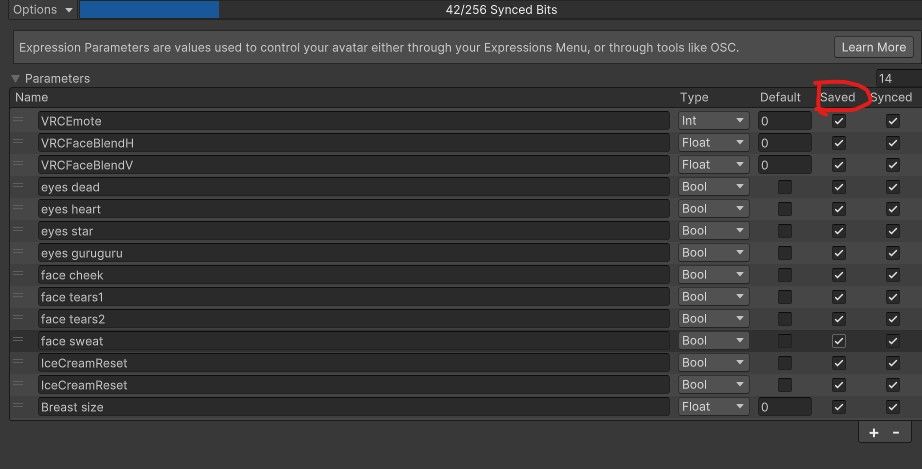 make sure that inside the parameters menu the parameter of the top and pasties is on saved because if is not prob gonna go back to his default state
 -
make sure that inside the parameters menu the parameter of the top and pasties is on saved because if is not prob gonna go back to his default state@GrimReaperrino they are all checked for saved and synced, that was the first thing I checked
Hello! It looks like you're interested in this conversation, but you don't have an account yet.
Getting fed up of having to scroll through the same posts each visit? When you register for an account, you'll always come back to exactly where you were before, and choose to be notified of new replies (either via email, or push notification). You'll also be able to save bookmarks and upvote posts to show your appreciation to other community members.
With your input, this post could be even better 💗
Register Login