
LF: Help W/ This Mega Dragonite Quest Material bug
-
In both respective reference to this initial post (by Solgesxd)
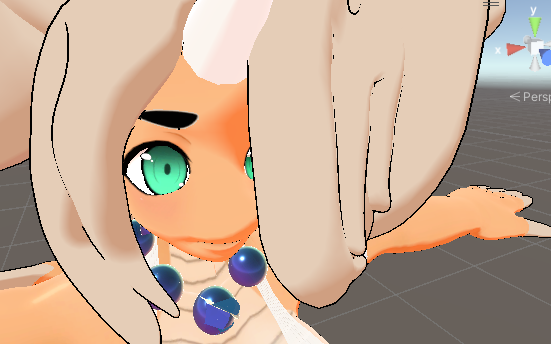
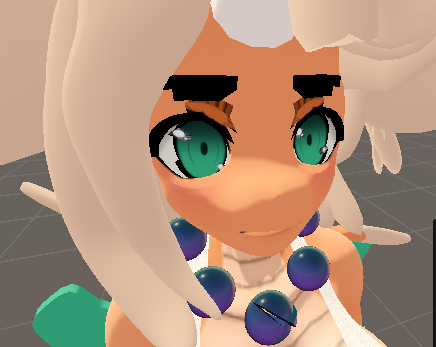
And a spoken mention to other technical avi issues here (@browniebatter48)I was almost done doing a batch of private uploads for myself, when I had noticed the quest-textures (or materials) of a model had some odd transparency issue around the eyes and eyebrows.
A unity friend of mine said smth abt Cutout Transparency, but I fiddled with everything myself and couldn't solve the issue with my lack of experience..
(PC)
(Quest w/ Parted hair)
please help out if ya cans
-
cutout transparency is typically something that can be done with poi at the top but thats a PC thing. for quest you may have to go to the texture itself and set it to transparent to see if that helps. its doing this cause the texture is supposed to be set to transparent or cutout in a pc shader.
-
cutout transparency is typically something that can be done with poi at the top but thats a PC thing. for quest you may have to go to the texture itself and set it to transparent to see if that helps. its doing this cause the texture is supposed to be set to transparent or cutout in a pc shader.
@BrownieBatter48 forgot to comment this btw but I fiddled with both the material & texture settings, couldn't get either to work -x-
-
sadly quest doesn't support transparent or cutout textures and the devs refuse to add support for it. If these are the only textures that are functioning like this and not something large like clothing, you could try changing it to a mobile particle shader within VRC's provided shaders, they work decent for smaller textures like this and glasses for Avis
Woah! A Signature! And an Idiot!
I want to learn blender but I'm too shy to ask because I know how much of a pain it is to teach someone.
wants to make and upload avis and yet is forever poor.
-
sadly quest doesn't support transparent or cutout textures and the devs refuse to add support for it. If these are the only textures that are functioning like this and not something large like clothing, you could try changing it to a mobile particle shader within VRC's provided shaders, they work decent for smaller textures like this and glasses for Avis
-
@Denath3 forgot to address this, but the eyes / eyebrows aren't sep materials, they're all in the singular Face material, and the closest thing to eliminating this was smth that def wouldn't be right..

@Resu dam, that's the worst outcome I forgot could be an option... looks like you'll have to go in and actively edit the texture to fix the issues, or if you have blender knowledge you could separate the eyes, eye brows and face into different mats, IDK how to do it, there's more then likely a tutorial that could help with that. Otherwise you're stuck with the messy textures on quest.
Hello! It looks like you're interested in this conversation, but you don't have an account yet.
Getting fed up of having to scroll through the same posts each visit? When you register for an account, you'll always come back to exactly where you were before, and choose to be notified of new replies (either via email, or push notification). You'll also be able to save bookmarks and upvote posts to show your appreciation to other community members.
With your input, this post could be even better 💗
Register Login