
LF: A rip of this Mimi Sentry avatar for NSFW editing
-
bump
-
-
-
bump
-
it not nsfw but it a combine version of ZzWz model with other avatar but here if anyone want to edit it
require avatar modular
-
-
-
Bump
-
bump
-
Bump
-
-
-
-
-
@Ralsai https://forum.ripper.store/topic/95061/toothless-stormfly-by-micowzow/86?_=1777008474104
can u help out with these two after ur done with mimi -
@Tsumiki-03 If you mean the visemes, I think I can give some pointers.
Lemme preface this by stating that I have no idea if this actually works in practice. I'm just using my knowledge of blendshapes to sortof... "summarize" the process.
Each part of the lips/mouth has a pair of bones (one for each side, they move in tandem), along with the teeth, which have two sets of bones. You want to move the bone that looks like a set of sharp jaws; these will prevent the teeth from clipping into eachother (or the mouth) if they get close enough, or far away enough. (I don't know how they did it for the bottom row of teeth. It's probably dark magic or something.)
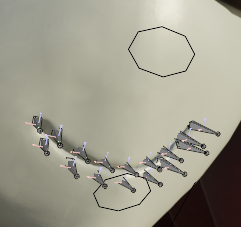
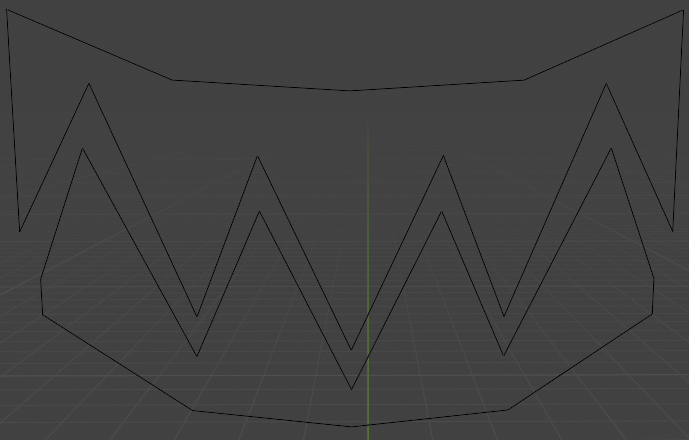
Using CATS, you can create blendshapes for the simple visemes.

Find a sample of what you're trying to make online from somewhere like smutbase. You want three baseline blendshapes (one for each of the simple sounds): "AA" (like in "apple"), "OH" (like in "home"), and "CH" (like in "chair"). You don't have to exactly match the sample you're using, it just has to look similar enough. In this example, this is "AA" at full strength.
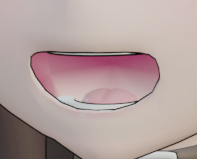
You might have noticed that when you test it in the face mesh, it doesn't seem to move the teeth with it. This is because the teeth are a separate mesh. It's the object called "Plane.003" on the model. Making your blendshapes caused both the face mesh and Plane.003 to have a blendshape with the same name. Once you've finished making your baseline blendshapes, return to Object Mode. Open the mouth with one of the new blendshapes, and click the teeth. Then, click the face and press Crtl+J. This will merge the two objects together into one. Since they both had a blendshape with the same name, they will use the same blendshape to control both simultaneously. Now, when you change the blendshape for the viseme, both the mouth and the teeth will move together.
Using CATS, you can take these three blendshapes and construct the rest in the add-on itself.
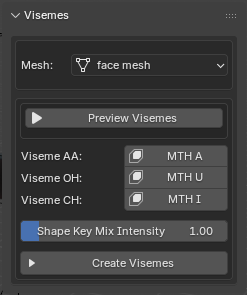
When you make your baseline visemes, remember that the modifications you make to the mouth will be what it looks like when the blendshape equals 1 (full strength). This is why I mentioned that "AA" was at full strength.
What CATS does is, it takes the three blendshapes and smoothly mixes them together to create the rest of the visemes, while also assigning those blendshapes to the base visemes... It also creates a "sil" viseme, meant for when there is no audio (hence the naming; it's "sil" as in "silent"), which is also required by VRChat.Past visemes, I don't have a clue as to getting this avatar to Unity, rigging it all up, and uploading it safely to VRChat. I've mostly stumbled my way through figuring it out. If anyone has any other pointers (or even wants to critique my guide, I'm open to it, rip me a new one), feel free to chime in.
@Seaport636 damn no updates weeeaaaaaaaaaaaaaak
-
-
bump
-
bump bump
-
22 days we shall wait longer bc unity is hard i gonna check next week






Hello! It looks like you're interested in this conversation, but you don't have an account yet.
Getting fed up of having to scroll through the same posts each visit? When you register for an account, you'll always come back to exactly where you were before, and choose to be notified of new replies (either via email, or push notification). You'll also be able to save bookmarks and upvote posts to show your appreciation to other community members.
With your input, this post could be even better 💗
Register Login