
FOUND by @meowy69: RURU by Rhimaru
-
This post is deleted!
-
Messing around with the avatar myself, I can definitely see how Vixen might cause some confusion with the toggles (I'm remaking them for my own preferences using VRCFury and re-arranging everything that I need, and removing what I don't).
One issue I have run into regarding the avatar is that I can't seem to figure out how to change the eye colors, because despite the fact I changed the texture, colors stay the same for the eyes, skin changes without issue tho.It was decal 3 causing the issue.
Avi looks nice nonetheless, so I might just buy it outright. Would be nice if there were proper pants options, though.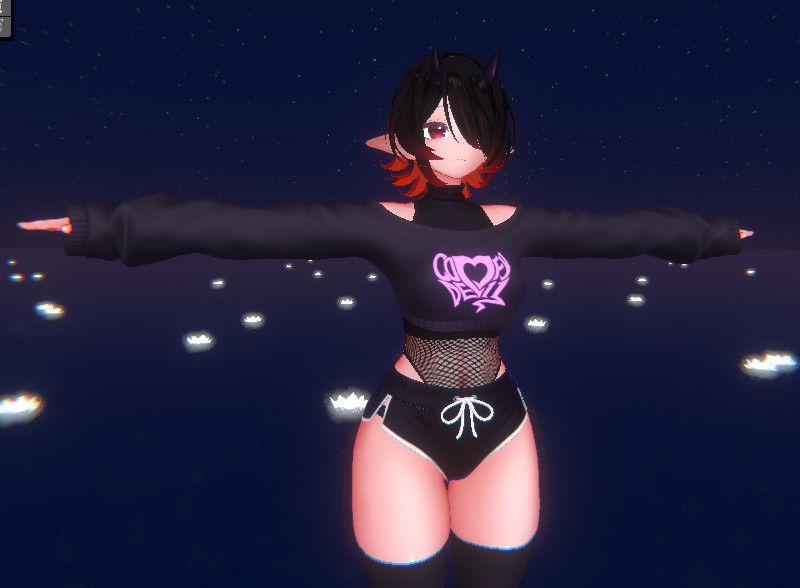
-
@Kleiner how optimized is she? if the creator had so much trouble with toggles and other issues im afraid they also failed on the opt part t-t
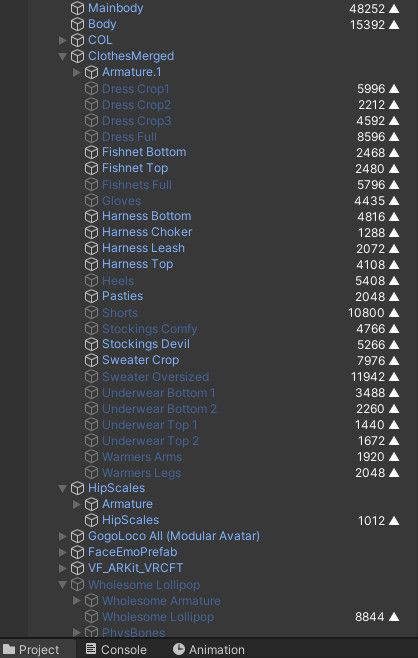
@Skydoms By default, there's only 1 prefab, which contains all the clothing options. Vram, material counts are thru the roof. Using d4rk optimizer and removing clothing pieces you can knock down the numbers quite a bit.
There aren't any VFX like godfall avatars so I'm not experiencing strong fps drops after optimizing the avi a bit. Just as any avi you get, needs some work before it's usable without complaints from others.
But overall, from TDA avatars I used, it's not terrible. I would recommend on waiting for the creator to update the avi with proper toggles NOT made with Vixen.
FX layer is a mess, menus are an unnamed file mess, parameters are an unnamed file mess. Oh and parameters are overflowing too.
But overall, I think it's possible to knock down the rating to medium, just by removing all but 1 set of clothing and clearing out a bunch of toggles. Oh and knocking down barely-textured textures to 1024 or even 512 resolution.I'm also suffering from an issue where the eye whites are invisible ingame and I have no idea what could've caused that.So some face textures seem to be missing the eye whites, hence the issue of them being invisible.|
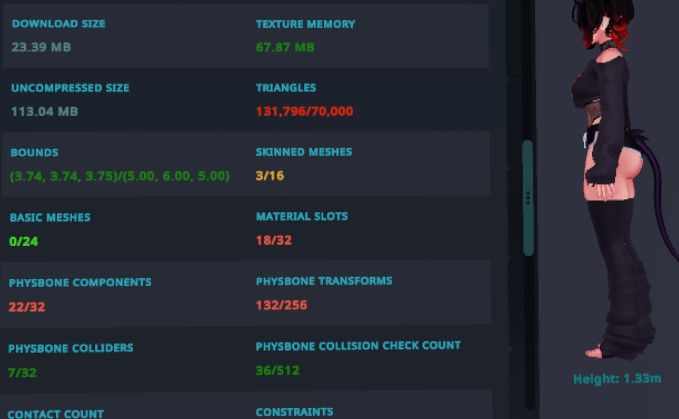
After a bit of work of fixing some issues, optimizing a bit but not entirely (got multiple pieces of clothing, not all though), here's the result
-
-
-
-
-
@SuGa2 I always optimize my nsfw avis to this level. SFW is usually medium or better, though. Tomorrow I'll try making a SFW version, so I can share results.
On average, download size for my SFW versions are under 10 mb. Around 8mb if I can manage.
-
-
they def couldve merged some mats into one mesh for some of the clothes i personally think to have optimized better
-
@SuGa2 There are toggles for changing colors of everything, which are material changes. Remove those toggles and mat count will cut in half, at the very least.
-
-
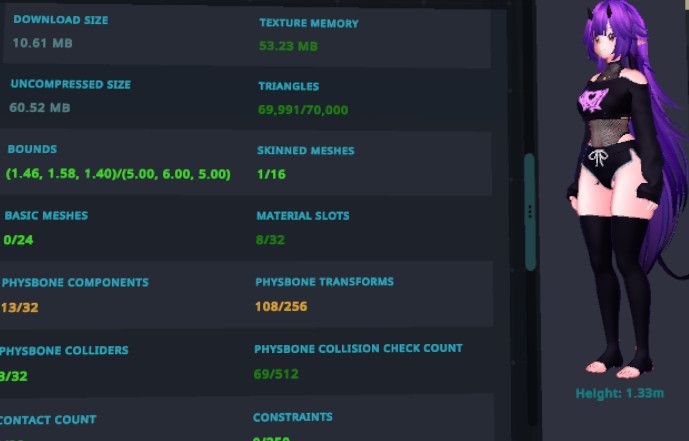
It is possible to get it down to medium, while keeping the overall look. Lots of features killed off though.
If I kill off the physbones, I can even get it good rated. Though I don't care much for it. -
-
@Skydoms By default, there's only 1 prefab, which contains all the clothing options. Vram, material counts are thru the roof. Using d4rk optimizer and removing clothing pieces you can knock down the numbers quite a bit.
There aren't any VFX like godfall avatars so I'm not experiencing strong fps drops after optimizing the avi a bit. Just as any avi you get, needs some work before it's usable without complaints from others.
But overall, from TDA avatars I used, it's not terrible. I would recommend on waiting for the creator to update the avi with proper toggles NOT made with Vixen.
FX layer is a mess, menus are an unnamed file mess, parameters are an unnamed file mess. Oh and parameters are overflowing too.
But overall, I think it's possible to knock down the rating to medium, just by removing all but 1 set of clothing and clearing out a bunch of toggles. Oh and knocking down barely-textured textures to 1024 or even 512 resolution.I'm also suffering from an issue where the eye whites are invisible ingame and I have no idea what could've caused that.So some face textures seem to be missing the eye whites, hence the issue of them being invisible.|
After a bit of work of fixing some issues, optimizing a bit but not entirely (got multiple pieces of clothing, not all though), here's the result
-
@Kleiner thank you sm for the answer! Good lawd tho,it really is mad heavy,such a shame for such a cute avi t-t The creator prolly wont update it for a good while,they'll have to redo everything basically and thats a lot of work
@Skydoms With a bit of willpower and work, it's quite usable. As you can see from the stats I posted.
Tools I use:- Modular Avatar Mesh Cutter. (Mask/Bone/Vertex mesh hider-deletion. Deletes the mesh, reducing poly count even more, if the mesh is always active. I suggest Mask-based. For example: Deleting a mesh under clothing for SFW avis.)
- Meshia's Mesh Simplification. (Realtime, non-destructive poly decimation per-mesh)
- VRCFury for remaking toggles.
- D4rk Optimizer. (Combines meshes, materials, etc., wherever possible, cleans up layers, blendshapes, physbones, bones, as best as possible.)
All of these are non-destructive, and get applied upon upload/playtest. Although, VRCFury doesn't help with optimization regarding the way it makes toggles and fx layer.
-
This avatar is shockingly hard to make Quest compatible. Then again, maybe I’m just a dunce.
-
Is the avatar still usable without any editing or does it cause too much fps issues?
I usually don't optimize my avatars too much -
Is the avatar still usable without any editing or does it cause too much fps issues?
I usually don't optimize my avatars too much@YumikoTheCutie I'd recommend using a Texture Optimizer to reduce the resolution of textures to at least 1024, no need to crunch compress.
And d4rk optimizer which is a script that gets added to your avatar descriptor. That should knock down most of the performance issues that might pop up. This is the bare minimum I add to my avatars. It's non-destructive and doesn't take long at all.
I heavily recommend adding d4rk optimizer to every single avatar you use.
Texture reduction really depends on how the textures were made on the avatar and clothing, but it will heavily reduce VRAM usage. -
Here are some example prefabs for those who need/curious about it. These are rather barebones without many options from the original avatar.
I don't have much motivation to do more work on it at the moment.
The 3 objects with scripts inside of the prefabs are somewhat transferable between avatars with minor adjustments needed to them.
D4rk's Optimizer on Avatar Descriptor
Mesh Cutter
Mask Texture Editor
Meshia's Mesh Simplification
VRCF Toggles
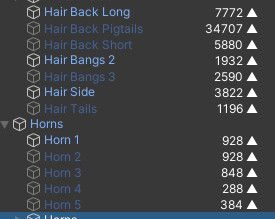
If you switch out the hair, it is possible to get it down to good rating. Physbone transforms are always the limiting factor on this avi.







Hello! It looks like you're interested in this conversation, but you don't have an account yet.
Getting fed up of having to scroll through the same posts each visit? When you register for an account, you'll always come back to exactly where you were before, and choose to be notified of new replies (either via email, or push notification). You'll also be able to save bookmarks and upvote posts to show your appreciation to other community members.
With your input, this post could be even better 💗
Register Login