Skip to content
  • Categories
  • Recent
  • Tags
  • Popular
Skins
  • Light
  • Brite
  • Cerulean
  • Cosmo
  • Flatly
  • Journal
  • Litera
  • Lumen
  • Lux
  • Materia
  • Minty
  • Morph
  • Pulse
  • Sandstone
  • Simplex
  • Sketchy
  • Spacelab
  • United
  • Yeti
  • Zephyr
  • Dark
  • Cyborg
  • Darkly
  • Quartz
  • Slate
  • Solar
  • Superhero
  • Vapor

  • Default (Zephyr)
  • No Skin
Collapse
RipperStore Logo
  1. Home
  2. Assets
  3. Looking for...
  4. NSFW
  5. Female Tails VRC Port Solved (RIGGED By Rott)

Female Tails VRC Port Solved (RIGGED By Rott)

Scheduled Pinned Locked Moved Unsolved NSFW
nsfwtailsfurryvrc portblender
99 Posts 27 Posters 6.7k Views 79 Watching
  • Oldest to Newest
  • Newest to Oldest
  • Most Votes
Reply
  • Reply as topic
Log in to reply
This topic has been deleted. Only users with topic management privileges can see it.
  • ALilRottenA
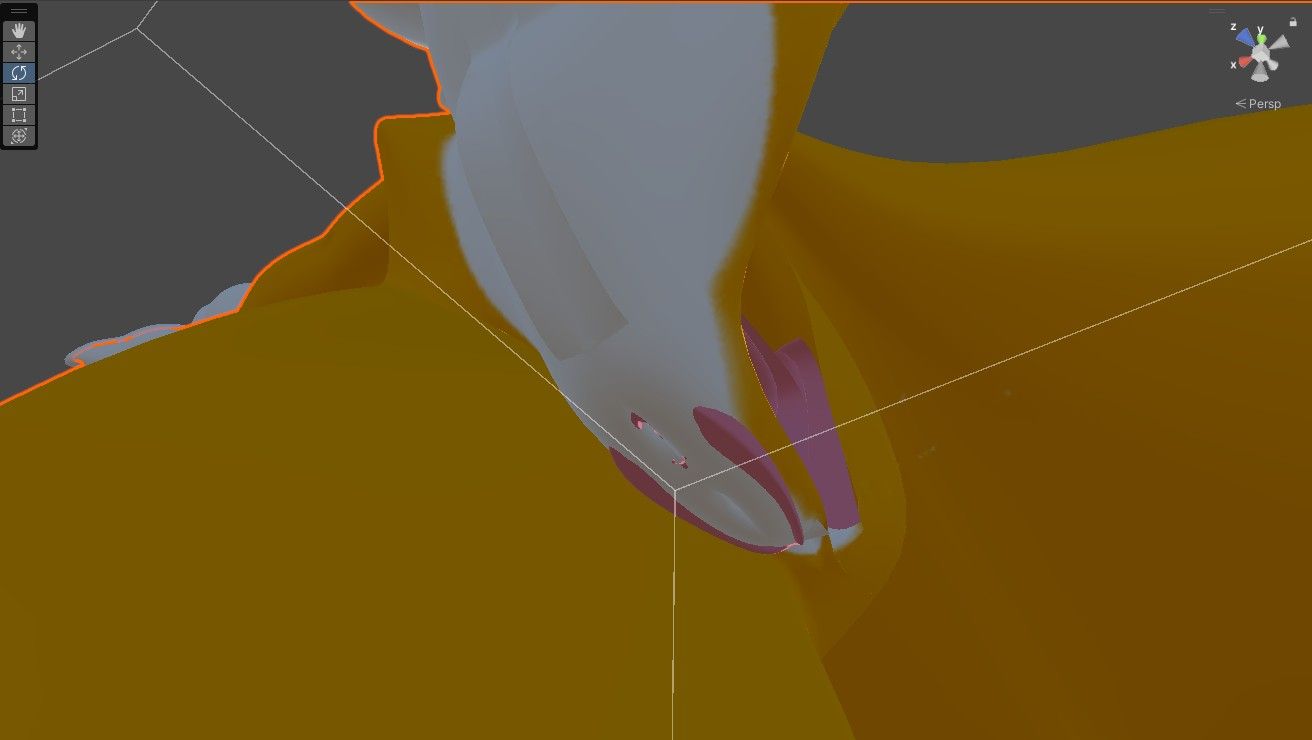
    ALilRottenA
    ALilRotten
    wrote on last edited by ALilRotten
    #36

    Update: I had an issue with her legs as shown in exhibit A.
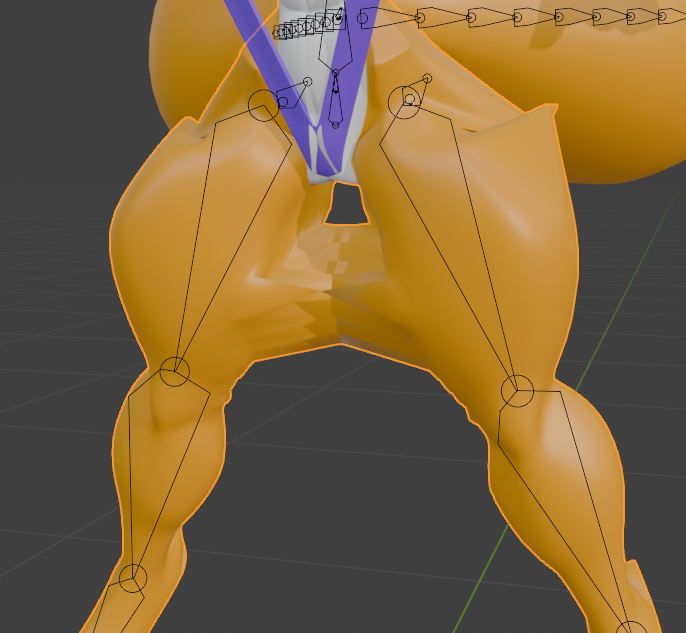
    Screenshot 2026-04-06 182230.png

    Now, this may look like a weight paint issue and it sort of it, BUT, get this. All of the verts you see here can EASILY be fixed. Except one as shown in exhibit B.
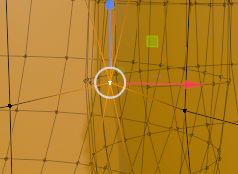
    Screenshot 2026-04-06 182253.png

    These two are connected, likely done from the mirror modifier the original creator did. To fix it I had to completely cut off a portion of one of the legs, weight it, delete the vert causing the connection issue on BOTH legs, recreate how they looked on both legs, weight paint it again and get this result as shown in exhibit C.

    Screenshot 2026-04-06 184919.png

    I hate to admit, but this took me way too long. I really didn't want to have to slice the model open or delete anything, but I had no choice in this case. Now I can tell someone of you are thinking: Why did you need to separate a portion of one of the legs if the issue was just one connected vert?

    Because it would be 100xs easier for me to weight paint that part of the leg instead of having to go into the model's leg and slowly weight it that way. The model itself is just ONE BIG MESH, no separate parts besides the tails, shoes, outfit, gloves, eyes, and eyelashes. Making it a little harder to weight paint.
    But I got it.

    What I got weighted so far is the Head, Neck, Ears, Eyes (if needed, but I have still eyes and moving eyes just in case. The moving eyes are acting weird in Blender a bit...), Upper chest, Chest, Spine, Shoulders, Upper arms, Upper legs, Lower Legs, Feet, and Toes.

    All that's left is the hair pieces, tails, the clothing, fingers, lower arms and hands.

    • I rig up models
    • I add clothing/assets to premade models
    • Learning how to make models
    • Can make VRC ports
    • I teach people via YT

    [I do NOT do trades]

    :Feel free to message me, just don't be demanding.:

    Ryuma SuppziardR 1 Reply Last reply
    5
    • ALilRottenA ALilRotten

      Update: I had an issue with her legs as shown in exhibit A.

      Screenshot 2026-04-06 182230.png

      Now, this may look like a weight paint issue and it sort of it, BUT, get this. All of the verts you see here can EASILY be fixed. Except one as shown in exhibit B.

      Screenshot 2026-04-06 182253.png

      These two are connected, likely done from the mirror modifier the original creator did. To fix it I had to completely cut off a portion of one of the legs, weight it, delete the vert causing the connection issue on BOTH legs, recreate how they looked on both legs, weight paint it again and get this result as shown in exhibit C.

      Screenshot 2026-04-06 184919.png

      I hate to admit, but this took me way too long. I really didn't want to have to slice the model open or delete anything, but I had no choice in this case. Now I can tell someone of you are thinking: Why did you need to separate a portion of one of the legs if the issue was just one connected vert?

      Because it would be 100xs easier for me to weight paint that part of the leg instead of having to go into the model's leg and slowly weight it that way. The model itself is just ONE BIG MESH, no separate parts besides the tails, shoes, outfit, gloves, eyes, and eyelashes. Making it a little harder to weight paint.
      But I got it.

      What I got weighted so far is the Head, Neck, Ears, Eyes (if needed, but I have still eyes and moving eyes just in case. The moving eyes are acting weird in Blender a bit...), Upper chest, Chest, Spine, Shoulders, Upper arms, Upper legs, Lower Legs, Feet, and Toes.

      All that's left is the hair pieces, tails, the clothing, fingers, lower arms and hands.

      Ryuma SuppziardR
      Ryuma SuppziardR
      Ryuma Suppziard
      wrote on last edited by
      #37

      @ALilRotten bro I'm watching your work and it looks like a masterpiece, really love the care you're having with the model, also your work is absolute awesome!

      ALilRottenA 1 Reply Last reply
      1
      • Ryuma SuppziardR Ryuma Suppziard

        @ALilRotten bro I'm watching your work and it looks like a masterpiece, really love the care you're having with the model, also your work is absolute awesome!

        ALilRottenA
        ALilRottenA
        ALilRotten
        wrote on last edited by
        #38

        @Ryuma-Suppziard

        Thank you! I greatly appreciate that. ^^
        I'm trying to do my best with it. I have seen its been a year since people have been wanting this model and because of that I feel like I should deliver a model worth waiting for. Of course... it won't be perfect. ^^;
        I'm no expert.

        • I rig up models
        • I add clothing/assets to premade models
        • Learning how to make models
        • Can make VRC ports
        • I teach people via YT

        [I do NOT do trades]

        :Feel free to message me, just don't be demanding.:

        1 Reply Last reply
        3
        • ALilRottenA ALilRotten

          @ClosetGhost

          You're lucky I was looking around for Sonic models just to see if anything caught my eye.
          I'm not a fan of these models, but as someone who likes seeing female Tails (Not this kind, but what can you do.) I decided to look it up and what do you know, there were some. (Just... overly thick ones though.)

          My point is...
          Ah, fuck it. Just look: https://gamejolt.com/p/warning-nsfw-note-i-m-not-a-fan-of-these-types-of-models-at-all-c52hfeix

          I'll do expressions later.

          ALilRottenA
          ALilRottenA
          ALilRotten
          wrote on last edited by
          #39

          In case no one saw it, my post on Gamejolt was taken down. Not that I'm surprised. It makes sense given the content that was in it.

          So any video updates will be posted on my YT and linked in these posts. That's only videos though. Not pictures.

          Just thought I should let everyone know.

          • I rig up models
          • I add clothing/assets to premade models
          • Learning how to make models
          • Can make VRC ports
          • I teach people via YT

          [I do NOT do trades]

          :Feel free to message me, just don't be demanding.:

          1 Reply Last reply
          2
          • Blaze7689B
            Blaze7689B
            Blaze7689
            wrote on last edited by
            #40

            Dang that sucks. Thanks for the heads up. I'll keep an eye out

            1 Reply Last reply
            0
            • ALilRottenA
              ALilRottenA
              ALilRotten
              wrote on last edited by ALilRotten
              #41

              Attention all model wanters!!

              Looks like I finished faster than expected. Its only the FBX and Blend file though.
              There are meshes that are separate just in case for those who don't want the NSFW option.

              Here are the features it contains just as a Blend file and FBX file:

              • Expressions : Angry, Sad, Confused, Blush, Jealous, Happy, Deadpan, Embarrassed, Blink
              • Visemes
              • Body modifications : No thickness, Outfit fix (normal), Outfit fix (no thickness), Hide fur (for shoes)

              What the file link contains:

              • All textures used
              • Blend file
              • FBX file
              • Original Blend file

              I have a video showing off these features I listed above here: https://www.youtube.com/watch?v=wMoolqaBVXM
              And here is the link to the model: https://drive.proton.me/urls/G4N9689FBG#uJo988NZPfAr

              • I rig up models
              • I add clothing/assets to premade models
              • Learning how to make models
              • Can make VRC ports
              • I teach people via YT

              [I do NOT do trades]

              :Feel free to message me, just don't be demanding.:

              Blaze7689B 1 Reply Last reply
              ♥ 👑
              6
              • ALilRottenA ALilRotten

                Attention all model wanters!!

                Looks like I finished faster than expected. Its only the FBX and Blend file though.
                There are meshes that are separate just in case for those who don't want the NSFW option.

                Here are the features it contains just as a Blend file and FBX file:

                • Expressions : Angry, Sad, Confused, Blush, Jealous, Happy, Deadpan, Embarrassed, Blink
                • Visemes
                • Body modifications : No thickness, Outfit fix (normal), Outfit fix (no thickness), Hide fur (for shoes)

                What the file link contains:

                • All textures used
                • Blend file
                • FBX file
                • Original Blend file

                I have a video showing off these features I listed above here: https://www.youtube.com/watch?v=wMoolqaBVXM
                And here is the link to the model: https://drive.proton.me/urls/G4N9689FBG#uJo988NZPfAr

                Blaze7689B
                Blaze7689B
                Blaze7689
                wrote on last edited by
                #42

                @ALilRotten Thank you for taking the time to finish this. I appreciate it very much

                ALilRottenA 1 Reply Last reply
                👍
                1
                • Blaze7689B Blaze7689

                  @ALilRotten Thank you for taking the time to finish this. I appreciate it very much

                  ALilRottenA
                  ALilRottenA
                  ALilRotten
                  wrote on last edited by
                  #43

                  @Sonic6908
                  No problem. Hope it works out for those who have downloaded it.
                  Have fun. I am now... taking a much needed rest. ^^

                  • I rig up models
                  • I add clothing/assets to premade models
                  • Learning how to make models
                  • Can make VRC ports
                  • I teach people via YT

                  [I do NOT do trades]

                  :Feel free to message me, just don't be demanding.:

                  Blaze7689B T 2 Replies Last reply
                  2
                  • ALilRottenA ALilRotten

                    @Sonic6908
                    No problem. Hope it works out for those who have downloaded it.
                    Have fun. I am now... taking a much needed rest. ^^

                    Blaze7689B
                    Blaze7689B
                    Blaze7689
                    wrote on last edited by
                    #44

                    @ALilRotten No worries. Hope you get some nice needed rest.

                    1 Reply Last reply
                    0
                    • CarmenTheC
                      CarmenTheC
                      CarmenThe
                      wrote on last edited by
                      #45

                      Thank you for giving your time into making this model vrc compatible ! 😀

                      Blaze7689B 1 Reply Last reply
                      👍
                      1
                      • CarmenTheC CarmenThe

                        Thank you for giving your time into making this model vrc compatible ! 😀

                        Blaze7689B
                        Blaze7689B
                        Blaze7689
                        wrote on last edited by
                        #46

                        @CarmenThe Oh one more thing, when you get the could you make this be a blendshape so it doesn't clip? When you get the chance that is. Its the only clipping I found.d1ec056b-2834-4505-af9a-04919eb0b569-image.jpeg

                        Blaze7689B 1 Reply Last reply
                        0
                        • Blaze7689B Blaze7689

                          @CarmenThe Oh one more thing, when you get the could you make this be a blendshape so it doesn't clip? When you get the chance that is. Its the only clipping I found.d1ec056b-2834-4505-af9a-04919eb0b569-image.jpeg

                          Blaze7689B
                          Blaze7689B
                          Blaze7689
                          wrote on last edited by
                          #47

                          Wait nevermind I just realized I could just make the mats white for it

                          ALilRottenA 1 Reply Last reply
                          0
                          • ALilRottenA ALilRotten

                            @Sonic6908
                            No problem. Hope it works out for those who have downloaded it.
                            Have fun. I am now... taking a much needed rest. ^^

                            T
                            T
                            TheTalkingPlush
                            wrote on last edited by
                            #48

                            @ALilRotten Hello there! maker of the post in here, you have no idea how much i have to thank you for making this, you have my thanks for making this model riggable. Hope you take a good break, and thank you

                            ALilRottenA 1 Reply Last reply
                            0
                            • Blaze7689B Blaze7689

                              Wait nevermind I just realized I could just make the mats white for it

                              ALilRottenA
                              ALilRottenA
                              ALilRotten
                              wrote on last edited by
                              #49

                              @Sonic6908
                              Sorry, I didn't realize there was clipping there. I thought I had it all sorted out. My apologies. ^^;
                              When I'm not busy again I'll have it fixed up.
                              Thanks for bringing this to my attention.

                              • I rig up models
                              • I add clothing/assets to premade models
                              • Learning how to make models
                              • Can make VRC ports
                              • I teach people via YT

                              [I do NOT do trades]

                              :Feel free to message me, just don't be demanding.:

                              1 Reply Last reply
                              2
                              • T TheTalkingPlush

                                @ALilRotten Hello there! maker of the post in here, you have no idea how much i have to thank you for making this, you have my thanks for making this model riggable. Hope you take a good break, and thank you

                                ALilRottenA
                                ALilRottenA
                                ALilRotten
                                wrote on last edited by
                                #50

                                @TheFumoPlush
                                Thank you and you're welcome. ^^
                                I did my best and I know the model is far from perfect. If there are any issues I can fix let me know. ^^

                                • I rig up models
                                • I add clothing/assets to premade models
                                • Learning how to make models
                                • Can make VRC ports
                                • I teach people via YT

                                [I do NOT do trades]

                                :Feel free to message me, just don't be demanding.:

                                T 1 Reply Last reply
                                1
                                • ALilRottenA ALilRotten

                                  @TheFumoPlush
                                  Thank you and you're welcome. ^^
                                  I did my best and I know the model is far from perfect. If there are any issues I can fix let me know. ^^

                                  T
                                  T
                                  TheTalkingPlush
                                  wrote on last edited by
                                  #51

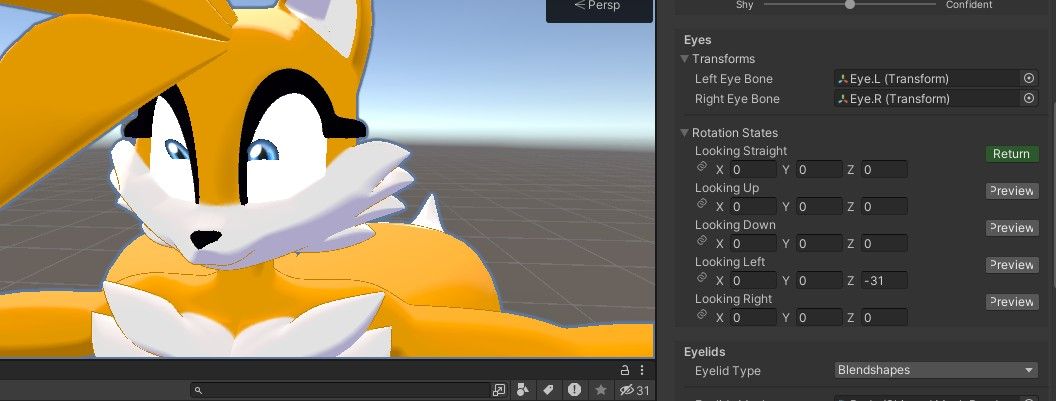
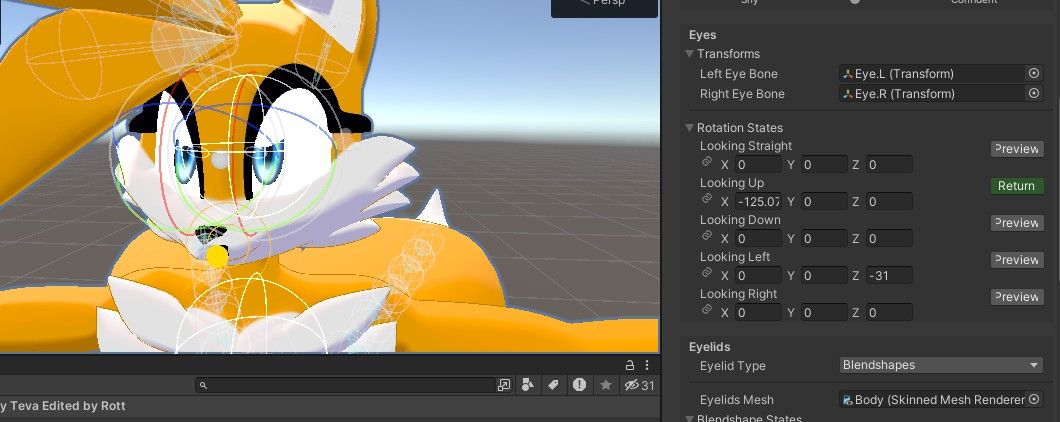
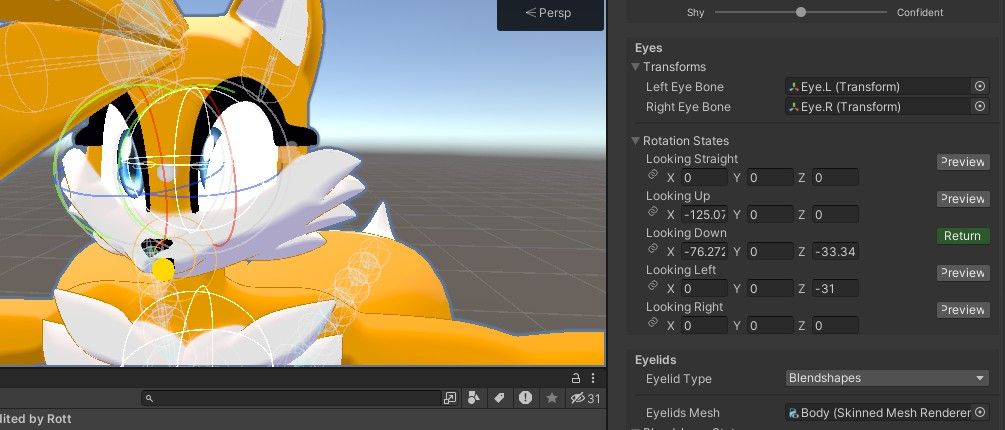
                                  @ALilRotten hello there, fumo here again. i've been editing the tailsko model so that i can place it here for anyone who wants to use it, ive found an issue and i wonder if you can fix it. basically the issue are the eyes, here's some pictures of the issue, tried to fix it myself but it wouldnt work so im here, if you have time for this little quick fix we all be thankfull to you95c36a08-4257-4ec7-a1d6-ea0e09413088-image.jpeg e03c3a4f-b8d7-41ea-a8eb-79022b4f3436-image.jpeg d19a0849-a731-4365-ae57-ac5eabd4c53e-image.jpeg

                                  T Blaze7689B 2 Replies Last reply
                                  0
                                  • T TheTalkingPlush

                                    @ALilRotten hello there, fumo here again. i've been editing the tailsko model so that i can place it here for anyone who wants to use it, ive found an issue and i wonder if you can fix it. basically the issue are the eyes, here's some pictures of the issue, tried to fix it myself but it wouldnt work so im here, if you have time for this little quick fix we all be thankfull to you95c36a08-4257-4ec7-a1d6-ea0e09413088-image.jpeg e03c3a4f-b8d7-41ea-a8eb-79022b4f3436-image.jpeg d19a0849-a731-4365-ae57-ac5eabd4c53e-image.jpeg

                                    T
                                    T
                                    TheTalkingPlush
                                    wrote on last edited by
                                    #52

                                    i also kinda fixed some of the clipping and added some things of my own for the model, when im done editing ill release it here for anyone

                                    ALilRottenA 1 Reply Last reply
                                    0
                                    • T TheTalkingPlush

                                      @ALilRotten hello there, fumo here again. i've been editing the tailsko model so that i can place it here for anyone who wants to use it, ive found an issue and i wonder if you can fix it. basically the issue are the eyes, here's some pictures of the issue, tried to fix it myself but it wouldnt work so im here, if you have time for this little quick fix we all be thankfull to you95c36a08-4257-4ec7-a1d6-ea0e09413088-image.jpeg e03c3a4f-b8d7-41ea-a8eb-79022b4f3436-image.jpeg d19a0849-a731-4365-ae57-ac5eabd4c53e-image.jpeg

                                      Blaze7689B
                                      Blaze7689B
                                      Blaze7689
                                      wrote on last edited by
                                      #53

                                      @TheFumoPlush I didn't bothered with using that when I ported mine. However the eyelids clip though when making the gestures

                                      1 Reply Last reply
                                      0
                                      • T TheTalkingPlush

                                        i also kinda fixed some of the clipping and added some things of my own for the model, when im done editing ill release it here for anyone

                                        ALilRottenA
                                        ALilRottenA
                                        ALilRotten
                                        wrote on last edited by
                                        #54

                                        @TheFumoPlush

                                        Oh boy, sounds like a lot of issues are happening. I figured the movable eyes would be an issue, but I didn't expect the eyelids to clip with expressions. When I get time I will fix everything I can. I'm gonna have to make a list now.

                                        Very sorry about all of this. I did say it wasn't going to be perfect. I'll see what I can do. After fixing it I will have a repost of the model.

                                        • I rig up models
                                        • I add clothing/assets to premade models
                                        • Learning how to make models
                                        • Can make VRC ports
                                        • I teach people via YT

                                        [I do NOT do trades]

                                        :Feel free to message me, just don't be demanding.:

                                        1 Reply Last reply
                                        1
                                        • ALilRottenA
                                          ALilRottenA
                                          ALilRotten
                                          wrote on last edited by
                                          #55

                                          That was quicker than I thought. So... I am unsure how to fix the issue with the blinking conflicting with the expressions. Its NOT suppose to do that. It might be a Unity issue, not sure because I know its not the blendshapes, I just checked.

                                          I added a new shapekey "PussClipFix" you can find it in "Modifications".
                                          You can now use the eye bones as intended. Don't be freaked out if you can't find them. They're a bit further away from the face now so that way you can get that eye movement you wish. Its gonna be a bit wonky at first, but once you get where you want the eyes to be it should work just fine.

                                          Link: https://drive.proton.me/urls/1E1VMQVQWM#l44STcihkJc4

                                          If you already worked on the model to a good degree, I suggest you replace the FBX file you have on hand with this one. THEY MUST HAVE THE SAME NAME. If you do not want to delete the original FBX you don't need to.
                                          Just put in a folder and save it just in case.

                                          To replace the model in Unity without having to redo EVERYTHING, just delete the prefab (the model) in the assets folder in Unity and then drag and drop the new FBX with the same name as the OG FBX name.

                                          (I also fixed some bones that weren't parented before. I didn't realize they weren't until I shoved the model into Unity for eye testing)

                                          • I rig up models
                                          • I add clothing/assets to premade models
                                          • Learning how to make models
                                          • Can make VRC ports
                                          • I teach people via YT

                                          [I do NOT do trades]

                                          :Feel free to message me, just don't be demanding.:

                                          Blaze7689B 1 Reply Last reply
                                          3

                                          Hello! It looks like you're interested in this conversation, but you don't have an account yet.

                                          Getting fed up of having to scroll through the same posts each visit? When you register for an account, you'll always come back to exactly where you were before, and choose to be notified of new replies (either via email, or push notification). You'll also be able to save bookmarks and upvote posts to show your appreciation to other community members.

                                          With your input, this post could be even better 💗

                                          Register Login
                                          Reply
                                          • Reply as topic
                                          Log in to reply
                                          • Oldest to Newest
                                          • Newest to Oldest
                                          • Most Votes


                                          • Login

                                          • Login or register to search.
                                          • First post
                                            Last post
                                          0
                                          • Categories
                                          • Recent
                                          • Tags
                                          • Popular