
Kayla Fox Poo-Chi 3D Model
-
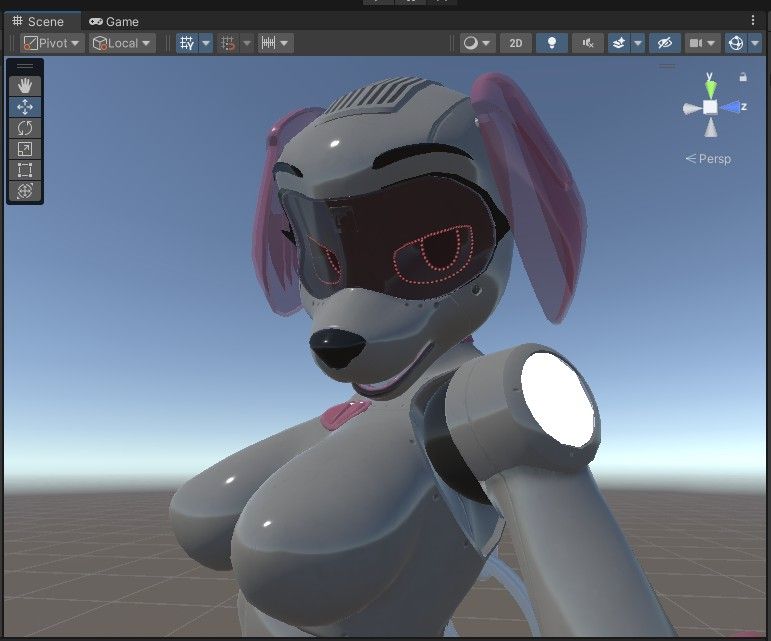
looking at the pink parts like the logos and stuff, the unity equivalent might be like a detail map or something extra like that
-
huge bump
-
bumpp
-
-
I was excited, so you all get a SECOND update today. Got her looking much more on-model now
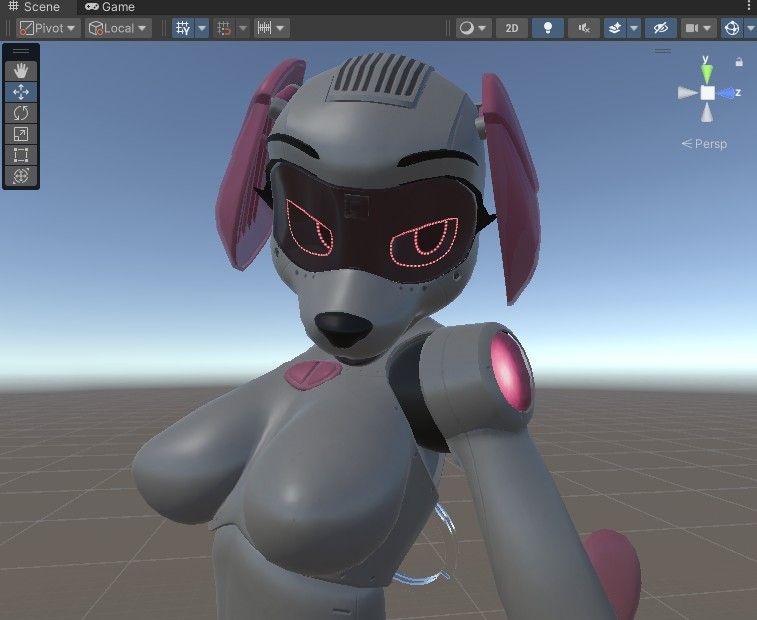
That all said, the to-do list is LENGTHY and there's a lot I have no idea how to do:
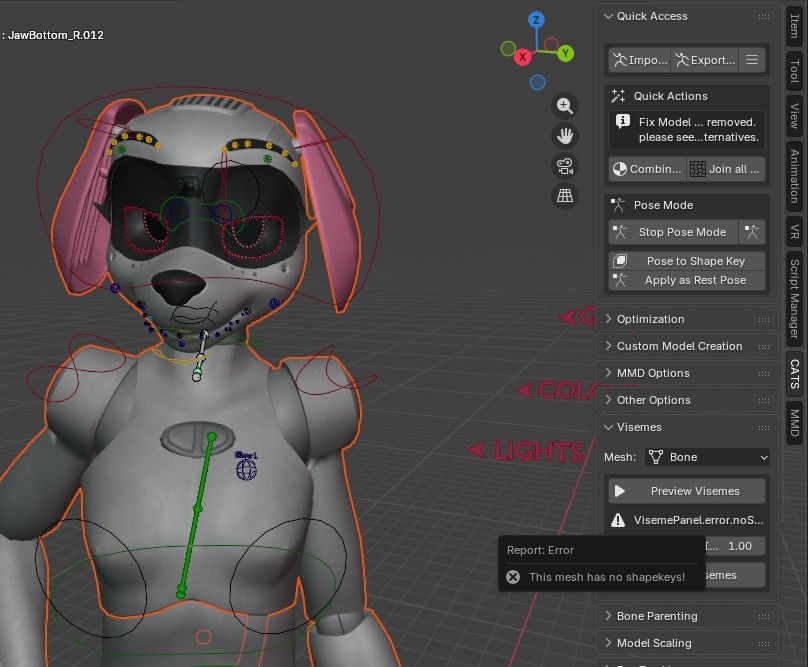
- blendshapes are nonexistant, nothing carried over from blender
- what IS in blender doesn't have any visemes set up, so I'd have to learn to make those myself
- facial expressions exist in limited fashion, but didn't export out of blender
- additional expressions should really get added (happy, sad, etc) and I'd need to add gesture controls for them
- the included bra doesn't seem to fit right, maybe blendshape related, maybe some other issue
- adding color toggles would be somewhat easy for me
If anyone knows blender and wants to offload some knowledge to ya girl, could really help get this out to you all sooner.
-
I was excited, so you all get a SECOND update today. Got her looking much more on-model now
That all said, the to-do list is LENGTHY and there's a lot I have no idea how to do:
- blendshapes are nonexistant, nothing carried over from blender
- what IS in blender doesn't have any visemes set up, so I'd have to learn to make those myself
- facial expressions exist in limited fashion, but didn't export out of blender
- additional expressions should really get added (happy, sad, etc) and I'd need to add gesture controls for them
- the included bra doesn't seem to fit right, maybe blendshape related, maybe some other issue
- adding color toggles would be somewhat easy for me
If anyone knows blender and wants to offload some knowledge to ya girl, could really help get this out to you all sooner.
@kryfus what you can do to make visemes (since it's an animation model, and shape keys aren't needed)
- pose the model in the shapekeys/visemes you want, then save pose as a shapekey
- repeat the process until you have enough visemes and expressions to run through CATS
- have CATS fill the spaces in and clean them up afterwards
-
@kryfus what you can do to make visemes (since it's an animation model, and shape keys aren't needed)
- pose the model in the shapekeys/visemes you want, then save pose as a shapekey
- repeat the process until you have enough visemes and expressions to run through CATS
- have CATS fill the spaces in and clean them up afterwards
@Handee_Vac CATS doesn't seem to work in Blender 5, I kinda didn't wanna downgrade a ton just for that...
-
@Handee_Vac CATS doesn't seem to work in Blender 5, I kinda didn't wanna downgrade a ton just for that...
@kryfus oof, I always keep a copy of 4.5 handy for that kind of stuff
-
@kryfus oof, I always keep a copy of 4.5 handy for that kind of stuff
-
@kryfus cats still works in 4.5? the unofficial patch does at least, though sunsetted, what's on the github still works
 dunno if they were able to start a 5.0 version before then
 -
Lol I definitely shouldn't be in these threads at work, but screw my work!

-
@Handee_Vac CATS doesn't seem to work in Blender 5, I kinda didn't wanna downgrade a ton just for that...
@kryfus just download old blender as a zip on the site that way it won't override new blender! :3
You're welcome! -
Even better, get Blender Launcher, lets you download different multiple different builds of blender plus it transfers over your addons when you upgrade to the newer versions; great way to keep it organized! You'll be working like the pros lmao
https://victor-ix.github.io/Blender-Launcher-V2/ -
-
start with the model unposed, then pose the bones into the visemes you want
with CATS, you click on "Pose to Shape Key" then label the new shape key to the viseme you want it to be (try to make AA OO EE) then with CATS, input the viseme shape keys, then generate the rest of them with it
Same with expressions as shape keys -
start with the model unposed, then pose the bones into the visemes you want
with CATS, you click on "Pose to Shape Key" then label the new shape key to the viseme you want it to be (try to make AA OO EE) then with CATS, input the viseme shape keys, then generate the rest of them with it
Same with expressions as shape keys -
@Handee_Vac appreciate it, but most of this is stuff I knew, I just don't know the next steps heh.
Like I said, learning still.
@kryfus I'm all for helping as best as I can, love seeing people learn blender; I'm in no rush to get a unity version myself but I can do my best to help ya with your project

-
Ayyy, I was looking for this thinking about porting it too, but you're making great headway @kryfus. I was in your position just a few months ago (WTF is a viseme?!) I just figured out manual weight painting a few weeks ago. Keep up the good work and keep us posted.
-
bump
-
bump bump



Hello! It looks like you're interested in this conversation, but you don't have an account yet.
Getting fed up of having to scroll through the same posts each visit? When you register for an account, you'll always come back to exactly where you were before, and choose to be notified of new replies (either via email, or push notification). You'll also be able to save bookmarks and upvote posts to show your appreciation to other community members.
With your input, this post could be even better 💗
Register Login