Skip to content
  • Categories
  • Recent
  • Tags
  • Popular
Skins
  • Light
  • Brite
  • Cerulean
  • Cosmo
  • Flatly
  • Journal
  • Litera
  • Lumen
  • Lux
  • Materia
  • Minty
  • Morph
  • Pulse
  • Sandstone
  • Simplex
  • Sketchy
  • Spacelab
  • United
  • Yeti
  • Zephyr
  • Dark
  • Cyborg
  • Darkly
  • Quartz
  • Slate
  • Solar
  • Superhero
  • Vapor

  • Default (Zephyr)
  • No Skin
Collapse
RipperStore Logo
  1. Home
  2. Assets
  3. Gifts / Downloads
  4. GIFT๐ŸŽ: VRChat LipSync Audio Converter

GIFT๐ŸŽ: VRChat LipSync Audio Converter

Scheduled Pinned Locked Moved Gifts / Downloads
toolmmdanimations
7 Posts 6 Posters 2.3k Views 16 Watching
  • Oldest to Newest
  • Newest to Oldest
  • Most Votes
Reply
  • Reply as topic
Log in to reply
This topic has been deleted. Only users with topic management privileges can see it.
  • kaizokuK
    kaizokuK
    kaizoku
    wrote on last edited by
    #1

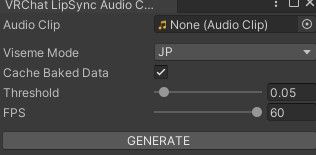
    3f28be75-ee84-462b-b8ae-9f5ddd37a929-image.jpeg

    Description
    Converts an audio file into facial animations for use in your projects.

    Installation

    Create a new VRChat avatar project.
    Import the Unity package.
    Access the tool via: Tools/VRChat LipSync Audio Converter
    

    Note
    This tool works best with clean vocals only. To extract vocals from a music, please use UVR (Ultimate Vocal Remover) or similar software before processing.

    [register or login to view this hidden content]

    ChangeLog:

    Version 0.1
    Initial release
    
    ailliA substanceS 2 Replies Last reply
    15
    • kaizokuK kaizoku referenced this topic on
    • kaizokuK kaizoku referenced this topic on
    • kaizokuK kaizoku

      3f28be75-ee84-462b-b8ae-9f5ddd37a929-image.jpeg

      Description
      Converts an audio file into facial animations for use in your projects.

      Installation

      Create a new VRChat avatar project.
      Import the Unity package.
      Access the tool via: Tools/VRChat LipSync Audio Converter
      

      Note
      This tool works best with clean vocals only. To extract vocals from a music, please use UVR (Ultimate Vocal Remover) or similar software before processing.

      [register or login to view this hidden content]

      ChangeLog:

      Version 0.1
      Initial release
      
      ailliA
      ailliA
      ailli
      wrote on last edited by
      #2

      @kaizoku said:

      3f28be75-ee84-462b-b8ae-9f5ddd37a929-image.jpeg

      Description
      Converts an audio file into facial animations for use in your projects.

      Installation

      Create a new VRChat avatar project.
      Import the Unity package.
      Access the tool via: Tools/VRChat LipSync Audio Converter
      

      Note
      This tool works best with clean vocals only. To extract vocals from a music, please use UVR (Ultimate Vocal Remover) or similar software before processing.

      [register or login to view this hidden content]

      ChangeLog:

      Version 0.1
      Initial release
      

      how to use this ,have use mp4?

      kaizokuK 1 Reply Last reply
      0
      • ailliA ailli

        @kaizoku said:

        3f28be75-ee84-462b-b8ae-9f5ddd37a929-image.jpeg

        Description
        Converts an audio file into facial animations for use in your projects.

        Installation

        Create a new VRChat avatar project.
        Import the Unity package.
        Access the tool via: Tools/VRChat LipSync Audio Converter
        

        Note
        This tool works best with clean vocals only. To extract vocals from a music, please use UVR (Ultimate Vocal Remover) or similar software before processing.

        [register or login to view this hidden content]

        ChangeLog:

        Version 0.1
        Initial release
        

        how to use this ,have use mp4?

        kaizokuK
        kaizokuK
        kaizoku
        wrote on last edited by kaizoku
        #3

        @mike666 You should use a clean acappella (clean voice) vocal track, preferably without any effects, mp3, ogg etc.

        Simply put, this is a tool that can record lip movements, just like in vrchat when you speak into a micro, but, you get an animation file.

        1 Reply Last reply
        0
        • kaizokuK kaizoku

          3f28be75-ee84-462b-b8ae-9f5ddd37a929-image.jpeg

          Description
          Converts an audio file into facial animations for use in your projects.

          Installation

          Create a new VRChat avatar project.
          Import the Unity package.
          Access the tool via: Tools/VRChat LipSync Audio Converter
          

          Note
          This tool works best with clean vocals only. To extract vocals from a music, please use UVR (Ultimate Vocal Remover) or similar software before processing.

          [register or login to view this hidden content]

          ChangeLog:

          Version 0.1
          Initial release
          
          substanceS
          substanceS
          substance
          wrote on last edited by
          #4

          @kaizoku TYSM! I LOVE YOU!!!

          1 Reply Last reply
          0
          • M
            M
            MamaLolo25
            wrote on last edited by
            #5

            How does this work?

            1 Reply Last reply
            0
            • HankaH
              HankaH
              Hanka
              wrote on last edited by
              #6

              Really cool!! Tysm

              Image
              แง”เท†แง“ เญง โ€งโ‚Š ๐•Ž๐•š๐•ค๐•™๐•๐•š๐•ค๐•ฅ โœฐ เญญ หš.แตŽแตŽ | โŠน เญจเญง ห– เฃช . ๐•Š๐•™๐•’๐•ฃ๐•š๐•Ÿ๐•˜ ๐•š๐•ค ๐•”๐•’๐•ฃ๐•š๐•Ÿ๐•˜! ห–

              โ”โ”โ”โ”โ”โ” ๊’ฐImage๊’ฑ โ”โ”โ”โ”โ”โ”โ”

              1 Reply Last reply
              0
              • A
                A
                Akisan
                wrote last edited by
                #7

                any tutorial on how to get this working? Can't seem to figure it out.

                1 Reply Last reply
                0

                Hello! It looks like you're interested in this conversation, but you don't have an account yet.

                Getting fed up of having to scroll through the same posts each visit? When you register for an account, you'll always come back to exactly where you were before, and choose to be notified of new replies (either via email, or push notification). You'll also be able to save bookmarks and upvote posts to show your appreciation to other community members.

                With your input, this post could be even better ๐Ÿ’—

                Register Login
                Reply
                • Reply as topic
                Log in to reply
                • Oldest to Newest
                • Newest to Oldest
                • Most Votes


                • Login

                • Login or register to search.
                • First post
                  Last post
                0
                • Categories
                • Recent
                • Tags
                • Popular