Skip to content
  • Categories
  • Recent
  • Tags
  • Popular
Skins
  • Light
  • Brite
  • Cerulean
  • Cosmo
  • Flatly
  • Journal
  • Litera
  • Lumen
  • Lux
  • Materia
  • Minty
  • Morph
  • Pulse
  • Sandstone
  • Simplex
  • Sketchy
  • Spacelab
  • United
  • Yeti
  • Zephyr
  • Dark
  • Cyborg
  • Darkly
  • Quartz
  • Slate
  • Solar
  • Superhero
  • Vapor

  • Default (Zephyr)
  • No Skin
Collapse
RipperStore Logo
  1. Home
  2. Community
  3. General Questions
  4. Bringing a VRCA into unity

Bringing a VRCA into unity

Scheduled Pinned Locked Moved General Questions
5 Posts 3 Posters 1.3k Views
  • Oldest to Newest
  • Newest to Oldest
  • Most Votes
Reply
  • Reply as topic
Log in to reply
This topic has been deleted. Only users with topic management privileges can see it.
  • sillygirlS
    sillygirlS
    sillygirl
    wrote on last edited by
    #1

    Is there a guide somewhere for this?

    grus enjoyer

    1 Reply Last reply
    0
    • eironE
      eironE
      eiron
      wrote on last edited by
      #2

      get asset ripper and open the vrca with that
      and then open the resulting project folder in unity

      sillygirlS 1 Reply Last reply
      0
      • eironE eiron

        get asset ripper and open the vrca with that
        and then open the resulting project folder in unity

        sillygirlS
        sillygirlS
        sillygirl
        wrote on last edited by
        #3

        @eiron

        e4b1ea1e-1079-47a1-92c3-f1825a9e9b9b-image.png

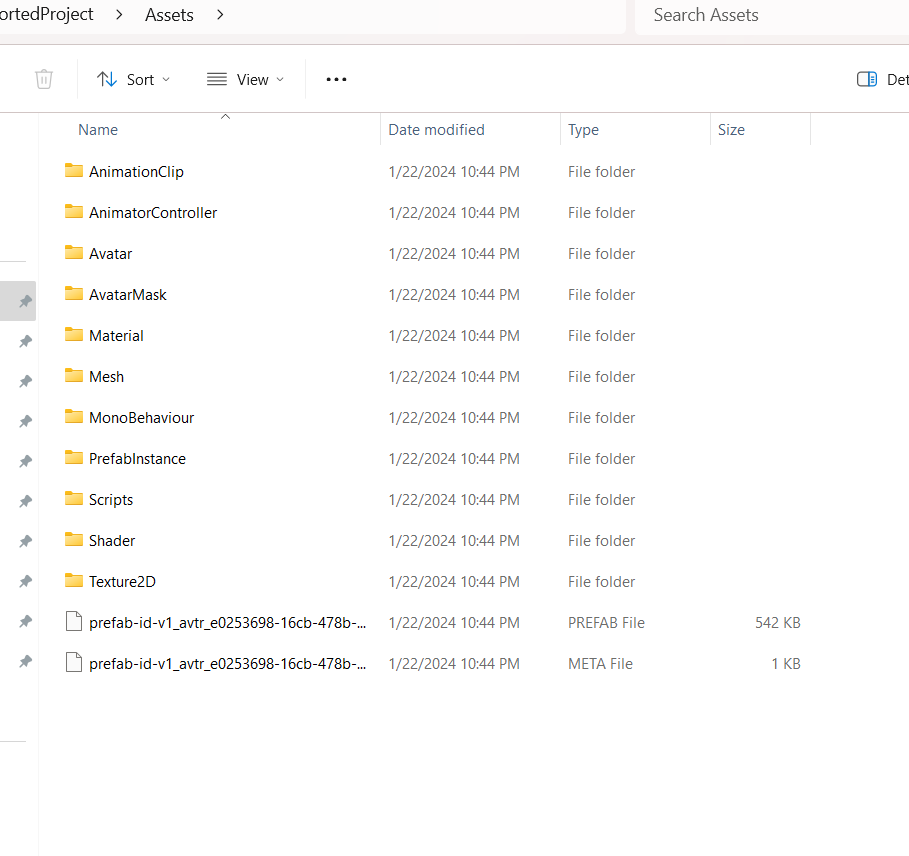
        I clicked export all files into a folder, then I ended up with this :

        1c6f0a00-7a6c-4916-97fd-dbc1cf737ec3-image.png

        grus enjoyer

        1 Reply Last reply
        0
        • eironE
          eironE
          eiron
          wrote on last edited by
          #4

          all those folder and files are part of the one unity project so either open the main folder (the one the incudes all subsequent subfolders, in this case ExportedProject is the main folder) through the unity hub app or you can just drag and drop it into unity

          VanxtoV 1 Reply Last reply
          0
          • eironE eiron

            all those folder and files are part of the one unity project so either open the main folder (the one the incudes all subsequent subfolders, in this case ExportedProject is the main folder) through the unity hub app or you can just drag and drop it into unity

            VanxtoV
            VanxtoV
            Vanxto
            wrote on last edited by
            #5

            @eiron
            Unf, You have to readd everything again as in, Readding the vrc descriptor and layers and such.
            Least it's doing it for me and somehow it's even MORE harder readding them because some of them aren't exactly english.
            Thanks for your help though just can't really setup something im completely blind in.

            1 Reply Last reply
            0

            Hello! It looks like you're interested in this conversation, but you don't have an account yet.

            Getting fed up of having to scroll through the same posts each visit? When you register for an account, you'll always come back to exactly where you were before, and choose to be notified of new replies (either via email, or push notification). You'll also be able to save bookmarks and upvote posts to show your appreciation to other community members.

            With your input, this post could be even better 💗

            Register Login
            Reply
            • Reply as topic
            Log in to reply
            • Oldest to Newest
            • Newest to Oldest
            • Most Votes


            • Login

            • Login or register to search.
            • First post
              Last post
            0
            • Categories
            • Recent
            • Tags
            • Popular