
[FOUND] LF: Furry Roblox Avatars By Mallow's Workshop
-
@Werewolp Tutorial? I want to make and export some roblox avatars like this to use pls!
-
-
And also how do I rig the models for usage in blender or other softwares?
I made a rig for it :3 I think it's pretty solid!
Here:
bandicam 2026-01-06 20-14-29-504.jpg
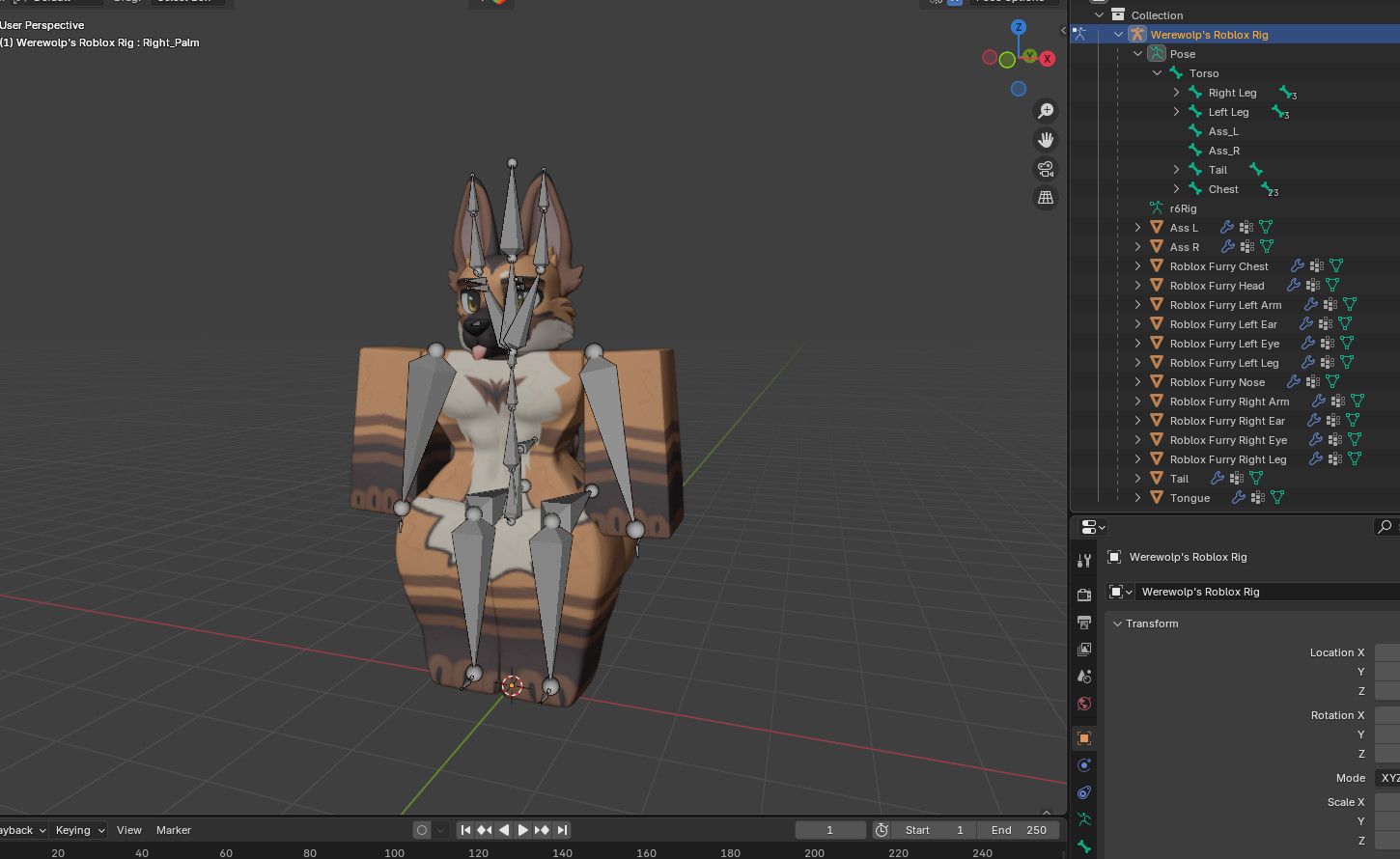
As i mentioned body and texture maps are the same and interchangeable. So say you wanted to use like Dobie skin or Cat skin, replace the lower and upper body texture and just swap the heads and tail, that's it. They are flat textured, so attaching NSFW parts on them and matching the colors is really EZ.
-
@Werewolp Tutorial? I want to make and export some roblox avatars like this to use pls!
@aexotin213 As for getting models and items i followed these tutorials here:
https://www.youtube.com/watch?v=xQ4r5vzAATo&list=LL&index=4
https://www.youtube.com/watch?v=wrriXnIL6ls&list=LL&index=3Get Voidstrap (I prefereable use over Bloxtrap, more stuff) for the modded bodys, they'll automatically load on your avatar when you open studio with it. Duplicate your character in studio and use and copy/paste the script in the vid in studio to get desired assets on the dupe and exports. It's that EZ, although some matching parts for body and head textures come from different workshops when looking for id numbers, like one will have a certain cat head and tail assets, but someone else's workshop will have it's body or lower body textures etc.
-
it'd be nice if there were more bloxstrap/voidstrap mods
-
so likeeee we getting mods orrr?
fih (lowkey need steam money hook me up fr)
-
so likeeee we getting mods orrr?
-
-
@aexotin213 As for getting models and items i followed these tutorials here:
https://www.youtube.com/watch?v=xQ4r5vzAATo&list=LL&index=4
https://www.youtube.com/watch?v=wrriXnIL6ls&list=LL&index=3Get Voidstrap (I prefereable use over Bloxtrap, more stuff) for the modded bodys, they'll automatically load on your avatar when you open studio with it. Duplicate your character in studio and use and copy/paste the script in the vid in studio to get desired assets on the dupe and exports. It's that EZ, although some matching parts for body and head textures come from different workshops when looking for id numbers, like one will have a certain cat head and tail assets, but someone else's workshop will have it's body or lower body textures etc.
-
@Werewolp I do ask, is Voidstrap safe to use? and could there be a possible visual representation of how this tutorial works?
-
-
What the hell is ts.
@sweetiegirlz Eh, a bunch of thicc furries nothing new? If ain't for u or your thing, then why stop by here by choice? Especially in Kinktober js smph .

-
@sweetiegirlz Eh, a bunch of thicc furries nothing new? If ain't for u or your thing, then why stop by here by choice? Especially in Kinktober js smph .
-
@Werewolp did you upload these to roblox? If so can you send an rbxm instead of a blend file? (Of you did of course just asking, I just need the rig with the bones and stuff as a rbxm to try out some of the bones in studio
@jaaasssh133661 Yes, i asked initially then got them myself and shared. I know nothing of Roblox fr, i just used the methods that i found with the programs needed to get the mesh and textures out. Couldn't find how to get the original rig from the game either, that's why i had to make a generic rig and made it a .blend.
I also no longer have the app currently, as i only wanted the characters from it at the time.
-
@jaaasssh133661 Yes, i asked initially then got them myself and shared. I know nothing of Roblox fr, i just used the methods that i found with the programs needed to get the mesh and textures out. Couldn't find how to get the original rig from the game either, that's why i had to make a generic rig and made it a .blend.
I also no longer have the app currently, as i only wanted the characters from it at the time.
@Werewolp ah darn, well if you ever decide to turn them into rbxms let me know I guess, thank you for answering tho!



Hello! It looks like you're interested in this conversation, but you don't have an account yet.
Getting fed up of having to scroll through the same posts each visit? When you register for an account, you'll always come back to exactly where you were before, and choose to be notified of new replies (either via email, or push notification). You'll also be able to save bookmarks and upvote posts to show your appreciation to other community members.
With your input, this post could be even better 💗
Register Login