
PLEASE HELP~! [MANUKA] PCSS ShadowAddon eye problem!
-
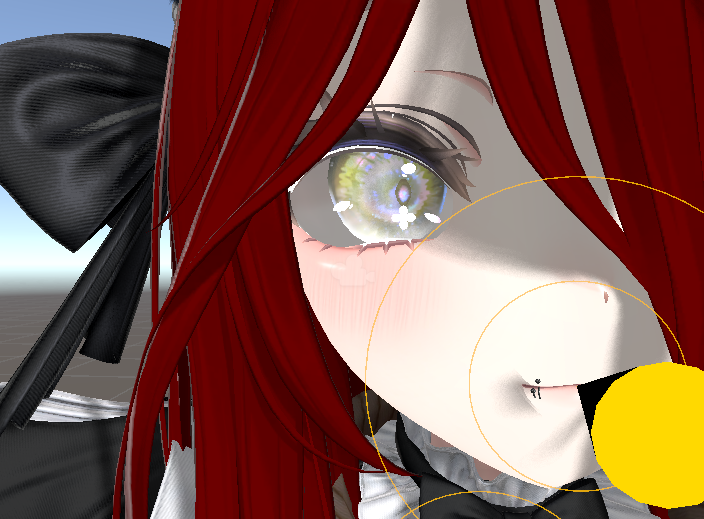
I really love the visual effect that PCSS shadows give for photography, but I’m running into a problem when using PCSS on Manuka specifically. Her eye geometry appears to be constructed in a way where the iris is a flat, floating surface, while the sclera (the white of the eye) is shaped like a semi-sphere that curves inward.
Because of this, when PCSS is enabled, the engine treats the eye whites as a recessed or hollow surface, causing them to receive heavy self-shadowing. This makes the whites of her eyes appear unusually dark, almost as if they’re in constant shadow.
I’m still very new to Unity and model editing, so I’m not sure what the correct fix is, whether it’s a material, lighting, shadow, or mesh issue. I’d really appreciate hearing how others have handled or worked around this problem. And thank you for taking the time to read this, even if you don’t have a solution, it genuinely means a lot.
I have put a lot of effort into my Manuka, so having to start again from scratch with another model is going to be very disappointing.
-
You need to make a mask to use in PCSS to reduce or prevent shadows from being cast there. In the face material, there should be a PCSS Shadow Settings section. Place a mask (white texture with black where you don't want shadows cast) into _ReceiveMaskTex and modify ReceiveMaskStrength to your liking. If you don't want to make your own mask, the discord invite https://discord.gg/zuaYSC5FHg from the PCSS booth page should have some from other users.
-

I made my own for MANUKA incase anyone finds this post and needs one!
Hello! It looks like you're interested in this conversation, but you don't have an account yet.
Getting fed up of having to scroll through the same posts each visit? When you register for an account, you'll always come back to exactly where you were before, and choose to be notified of new replies (either via email, or push notification). You'll also be able to save bookmarks and upvote posts to show your appreciation to other community members.
With your input, this post could be even better 💗
Register Login