Skip to content
  • Categories
  • Recent
  • Tags
  • Popular
Skins
  • Light
  • Brite
  • Cerulean
  • Cosmo
  • Flatly
  • Journal
  • Litera
  • Lumen
  • Lux
  • Materia
  • Minty
  • Morph
  • Pulse
  • Sandstone
  • Simplex
  • Sketchy
  • Spacelab
  • United
  • Yeti
  • Zephyr
  • Dark
  • Cyborg
  • Darkly
  • Quartz
  • Slate
  • Solar
  • Superhero
  • Vapor

  • Default (Zephyr)
  • No Skin
Collapse
RipperStore Logo
  1. Home
  2. Assets
  3. Gifts / Downloads
  4. GIFT ๐ŸŽ: ใƒใƒผใ‚บใฎใƒกใƒ‹ใƒฅใƒผใ‚’็„ก้™ใซ่‡ชๅ‹•็”Ÿๆˆ๏ผใ€ŒPoseMenuBuilderใ€

GIFT ๐ŸŽ: ใƒใƒผใ‚บใฎใƒกใƒ‹ใƒฅใƒผใ‚’็„ก้™ใซ่‡ชๅ‹•็”Ÿๆˆ๏ผใ€ŒPoseMenuBuilderใ€

Scheduled Pinned Locked Moved Gifts / Downloads
assetboothgiftgift-booth
10 Posts 8 Posters 3.3k Views 7 Watching
  • Oldest to Newest
  • Newest to Oldest
  • Most Votes
Reply
  • Reply as topic
Log in to reply
This topic has been deleted. Only users with topic management privileges can see it.
  • GVLAXYG
    GVLAXYG
    GVLAXY
    wrote on last edited by
    #1

    Enjoy ๐Ÿ™‚

    BL
    91df331d-d6de-491f-b15a-7aa1b727a8c6-image.png

    V.1.1.0 [register or login to view this hidden content]
    PASSWORD: GVLAXY

    1 Reply Last reply
    โ™ฅ ๐Ÿ’œ
    13
    • S
      S
      serochan
      wrote on last edited by
      #2

      thank U !

      1 Reply Last reply
      0
      • tenderwaterT
        tenderwaterT
        tenderwater
        wrote on last edited by
        #3

        interesting asset...

        Mental Abnormal

        1 Reply Last reply
        0
        • skiesazuraS
          skiesazuraS
          skiesazura
          wrote on last edited by
          #4

          anyone know how to use it? im not japanese so cant read it, but when using google translate doesnt really help either, i keep getting an error pop up message when trying to use it

          O 1 Reply Last reply
          0
          • skiesazuraS skiesazura

            anyone know how to use it? im not japanese so cant read it, but when using google translate doesnt really help either, i keep getting an error pop up message when trying to use it

            O
            O
            OOOAAA
            wrote on last edited by
            #5

            @skiesazura
            https://booth.pm/zh-tw/items/6902222
            Try this
            It's on github can also manag pose
            https://hhotatea.github.io/AvatarPoseLibrary/

            but don't have tracking control

            1 Reply Last reply
            1
            • GVLAXYG
              GVLAXYG
              GVLAXY
              wrote on last edited by
              #6

              @skiesazura

              Sorry for my english, I'll try to explain it ๐Ÿ™‚

              image.png
              Drag your avatar here

              702f3a6c-1476-40fa-9707-74408ddce440-image.png
              c1ba5f9e-2b65-4ef4-8d6b-cd487b747e88-image.png
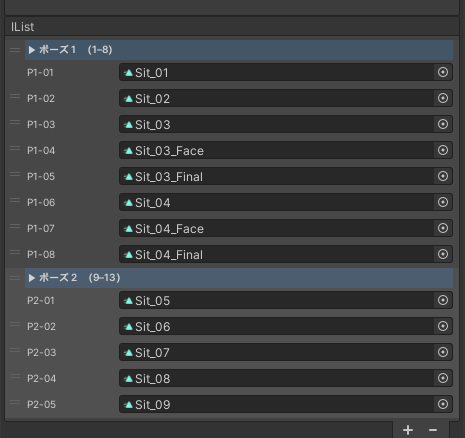
              You can drag a whole folder, or .anim individual here. By default this asset will create a 8 animation list.

              6d0a729b-5994-434e-804f-3d35ce7a9dda-image.png
              The first option is the tracking you avatar will have in idl or in pose. I don't usually touch the idl. But if you want the head to move even in pose, you can choose it here. I usually use it with hands, arms and head movement.

              There's a lot of pose menu builders, the Avatar Pose Library I've been usuing it too, but sometimes it doesnt work properly (For me).
              With this asset, I think the pose changes are more natural

              skiesazuraS OneShotaVRCO 2 Replies Last reply
              1
              • tsurugiT
                tsurugiT
                tsurugi
                wrote on last edited by
                #7

                I might just be misunderstanding what this product does, but this one {https://forum.ripper.store/topic/30658/vrcemotemanager-by-vrchat-kittenji-found} seems to do a similar thing but simpler (for adding emotes to an avatar). The one in this post seems to allow your head to move in a pose though which is cool.

                ๐™ผ๐šŠ๐š—๐šž๐š”๐šŠ, ๐™ผ๐š’๐š•๐š๐š’๐š—๐šŠ ๐šŠ๐š—๐š ๐š‚๐š‘๐š’๐š—๐šŠ๐š—๐š˜ ๐šŠ๐šœ๐šœ๐šŽ๐š ๐š‘๐šž๐š—๐š๐šŽ๐š›.
                ๐™ถ๐šŠ๐š๐šŽ๐š”๐šŽ๐šŽ๐š™๐š’๐š—๐š ๐š’๐šœ ๐š๐š‘๐šŽ ๐š๐šŽ๐šŠ๐š๐š‘ ๐š˜๐š ๐š๐š‘๐šŽ ๐šŒ๐š˜๐š–๐š‹๐š’๐š—๐šŽ๐š ๐šŽ๐š๐š๐š˜๐š›๐š ๐š๐š˜ ๐š–๐šŠ๐š”๐šŽ ๐šŠ๐šœ๐šœ๐šŽ๐š๐šœ ๐šŠ๐šŸ๐šŠ๐š’๐š•๐šŠ๐š‹๐š•๐šŽ ๐š๐š˜ ๐šŠ๐š•๐š• ๐™ฒ๐š‘๐šŽ๐šŒ๐š” ๐š–๐šข ๐š™๐š›๐š˜๐š๐š’๐š•๐šŽ ๐š๐š˜๐š› ๐š๐š’๐š๐š๐šœ!

                ๐š๐šŽ๐š–๐šŽ๐š–๐š‹๐šŽ๐š›, ๐š’๐š ๐š๐š‘๐šŽ ๐š๐š’๐š•๐šŽ ๐šœ๐šŠ๐šข๐šœ .๐š›๐šŠ๐š› .7๐šฃ ๐š˜๐š› ๐™ฐ๐™ฝ๐šˆ๐šƒ๐™ท๐™ธ๐™ฝ๐™ถ ๐š˜๐š๐š‘๐šŽ๐š› ๐š๐š‘๐šŠ๐š— ๐šฃ๐š’๐š™, ๐š๐š˜ ๐š—๐š˜๐š ๐š๐šŽ๐š๐šŠ๐šž๐š•๐š ๐šž๐š—๐šฃ๐š’๐š™ ๐š’๐š! ๐š„๐šœ๐šŽ ๐š ๐š’๐š—๐š›๐šŠ๐š› ๐š˜๐š› 7๐šฃ๐š’๐š™!!! ๐šˆ๐š˜๐šž ๐š‘๐šŠ๐šŸ๐šŽ ๐šŠ ๐š‘๐š’๐š๐š‘ ๐šŒ๐š‘๐šŠ๐š—๐šŒ๐šŽ ๐š˜๐š ๐š—๐š˜๐š ๐šŽ๐šก๐š๐š›๐šŠ๐šŒ๐š๐š’๐š—๐š ๐šŠ๐š•๐š• ๐šŠ๐šœ๐šœ๐šŽ๐š๐šœ!

                1 Reply Last reply
                1
                • GVLAXYG GVLAXY

                  @skiesazura

                  Sorry for my english, I'll try to explain it ๐Ÿ™‚

                  image.png
                  Drag your avatar here

                  702f3a6c-1476-40fa-9707-74408ddce440-image.png
                  c1ba5f9e-2b65-4ef4-8d6b-cd487b747e88-image.png
                  You can drag a whole folder, or .anim individual here. By default this asset will create a 8 animation list.
                  6d0a729b-5994-434e-804f-3d35ce7a9dda-image.png
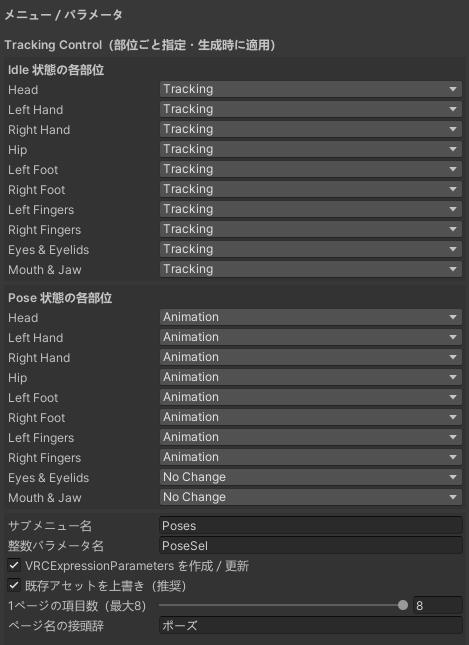
                  The first option is the tracking you avatar will have in idl or in pose. I don't usually touch the idl. But if you want the head to move even in pose, you can choose it here. I usually use it with hands, arms and head movement.

                  There's a lot of pose menu builders, the Avatar Pose Library I've been usuing it too, but sometimes it doesnt work properly (For me).
                  With this asset, I think the pose changes are more natural

                  skiesazuraS
                  skiesazuraS
                  skiesazura
                  wrote on last edited by
                  #8

                  @GVLAXY thank you!! i was able to figure it out! <33

                  1 Reply Last reply
                  ๐Ÿค
                  1
                  • GVLAXYG GVLAXY

                    @skiesazura

                    Sorry for my english, I'll try to explain it ๐Ÿ™‚

                    image.png
                    Drag your avatar here

                    702f3a6c-1476-40fa-9707-74408ddce440-image.png
                    c1ba5f9e-2b65-4ef4-8d6b-cd487b747e88-image.png
                    You can drag a whole folder, or .anim individual here. By default this asset will create a 8 animation list.

                    6d0a729b-5994-434e-804f-3d35ce7a9dda-image.png
                    The first option is the tracking you avatar will have in idl or in pose. I don't usually touch the idl. But if you want the head to move even in pose, you can choose it here. I usually use it with hands, arms and head movement.

                    There's a lot of pose menu builders, the Avatar Pose Library I've been usuing it too, but sometimes it doesnt work properly (For me).
                    With this asset, I think the pose changes are more natural

                    OneShotaVRCO
                    OneShotaVRCO
                    OneShotaVRC
                    wrote on last edited by
                    #9

                    Your kind thoughts are deeply appreciated~~~~~~~~๐Ÿ’–
                    I am absolutely overjoyed๐Ÿ’•

                    @GVLAXY @tsurugi Thank you sincerely for your thoughtful and detailed guidance. ๐Ÿ’–
                    They allow us to express our individuality and serve as wonderful means for interaction, which brings us great joy ๐Ÿค
                    Happy New Year๐Ÿ’ž

                    Corrupted File After Extraction?๐Ÿ’ป Virus Detected?๐Ÿ‘พ
                    of easy fixes you can try right away. I hope youโ€™ll give it a read!๐Ÿ› 

                    Is Booth avatar's default body type a bit too slender for your taste?
                    Worry not! You can use Unity alone to transform her into a voluptuous, alluring Venusโ€”plump and perfectly curved! ๐Ÿฅฐ

                    I eagerly await the benevolent deity who will bless us with the latest version, including the profile picture costume!
                    I would be delighted if you could take a look at my Profile & Topic List๐Ÿ’–

                    1 Reply Last reply
                    1
                    • SnowFlan2020S
                      SnowFlan2020S
                      SnowFlan2020
                      wrote on last edited by
                      #10

                      ty

                      1 Reply Last reply
                      0

                      Hello! It looks like you're interested in this conversation, but you don't have an account yet.

                      Getting fed up of having to scroll through the same posts each visit? When you register for an account, you'll always come back to exactly where you were before, and choose to be notified of new replies (either via email, or push notification). You'll also be able to save bookmarks and upvote posts to show your appreciation to other community members.

                      With your input, this post could be even better ๐Ÿ’—

                      Register Login
                      Reply
                      • Reply as topic
                      Log in to reply
                      • Oldest to Newest
                      • Newest to Oldest
                      • Most Votes


                      • Login

                      • Login or register to search.
                      • First post
                        Last post
                      0
                      • Categories
                      • Recent
                      • Tags
                      • Popular