
GIFT 🎁: ポーズのメニューを無限に自動生成!「PoseMenuBuilder」
-
-
-
interesting asset...
-
anyone know how to use it? im not japanese so cant read it, but when using google translate doesnt really help either, i keep getting an error pop up message when trying to use it
-
anyone know how to use it? im not japanese so cant read it, but when using google translate doesnt really help either, i keep getting an error pop up message when trying to use it
@skiesazura
https://booth.pm/zh-tw/items/6902222
Try this
It's on github can also manag pose
https://hhotatea.github.io/AvatarPoseLibrary/but don't have tracking control
-
Sorry for my english, I'll try to explain it


Drag your avatar here
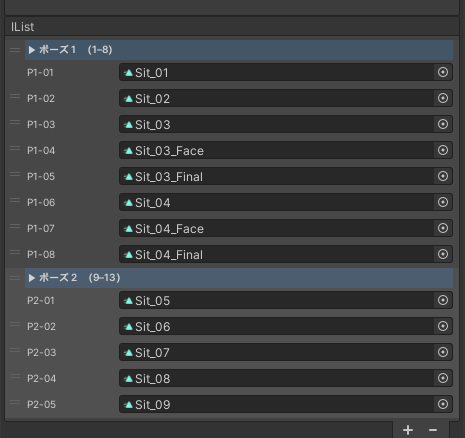
You can drag a whole folder, or .anim individual here. By default this asset will create a 8 animation list.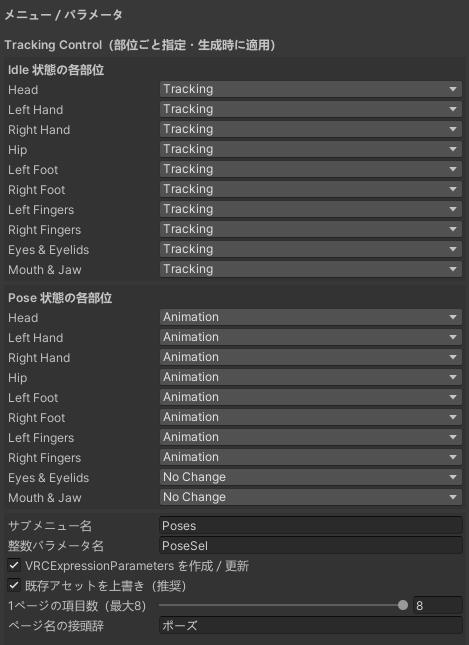
The first option is the tracking you avatar will have in idl or in pose. I don't usually touch the idl. But if you want the head to move even in pose, you can choose it here. I usually use it with hands, arms and head movement.There's a lot of pose menu builders, the Avatar Pose Library I've been usuing it too, but sometimes it doesnt work properly (For me).
With this asset, I think the pose changes are more natural -
I might just be misunderstanding what this product does, but this one {https://forum.ripper.store/topic/30658/vrcemotemanager-by-vrchat-kittenji-found} seems to do a similar thing but simpler (for adding emotes to an avatar). The one in this post seems to allow your head to move in a pose though which is cool.
-
Sorry for my english, I'll try to explain it
Drag your avatar here
You can drag a whole folder, or .anim individual here. By default this asset will create a 8 animation list.
The first option is the tracking you avatar will have in idl or in pose. I don't usually touch the idl. But if you want the head to move even in pose, you can choose it here. I usually use it with hands, arms and head movement.There's a lot of pose menu builders, the Avatar Pose Library I've been usuing it too, but sometimes it doesnt work properly (For me).
With this asset, I think the pose changes are more natural -
Sorry for my english, I'll try to explain it
Drag your avatar here
You can drag a whole folder, or .anim individual here. By default this asset will create a 8 animation list.
The first option is the tracking you avatar will have in idl or in pose. I don't usually touch the idl. But if you want the head to move even in pose, you can choose it here. I usually use it with hands, arms and head movement.There's a lot of pose menu builders, the Avatar Pose Library I've been usuing it too, but sometimes it doesnt work properly (For me).
With this asset, I think the pose changes are more natural -
ty









Hello! It looks like you're interested in this conversation, but you don't have an account yet.
Getting fed up of having to scroll through the same posts each visit? When you register for an account, you'll always come back to exactly where you were before, and choose to be notified of new replies (either via email, or push notification). You'll also be able to save bookmarks and upvote posts to show your appreciation to other community members.
With your input, this post could be even better 💗
Register Login