Skip to content
  • Categories
  • Recent
  • Tags
  • Popular
Skins
  • Light
  • Brite
  • Cerulean
  • Cosmo
  • Flatly
  • Journal
  • Litera
  • Lumen
  • Lux
  • Materia
  • Minty
  • Morph
  • Pulse
  • Sandstone
  • Simplex
  • Sketchy
  • Spacelab
  • United
  • Yeti
  • Zephyr
  • Dark
  • Cyborg
  • Darkly
  • Quartz
  • Slate
  • Solar
  • Superhero
  • Vapor

  • Default (Zephyr)
  • No Skin
Collapse
RipperStore Logo
  1. Home
  2. Community
  3. General Discussions
  4. Explaining how to create a femboy edit for those curious <3

Explaining how to create a femboy edit for those curious <3

Scheduled Pinned Locked Moved General Discussions
femboy
30 Posts 11 Posters 3.3k Views 14 Watching
  • Oldest to Newest
  • Newest to Oldest
  • Most Votes
Reply
  • Reply as topic
Log in to reply
This topic has been deleted. Only users with topic management privileges can see it.
  • Ċäṅḋÿ ḟṛöṡẗïṅġĊ
    Ċäṅḋÿ ḟṛöṡẗïṅġĊ
    Ċäṅḋÿ ḟṛöṡẗïṅġ
    wrote on last edited by Ċäṅḋÿ ḟṛöṡẗïṅġ
    #1

    1st.

    Open unity and import the avatar you want to edit.

    2nd.

    Import the avatars FBX into blender, then take off all the tops, after go into sculpt mode on the body, use these sculpt tools the most
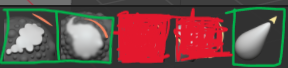
    Screenshot (36).png

    3rd.

    Sculpt the chest flat as well as all the tops

    4th.

    export the avatars FBX back into the project as the original FBX

    and that's it.

    For visual learners

    Ċäṅḋÿ ḟṛöṡẗïṅġĊ 1 Reply Last reply
    ❤
    9
    • Ċäṅḋÿ ḟṛöṡẗïṅġĊ Ċäṅḋÿ ḟṛöṡẗïṅġ

      1st.

      Open unity and import the avatar you want to edit.

      2nd.

      Import the avatars FBX into blender, then take off all the tops, after go into sculpt mode on the body, use these sculpt tools the most
      Screenshot (36).png

      3rd.

      Sculpt the chest flat as well as all the tops

      4th.

      export the avatars FBX back into the project as the original FBX

      and that's it.

      For visual learners

      Ċäṅḋÿ ḟṛöṡẗïṅġĊ
      Ċäṅḋÿ ḟṛöṡẗïṅġĊ
      Ċäṅḋÿ ḟṛöṡẗïṅġ
      wrote on last edited by
      #2

      @ProAce420 @HisMaimai mainly made this for you too lovely people

      ProAce420P 1 Reply Last reply
      1
      • HisMaimaiH
        HisMaimaiH
        HisMaimai
        wrote on last edited by
        #3

        YAY ! THANK U HEHEHE

        ‧ ⁺ ︵⏜ 𓇼 ⏜︵ ‧ ₊

        1 Reply Last reply
        0
        • HisMaimaiH
          HisMaimaiH
          HisMaimai
          wrote on last edited by
          #4

          my blender be looking different though i used older ones

          ‧ ⁺ ︵⏜ 𓇼 ⏜︵ ‧ ₊

          1 Reply Last reply
          0
          • Ċäṅḋÿ ḟṛöṡẗïṅġĊ Ċäṅḋÿ ḟṛöṡẗïṅġ

            @ProAce420 @HisMaimai mainly made this for you too lovely people

            ProAce420P
            ProAce420P
            ProAce420
            wrote on last edited by
            #5

            @Ċäṅḋÿ-ḟṛöṡẗïṅġ Omg thank you! I am still a bit confused. I can figure out how to open the avatar in blender but I can't find any of the tools in the video. I know once I fully figure it out, it'll be easy, I'm just a bit stumped in finding the tools.

            G 1 Reply Last reply
            0
            • ProAce420P ProAce420

              @Ċäṅḋÿ-ḟṛöṡẗïṅġ Omg thank you! I am still a bit confused. I can figure out how to open the avatar in blender but I can't find any of the tools in the video. I know once I fully figure it out, it'll be easy, I'm just a bit stumped in finding the tools.

              G
              G
              guichonxvi
              wrote on last edited by guichonxvi
              #6

              @ProAce420 select what you want to sculpt(body first) then switch to sculpt mode. In sculpt mode turn on x mirror, switch to side view and use a grab tool to pull chest in, switch back to front view and use flatten then smooth brush. Smooth brush is very strong! Turn strengthdown to .35ish. Repeat for all tops. Step1-2.png Step3+.png Export.png follow these export settings.

              On top of all that you'll likely want to edit the chest texture in ps,gimp, or sp if you plan to be topless ever

              Usually typing with my mouse sorry for grammar etc

              ProAce420P 1 Reply Last reply
              3
              • G guichonxvi

                @ProAce420 select what you want to sculpt(body first) then switch to sculpt mode. In sculpt mode turn on x mirror, switch to side view and use a grab tool to pull chest in, switch back to front view and use flatten then smooth brush. Smooth brush is very strong! Turn strengthdown to .35ish. Repeat for all tops. Step1-2.png Step3+.png Export.png follow these export settings.

                On top of all that you'll likely want to edit the chest texture in ps,gimp, or sp if you plan to be topless ever

                ProAce420P
                ProAce420P
                ProAce420
                wrote on last edited by
                #7

                @guichonxvi Omg! These pictures were a HUGE help! I'm figuring it out now! Though I'm struggling a little it in sculpting the clothes right but I'm making progress! Thank you so much for all the help!

                Ċäṅḋÿ ḟṛöṡẗïṅġĊ G 2 Replies Last reply
                0
                • ProAce420P ProAce420

                  @guichonxvi Omg! These pictures were a HUGE help! I'm figuring it out now! Though I'm struggling a little it in sculpting the clothes right but I'm making progress! Thank you so much for all the help!

                  Ċäṅḋÿ ḟṛöṡẗïṅġĊ
                  Ċäṅḋÿ ḟṛöṡẗïṅġĊ
                  Ċäṅḋÿ ḟṛöṡẗïṅġ
                  wrote on last edited by
                  #8

                  @ProAce420 if you cant figure it out fully, i still take request if necessary, just dm me on here with a request you might have and ill get to it when possible

                  ProAce420P 1 Reply Last reply
                  0
                  • Ċäṅḋÿ ḟṛöṡẗïṅġĊ Ċäṅḋÿ ḟṛöṡẗïṅġ

                    @ProAce420 if you cant figure it out fully, i still take request if necessary, just dm me on here with a request you might have and ill get to it when possible

                    ProAce420P
                    ProAce420P
                    ProAce420
                    wrote on last edited by
                    #9

                    @Ċäṅḋÿ-ḟṛöṡẗïṅġ I think I figured out everything but the export process. I exported the avi into unity and when I uploaded it, it was hella broken in game and I'm not sure what I'm doing wrong.

                    1 Reply Last reply
                    0
                    • HisMaimaiH
                      HisMaimaiH
                      HisMaimai
                      wrote on last edited by
                      #10

                      UR A GODS SNET CUZ I WAS JUST MAKIN A TWINK AND IT LOOKED REALL FUCKED UP LOL

                      Screenshot 2025-11-23 011116.png

                      ‧ ⁺ ︵⏜ 𓇼 ⏜︵ ‧ ₊

                      1 Reply Last reply
                      0
                      • HisMaimaiH
                        HisMaimaiH
                        HisMaimai
                        wrote on last edited by
                        #11

                        thehe i fixed it though

                        ‧ ⁺ ︵⏜ 𓇼 ⏜︵ ‧ ₊

                        1 Reply Last reply
                        0
                        • ProAce420P ProAce420

                          @guichonxvi Omg! These pictures were a HUGE help! I'm figuring it out now! Though I'm struggling a little it in sculpting the clothes right but I'm making progress! Thank you so much for all the help!

                          G
                          G
                          guichonxvi
                          wrote on last edited by
                          #12

                          @ProAce420 If you sculpt the body as a blendshape you can use surface deform modifier on the clothes. This video explains it link text

                          Exporting can be tricky.. Try different export/import settings. Sometimes I save it as a new fbx and transfer everything with pumpkins avatar tools

                          Usually typing with my mouse sorry for grammar etc

                          1 Reply Last reply
                          0
                          • HingeH
                            HingeH
                            Hinge
                            wrote on last edited by
                            #13

                            how do you export the fbx from unity?

                            G 1 Reply Last reply
                            0
                            • HingeH Hinge

                              how do you export the fbx from unity?

                              G
                              G
                              guichonxvi
                              wrote on last edited by guichonxvi
                              #14

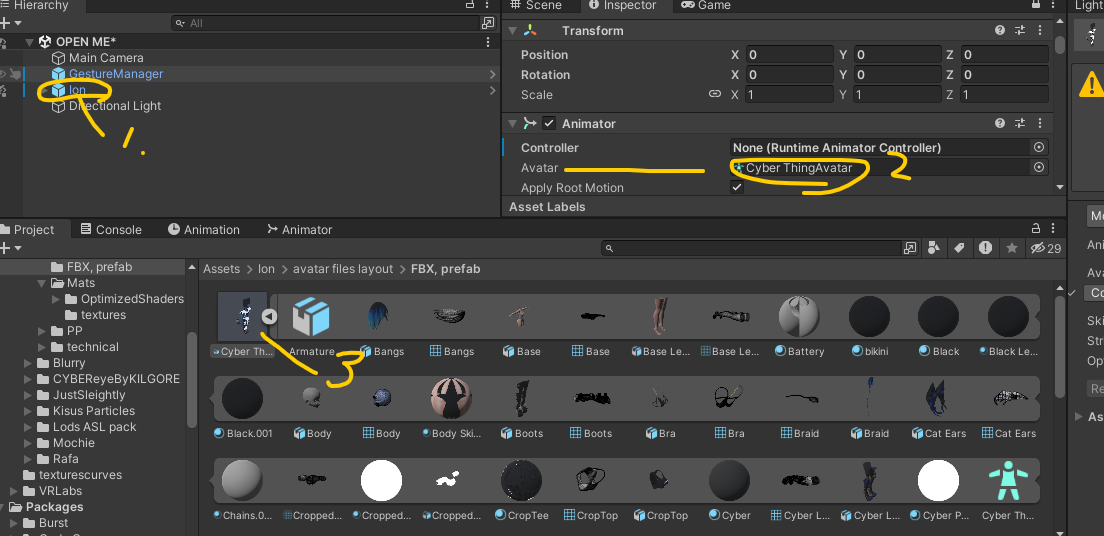
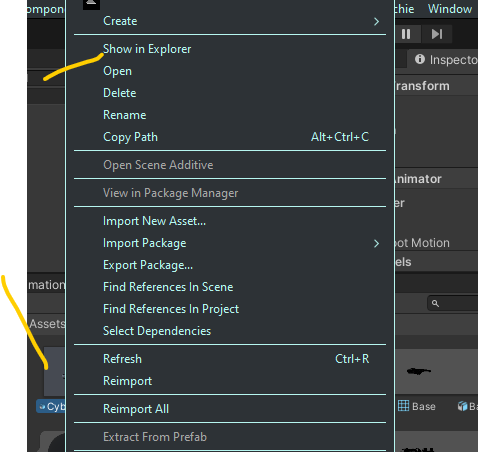
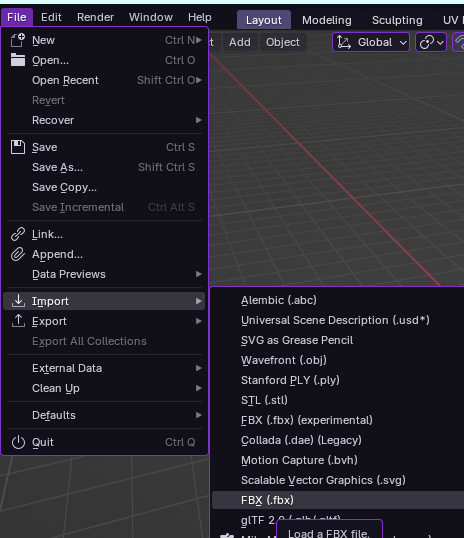
                              @Hinge Importfbx.png Fbx.pngScreenshot 2025-12-04 215223.png

                              Usually typing with my mouse sorry for grammar etc

                              1 Reply Last reply
                              0
                              • HingeH
                                HingeH
                                Hinge
                                wrote on last edited by
                                #15

                                Gotcha

                                1 Reply Last reply
                                0
                                • HingeH
                                  HingeH
                                  Hinge
                                  wrote on last edited by
                                  #16

                                  I have a issue..

                                  1 Reply Last reply
                                  0
                                  • HingeH
                                    HingeH
                                    Hinge
                                    wrote on last edited by
                                    #17

                                    image_2025-12-05_181300954.png
                                    Screenshot 2025-12-05 181153.png the avi I did a edit for crumpled into a ball

                                    1 Reply Last reply
                                    0
                                    • HingeH
                                      HingeH
                                      Hinge
                                      wrote on last edited by
                                      #18

                                      it happens in play mode

                                      1 Reply Last reply
                                      0
                                      • TyeXOT
                                        TyeXOT
                                        TyeXO
                                        wrote on last edited by TyeXO
                                        #19

                                        @hinge Export the model through fbx all and if that doesn’t work then export through fbx custom scale

                                        I collect shit and I share shit, lets all shit together :D

                                        1 Reply Last reply
                                        ❤
                                        1
                                        • T
                                          T
                                          teataking
                                          wrote on last edited by teataking
                                          #20

                                          my avatar just goes invisible when I export it, it's fine until I export the edited fbx over it, I don't know what to do and I was having trouble following the import and export in the video (I don't import fbx's like in the video, I find it in unity and then explorer) So when exporting from blender i click my most recent (the fbx) and export it to that. When I drag the fbx into the scene it shows the avatar fine and edited. I don't know what I'm doing wrong T.T (hope all that made sense)
                                          Avatar is MIYABI by ezra.mp3
                                          image.png

                                          What is also tells me: cd90bfb4-3397-48a7-a8dd-be4a99d7e402-image.png

                                          T 1 Reply Last reply
                                          0

                                          Hello! It looks like you're interested in this conversation, but you don't have an account yet.

                                          Getting fed up of having to scroll through the same posts each visit? When you register for an account, you'll always come back to exactly where you were before, and choose to be notified of new replies (either via email, or push notification). You'll also be able to save bookmarks and upvote posts to show your appreciation to other community members.

                                          With your input, this post could be even better 💗

                                          Register Login
                                          Reply
                                          • Reply as topic
                                          Log in to reply
                                          • Oldest to Newest
                                          • Newest to Oldest
                                          • Most Votes


                                          • Login

                                          • Login or register to search.
                                          • First post
                                            Last post
                                          0
                                          • Categories
                                          • Recent
                                          • Tags
                                          • Popular