
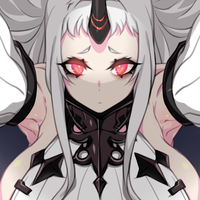
LF: A rip of this Mimi Sentry avatar for NSFW editing
-
So, I have this model all rigged up and everything for unity, the only thing i'm missing is the vismes which I can't be bothered to do, so if some want to bother with that I'll send the model :3
@bighonker420 could i get the files off of you?
-
Bit of an update.
It seems ripping is the only way to get this done. With Szeppelin releasing their files publicly, I attempted a head hack of their Mimi on to ZwZZ's own. Didn't work out unfortunately as, for some very weird reason, ZZwZ has combined the head mesh of their model to the right arm. So, removing the head of the model results in having no right arm. Additionally, Szeppelin's model cannot isolate the head exclusively due to it's placement in the armature hierarchy, making use of the Kimera head hacking tool, or any similar tool in Unity, impossible.
A direct rip of the avatar in the OP is the only way to get this done, unless someone with Blender knowledge and a care to do this wants to give it a go, which I doubt.
-
Ill do the blender work gimme files
-
Ill do the blender work gimme files
That would be awesome if so! I recommend referring to the avatar I linked in the original post for a goal of what to aim for! Just with the full NSFW features, of course.
ZZwZ's Mimi blender model: https://www.patreon.com/posts/mimi-sentry-nsfw-98567189
ZZwZ's Mimi model as a Unity package:
For the head off of Szeppelin's Mimi, you can find the files in his google drive here:
https://forum.ripper.store/post/1041836
Hope this helps!
-
-
Bump
on a side note has anybody made a unity package for the Mimi depenser made by ZZwz?
-
-
-
Since no one is working on this Project I am willing to throw my hat in the ring and attempt to recreate this avatar.
@wewwa any news?
-
-
here is vrca
-
-
hey has anyone gotten this model to work on unity with working toggles? if so could i get it?
-
@pepep i think the reason why they stitched the head was because zzwz mimi doesnt have blendshapes for the expressions and most of the ones of it are purely blender based
@Tsumiki-03 If you mean the visemes, I think I can give some pointers.
Lemme preface this by stating that I have no idea if this actually works in practice. I'm just using my knowledge of blendshapes to sortof... "summarize" the process.
Each part of the lips/mouth has a pair of bones (one for each side, they move in tandem), along with the teeth, which have two sets of bones. You want to move the bone that looks like a set of sharp jaws; these will prevent the teeth from clipping into eachother (or the mouth) if they get close enough, or far away enough. (I don't know how they did it for the bottom row of teeth. It's probably dark magic or something.)
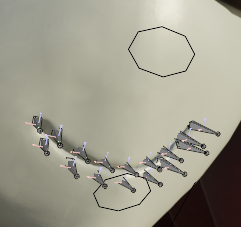
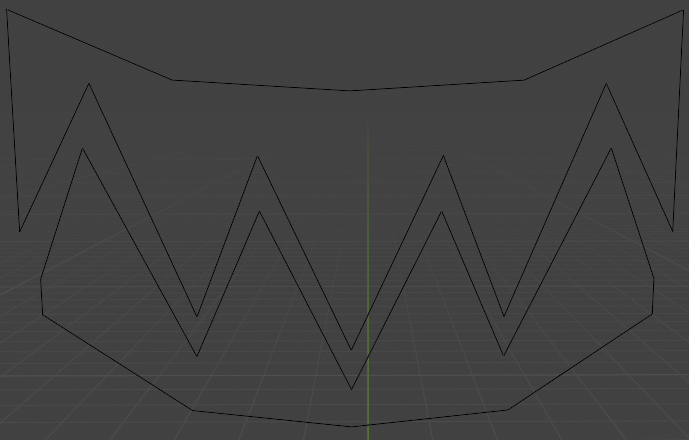
Using CATS, you can create blendshapes for the simple visemes.

Find a sample of what you're trying to make online from somewhere like smutbase. You want three baseline blendshapes (one for each of the simple sounds): "AA" (like in "apple"), "OH" (like in "home"), and "CH" (like in "chair"). You don't have to exactly match the sample you're using, it just has to look similar enough. In this example, this is "AA" at full strength.
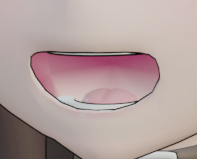
You might have noticed that when you test it in the face mesh, it doesn't seem to move the teeth with it. This is because the teeth are a separate mesh. It's the object called "Plane.003" on the model. Making your blendshapes caused both the face mesh and Plane.003 to have a blendshape with the same name. Once you've finished making your baseline blendshapes, return to Object Mode. Open the mouth with one of the new blendshapes, and click the teeth. Then, click the face and press Crtl+J. This will merge the two objects together into one. Since they both had a blendshape with the same name, they will use the same blendshape to control both simultaneously. Now, when you change the blendshape for the viseme, both the mouth and the teeth will move together.
Using CATS, you can take these three blendshapes and construct the rest in the add-on itself.
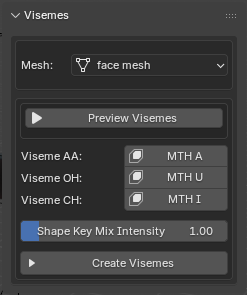
When you make your baseline visemes, remember that the modifications you make to the mouth will be what it looks like when the blendshape equals 1 (full strength). This is why I mentioned that "AA" was at full strength.
What CATS does is, it takes the three blendshapes and smoothly mixes them together to create the rest of the visemes, while also assigning those blendshapes to the base visemes... It also creates a "sil" viseme, meant for when there is no audio (hence the naming; it's "sil" as in "silent"), which is also required by VRChat.Past visemes, I don't have a clue as to getting this avatar to Unity, rigging it all up, and uploading it safely to VRChat. I've mostly stumbled my way through figuring it out. If anyone has any other pointers (or even wants to critique my guide, I'm open to it, rip me a new one), feel free to chime in.
-
@Tsumiki-03 If you mean the visemes, I think I can give some pointers.
Lemme preface this by stating that I have no idea if this actually works in practice. I'm just using my knowledge of blendshapes to sortof... "summarize" the process.
Each part of the lips/mouth has a pair of bones (one for each side, they move in tandem), along with the teeth, which have two sets of bones. You want to move the bone that looks like a set of sharp jaws; these will prevent the teeth from clipping into eachother (or the mouth) if they get close enough, or far away enough. (I don't know how they did it for the bottom row of teeth. It's probably dark magic or something.)
Using CATS, you can create blendshapes for the simple visemes.
Find a sample of what you're trying to make online from somewhere like smutbase. You want three baseline blendshapes (one for each of the simple sounds): "AA" (like in "apple"), "OH" (like in "home"), and "CH" (like in "chair"). You don't have to exactly match the sample you're using, it just has to look similar enough. In this example, this is "AA" at full strength.
You might have noticed that when you test it in the face mesh, it doesn't seem to move the teeth with it. This is because the teeth are a separate mesh. It's the object called "Plane.003" on the model. Making your blendshapes caused both the face mesh and Plane.003 to have a blendshape with the same name. Once you've finished making your baseline blendshapes, return to Object Mode. Open the mouth with one of the new blendshapes, and click the teeth. Then, click the face and press Crtl+J. This will merge the two objects together into one. Since they both had a blendshape with the same name, they will use the same blendshape to control both simultaneously. Now, when you change the blendshape for the viseme, both the mouth and the teeth will move together.
Using CATS, you can take these three blendshapes and construct the rest in the add-on itself.
When you make your baseline visemes, remember that the modifications you make to the mouth will be what it looks like when the blendshape equals 1 (full strength). This is why I mentioned that "AA" was at full strength.
What CATS does is, it takes the three blendshapes and smoothly mixes them together to create the rest of the visemes, while also assigning those blendshapes to the base visemes... It also creates a "sil" viseme, meant for when there is no audio (hence the naming; it's "sil" as in "silent"), which is also required by VRChat.Past visemes, I don't have a clue as to getting this avatar to Unity, rigging it all up, and uploading it safely to VRChat. I've mostly stumbled my way through figuring it out. If anyone has any other pointers (or even wants to critique my guide, I'm open to it, rip me a new one), feel free to chime in.
@Seaport636 BUMP FOR UPDATE, ALSO CAN WE PLZ GET THE BOY VERSION AS WELL
-
-
ALSO CAN WE PLZ GET THE BOY VERSION AS WELL bump
-
ALSO CAN WE PLZ GET THE BOY VERSION AS WELL bump
@Protagonist. wouldn't it just be easier to make a toggle to remove the breasts and add a cock to it?
-
@Protagonist. wouldn't it just be easier to make a toggle to remove the breasts and add a cock to it?
along with adding stuff like this one has? https://vrchat.com/home/avatar/avtr_39e9fdca-7d19-4387-bfb1-9ed24084a8de
-
@Tsumiki-03 If you mean the visemes, I think I can give some pointers.
Lemme preface this by stating that I have no idea if this actually works in practice. I'm just using my knowledge of blendshapes to sortof... "summarize" the process.
Each part of the lips/mouth has a pair of bones (one for each side, they move in tandem), along with the teeth, which have two sets of bones. You want to move the bone that looks like a set of sharp jaws; these will prevent the teeth from clipping into eachother (or the mouth) if they get close enough, or far away enough. (I don't know how they did it for the bottom row of teeth. It's probably dark magic or something.)
Using CATS, you can create blendshapes for the simple visemes.
Find a sample of what you're trying to make online from somewhere like smutbase. You want three baseline blendshapes (one for each of the simple sounds): "AA" (like in "apple"), "OH" (like in "home"), and "CH" (like in "chair"). You don't have to exactly match the sample you're using, it just has to look similar enough. In this example, this is "AA" at full strength.
You might have noticed that when you test it in the face mesh, it doesn't seem to move the teeth with it. This is because the teeth are a separate mesh. It's the object called "Plane.003" on the model. Making your blendshapes caused both the face mesh and Plane.003 to have a blendshape with the same name. Once you've finished making your baseline blendshapes, return to Object Mode. Open the mouth with one of the new blendshapes, and click the teeth. Then, click the face and press Crtl+J. This will merge the two objects together into one. Since they both had a blendshape with the same name, they will use the same blendshape to control both simultaneously. Now, when you change the blendshape for the viseme, both the mouth and the teeth will move together.
Using CATS, you can take these three blendshapes and construct the rest in the add-on itself.
When you make your baseline visemes, remember that the modifications you make to the mouth will be what it looks like when the blendshape equals 1 (full strength). This is why I mentioned that "AA" was at full strength.
What CATS does is, it takes the three blendshapes and smoothly mixes them together to create the rest of the visemes, while also assigning those blendshapes to the base visemes... It also creates a "sil" viseme, meant for when there is no audio (hence the naming; it's "sil" as in "silent"), which is also required by VRChat.Past visemes, I don't have a clue as to getting this avatar to Unity, rigging it all up, and uploading it safely to VRChat. I've mostly stumbled my way through figuring it out. If anyone has any other pointers (or even wants to critique my guide, I'm open to it, rip me a new one), feel free to chime in.
@Seaport636 bump




Hello! It looks like you're interested in this conversation, but you don't have an account yet.
Getting fed up of having to scroll through the same posts each visit? When you register for an account, you'll always come back to exactly where you were before, and choose to be notified of new replies (either via email, or push notification). You'll also be able to save bookmarks and upvote posts to show your appreciation to other community members.
With your input, this post could be even better 💗
Register Login