
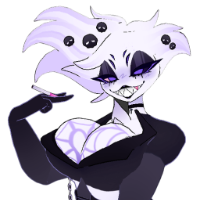
LF Mimi The MimiKyu VRC Port
-
then i'm sorry there is no way to help. when you already made a new project and it doens't work then noone can help you
@the_stupid Having a similar issue to @LateNiteRaven even though the blueprint id was detached before I even tried to upload the file. When the SDK doesn't give a straight answer it usually means that there is either something wrong with the packages or the avatar itself has a problem. an example being missing scripts or the unity package itself being renamed in some way. I had a similar problem with arko's Eclipse absol avatar but i was able to fix it by deleting the unity package, redownloding it, remaking the project and reimporting the required unity packages and avatar unity package.
-
Hold on.... just did what i did for the eclipse avatar and it worked. Alright for those who are having a upload problem try deleting the old unity package and redownloading it
-
Just an FYI, not a recommendation or tutorial
My setup:
VRC Creator Companion 2.4.1 (Outdated, yeah, but it still works so)
Unity 2022.3.22f1
VRChat SDK 3.7.6 (Base and Avatars) (also outdated but it still works)
VRCFury 1.1230.0
Poiomi Toon Shader 9.2.43
wholesome SPS Configurator 2.0.11
(I also added GoGoLoco 1.8.6, Gesture Manager 3.9.4, and Pumkins Avatar Tools 1.4.7)Opened project, imported the unitypackage, opened Assets > Mimikyu > OpenMe!
Logged into the VRChat SDK window, clicked Build & Publish
Upload succeeded, no errors. Did not have to clear Blueprint ID.
Thank you @Kitku2007 ! (I would upvote but I don't have the rep yet) -
I just uploaded mine with @zlaggaming and @catsyrup5000 help. It wasn't working at first, but this time, I uploaded a random image from my computer as the preview, I guess it registered the one I was trying to use as too NSFW.
-
I just uploaded mine with @zlaggaming and @catsyrup5000 help. It wasn't working at first, but this time, I uploaded a random image from my computer as the preview, I guess it registered the one I was trying to use as too NSFW.
@LateNiteRaven said in LF Mimi The MimiKyu VRC Port:
I uploaded a random image from my computer as the preview, I guess it registered the one I was trying to use as too NSFW.
Huh. I didn't know they were doing that, does it use AI I wonder? When I did the upload just to test, I set the preview to just the head, from the shoulders up. Now I'm going to have to see what happens when I try with just a shot of the torso

Glad you got it sorted -
There's an official port HERE
Direct download link (Drive)
I forgot to mention that it needs XSToon Shader and VRCFURY.
-
I forgot to mention that it needs XSToon Shader and VRCFURY.
@toounknown There is a problem with the eyes, there not showing up on the face, so I just get this 0_0
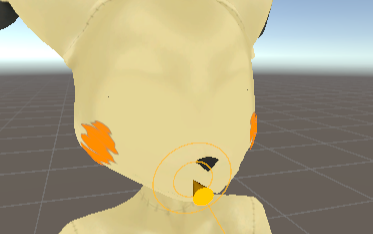
-
@toounknown There is a problem with the eyes, there not showing up on the face, so I just get this 0_0
@LunarFazbear Just apply Toonlit Standard, you can do that material by selecting vrchat > mobile > toonlit Standard. that quest matertial has a option to swap what side a material is facing
-
This post is deleted!
-
@Kitku2007 do you still have the riolukidd version of the avatar? and if you do are you able to send it my way?
-
@Kitku2007 Do you still have the file?
-
This post is deleted!
-
bump for new link
-
Bump for new link
-
bumpies
-
bump for new link
-
This avatar is on VRModels. It uses Xiexe's Unity Shaders.
https://vrmodels.store/avatars/49283-mimi-the-mimikyu-warfaremachine-port.html
https://github.com/Xiexe/Xiexes-Unity-Shaders/releases





 Download Link (drive.google.com)


Hello! It looks like you're interested in this conversation, but you don't have an account yet.
Getting fed up of having to scroll through the same posts each visit? When you register for an account, you'll always come back to exactly where you were before, and choose to be notified of new replies (either via email, or push notification). You'll also be able to save bookmarks and upvote posts to show your appreciation to other community members.
With your input, this post could be even better 💗
Register Login