Skip to content
  • Categories
  • Recent
  • Tags
  • Popular
Skins
  • Light
  • Brite
  • Cerulean
  • Cosmo
  • Flatly
  • Journal
  • Litera
  • Lumen
  • Lux
  • Materia
  • Minty
  • Morph
  • Pulse
  • Sandstone
  • Simplex
  • Sketchy
  • Spacelab
  • United
  • Yeti
  • Zephyr
  • Dark
  • Cyborg
  • Darkly
  • Quartz
  • Slate
  • Solar
  • Superhero
  • Vapor

  • Default (Zephyr)
  • No Skin
Collapse
RipperStore Logo
  1. Home
  2. Assets
  3. Looking for...
  4. Uncategorized
  5. 【Found】 Looking for this glasses

【Found】 Looking for this glasses

Scheduled Pinned Locked Moved Uncategorized
solvedbooth asset
12 Posts 10 Posters 5.7k Views 23 Watching
  • Oldest to Newest
  • Newest to Oldest
  • Most Votes
Reply
  • Reply as topic
Log in to reply
This topic has been deleted. Only users with topic management privileges can see it.
  • R
    R
    RedBeacon
    wrote on last edited by RedBeacon
    #1

    alt text

    1 Reply Last reply
    0
    • R
      R
      RedBeacon
      wrote on last edited by
      #2

      https://garden-of-ashen.booth.pm/items/4929403

      1 Reply Last reply
      0
      • SheepyS
        SheepyS
        Sheepy
        wrote on last edited by
        #3

        Bumps

        1 Reply Last reply
        0
        • Subprime1264S
          Subprime1264S
          Subprime1264
          wrote on last edited by
          #4

          Bump~ლ(╹◡╹ლ)

          If you want share the links in my posts, remember copy post link and paste at your post, thanks.

          CiTRo is THE BEST, Mamehinata and Shipilka CUTE TOOOOOOOO~

          1 Reply Last reply
          0
          • V
            V
            vitaH
            wrote on last edited by
            #5

            bump,

            aGF2ZWFsb3ZlbHlkYXk=

            1 Reply Last reply
            0
            • xpurpleX
              xpurpleX
              xpurple
              wrote on last edited by
              #6

              +1

              1 Reply Last reply
              0
              • System moved this topic from Looking for... on
              • ?
                ?
                A Former User
                wrote on last edited by
                #7

                bbbbbbbbbbbbbbbbbbbbbbbbbbbbbbbbbbbbbbbbbbbbbb

                1 Reply Last reply
                0
                • Nuko_The_RippaN
                  Nuko_The_RippaN
                  Nuko_The_Rippa
                  wrote on last edited by
                  #8

                  bumpy bump

                  1 Reply Last reply
                  0
                  • RivenR
                    RivenR
                    Riven
                    wrote on last edited by
                    #9

                    bmp

                    1 Reply Last reply
                    0
                    • Special WeekS
                      Special WeekS
                      Special Week
                      wrote on last edited by
                      #10

                      I'm shocked that this is not here yet, but I was doing a Milltina avi and I came across this. It looks great by the way!

                      IMPORTANT! IMPORTANT!!

                      When you do import the glasses, the lenses will be white. You need to head to v1.0 in the Materials folder with the glasses and drag the "lens" material over the lenses to get the actual lenses shader. I dunno why it is not there by default, but just do that and the lens will work properly.

                      And yes, you DO need the shader that is also in the link for the lenses to work as a FYI.
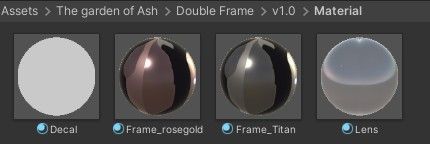
                      1048b33b-2c0d-4d33-822a-d716fbddc5f6-image.jpeg

                      1f7ca7a5-cfe3-406f-b02e-222286c1c3f7-image.jpeg

                      [register or login to view this hidden content]

                      giphy.gif

                      R kittriK 2 Replies Last reply
                      1
                      • Special WeekS Special Week

                        I'm shocked that this is not here yet, but I was doing a Milltina avi and I came across this. It looks great by the way!

                        IMPORTANT! IMPORTANT!!

                        When you do import the glasses, the lenses will be white. You need to head to v1.0 in the Materials folder with the glasses and drag the "lens" material over the lenses to get the actual lenses shader. I dunno why it is not there by default, but just do that and the lens will work properly.

                        And yes, you DO need the shader that is also in the link for the lenses to work as a FYI.

                        1048b33b-2c0d-4d33-822a-d716fbddc5f6-image.jpeg

                        1f7ca7a5-cfe3-406f-b02e-222286c1c3f7-image.jpeg

                        [register or login to view this hidden content]

                        giphy.gif

                        R
                        R
                        RedBeacon
                        wrote on last edited by
                        #11

                        @Special-Week Thanks for the careful explanation!

                        1 Reply Last reply
                        0
                        • Special WeekS Special Week

                          I'm shocked that this is not here yet, but I was doing a Milltina avi and I came across this. It looks great by the way!

                          IMPORTANT! IMPORTANT!!

                          When you do import the glasses, the lenses will be white. You need to head to v1.0 in the Materials folder with the glasses and drag the "lens" material over the lenses to get the actual lenses shader. I dunno why it is not there by default, but just do that and the lens will work properly.

                          And yes, you DO need the shader that is also in the link for the lenses to work as a FYI.

                          1048b33b-2c0d-4d33-822a-d716fbddc5f6-image.jpeg

                          1f7ca7a5-cfe3-406f-b02e-222286c1c3f7-image.jpeg

                          [register or login to view this hidden content]

                          giphy.gif

                          kittriK
                          kittriK
                          kittri
                          wrote last edited by
                          #12

                          @Special-Week How do I put on the shader?
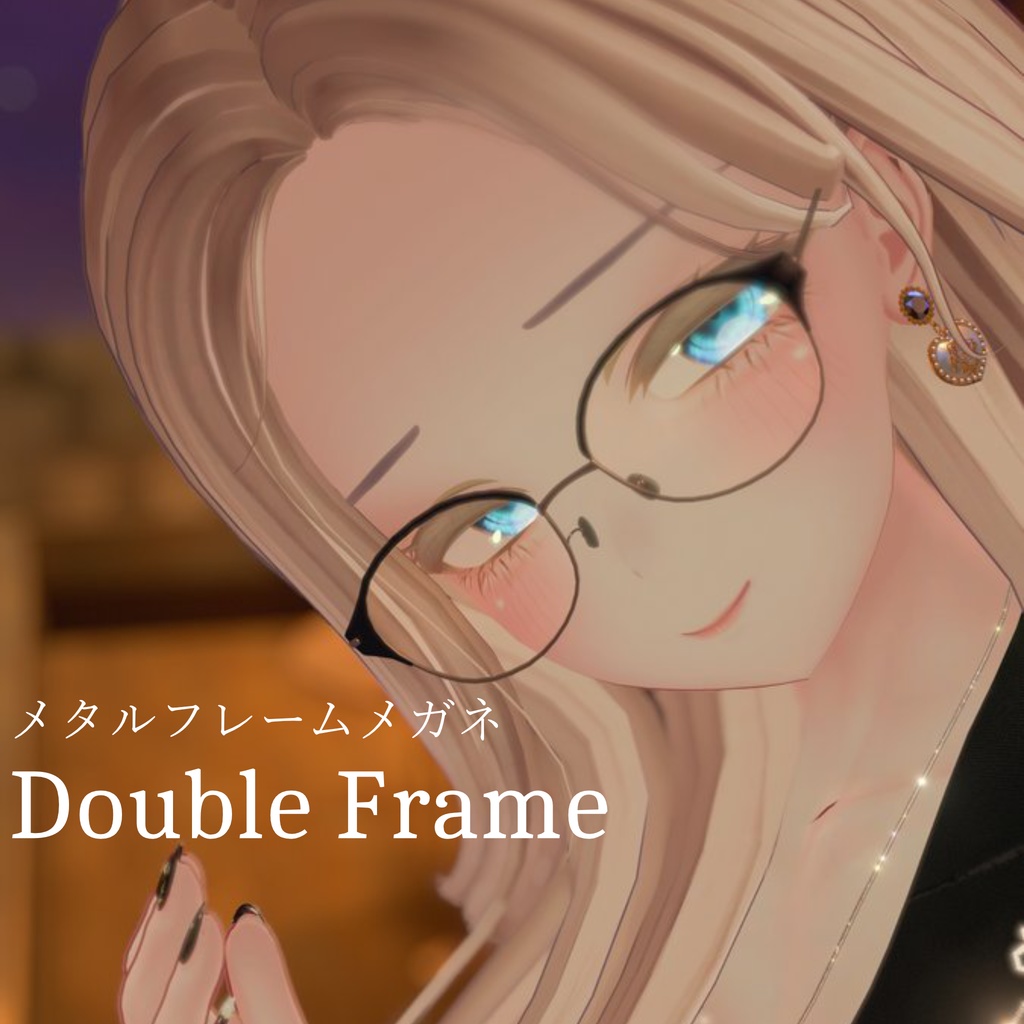
                          1 Reply Last reply
                          0

                          Hello! It looks like you're interested in this conversation, but you don't have an account yet.

                          Getting fed up of having to scroll through the same posts each visit? When you register for an account, you'll always come back to exactly where you were before, and choose to be notified of new replies (either via email, or push notification). You'll also be able to save bookmarks and upvote posts to show your appreciation to other community members.

                          With your input, this post could be even better 💗

                          Register Login
                          Reply
                          • Reply as topic
                          Log in to reply
                          • Oldest to Newest
                          • Newest to Oldest
                          • Most Votes


                          • Login

                          • Login or register to search.
                          • First post
                            Last post
                          0
                          • Categories
                          • Recent
                          • Tags
                          • Popular