Skip to content
  • Categories
  • Recent
  • Tags
  • Popular
Skins
  • Light
  • Brite
  • Cerulean
  • Cosmo
  • Flatly
  • Journal
  • Litera
  • Lumen
  • Lux
  • Materia
  • Minty
  • Morph
  • Pulse
  • Sandstone
  • Simplex
  • Sketchy
  • Spacelab
  • United
  • Yeti
  • Zephyr
  • Dark
  • Cyborg
  • Darkly
  • Quartz
  • Slate
  • Solar
  • Superhero
  • Vapor

  • Default (Zephyr)
  • No Skin
Collapse
RipperStore Logo
  1. Home
  2. Assets
  3. Looking for...
  4. Gumroad/Payhip Avatars
  5. LF: [NULL] "The Runner"

LF: [NULL] "The Runner"

Scheduled Pinned Locked Moved Unsolved Gumroad/Payhip Avatars
avatarcyberpunkfemalelooking forthe runner
41 Posts 25 Posters 3.7k Views 46 Watching
  • Oldest to Newest
  • Newest to Oldest
  • Most Votes
Reply
  • Reply as topic
Log in to reply
This topic has been deleted. Only users with topic management privileges can see it.
  • Katie_foxK
    Katie_foxK
    Katie_fox
    wrote on last edited by Katie_fox
    #10

    Literally look at it more then 1 second an you can see the FX layer is wrong just change it to the "N FX" and the hand gesture layer in the Gesture FX layer its not hard an a very common mistake cause you have to test every layer.

    notyourclownN S 2 Replies Last reply
    👍
    2
    • S senpai actual2

      I come with a gift, I adored the model, so why not
      🔗 Download Link (workupload.com)

      DekinaiD
      DekinaiD
      Dekinai
      wrote on last edited by
      #11

      @senpai-actual2 thank you

      1 Reply Last reply
      0
      • Katie_foxK Katie_fox

        Literally look at it more then 1 second an you can see the FX layer is wrong just change it to the "N FX" and the hand gesture layer in the Gesture FX layer its not hard an a very common mistake cause you have to test every layer.

        notyourclownN
        notyourclownN
        notyourclown
        wrote on last edited by
        #12

        @Katie_fox and how in the world do you do allat 💔

        RegretsR 1 Reply Last reply
        0
        • S senpai actual2

          I come with a gift, I adored the model, so why not
          🔗 Download Link (workupload.com)

          AlètaA
          AlètaA
          Alèta
          wrote on last edited by
          #13

          @senpai-actual2 wow so fast, thank you ❤

          1 Reply Last reply
          0
          • notyourclownN notyourclown

            @Katie_fox and how in the world do you do allat 💔

            RegretsR
            RegretsR
            Regrets
            wrote on last edited by
            #14

            @notyourclown so bascially..
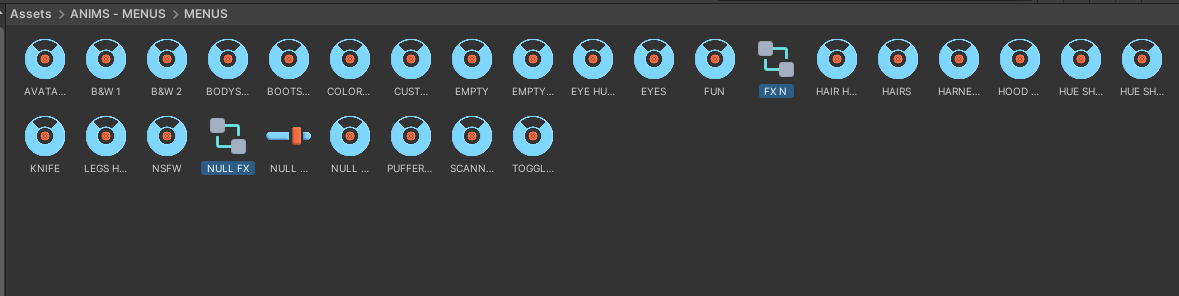
            go to this folder
            628df641-c54a-4e60-8b39-5edb7a8d67b3-image.png

            Look for the 2 highlighted FX Layers
            8010848a-88a4-4eec-8580-cbeb3381a6e9-image.png

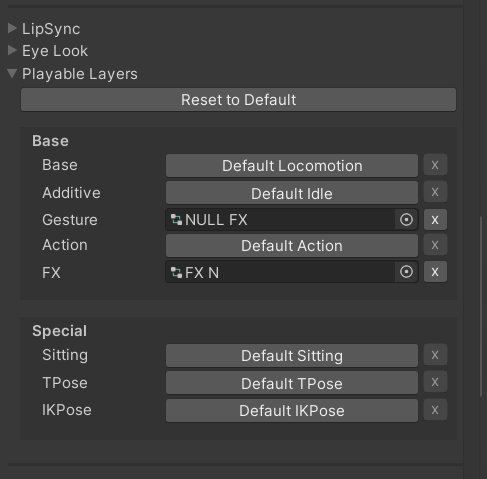
            Select the model on the top left and on the right located under VRC Avatar Descriptor
            Place the FX layers accordingly
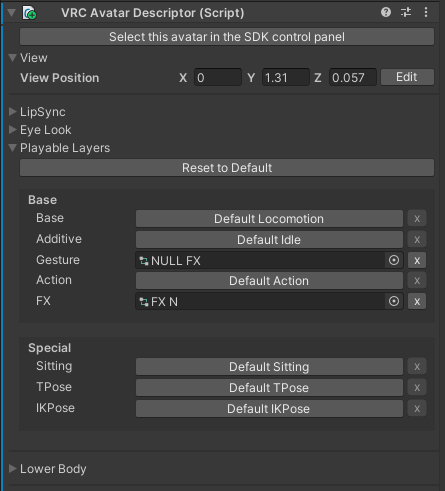
            115aeaa9-4eb1-420b-92a0-babc46190660-image.png

            And your done!!!

            SskitarS G 2 Replies Last reply
            👍
            3
            • RegretsR Regrets

              @notyourclown so bascially..
              go to this folder
              628df641-c54a-4e60-8b39-5edb7a8d67b3-image.png

              Look for the 2 highlighted FX Layers
              8010848a-88a4-4eec-8580-cbeb3381a6e9-image.png

              Select the model on the top left and on the right located under VRC Avatar Descriptor
              Place the FX layers accordingly
              115aeaa9-4eb1-420b-92a0-babc46190660-image.png

              And your done!!!

              SskitarS
              SskitarS
              Sskitar
              wrote on last edited by
              #15
              This post is deleted!
              Lena catL 1 Reply Last reply
              0
              • SskitarS Sskitar
                [[topic:post-is-deleted]]
                Lena catL
                Lena catL
                Lena cat
                wrote on last edited by
                #16

                @Sskitar https://forum.ripper.store/post/1512013 its right above your post......

                SskitarS 1 Reply Last reply
                0
                • Lena catL Lena cat

                  @Sskitar https://forum.ripper.store/post/1512013 its right above your post......

                  SskitarS
                  SskitarS
                  Sskitar
                  wrote on last edited by
                  #17

                  @Lena-cat I did that.. 6087a809-ab06-4625-8a2e-a353fab1961f-image.png

                  Lena catL 1 Reply Last reply
                  0
                  • SskitarS Sskitar

                    @Lena-cat I did that.. 6087a809-ab06-4625-8a2e-a353fab1961f-image.png

                    Lena catL
                    Lena catL
                    Lena cat
                    wrote on last edited by
                    #18

                    @Sskitar i feel like there backwards ill bot up my laptop...

                    Lena catL 1 Reply Last reply
                    😊 👍
                    0
                    • Katie_foxK Katie_fox

                      Literally look at it more then 1 second an you can see the FX layer is wrong just change it to the "N FX" and the hand gesture layer in the Gesture FX layer its not hard an a very common mistake cause you have to test every layer.

                      S
                      S
                      senpai actual2
                      wrote on last edited by
                      #19

                      @Katie_fox yea fam but im not gonna go into the layers to check everything so relax

                      1 Reply Last reply
                      😹
                      -2
                      • Lena catL Lena cat

                        @Sskitar i feel like there backwards ill bot up my laptop...

                        Lena catL
                        Lena catL
                        Lena cat
                        wrote on last edited by
                        #20

                        i got sht going on yall figure it out its not hard.

                        SskitarS 1 Reply Last reply
                        0
                        • Lena catL Lena cat

                          i got sht going on yall figure it out its not hard.

                          SskitarS
                          SskitarS
                          Sskitar
                          wrote on last edited by
                          #21

                          @Lena-cat damn, thx anyways, im a newbie in unity so no idea how to propertly fix this.

                          DekinaiD 1 Reply Last reply
                          0
                          • SskitarS
                            SskitarS
                            Sskitar
                            wrote on last edited by
                            #22

                            Okay so basically for anyone still having issues with the avi, you ONLY need to put the "FX N" Animator controller into the FX layer on the avatar descriptor just like the image on this answer.
                            The FX layer can be found in Assets -> ANIMS - MENUS -> MENUS -> (FX N) as @Regrets said.
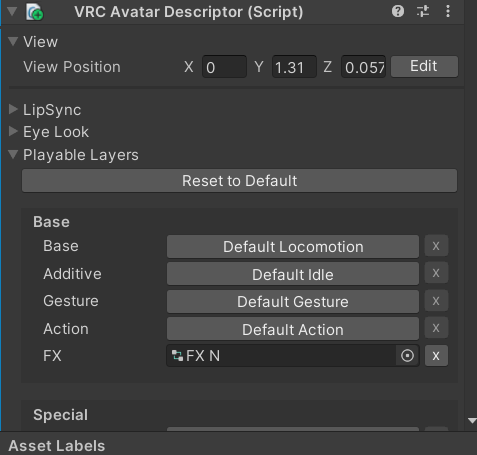
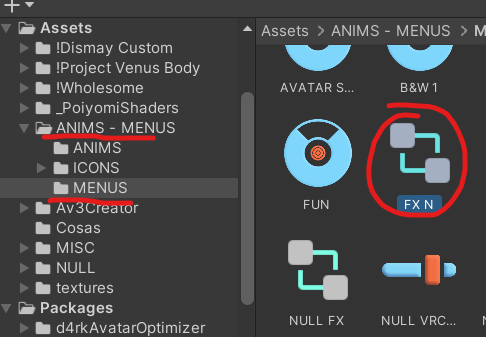
                            image.png

                            image.png

                            1 Reply Last reply
                            0
                            • SskitarS Sskitar

                              @Lena-cat damn, thx anyways, im a newbie in unity so no idea how to propertly fix this.

                              DekinaiD
                              DekinaiD
                              Dekinai
                              wrote on last edited by
                              #23

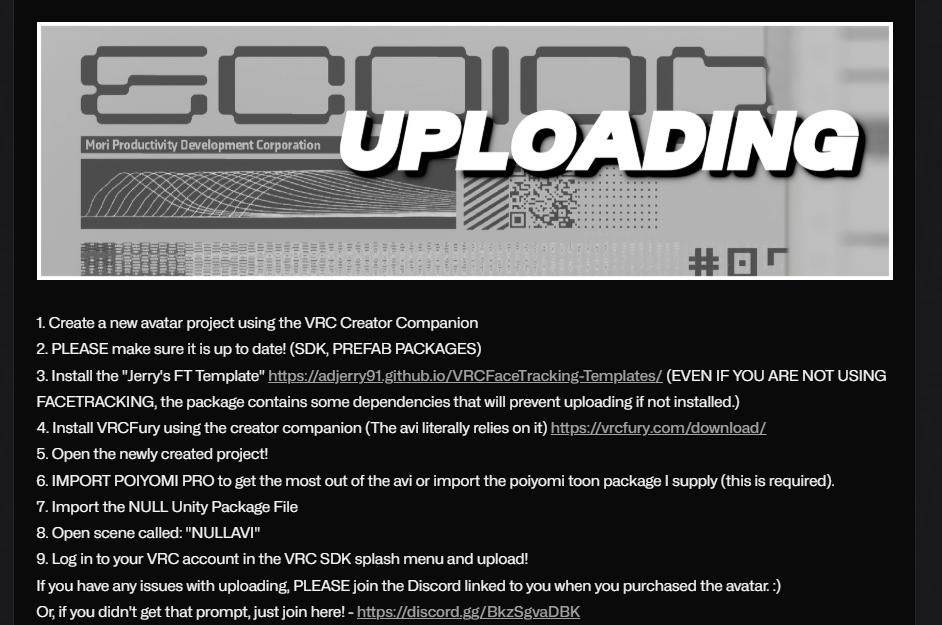
                              @Sskitar You need to have VRCFury installed, alongside Poiyomi shaders, and the "Jerry's FT Template" even if you don't use face tracking. VRCFury will fix the "mask" issue, basically the gesture controller is set up only for the right hand but VRC duplicates it and puts the same gestures on the left hand, that is all. You can upload even with that error showing up, VRCFury will take care of it when the avi is building. Hope that helps.

                              1 Reply Last reply
                              0
                              • KYOuuK
                                KYOuuK
                                KYOuu
                                wrote on last edited by
                                #24

                                image.png they wrote how to upload it on their jinxy

                                1 Reply Last reply
                                0
                                • KYOuuK
                                  KYOuuK
                                  KYOuu
                                  wrote on last edited by
                                  #25

                                  some of the toggles still don't show up for me like changing the clothes

                                  1 Reply Last reply
                                  0
                                  • NJSXTN
                                    NJSXTN
                                    NJSXT
                                    wrote on last edited by
                                    #26

                                    Does 1.0.4 update fix all of the current problems? If so +1 bump for that updateee

                                    1 Reply Last reply
                                    0
                                    • KYOuuK
                                      KYOuuK
                                      KYOuu
                                      wrote on last edited by
                                      #27

                                      oh yeah tru, bump for update!

                                      1 Reply Last reply
                                      0
                                      • pure870193P
                                        pure870193P
                                        pure870193
                                        wrote on last edited by
                                        #28

                                        +1

                                        1 Reply Last reply
                                        0
                                        • S senpai actual2

                                          I come with a gift, I adored the model, so why not
                                          🔗 Download Link (workupload.com)

                                          puggyP
                                          puggyP
                                          puggy
                                          wrote on last edited by
                                          #29

                                          @senpai-actual2 hi! can u upload the fix? please and ty!

                                          1 Reply Last reply
                                          0

                                          Hello! It looks like you're interested in this conversation, but you don't have an account yet.

                                          Getting fed up of having to scroll through the same posts each visit? When you register for an account, you'll always come back to exactly where you were before, and choose to be notified of new replies (either via email, or push notification). You'll also be able to save bookmarks and upvote posts to show your appreciation to other community members.

                                          With your input, this post could be even better 💗

                                          Register Login
                                          Reply
                                          • Reply as topic
                                          Log in to reply
                                          • Oldest to Newest
                                          • Newest to Oldest
                                          • Most Votes


                                          • Login

                                          • Login or register to search.
                                          • First post
                                            Last post
                                          0
                                          • Categories
                                          • Recent
                                          • Tags
                                          • Popular