
Pearl the Squidstack quest port help
-
Hey y'all, I was trying to port an avatar that looks really cool over to Quest but unfortunately it has proven really really difficult. While I did use the VRCquest tool to do the texture, shader and physbones porting, I did make sure to look through the files I had to see if I can combat the issues. The main problems I ran into were that parts like clothing, the head puppet and so on are always visible on the Quest version, while they are usually hidden by default on PC. The first Is PC and the second one is quest. (captured in gesture manager with the same toggles enabled)

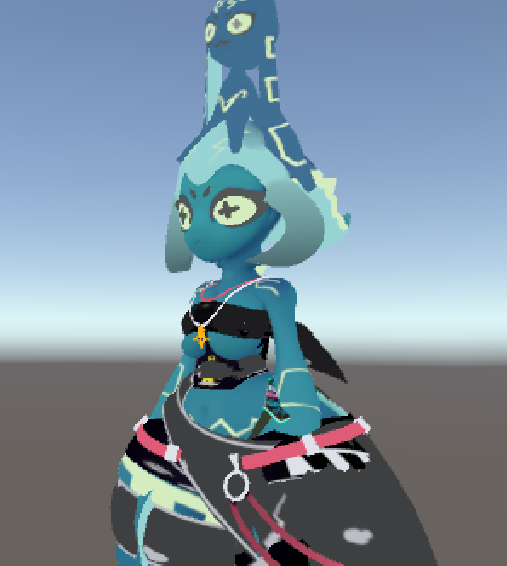
I was hoping someone could look at the files for this Avatar and tell me what I did wrong exactly and how to fix the clothing. I wouldn't mind if someone fixed them for me but I do try to learn as well

The link to the Avatar is: https://vrmodels.store/avatars/32699-pearl-the-squidstack-vrchat-shortstack-squids-555.html
-
might be an issue with animations or toggles, since they seem to default to on instead of yknow being toggled, im having trouble doing the same with the newer pearl avi that dropped recently as well, so if you or someone else figures it out id very much appreciate help with this one too

https://payhip.com/b/FY827link to avi files: https://vrmodels.store/avatars/53454-leviathan-pearl.html
Hello! It looks like you're interested in this conversation, but you don't have an account yet.
Getting fed up of having to scroll through the same posts each visit? When you register for an account, you'll always come back to exactly where you were before, and choose to be notified of new replies (either via email, or push notification). You'll also be able to save bookmarks and upvote posts to show your appreciation to other community members.
With your input, this post could be even better 💗
Register Login