Skip to content
  • Categories
  • Recent
  • Tags
  • Popular
Skins
  • Light
  • Brite
  • Cerulean
  • Cosmo
  • Flatly
  • Journal
  • Litera
  • Lumen
  • Lux
  • Materia
  • Minty
  • Morph
  • Pulse
  • Sandstone
  • Simplex
  • Sketchy
  • Spacelab
  • United
  • Yeti
  • Zephyr
  • Dark
  • Cyborg
  • Darkly
  • Quartz
  • Slate
  • Solar
  • Superhero
  • Vapor

  • Default (Zephyr)
  • No Skin
Collapse
RipperStore Logo
  1. Home
  2. Assets
  3. Found Avatars and Assets
  4. Shinra Sweet Elf! (Blendshape Settings)

Shinra Sweet Elf! (Blendshape Settings)

Scheduled Pinned Locked Moved Found Avatars and Assets
12 Posts 7 Posters 6.0k Views 6 Watching
  • Oldest to Newest
  • Newest to Oldest
  • Most Votes
Reply
  • Reply as topic
Log in to reply
This topic has been deleted. Only users with topic management privileges can see it.
  • eironE eiron

    Thanks!!

    M
    M
    mimanz
    wrote on last edited by
    #3

    @eiron Of course! No problem at all ♡

    EepyyE 1 Reply Last reply
    0
    • M mimanz

      @eiron Of course! No problem at all ♡

      EepyyE
      EepyyE
      Eepyy
      wrote on last edited by
      #4

      @mimanz How did you get the settings to stay? Mine wont after uploading it goes back to default

      M 1 Reply Last reply
      1
      • EepyyE Eepyy

        @mimanz How did you get the settings to stay? Mine wont after uploading it goes back to default

        M
        M
        mimanz
        wrote on last edited by
        #5

        @Eepy So for these to stay, you'll need to go into Shinra's animations and edit these settings to stay in her face animations that come with Shinra! I'm pretty sure you need to copy these blendshape values to every single animation (gestures as well as the default of course) or else the settings and elf ears will go away when you do gestures in game.

        I would recommend using the record button on the animations tab when doing the shapes and just moving the value a little and then back to the value you want instead of entering it manually. That should make it stay!

        Hope it helps, it's really not straight forward to thanks for asking ^^;
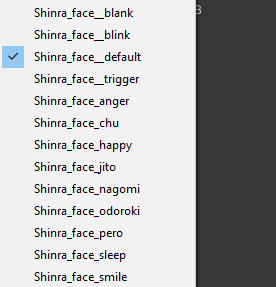
        image (2).png

        EepyyE 1 Reply Last reply
        1
        • M mimanz

          @Eepy So for these to stay, you'll need to go into Shinra's animations and edit these settings to stay in her face animations that come with Shinra! I'm pretty sure you need to copy these blendshape values to every single animation (gestures as well as the default of course) or else the settings and elf ears will go away when you do gestures in game.

          I would recommend using the record button on the animations tab when doing the shapes and just moving the value a little and then back to the value you want instead of entering it manually. That should make it stay!

          Hope it helps, it's really not straight forward to thanks for asking ^^;

          image (2).png

          EepyyE
          EepyyE
          Eepyy
          wrote on last edited by
          #6

          @mimanz You explained it really well, I've got a good understanding for animations hopefully this works thanks!

          1 Reply Last reply
          1
          • E
            E
            eiennn
            wrote on last edited by
            #7

            this is my setting on booth... please remove this

            peppiP 1 Reply Last reply
            👎
            0
            • E eiennn

              this is my setting on booth... please remove this

              peppiP
              peppiP
              peppi
              wrote on last edited by peppi
              #8

              @eiennn You are charging 500 for images with shapekey settings that come free with base model, and you don't add any new face animations that apply these settings into the package. You are also asking a leaking community to stop leaking. Some people like to try and buy here. x

              1 Reply Last reply
              👍
              0
              • N
                N
                nemame
                wrote on last edited by
                #9

                if you already have these settings applied to a unity project , is it possible to gimme a download unity package thing ? this is a bit confusing ( newbie ) also is the elf ears made with messing with the blendshapes or a new base model ?

                haaiH 1 Reply Last reply
                0
                • N nemame

                  if you already have these settings applied to a unity project , is it possible to gimme a download unity package thing ? this is a bit confusing ( newbie ) also is the elf ears made with messing with the blendshapes or a new base model ?

                  haaiH
                  haaiH
                  haai
                  wrote on last edited by
                  #10

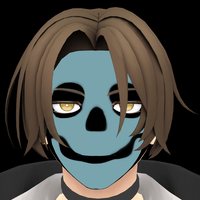
                  @nemame the elf ears are a blendshape, and i don't think it's possible to make a unity package for blendshapes unless u mean the animations with the blendshapes already applied.

                  N 2 Replies Last reply
                  0
                  • haaiH haai

                    @nemame the elf ears are a blendshape, and i don't think it's possible to make a unity package for blendshapes unless u mean the animations with the blendshapes already applied.

                    N
                    N
                    nemame
                    wrote on last edited by
                    #11

                    @haai yeah i mean the already applied one , im really not confident in doing it myself ( i have already tried but it was a huge fail ;-; nothing worked ) have you maybe tried doing this already and if so is it possible to teach me or guide mt trough it ?

                    1 Reply Last reply
                    0
                    • haaiH haai

                      @nemame the elf ears are a blendshape, and i don't think it's possible to make a unity package for blendshapes unless u mean the animations with the blendshapes already applied.

                      N
                      N
                      nemame
                      wrote on last edited by
                      #12

                      @haai or just the unity package with everything already applied ;-; if that isnt to much to ask for

                      1 Reply Last reply
                      0

                      Hello! It looks like you're interested in this conversation, but you don't have an account yet.

                      Getting fed up of having to scroll through the same posts each visit? When you register for an account, you'll always come back to exactly where you were before, and choose to be notified of new replies (either via email, or push notification). You'll also be able to save bookmarks and upvote posts to show your appreciation to other community members.

                      With your input, this post could be even better 💗

                      Register Login
                      Reply
                      • Reply as topic
                      Log in to reply
                      • Oldest to Newest
                      • Newest to Oldest
                      • Most Votes


                      • Login

                      • Login or register to search.
                      • First post
                        Last post
                      0
                      • Categories
                      • Recent
                      • Tags
                      • Popular