
GIFT; Reindeer edit of Onyx V2
-
I know Bratbun is dropping a christmas avatar soon, but I thought a reindeer edit of Onyx would be really cute, so I did it.
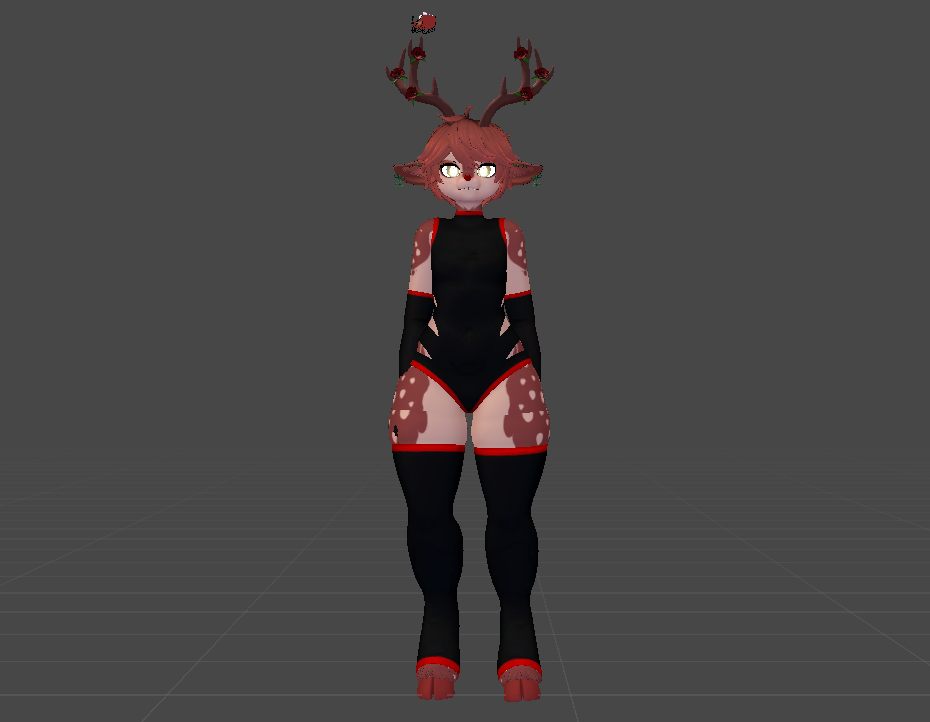
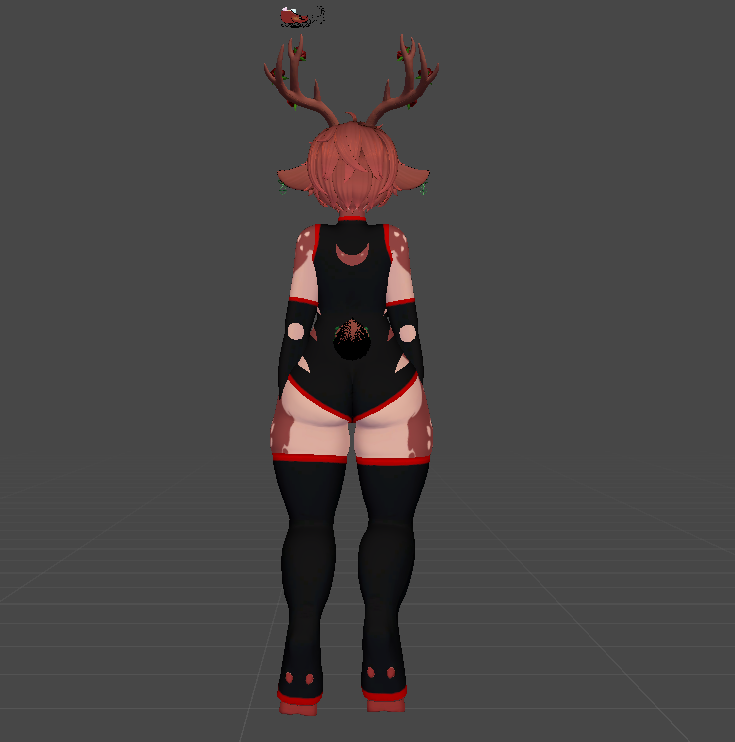
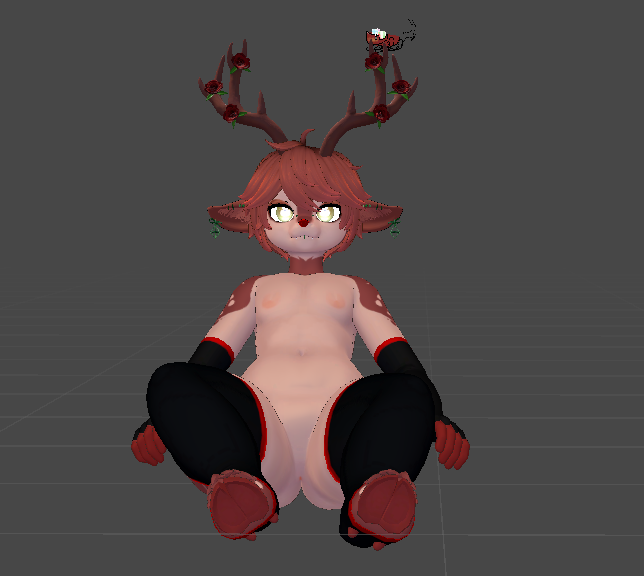
(PLEASE NOTE I am very novice to blender and unity! I am self-taught, so some things might be broken/wont work! Some things have been removed due to issues! He still has his peenor tho dw lol. I quest converted it as well, to make it easier.
Make sure to have VRCFury, poiyomi shader, and latest go go loco installed!!DL LINK:
Assets I used!
OnyxV2 by Bratbun: Store Link
Santa's sled-halo with anime Store link
Fauna Ears & Tail by JinxieWinks Store link Download link -
Amazing and cute edit very well too for a bratbun edit!

-
-
Hey there, I hope you're doing alright
I got the edit so I could use the body since the original has a tail glued to its mesh and your edit doesn't.. I was trying to make an avatar for my friend, but trying to upload it to VRChat gives the "clearing blueprint ID" error, I think you might know what it is. And no.. the avatar's prefab doesn't have an ID, I don't know why it happens.
I don't have experience with Blender and when I tried to remove the tail from the original model by myself I screwed up. Do you have any tips on how I can solve this or maybe you have the body without the tail so I could use it? Thanks a lot anyway.
-
Hey there, I hope you're doing alright
I got the edit so I could use the body since the original has a tail glued to its mesh and your edit doesn't.. I was trying to make an avatar for my friend, but trying to upload it to VRChat gives the "clearing blueprint ID" error, I think you might know what it is. And no.. the avatar's prefab doesn't have an ID, I don't know why it happens.
I don't have experience with Blender and when I tried to remove the tail from the original model by myself I screwed up. Do you have any tips on how I can solve this or maybe you have the body without the tail so I could use it? Thanks a lot anyway.
@Kykys If you want to remove the tail by yourself in blender, open unity and import your avatar. Go into "All models" and find the avatars fbx. Right click it and choose "show in explorer", it will show you where the fbx is in your files. Right click the link at the top of your file explorer and copy it. Go into blender, go into file and then 'import'. Paste the link you copied and select the fbx to import it. Once its in blender, go to the side bar and make all of the clothing options not visible by clicking the eye icon, this is just to make the process easier. Select the body mesh, and go into edit mode by hovering over where it says 'object mode' and selecting the edit mode option. Then your avatar will look like it has a bunch of squares on it lol, these are the vertices. Zoom into the tail and select all of the little dots that you'll be able to see. Using the shift key and ctrl key while you select makes it easier. Once the entire tail is selected, right click it and choose "delete vertices" and it'll be gone. There will be a big hole in its place, if you want to remove that go into sculpt mode and try to pull the hole together using some of the options there. There is most likely a better way to do that, I just don't know it yet without messing up the UV map lol.
If all of this sounds too complicated and you'd rather use my edit, go into the console in unity and take a screenshot. I can probably tell you the issue from there.
-
@Kykys If you want to remove the tail by yourself in blender, open unity and import your avatar. Go into "All models" and find the avatars fbx. Right click it and choose "show in explorer", it will show you where the fbx is in your files. Right click the link at the top of your file explorer and copy it. Go into blender, go into file and then 'import'. Paste the link you copied and select the fbx to import it. Once its in blender, go to the side bar and make all of the clothing options not visible by clicking the eye icon, this is just to make the process easier. Select the body mesh, and go into edit mode by hovering over where it says 'object mode' and selecting the edit mode option. Then your avatar will look like it has a bunch of squares on it lol, these are the vertices. Zoom into the tail and select all of the little dots that you'll be able to see. Using the shift key and ctrl key while you select makes it easier. Once the entire tail is selected, right click it and choose "delete vertices" and it'll be gone. There will be a big hole in its place, if you want to remove that go into sculpt mode and try to pull the hole together using some of the options there. There is most likely a better way to do that, I just don't know it yet without messing up the UV map lol.
If all of this sounds too complicated and you'd rather use my edit, go into the console in unity and take a screenshot. I can probably tell you the issue from there.


Hello! It looks like you're interested in this conversation, but you don't have an account yet.
Getting fed up of having to scroll through the same posts each visit? When you register for an account, you'll always come back to exactly where you were before, and choose to be notified of new replies (either via email, or push notification). You'll also be able to save bookmarks and upvote posts to show your appreciation to other community members.
With your input, this post could be even better 💗
Register Login