Skip to content
  • Categories
  • Recent
  • Tags
  • Popular
Skins
  • Light
  • Brite
  • Cerulean
  • Cosmo
  • Flatly
  • Journal
  • Litera
  • Lumen
  • Lux
  • Materia
  • Minty
  • Morph
  • Pulse
  • Sandstone
  • Simplex
  • Sketchy
  • Spacelab
  • United
  • Yeti
  • Zephyr
  • Dark
  • Cyborg
  • Darkly
  • Quartz
  • Slate
  • Solar
  • Superhero
  • Vapor

  • Default (Zephyr)
  • No Skin
Collapse
RipperStore Logo
  1. Home
  2. Assets
  3. Looking for...
  4. Gumroad/Payhip Avatars
  5. LF: Vexra by eternal memories ( releasing soon )

LF: Vexra by eternal memories ( releasing soon )

Scheduled Pinned Locked Moved Unsolved Gumroad/Payhip Avatars
looking forfemale avatarvrcftpc questunreleased
73 Posts 39 Posters 10.7k Views 61 Watching
  • Oldest to Newest
  • Newest to Oldest
  • Most Votes
Reply
  • Reply as topic
Log in to reply
This topic has been deleted. Only users with topic management privileges can see it.
  • B
    B
    BooBooKeyz
    wrote on last edited by
    #64

    QUEST VERSION PLEASE

    1 Reply Last reply
    1
    • remy_vrcR
      remy_vrcR
      remy_vrc
      wrote on last edited by
      #65

      quest bump πŸ™πŸ»πŸ™πŸ»

      1 Reply Last reply
      1
      • SupvFoxS
        SupvFoxS
        SupvFox
        wrote on last edited by
        #66

        quest bump πŸ˜„

        1 Reply Last reply
        1
        • G
          G
          GothicMew
          wrote on last edited by
          #67

          Anyone getting the loaded avatar we do not own clearing blueprint ID issue?

          ZennetheZ 1 Reply Last reply
          0
          • G GothicMew

            Anyone getting the loaded avatar we do not own clearing blueprint ID issue?

            ZennetheZ
            ZennetheZ
            Zennethe
            wrote on last edited by
            #68

            @GothicMew

            How to clear a Blueprint ID from a VRChat avatar:

            1. Open your avatar project in Unity.

            2. In the left Hierarchy window, click the main (root) object of your avatar.

            3. In the right Inspector window, scroll down and find the β€œPipeline Manager” component.

            4. Click the β€œDetach” button.
              The Blueprint ID field should now be empty.

            5. Save the scene/project, then upload again through the VRChat SDK.
              VRChat will automatically assign a new ID that belongs to your account.

            1 Reply Last reply
            0
            • SupvFoxS
              SupvFoxS
              SupvFox
              wrote on last edited by
              #69

              quest bump

              1 Reply Last reply
              1
              • anna_bn21A
                anna_bn21A
                anna_bn21
                wrote on last edited by
                #70
                This post is deleted!
                1 Reply Last reply
                0
                • ripperooR
                  ripperooR
                  ripperoo
                  wrote last edited by
                  #71

                  quest bump please!

                  1 Reply Last reply
                  1
                  • DaCatD
                    DaCatD
                    DaCat
                    wrote last edited by
                    #72

                    bum quest

                    1 Reply Last reply
                    1
                    • xbluerosexX xbluerosex

                      hopefully im doing this right but uhhh... bazinga πŸ”— Download Link (pixeldrain.com)

                      Bread_Lover_B
                      Bread_Lover_B
                      Bread_Lover_
                      wrote last edited by Bread_Lover_
                      #73

                      @xbluerosex said:

                      hopefully im doing this right but uhhh... bazinga [register or login to view this hidden content]

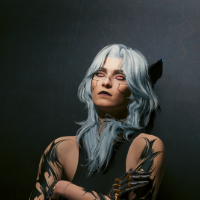
                      This has the quest file in the zip!
                      1 Reply Last reply
                      0

                      Hello! It looks like you're interested in this conversation, but you don't have an account yet.

                      Getting fed up of having to scroll through the same posts each visit? When you register for an account, you'll always come back to exactly where you were before, and choose to be notified of new replies (either via email, or push notification). You'll also be able to save bookmarks and upvote posts to show your appreciation to other community members.

                      With your input, this post could be even better πŸ’—

                      Register Login
                      Reply
                      • Reply as topic
                      Log in to reply
                      • Oldest to Newest
                      • Newest to Oldest
                      • Most Votes


                      • Login

                      • Login or register to search.
                      • First post
                        Last post
                      0
                      • Categories
                      • Recent
                      • Tags
                      • Popular