
How to bypass DMCA for avatars
-
For now, the obvious option is to make it private. But then, how can I share it? If I want to use it publicly, I could change the name or modify any mentions on the textures.
But… the question is, how does VRChat detect DMCA-violating avatars? Do they check by name, use AI to scan avatar thumbnails, or decompile the source files to look for violations?
-
upload to the other person's account. then upload to your own. simple as that
-
great punch from dmca warlord
-
upload to the other person's account. then upload to your own. simple as that
@nyakiku9261
The point isn’t where to upload it, but how to make sure the automated DMCA system doesn’t detect the avatar. Theoretically and hypothetically, how could this be prevented? Maybe it checks metadata or hashes, or perhaps it just scans by name, description, or preview image.I mean, you can still upload it to your original account - as we can see from VRChat’s actions, they simply block the avatar itself, but they don’t seem to ban the profile or impose other sanctions (apparently).
-
@nyakiku9261
The point isn’t where to upload it, but how to make sure the automated DMCA system doesn’t detect the avatar. Theoretically and hypothetically, how could this be prevented? Maybe it checks metadata or hashes, or perhaps it just scans by name, description, or preview image.I mean, you can still upload it to your original account - as we can see from VRChat’s actions, they simply block the avatar itself, but they don’t seem to ban the profile or impose other sanctions (apparently).
@Faxawen
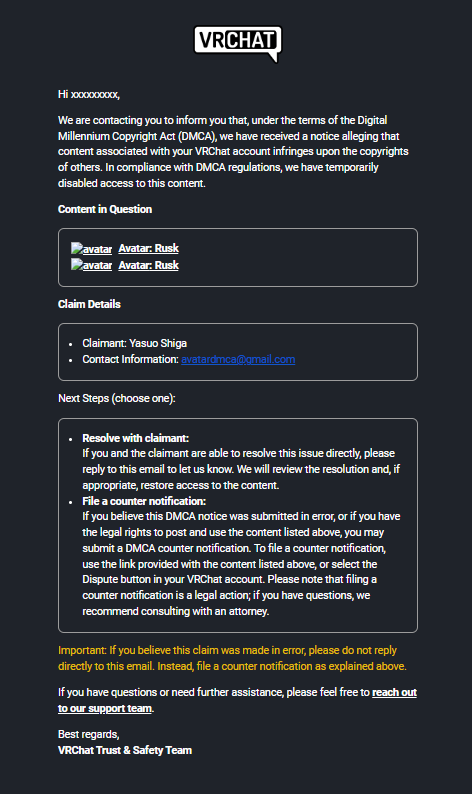
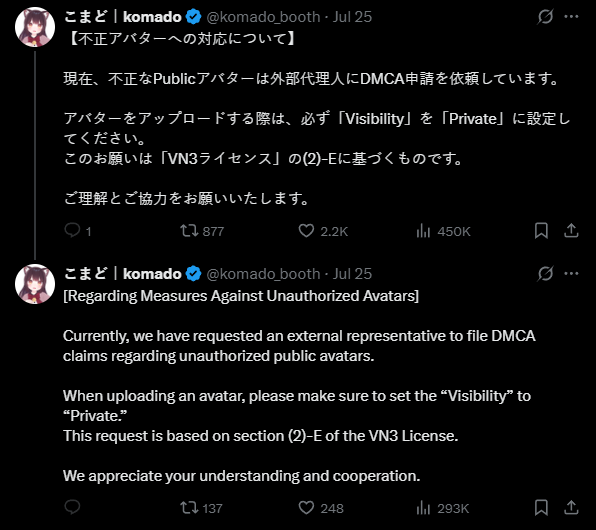
VRChat itself doesn't have an automatic DMCA system running in the background. So, when you hear about an avatar getting taken down, it's not VRChat's team doing the filing directly. Instead, what's happening is that third-party services are stepping in to file these DMCA requests on behalf of creators.It seems the recent wave of DMCA takedowns, affecting avatars like "Rusk" and others, is largely due to these third-party services using (or, some might say, "abusing") public avatar search worlds and websites. We're talking about platforms like Prismic and similar places where you can look up avatars. These sites make it super easy to:
- Find Avatars: They essentially create a big, searchable database of avatars.
- Automate Filings: Once an avatar is found and flagged, these services can pretty much automate the DMCA filing process. As automating the emails are quite easy tbh.
From my understanding on how this works gives us some clever ways to help protect our avatars!
The main goal is to make sure your avatar doesn't get listed on those big search sites.
Here are some of my friendly tips:Change the Name: Give your avatar a unique or unrelated name. My friend's "Rusk" avatar, for example, stayed safe because he called it "Konset" (Not The Actual Name, I'm pretty sure, the person who filed DMCA will be paying attention to this post) (no idea why, but it worked!). A name that doesn't immediately give away what it is makes it much harder to find in a search.
Use a Misleading Picture: Instead of showing the actual avatar, use a random or abstract image for its thumbnail. My friend used some crap AI-generated abstract art for his stupid ass avatar, but it is what it is ig. It can easily stops or avoid the automated visual search if there's any.
But, how do you share your avatar?
Go Private with Friends: This is probably the simplest and most effective! Share your avatar only with your close pals in a private instance of a world. Just be mindful of which worlds you use – some might secretly gather avatar info! Keeping it among your trusted circle keeps it off the public radar -
@Faxawen
VRChat itself doesn't have an automatic DMCA system running in the background. So, when you hear about an avatar getting taken down, it's not VRChat's team doing the filing directly. Instead, what's happening is that third-party services are stepping in to file these DMCA requests on behalf of creators.It seems the recent wave of DMCA takedowns, affecting avatars like "Rusk" and others, is largely due to these third-party services using (or, some might say, "abusing") public avatar search worlds and websites. We're talking about platforms like Prismic and similar places where you can look up avatars. These sites make it super easy to:
- Find Avatars: They essentially create a big, searchable database of avatars.
- Automate Filings: Once an avatar is found and flagged, these services can pretty much automate the DMCA filing process. As automating the emails are quite easy tbh.
From my understanding on how this works gives us some clever ways to help protect our avatars!
The main goal is to make sure your avatar doesn't get listed on those big search sites.
Here are some of my friendly tips:Change the Name: Give your avatar a unique or unrelated name. My friend's "Rusk" avatar, for example, stayed safe because he called it "Konset" (Not The Actual Name, I'm pretty sure, the person who filed DMCA will be paying attention to this post) (no idea why, but it worked!). A name that doesn't immediately give away what it is makes it much harder to find in a search.
Use a Misleading Picture: Instead of showing the actual avatar, use a random or abstract image for its thumbnail. My friend used some crap AI-generated abstract art for his stupid ass avatar, but it is what it is ig. It can easily stops or avoid the automated visual search if there's any.
But, how do you share your avatar?
Go Private with Friends: This is probably the simplest and most effective! Share your avatar only with your close pals in a private instance of a world. Just be mindful of which worlds you use – some might secretly gather avatar info! Keeping it among your trusted circle keeps it off the public radar@lodash_fun1
That’s a helpful observation, makes me think… -
For now, the obvious option is to make it private. But then, how can I share it? If I want to use it publicly, I could change the name or modify any mentions on the textures.
But… the question is, how does VRChat detect DMCA-violating avatars? Do they check by name, use AI to scan avatar thumbnails, or decompile the source files to look for violations?
-
yeah he is using a script https://x.com/AvatarDMCA/status/1911416381804867826/video/1
also what i do is make the avatar public then private i call them instance avatars cause only anyone one in the instance can use it

Hello! It looks like you're interested in this conversation, but you don't have an account yet.
Getting fed up of having to scroll through the same posts each visit? When you register for an account, you'll always come back to exactly where you were before, and choose to be notified of new replies (either via email, or push notification). You'll also be able to save bookmarks and upvote posts to show your appreciation to other community members.
With your input, this post could be even better 💗
Register Login