
GIFT:【VRChat】 PRP System
-
-
-
Thank you!!
-
-
I had no idea such a useful tool existed for costume creation…!
Thank you so deeply for your generous contribution—I’m truly grateful from the bottom of my heart!
-
-
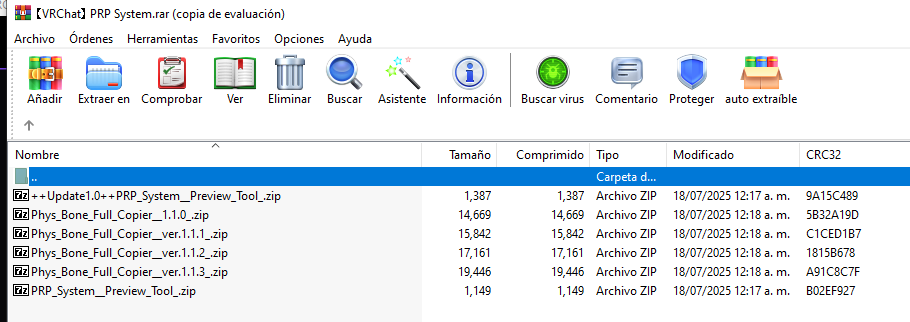
Thank you for the pose previewer @lacasaz , but i think the PhysBone Full Copier is missing!
-
@Disomnia Ooop, I forgot to use 7Zip. Thanks!!!
-
bump for PhysBone Full Copier update!
January 1, 2026 (ver. 1.1.5)
-
Added Component Copy Function
In addition to the previous PhysBone/Collider, you can now also copy compatible components such as Animators and Modular Avatars.
You can select the components to copy using the filter (checkbox).
Mesh-based Modular Avatars (e.g., Shape Changers) may break depending on the environment, so this feature is optional (default setting: OFF). -
Improved Modular Avatar Compatibility (Toggle/Cloth Switch + Shape Changer Auto Matching)
- The Merge Animator (Toggle/Cloth Switch) animation path is now automatically adjusted to facilitate smooth operation, even if the avatar's root name/object name is different.
- In particular, when using the MA Shape Changer, even if the costume-side avatar is different, the function will automatically find and match the connection destination as long as the internal bone structure and object configuration are the same. This significantly reduces the need for tedious reconnection work.
-
Improved matching logic to make it easier to find files even with name and structure differences.
Even with minor differences such as spaces, _ , - , .1 , or (Clone), the system automatically searches for and matches the closest possible match. -
Improved copy failure diagnostic tool (Copy Failure Inspector)
The previous Structure Diagnostic Window has been revamped. Instead of a simple comparison, it now displays failure causes by category, such as bone name mismatches (e.g., .001), duplication, hierarchy (path) differences, and missing targets.
In addition, the diagnostic results have been organized so that they can be copied as a text report.
- Improved log saving/reset behavior
The work log is now automatically saved to a file.
(Example: Assets/! PRP System !/Phys Bone Full Copier/Logs/PhysBoneCopyLog.txt)
When executing Reset, this version has been adjusted to initialize all components, including those copied.
-
-






Hello! It looks like you're interested in this conversation, but you don't have an account yet.
Getting fed up of having to scroll through the same posts each visit? When you register for an account, you'll always come back to exactly where you were before, and choose to be notified of new replies (either via email, or push notification). You'll also be able to save bookmarks and upvote posts to show your appreciation to other community members.
With your input, this post could be even better 💗
Register Login