
BloomPhone2
-
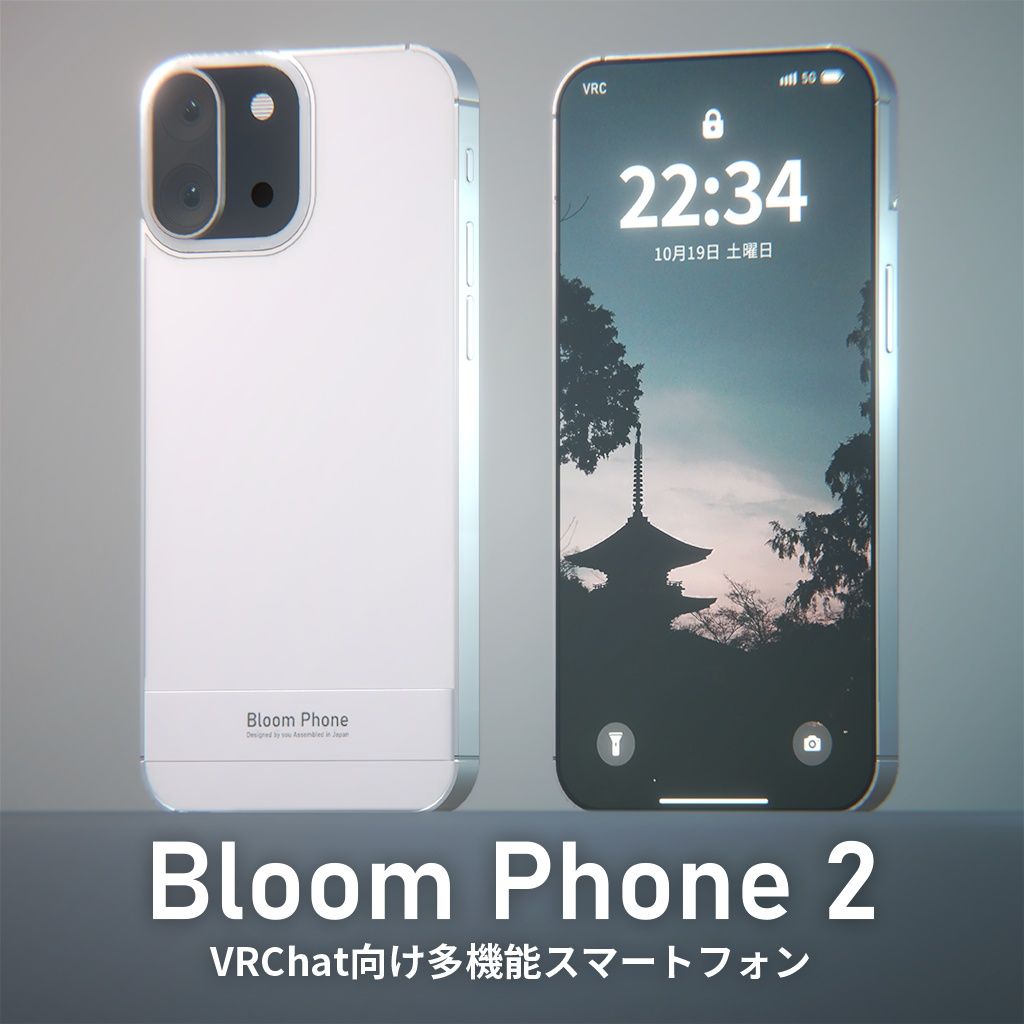
This is an interesting phone that can take photos. Its camera system allows its external camera to flip over for selfies, flash, and photography. Other functions also include flashlights. Or record the parameters of your movement speed and volume. There is also a custom phone screensaver available
Similarly... I don't have the habit of keeping track of Booth links, I'm sorry -
random question but if you figure out how to get the prefab into english that would be massively appreciated, i've had this for a while now but never really played with it because i didn't understand any of the toggles at all

-
random question but if you figure out how to get the prefab into english that would be massively appreciated, i've had this for a while now but never really played with it because i didn't understand any of the toggles at all
@lilsisgay it has pretty intuitive pictures in its menu c;
-Coming back temporarily-
PLEASE READ
Leaving the community, some people in here really make staying here exhausting, don't ask for any future updatesFor file issues, I recommend @OneShotaVRC 's “Corrupted File After Extraction? Virus Detected? Check this before asking your benefactor” thread , worth a read!
-
-
@offonoff i play with resolution cranked down because of my shit pc so the pictures are really hard to make out unfortunately
-
thanks ! heres the booth link : https://booth.pm/ja/items/6141712
-
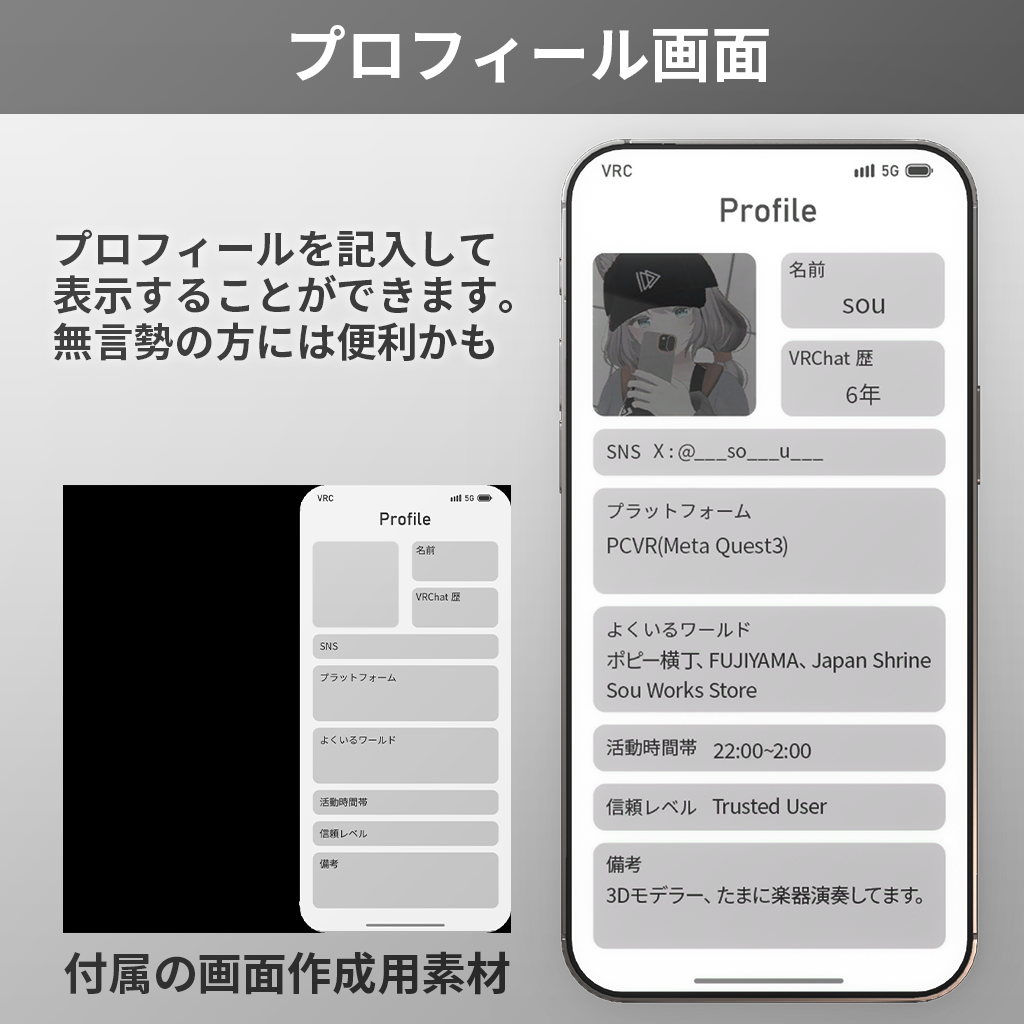
The profile display feature is such a fantastic addition too!
Thank you so much for this wonderful creation—it's absolutely lovely!
AI Translations;
Multi-functional Smartphone for VRChat
A feature-packed smartphone equipped with a camera, flashlight, avatar status display, world locking, and more!

Compatible with Modular Avatar, making it easy to integrate into your avatar!
For beginners, we’ve prepared a tutorial video on how to set it up:
📺 https://www.youtube.com/watch?v=WSfToJ8zuQc

Installation Guide
⚠ Prerequisite: Your Unity project must have Modular Avatar installed.

Import the included .unitypackage into your project.

Navigate to Assets/BloomPhone2/Prefabs/ and drag either the RightHand or LeftHand prefab directly under your avatar in the Hierarchy.
Select (Your Avatar)/BloomPhone2(_RightHand/_LeftHand)/BP_HandParent/BP_Root and adjust its position & scale to fit your avatar’s hand.
⚠ Do not move anything other than BP_Root!


Customization Guide
📱 Creating & Setting Up Custom Screens
Use the included PSD template or assets to design your screen texture. (Apply the mask to ensure the image fits within the display area.)

Import your custom texture into Unity.

Select the desired screen material in Assets/BloomPhone2/Screens/.
Apply your texture to the Emission Color field in the Material Inspector.

📸 Changing the Shutter Sound
Import your custom sound file (around 1 second long).

Select BP_ShutterSound under BloomPhone2/BP_CameraUnit/ in the Hierarchy.
Replace the AudioClip in the Audio Source component with your sound file.


👆 Changing the Touch Sound
Import your custom sound file (around 1 second long).

Select BP_ContactSound under BloomPhone2/BP_Contact/ in the Hierarchy.
Replace the AudioClip in the Audio Source component with your sound file.


📝 Renaming Menu Items
Navigate to Assets/BloomPhone2/Menu/ and select the menu you want to edit.

Modify the Name field in the Inspector.


⚠ Important Notes
Some features (e.g., camera & flashlight) will only be visible to others if they have "Show Avatar" enabled (always visible to you & friends).

Photos taken with the camera cannot be saved as data.
Modular Avatar is required for all functionalities.
Custom screens require image editing software (e.g., Photoshop).
Not Quest-compatible.
No refunds or returns due to the nature of digital products.
Only tested on Unity 2022.3.22f1.
Corrupted File After Extraction?💻 Virus Detected?👾
of easy fixes you can try right away. I hope you’ll give it a read!🛠Is Booth avatar's default body type a bit too slender for your taste?
Worry not! You can use Unity alone to transform her into a voluptuous, alluring Venus—plump and perfectly curved! 🥰I eagerly await the benevolent deity who will bless us with the latest version, including the profile picture costume!
I would be delighted if you could take a look at my Profile & Topic List💖 -
-
-








Hello! It looks like you're interested in this conversation, but you don't have an account yet.
Getting fed up of having to scroll through the same posts each visit? When you register for an account, you'll always come back to exactly where you were before, and choose to be notified of new replies (either via email, or push notification). You'll also be able to save bookmarks and upvote posts to show your appreciation to other community members.
With your input, this post could be even better 💗
Register Login