Skip to content
  • Categories
  • Recent
  • Tags
  • Popular
Skins
  • Light
  • Brite
  • Cerulean
  • Cosmo
  • Flatly
  • Journal
  • Litera
  • Lumen
  • Lux
  • Materia
  • Minty
  • Morph
  • Pulse
  • Sandstone
  • Simplex
  • Sketchy
  • Spacelab
  • United
  • Yeti
  • Zephyr
  • Dark
  • Cyborg
  • Darkly
  • Quartz
  • Slate
  • Solar
  • Superhero
  • Vapor

  • Default (Zephyr)
  • No Skin
Collapse
RipperStore Logo
  1. Home
  2. Assets
  3. General Assets
  4. iY MMD World (Offline Testing Mode)

iY MMD World (Offline Testing Mode)

Scheduled Pinned Locked Moved General Assets
mmdworldfiletaken downdeleted
32 Posts 20 Posters 17.1k Views 18 Watching
  • Oldest to Newest
  • Newest to Oldest
  • Most Votes
Reply
  • Reply as topic
Log in to reply
This topic has been deleted. Only users with topic management privileges can see it.
  • Lizzie_LizzieL
    Lizzie_LizzieL
    Lizzie_Lizzie
    wrote on last edited by
    #8

    just cause im nosey, what kinda drama would have caused the world to get deleted?

    currently collecting: shinano, milltina, lumina and other assets

    also, i fucked your mom xoxo

    1 Reply Last reply
    1
    • tinykissiesT
      tinykissiesT
      tinykissies
      wrote on last edited by
      #9

      Whys is deleted what?!?? ๐Ÿ˜ž

      :3 hug me you'll feel better.

      1 Reply Last reply
      0
      • O
        O
        oneblackck
        wrote on last edited by oneblackck
        #10

        ๐Ÿค•

        1 Reply Last reply
        0
        • bloodsphereB
          bloodsphereB
          bloodsphere
          wrote on last edited by
          #11

          Thank you so much for this.

          1 Reply Last reply
          0
          • irawryouI
            irawryouI
            irawryou
            wrote on last edited by
            #12

            How in the hell would a MMD world cause drama???

            1 Reply Last reply
            0
            • OokamiOnigiriO
              OokamiOnigiriO
              OokamiOnigiri
              wrote on last edited by
              #13

              For people asking, was drama cause community/copyright. So the creators seems to put down the world for ''just in case''

              1 Reply Last reply
              0
              • B
                B
                BENULU
                wrote on last edited by
                #14

                I don't have local access. Is there a solution?

                1 Reply Last reply
                0
                • B
                  B
                  BENULU
                  wrote on last edited by
                  #15

                  I don't have local access. Is there a solution?

                  1 Reply Last reply
                  0
                  • B
                    B
                    BENULU
                    wrote on last edited by
                    #16

                    image.png

                    M 1 Reply Last reply
                    0
                    • B BENULU

                      image.png

                      M
                      M
                      Metasect
                      wrote on last edited by Metasect
                      #17

                      @BENULU

                      Make sure Creator Companion is up to date. If need be, redownload it from the VRChat website and then try relaunching the VRC Quick Launcher

                      (Also make sure the world is properly placed in the Worlds folder as indicated in the first post)

                      1 Reply Last reply
                      0
                      • EricZhouE
                        EricZhouE
                        EricZhou
                        wrote on last edited by
                        #18

                        iY MMD World_Old Version

                        I am very fortunate to share the old version Iy MMD World cache files here.
                        Enjoy~ (เน‘หƒแด—ห‚)๏ปญ

                        1 Reply Last reply
                        ๐Ÿ‘
                        1
                        • P
                          P
                          pinkie_pie
                          wrote on last edited by
                          #19

                          If can swap npc model in this world file?
                          I wanna swap to my avatar

                          M 1 Reply Last reply
                          0
                          • P pinkie_pie

                            If can swap npc model in this world file?
                            I wanna swap to my avatar

                            M
                            M
                            Metasect
                            wrote on last edited by
                            #20

                            @pinkie_pie

                            You cannot swap the NPC models, only use the existing ones.

                            1 Reply Last reply
                            0
                            • M Metasect

                              Following the deletion of iY MMD World from VRChat by its creator due to drama, here is the link to the latest update's world file, and how to load it up locally in Offline Testing mode.

                              https://drive.proton.me/urls/YB1NKNSS80#pXZGMVXu1pAl

                              1. Download the world file from the Proton link and place it in "C:\Users\YourUsername\AppData\LocalLow\VRChat\VRChat\Worlds" (If AppData is not visible: In File Explorer, click on View, then Show, and select Hidden Items, also if the "Worlds" folder doesn't exists, create it.).
                              2. Make sure VRChat Creator Companion is installed, is up to date, and open it.
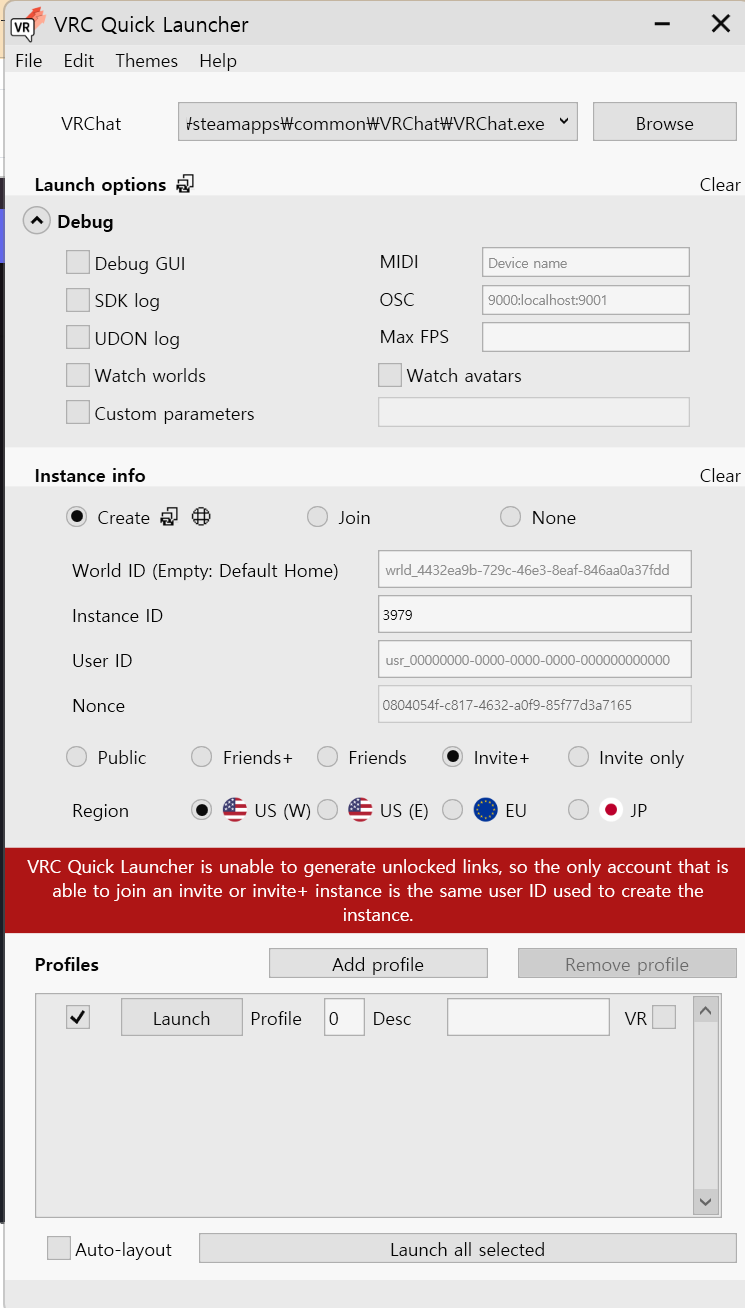
                              3. Click on Tools at the top left, then launch "VRC Quick Launcher".
                              4. In VRC Quick Launcher, ensure the path to the VRChat executable is correct. If missing, click "Browse" and find VRChat.exe on your computer.
                              5. Go to the Instance info section, and select "Local", then select the world file.
                              6. In Profiles section, click on "Add Profile" (it will be Profile 0), and make sure the checkbox on the left is checked.
                              7. Press "Launch all selected" and enjoy.

                              Q: Can I join other Worlds and People or them join me while in Testing Mode ?
                              A: No, you cannot join other Worlds or People or be joined in Testing Mode, since you're basically Offline.

                              Q: Can I upload this world to VRChat ?
                              A: I do not know how, and I do not encourage it either. By attempting to do so, you put yourself at risk of being banned.

                              Q: Help ! The "Local" option in VRC Quick Launcher doesn't appear !
                              A: VRC Quick Launcher's Local Instance option relies on "Worlds" folder in C:\Users\YourUsername\AppData\LocalLow\VRChat\VRChat, it checks at launch to see if it exists and enables "Local" option when found.

                              Q: Why "scene-StandaloneWindows64-namehere.vrcw" ?
                              A: That is the standard naming format for the VRC Quick Launcher to display the world in the list. You can set "namehere" to whatever you want, it will appear as such in the list. and yes that file is just the __data world file itself renamed. No, you don't need to have an existing world built in Unity.

                              Q: Help ! The world's shaders looks off, did you break them ?!
                              A: I touched nothing of the sort, this world I shared is the exact one straight out of my cache which was loaded from VRC servers. If you think it's broken, blame Iris Alias for making it that way in the latest update before it got taken down. And if you think getting someone else's copy of this same update will solve it, I wouldn't count on it.

                              Q: Can you provide the old version before the big update ?
                              A: See @EricZhou's post (Grab the __data file from the archive and rename it to "scene-StandaloneWindows64-Old_iYMMDWorld.vrcw" without the "" and follow the same instructions as above, or look at the picture in the post for nicer instructions !)

                              Q: Help ! The link is asking for a password !
                              A: That is a mistake, the link does not actually have a password. However, Ripper.store only showing the embed instead of the full link, and Proton having seemingly broken said embeds, you can fix the issue by adding "#pXZGMVXu1pAl" (without the quotes) at the end of the Proton link. Sorry for the inconvenience.
                              PS: Do that in a new tab, I found it does not work if you just paste it in an already opened Proton page.

                              I hope this will make it so those who never had a chance to visit that world, or miss going there following the shutdown may enjoy it again.
                              Note: This cache copy of iY MMD World was done before VRChat introduced encryption to the cache.
                              Newer caches will not be loadable in Offline mode !

                              N
                              N
                              N0B0DY
                              wrote on last edited by
                              #21

                              @Metasect Do you have the password for the link?

                              ๐Ÿฆ‹ Do you have Papillon stuffs? pls pls pls

                              M 1 Reply Last reply
                              0
                              • N N0B0DY

                                @Metasect Do you have the password for the link?

                                M
                                M
                                Metasect
                                wrote on last edited by Metasect
                                #22

                                @N0B0DY

                                There is no password.

                                The link is right in the edit window, but the embed is missing an important bit of data at the end of the link, and the forum does not show the full link, only the embed.

                                As a workaround for now, I have updated the FAQ to learn how to fix the issue. Take a look.

                                1 Reply Last reply
                                0
                                • EricZhouE EricZhou referenced this topic on
                                • GiganticDarkG
                                  GiganticDarkG
                                  GiganticDark
                                  wrote on last edited by
                                  #23

                                  Someone have a old ver. this world? (Versions prior to the latest version)

                                  i'm looking for trade or GIFT Live2D Model
                                  i can trade VRChat Assest for Live2D Model if you don't mind
                                  you can see what i have in this link below

                                  https://drive.google.com/drive/folders/1U8r32M4WhRdRHDul5qLvV0XaqE2rpZ-f?usp=sharing

                                  Looking for a Discord server to share the cost of Live2D models.

                                  1 Reply Last reply
                                  0
                                  • M Metasect

                                    Following the deletion of iY MMD World from VRChat by its creator due to drama, here is the link to the latest update's world file, and how to load it up locally in Offline Testing mode.

                                    https://drive.proton.me/urls/YB1NKNSS80#pXZGMVXu1pAl

                                    1. Download the world file from the Proton link and place it in "C:\Users\YourUsername\AppData\LocalLow\VRChat\VRChat\Worlds" (If AppData is not visible: In File Explorer, click on View, then Show, and select Hidden Items, also if the "Worlds" folder doesn't exists, create it.).
                                    2. Make sure VRChat Creator Companion is installed, is up to date, and open it.
                                    3. Click on Tools at the top left, then launch "VRC Quick Launcher".
                                    4. In VRC Quick Launcher, ensure the path to the VRChat executable is correct. If missing, click "Browse" and find VRChat.exe on your computer.
                                    5. Go to the Instance info section, and select "Local", then select the world file.
                                    6. In Profiles section, click on "Add Profile" (it will be Profile 0), and make sure the checkbox on the left is checked.
                                    7. Press "Launch all selected" and enjoy.

                                    Q: Can I join other Worlds and People or them join me while in Testing Mode ?
                                    A: No, you cannot join other Worlds or People or be joined in Testing Mode, since you're basically Offline.

                                    Q: Can I upload this world to VRChat ?
                                    A: I do not know how, and I do not encourage it either. By attempting to do so, you put yourself at risk of being banned.

                                    Q: Help ! The "Local" option in VRC Quick Launcher doesn't appear !
                                    A: VRC Quick Launcher's Local Instance option relies on "Worlds" folder in C:\Users\YourUsername\AppData\LocalLow\VRChat\VRChat, it checks at launch to see if it exists and enables "Local" option when found.

                                    Q: Why "scene-StandaloneWindows64-namehere.vrcw" ?
                                    A: That is the standard naming format for the VRC Quick Launcher to display the world in the list. You can set "namehere" to whatever you want, it will appear as such in the list. and yes that file is just the __data world file itself renamed. No, you don't need to have an existing world built in Unity.

                                    Q: Help ! The world's shaders looks off, did you break them ?!
                                    A: I touched nothing of the sort, this world I shared is the exact one straight out of my cache which was loaded from VRC servers. If you think it's broken, blame Iris Alias for making it that way in the latest update before it got taken down. And if you think getting someone else's copy of this same update will solve it, I wouldn't count on it.

                                    Q: Can you provide the old version before the big update ?
                                    A: See @EricZhou's post (Grab the __data file from the archive and rename it to "scene-StandaloneWindows64-Old_iYMMDWorld.vrcw" without the "" and follow the same instructions as above, or look at the picture in the post for nicer instructions !)

                                    Q: Help ! The link is asking for a password !
                                    A: That is a mistake, the link does not actually have a password. However, Ripper.store only showing the embed instead of the full link, and Proton having seemingly broken said embeds, you can fix the issue by adding "#pXZGMVXu1pAl" (without the quotes) at the end of the Proton link. Sorry for the inconvenience.
                                    PS: Do that in a new tab, I found it does not work if you just paste it in an already opened Proton page.

                                    I hope this will make it so those who never had a chance to visit that world, or miss going there following the shutdown may enjoy it again.
                                    Note: This cache copy of iY MMD World was done before VRChat introduced encryption to the cache.
                                    Newer caches will not be loadable in Offline mode !

                                    V
                                    V
                                    Vyr
                                    wrote on last edited by
                                    #24

                                    @Metasect Can you tell me the password

                                    V 1 Reply Last reply
                                    0
                                    • V Vyr

                                      @Metasect Can you tell me the password

                                      V
                                      V
                                      Vyr
                                      wrote on last edited by
                                      #25

                                      Oh i have read it nvm.

                                      1 Reply Last reply
                                      0
                                      • CorinwickedC
                                        CorinwickedC
                                        Corinwicked
                                        wrote on last edited by
                                        #26

                                        hi... is there any way to run any world "__data" file localy?
                                        bcs I tried using other mmd "__data" and boom is seem to load first then teleported me to the blank E r r o r World.

                                        bcs when I go to mmd world is always re downloading and my internet is suck

                                        1 Reply Last reply
                                        0
                                        • U
                                          U
                                          UkUser
                                          wrote on last edited by
                                          #27

                                          whats the password pls

                                          D 1 Reply Last reply
                                          0

                                          Hello! It looks like you're interested in this conversation, but you don't have an account yet.

                                          Getting fed up of having to scroll through the same posts each visit? When you register for an account, you'll always come back to exactly where you were before, and choose to be notified of new replies (either via email, or push notification). You'll also be able to save bookmarks and upvote posts to show your appreciation to other community members.

                                          With your input, this post could be even better ๐Ÿ’—

                                          Register Login
                                          Reply
                                          • Reply as topic
                                          Log in to reply
                                          • Oldest to Newest
                                          • Newest to Oldest
                                          • Most Votes


                                          • Login

                                          • Login or register to search.
                                          • First post
                                            Last post
                                          0
                                          • Categories
                                          • Recent
                                          • Tags
                                          • Popular