
LF: anyone who can fix this avatar <3
-
-
Seems like an engine error with its own package system. May I ask, which Unity version are you using?
@blapanda 2019.4.31f1
-
With the latest VRC SDK? Like 3.7.5 e.g.?
It may interfere. You could try to either demote the SDK version or try it with the recommended Unity version (2022.3.22f1).
I could give it a try tomorrow, loading the avi files and trying the upload process on my end. -
With the latest VRC SDK? Like 3.7.5 e.g.?
It may interfere. You could try to either demote the SDK version or try it with the recommended Unity version (2022.3.22f1).
I could give it a try tomorrow, loading the avi files and trying the upload process on my end.@blapanda that would be great ty!
-


Uploaded it via the Unity version I've mentioned. You should upgrade. There is also no way around, and in future, VRC will drop the support for it, as a side note, because the SDKs gonna require the newer unity engine versions.
Boot up your Creator Companion (yea, don't you judge me people! It is convenient and saves me time, so should you all use it, too!) Use the latest SDKs and shown headers/plugins (not all may be required, but necessary for testing and for the upcoming "fix", which I personally use for every case):
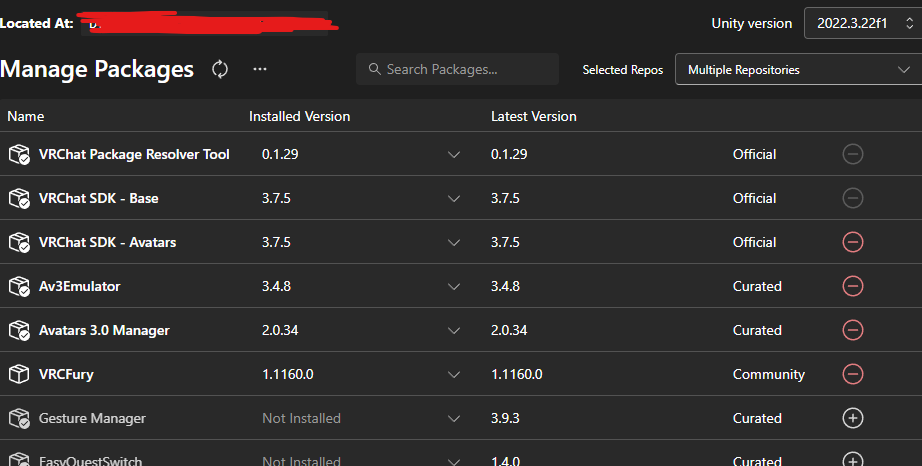
If you are at your project, open the Julie.Unity (project file), go to your "Julie Fixed" at your Hierarchy (rename it to Julie for a clean upload name btw.), head over to your Inspector and remove the "Missing (Mono Script)"-Script. This has to do with something called "clone", probably a ghost/mirror character-effect, not present in that project anymore, as far as I've noticed.

Secondly, remove everything related to Gogo Loco from your avatar.
Menu point, Parameters. Get rid off that old stuff.
This part is optional (where VRCFury comes in handy), I skipped it, as I am not going to use this avi; Download the newest Gogo Loco unitypackage from the websites and automate that process via VRCFury upon upload. Drop the regular or "beyond" script onto your avatar and that is it.
Do not use the outdated "manually inserted" Gogo Loco packages, that may also be a case of failing uploads nowadays.And that is basically it.
Have any further questions? DM me.
-
thank you so much omg
-
Uploaded it via the Unity version I've mentioned. You should upgrade. There is also no way around, and in future, VRC will drop the support for it, as a side note, because the SDKs gonna require the newer unity engine versions.
Boot up your Creator Companion (yea, don't you judge me people! It is convenient and saves me time, so should you all use it, too!) Use the latest SDKs and shown headers/plugins (not all may be required, but necessary for testing and for the upcoming "fix", which I personally use for every case):
If you are at your project, open the Julie.Unity (project file), go to your "Julie Fixed" at your Hierarchy (rename it to Julie for a clean upload name btw.), head over to your Inspector and remove the "Missing (Mono Script)"-Script. This has to do with something called "clone", probably a ghost/mirror character-effect, not present in that project anymore, as far as I've noticed.
Secondly, remove everything related to Gogo Loco from your avatar.
Menu point, Parameters. Get rid off that old stuff.
This part is optional (where VRCFury comes in handy), I skipped it, as I am not going to use this avi; Download the newest Gogo Loco unitypackage from the websites and automate that process via VRCFury upon upload. Drop the regular or "beyond" script onto your avatar and that is it.
Do not use the outdated "manually inserted" Gogo Loco packages, that may also be a case of failing uploads nowadays.And that is basically it.
Have any further questions? DM me.
@blapanda i got her uploaded! tysm for the help
-
-
-
@LETHAL im not sure where the chicken nugget asset came from but the dino nuggie asset is leaked :3 https://forum.ripper.store/post/1179529
Hello! It looks like you're interested in this conversation, but you don't have an account yet.
Getting fed up of having to scroll through the same posts each visit? When you register for an account, you'll always come back to exactly where you were before, and choose to be notified of new replies (either via email, or push notification). You'll also be able to save bookmarks and upvote posts to show your appreciation to other community members.
With your input, this post could be even better 💗
Register Login