
LF: Limb grabber by VirtualThreads
-
-
@cry911 can u give us a new link please
-
dm me, if you have unity script\package files that have a license check, I will try to hack it when I have time.
-
@HornyJail so, how is this used? i put it in my avatar project but i can't figure it out
-
@HornyJail Heya! Dosen't work even with the dependecies. None of the parameters that come in the package are correct.
( ^ u ^ ) Rep?!?
-
@HornyJail Heya! Dosen't work even with the dependecies. None of the parameters that come in the package are correct.
@BloodPup
Oh, I'm already thinking of writing a universal guide on how to write bug reports.I'm not psychic, and I don't read your mind.
Don't just write "it doesn't work for me."
describe your actions, what exactly doesn't work, and whether there are errors in the unity log.
the more information the betterdm me, if you have unity script\package files that have a license check, I will try to hack it when I have time.
-
@BloodPup
Oh, I'm already thinking of writing a universal guide on how to write bug reports.I'm not psychic, and I don't read your mind.
Don't just write "it doesn't work for me."
describe your actions, what exactly doesn't work, and whether there are errors in the unity log.
the more information the better@HornyJail Sorry for the lack of detail my first language isn't English.. I think an in depth how-to guide would be a great idea especially for setup. My issue is upon importing the package, and all the necessary dependencies, all of the parameter assets (found in your asset folders) are empty and the setup doesn't actually initiate or add anything to the model, (Other than the information script, which doesn't actually add the grabbing mechanic.) The popup showed below stays no matter what, even though unity is still interactable.
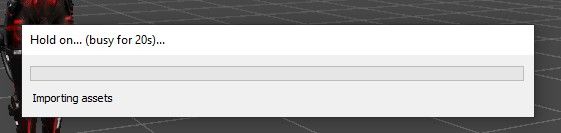
Feel free to let me know if I'm just being a pea brain and if this description is better or not, and if you'd be able to grab an in-depth setup tutorial that would be amazing. Thanks!(Edit, Its also throwing this error.)

( ^ u ^ ) Rep?!?
-
@HornyJail Sorry for the lack of detail my first language isn't English.. I think an in depth how-to guide would be a great idea especially for setup. My issue is upon importing the package, and all the necessary dependencies, all of the parameter assets (found in your asset folders) are empty and the setup doesn't actually initiate or add anything to the model, (Other than the information script, which doesn't actually add the grabbing mechanic.) The popup showed below stays no matter what, even though unity is still interactable.
Feel free to let me know if I'm just being a pea brain and if this description is better or not, and if you'd be able to grab an in-depth setup tutorial that would be amazing. Thanks!(Edit, Its also throwing this error.)
@BloodPup
check the project path, it should not contain special characters or Russian letters.
and yes, English is also not my native language, fortunately there are translators)dm me, if you have unity script\package files that have a license check, I will try to hack it when I have time.
-
@BloodPup
check the project path, it should not contain special characters or Russian letters.
and yes, English is also not my native language, fortunately there are translators)@HornyJail I try not to use translators, I learn better that way.
However, The project is in the correct location and the Unity Package for the asset is where typically place them all. I've never had this issue thrown at me so I'm very confused. -
importing grants this error for me sense idk what that Assembly is ima hope you know
(thats the only error)
@HornyJail
Trading and gatekeeping is dumb so don't do it
Gib Thicc furry avis <3
Big furry gooner -
importing grants this error for me sense idk what that Assembly is ima hope you know
(thats the only error)
@HornyJail -
@PancakesXD import FinalIK Stub
@HornyJail thanks

-
-
I cant find a video anywhere on how to make this work just prefab drop wise so I guess i'll try to figure it out myself
-
Has anyone figured out a tutorial for this? it is a bit confusing






Hello! It looks like you're interested in this conversation, but you don't have an account yet.
Getting fed up of having to scroll through the same posts each visit? When you register for an account, you'll always come back to exactly where you were before, and choose to be notified of new replies (either via email, or push notification). You'll also be able to save bookmarks and upvote posts to show your appreciation to other community members.
With your input, this post could be even better 💗
Register Login